Counting suppressed alerts when using Ens.Alerting.ManagedAlert suppression window IsRecentManagedAlert() method.
Hello everyone, thanks for reading this question.
I am currently working with Ens.Alerting.ManagedAlert in an interoperability production and I am using the alert suppression mechanism to avoid generating duplicate alerts within a defined time window (for example, 30 minutes).
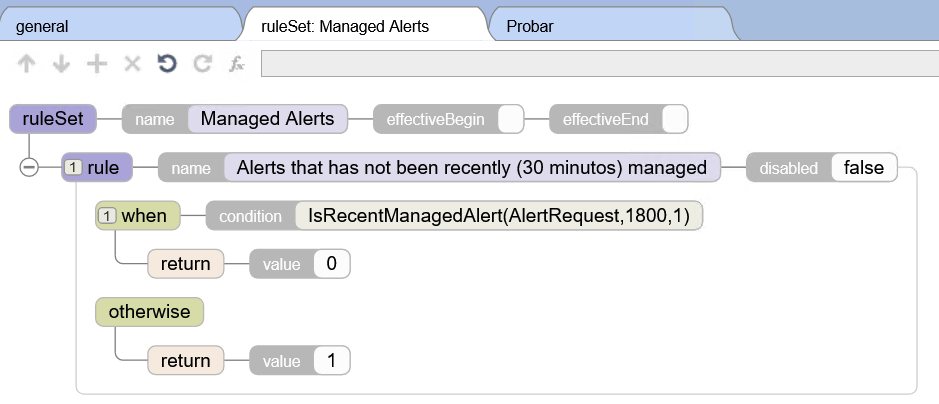
The configuration works correctly in terms of preventing duplicate alerts from being generated, but I have a question regarding observability.
When an alert is suppressed during the configured time window, I can see log messages such as:
"Managed alert not created for AlertRequest with ID 'XXXX' due to rule 'Rules.ManagedAlerts'"
By inspecting the trace, I can see the associated Ens.Alert message and the MessageBodyId that references the original log entry.
However, what I would like to know is:
Is there a simple way to determine how many times the same alert occurred during the suppression window?
For example, if the same condition triggered the alert 10 times within 30 minutes, the system would only create the first alert and suppress the rest. When the alert is generated again after the window expires, I would like to know whether it is possible to include or retrieve something like:
The number of suppressed occurrences.
The Bussiness Service (or Production item which generated the Ens.Alert) [the Source component].
The total number of times the same alert was triggered during the suppression interval.
The goal is to identify which alerts are most frequent and which services they originate from.
I have reviewed the documentation on alert monitoring and Ens.Alerting.ManagedAlert, but I did not find a built-in mechanism to easily obtain this count.
Has anyone implemented a simple pattern for this? For example:
Extending the alert handling process
Using a custom global or persistent table
Aggregating alerts through a custom business process
Any guidance or recommended approach would be greatly appreciated.
Thanks in advance! 🙂
I have already read:
https://docs.intersystems.com/irislatest/csp/docbook/DocBook.UI.Page.cls?KEY=EMONITOR_alerts
https://community.intersystems.com/post/interoperability-alerts-routing-and-aggregating
Comments
To count suppressed alert occurrences within the suppression window and obtain additional details such as the source component and total trigger count, you might need to implement customizations, as there is no direct, built-in method available.
-
Tracking Suppressed Alerts:
- You can customize your alert-handling logic by integrating additional measures to count suppressed occurrences. For instance, you can use a custom global or table in your solution to track the count of these suppressed occurrences against each unique alert
[[1]](https://community.intersystems.com/post/ensemble-suppressing-multiple-alerts-eg-naks-validation-etc-using-ensalert-process).
- You can customize your alert-handling logic by integrating additional measures to count suppressed occurrences. For instance, you can use a custom global or table in your solution to track the count of these suppressed occurrences against each unique alert
-
Using the IsRecentManagedAlert() Function:
- The
Ens.Alerting.Rule.FunctionSet.IsRecentManagedAlert()function can be used in your alert rules to suppress repeated alerts. Additionally, it can automatically add areoccursaction to the associated managed alert that encapsulates the repeated occurrence history within the suppression window[[1]](https://community.intersystems.com/post/ensemble-suppressing-multiple-alerts-eg-naks-validation-etc-using-ensalert-process)[[2]](https://docs.intersystems.com/supplychain20251/csp/docbook/DocBook.UI.Page.cls?KEY=EMONITOR_alerts&ext=supplychain2025.1).
- The
-
Custom Functions and Persistent Storage:
- You may enhance alert handling by creating a business rule or a business process to extend logging and manipulation related to the alerts.
- A custom function within your routing or handling logic could log every suppression event into a database table or global with fields for the component source, alert text, timestamp, and reoccurrence counts
[[2]](https://docs.intersystems.com/supplychain20251/csp/docbook/DocBook.UI.Page.cls?KEY=EMONITOR_alerts&ext=supplychain2025.1).
-
Audit through the Managed Alerts Viewer:
- The
Managed Alert Viewerprovides access to alert histories. The table displays detailed fields including reoccurrence actions recorded against alerts using theIsRecentManagedAlert()function[[3]](https://docs.intersystems.com/irisforhealth20251/csp/docbook/DocBook.UI.Page.cls?KEY=EMONITOR_alerts&ext=irisforhealth2025.1)[[2]](https://docs.intersystems.com/supplychain20251/csp/docbook/DocBook.UI.Page.cls?KEY=EMONITOR_alerts&ext=supplychain2025.1).
- The
By combining the built-in capabilities with the customization above, you’ll be able to achieve greater observability and aggregated metrics for alerts during their suppression period.
Sources: