Hi, Community!
Ready to create a retrieval-augmented generation (RAG) architecture for your next GenAI application? See how to get started:
An integrated development environment (IDE) is a software application that provides comprehensive facilities to computer programmers for software development.
The official IDE for InterSystems Data Platform products is Atelier.
Hi, Community!
Ready to create a retrieval-augmented generation (RAG) architecture for your next GenAI application? See how to get started:
Visual Studio Code releases new updates every month with new features and bug fixes, and the July 2024 release is now available.
Version 1.92 includes:
Not so while ago GitHub introduced, ability to very quickly run VSCode in the browser for any repository hosted there. Press the . key on any repository or pull request, or swap .com with .dev in the URL, to go directly to a VS Code environment in your browser.
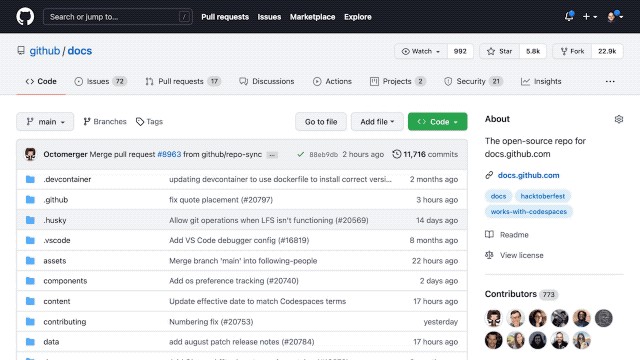
This VSCode is a light version of the Desktop version but works entirely in Browser. And due to this, it has a limitation for extensions which was allowed to work this way. And let me introduce the new version 1.2.1 of VSCode-ObjectScript extension which now supports running in Browser mode.
An effective source control solution allows organizations to manage complex codebases, facilitate seamless collaboration within development teams, and streamline deployment processes.
Sonic Healthcare, a leading provider of pathology, radiology, general practice, and corporate medical services, has significantly enhanced visibility and control over its complex environment by implementing Deltanji source control. The tight integration Deltanji provides with InterSystems IRIS and IRIS for Health has been central in achieving these improvements.
Visual Studio Code releases new updates every month with new features and bug fixes, and the June 2024 release is now available.
Version 1.91 includes:
Hi,
I have over 36 years of experience developing solutions with MUMPS and Cache. Additionally, I also develop in Python and HTML.
I have no experience in Vista or PSL, but I would be very happy to have the opportunity to learn it. I'm looking for a job opportunity.
Best,
Carlos
Hi Team,
I am trying to use the inbuilt class: EnsLib.HL7.Service.FileService to pass through an HL7 ADT message as a part of an HL7 to FHIR transformation. We have a client requirement, where we are receiving an NTE segment as a part of the ADT message. I am trying to map the NTE segment to an OBX Segment. I need to implement a counter for OBX segment whenever a NTE segment is found and map the NTE fields to the new OBX segment
How do I implement the counter for OBX?
Thanks
Santosh
Hello everyone,
After upgrade to InterSystems ObjectScriptv2.12.3 extension an annoying "bulb" occured in the beggining of code line. If point upon it, there are some actions being offered. In my case, an action "Wrap in try/catch" is alwaysamong them, even if the code line is already within try/catch block. Another action which appears sometimes is "Extract to method". If accept, new method is inserted into the class with only one line body inside. IMHO, not too clever "AI solution" as well.
The question is: how to disable this "bulb"?
As most of you have heard already, InterSystems announced the deprecation of Studio with the release of IRIS 2023.2. A detailed deprecation plan was revealed in November, and we are now hitting the first milestone in that plan. Starting with 2024.2 preview kits, Windows kits will no longer contain Studio. This means that new installations using this kit will not install Studio, and upgrading an existing instance to version 2024.2 (or later) will remove Studio from the instance’s bin directory.
Developers who wish to keep using Studio simply need to download the 2024.
Visual Studio Code releases new updates every month with new features and bug fixes, and the April 2024 release is now available.
Version 1.89 includes:
Hi,
I recently moved to a Mac M2. I was already using VSCode on my intel-based Mac, and used the plug "objectscriptQuality for VSCode". It installs nicely, but it does not seem to do anything, not even an error. I installed the same java version (but ARM based) as on my old machine so that prerequisite is met. Also set the path to java in VSCode.
Any clues/has anyone got this working on a Mac based on Apple silicon M1/M2 chips?
Thanks.
Visual Studio Code releases new updates every month with new features and bug fixes, and the March 2024 release is now available.
Version 1.88 includes:
I'm excited to let you know that we at George James Software have released some new VS Code training courses. Following the success of our Basics course we have expanded our offering to help InterSystems users looking to move to VS Code improve their knowledge.
Here's what's on offer...
Studio to VS Code Migration - The Basics (2.5 hours)
Hi VSCode users!
Just want to check with you, is this settings.json file ideal enough if I:
1. Want VSCode to connect to IRIS in docker?
2. Want to use VSCode SQL Tool?
The connection settings file:
{
    "files.associations": {

        "Dockerfile*": "dockerfile",
        "iris.script": "objectscript"
      },
    "objectscript.conn" :{
      "ns": "IRISAPP",
      "username":"_SYSTEM",
      "password": "SYS",
      "docker-compose": {
        "service": "iris",
        "internalPort": 52773
      }
    },
"sqltools.Visual Studio Code releases new updates every month with new features and bug fixes, and the February 2024 release is now available.
Version 1.87 includes:
I recently realized it's been far too long since I talked about the latest features in the InterSystems ObjectScript Extension for Visual Studio Code.
I'm pleased to announce version 2.12.1 of the ObjectScript extension, containing a number of enhancements that make a developer's life easier. Some highlights are described below, including the #1 requested feature from Global Summit -- XML import!
As always, find the full list of modifications in the CHANGELOG, including many bug and vulnerability fixes.
Hi Devs!
Recently I was impressed by @Dan Pasco's article where he shares also how he uses terminal aliases.
Terminal aliases is a very powerful tool for developers and sys admins if you often need to call some cumbersome terminal expressions and make it shorter and cleaner. Here is the documentation.
Yes!
But what about Docker environments? What if you are fan of Docker dev environments but also want to keep using your favorite aliases with Docker as well?
Turned out it is very possible.
Hi folks!
Sometimes building an images via docker-compose.yml can take significant time.
And often after a minute or two of waiting it turns out that ports listed in docker-compose are busy and you need to start building process again with different ports or to turn down processes that took it.
Is there a way to check ports listed in docker-compose BEFORE starting the image baking process?
How do you deal with this problem?
Does anyone have an effective tool for anonymizing/deidentifying CCDAs for testing purposes?
While starting the development with IRIS we have a distribution kit or in case of Docker we are pulling the docker image and then often we need to initialize it and setup the development environment. We might need to create databases, namespaces, turn on/off some services, create resources. We often need to import code and data into IRIS instance and run some custom code to init the solution.
And there plenty of templates on Open Exchange where we suggest how to init REST, Interoperability, Analytics, Fullstack and many other templates with ObjectScript. What if we want to use only Python to setup the development environment for Embedded Python project with IRIS?
So, the recent release of Embedded Python template is the pure python boilerplate that could be a starting point for developers that build python projects with no need to use and learn ObjectScript. This article expresses how this template could be used to initialize IRIS. Here we go!
As first announced in May, and after many presentations and robust discussions at Global Summit 2023, we are continuing with the plans to deprecate InterSystems Studio (deprecated designates a feature or technology that InterSystems no longer actively develops, and for which better options exist).
InterSystems Studio was deprecated in 2023.2 but will continue to ship with versions 2023.3 and 2024.1. The latter will be the last release that includes Studio as part of the Windows kit, and it will be the only version that allows connections to future versions of InterSystems IRIS.
When you use VS Code to edit source code, the settings model allows you to specify folder-specific values for some settings by using a settings.json file located in a .vscode sub-folder of the workspace root folder. A value set here takes precedence over one from your personal settings when you are working within that workspace root folder.
If you use an isfs-type workspace to operate directly in a namespace on a server, you first need to configure that server to support a special .vscode folder for each of its namespaces, present and future.
Are you preparing to use VS code for the first time? Just make sure you have enough privileges.
Have you defined your Iris server in your VS Code settings, and still get the following error?
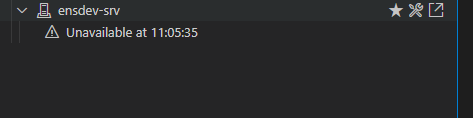
VS Code accesses Iris/HealthConnect using the web application /api/atelier. If you do not have permission (i.e. you are using an LDAP user to connect and the web application is not configured to support LDAP), this is the reason why you couldn't connect.
you will also notice a 'Login Failure' entry in the audit database, with the reason for it.
For several years now Visual Studio Code has supported the notebook coding paradigm with a maturing UX and an API that is enabling a notebook extensions ecosystem to grow. One of the best-known notebook platforms is Jupyter Notebooks. A Microsoft team publishes an extension that allows VS Code to handle .ipynb notebook files. These can either work against a local Python environment or connect to a Jupyter Server, which typically hosts remote Python environments with beefier resources.
What if your InterSystems IRIS environments, whether local on your workstation or remote in your organization / cloud, could operate as Jupyter Servers? And not only for Embedded Python but also for ObjectScript and SQL
I have a problem. Occasionally, I am getting locked out of IRIS because of password failures. However, the failures aren't necessarily related to my password. We are using VSCode, and I have installed one or two proposed APIs for use with the software (because that's just how I am; I want to learn the new stuff).
Today, I had that problem again. The step that caused the problem was most likely when I was trying to switch the branch I was using and updating within VSCode. Let's say I was switching from branch "1A" to branch "2B".
In the discussions at https://community.intersystems.com/post/intersystems-studio-deprecated-starting-20232 one notable topic has been that some Studio users make regular use of its facilities for exporting multiple code artifacts (e.g. classes and routines) into a single XML file on the workstation, then exporting that file into a different server namespace.
Unless / until equivalent features are added to the VS Code ObjectScript extension, can these people fill the gap by using the System Explorer section of Management Portal?
Exciting news for developers using GitLab for their InterSystems applications repositories! Open Exchange has expanded its support to include GitLab, allowing you to submit your projects just as easily as you would do with GitHub repos.
Submitting Your GitLab Repo app on Open Exchange:
Hi devs!
How one can understand the classnames of request and response messages of a given operation?
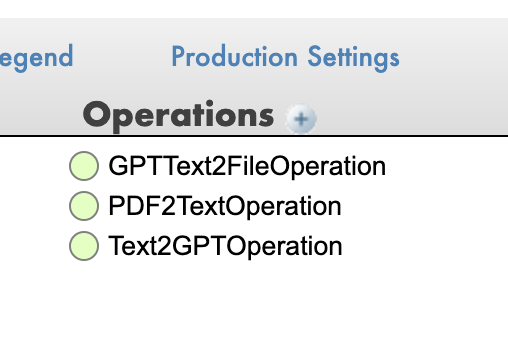
E.g. when I build the data transformation, how do I know which message will come to the operation?
Good day,
Is there a way to change the theme in management portal? or at least the color of the header.
Issue is, some users have access to Development and Testing and Production environments. I would like a way to color-differentiate the environments to reduce the errors.
NOTE: This content was originally presented at the InterSystems Global Summit in 2014, however related topics often come up on the Developer Community so I have decided to turn this into an article for easier reference and discussion. However, much of the content was pulled directly from the presentation slides so the article format resembles that of a PPT deck more than paragraphs.
Teams that deal with many environments (e.g. for development, testing and production) multiplied by many systems (e.g.