Here's a sample code to display JSON or dynamic object.
It shows how to iterate over object, get property values and their paths.
Best Practices recommendations on how to develop, test, deploy and manage solutions on InterSystems Data Platforms better.
Here's a sample code to display JSON or dynamic object.
It shows how to iterate over object, get property values and their paths.
Hi community,
The aim of this article is to explain how to create messaging between IRIS and Microsoft Teams.
In my company, we wanted to monitor error messages, and we used the Ens.Alert class to redirect those error messages through a Business Operation that sent an email.
The problem was that we sent those error messages to a support account where there were many emails. We wanted something specific for a specific team.
So we investigated how to make these messages reach the development team directly and they could have, in real time, a notification of an error in our production.
In our company we use Microsoft Teams as a corporate tool, so we asked ourselves: How could we make these messages reach the IRIS development team?
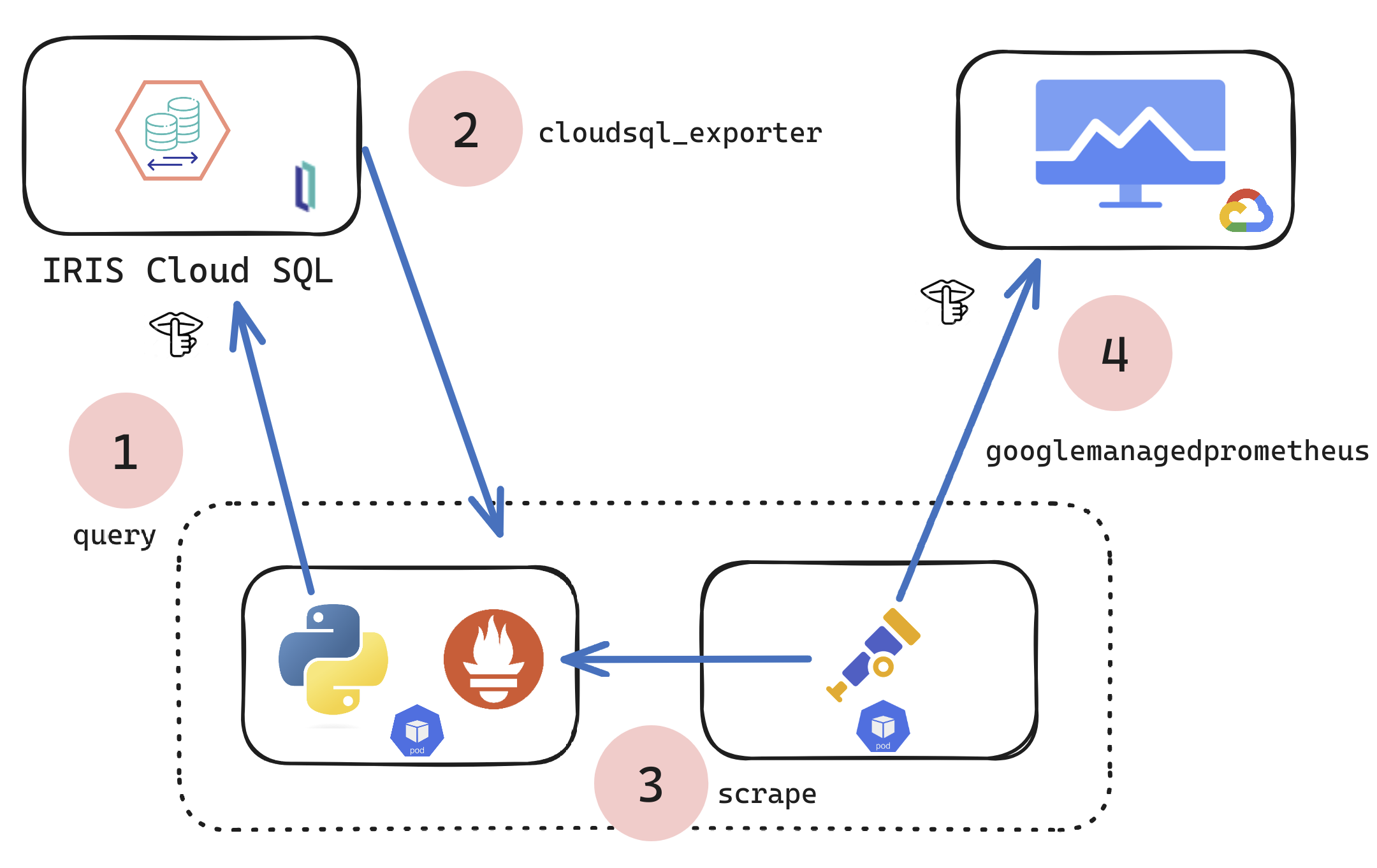
If you are a customer of the new InterSystems IRIS® Cloud SQL and InterSystems IRIS® Cloud IntegratedML® cloud offerings and want access to the metrics of your deployments and send them to your own Observability platform, here is a quick and dirty way to get it done by sending the metrics to Google Cloud Platform Monitoring (formerly StackDriver).
Artificial Intelligence (AI) is getting a lot of attention lately because it can change many areas of our lives. Better computer power and more data have helped AI do amazing things, like improving medical tests and making self-driving cars. AI can also help businesses make better decisions and work more efficiently, which is why it's becoming more popular and widely used. How can one integrate the OpenAI API calls into an existing IRIS Interoperability application?
The InterSystems IRIS is a great data platform and it is met the current features required by the market. In this article, you see the top 10:
Note: this list was updated because many features are added to IRIS in last 3 years (thanks @Kristina.
An experiment on how to use the LangChain framework, IRIS Vector Search, and LLMs to generate IRIS-compatible SQL from user prompts.
This article was based in this notebook. You can run it with a ready to use environment with this application in OpenExchange.
First, we need to install the necessary libraries:
!If you're solving complex problems in ObjectScript, you probably have a lot of code that works with %Status values. If you have interacted with persistent classes from an object perspective (%Save, %OpenId, etc.), you have almost certainly seen them. A %Status provides a wrapper around a localizable error message in InterSystems' platforms. An OK status ($$$OK) is just equal to 1, whereas a bad status ($$$ERROR(errorcode,arguments...)) is represented as a 0 followed by a space followed by a $ListBuild list with structured information about the error. $System.Status (see class reference) provides several handy APIs for working with %Status values; the class reference is helpful and I won't bother duplicating it here. There have been a few other useful articles/questions on the topic as well (see links at the end). My focus in this article will be on a few debugging tricks techniques rather than coding best practices (again, if you're looking for those, see links at the end).
One of the pain points for maintaining HL7 interfaces is the need to run a reliable regression test upon deployment to new environments and after upgrades. The %UnitTest class allows unit tests to be created and packaged alongside interface code. Test data can also be maintained within the unit test class, allowing for quick and easily repeatable smoke-testing and regression testing.
##Resources:
Standard %UnitTest class
This tutorial utilizes a modification of UnitTest-RuleSet by Alex Woodhead from the Open Exchange (https://openexchange.intersystems.
What I find really useful about IRIS when teaching my subject of Postrelational databases is the fact that it is a multi model database. Which means that I can actually go into architecture and structure and all that only once but then show the usage of different models (like object, document, hierarchy) using the same language and approach. And it is not a huge leap to go from an object oriented programming language (like C#, Java etc) to an object oriented database.
However, along with advantages (which are many) come some drawbacks when we switch from object oriented model to relational. When I say that you can get access to the same data using different models I need to also explain how it is possible to work with lists and arrays from object model in relational table. With arrays it is very simple - by default they are represented as separate tables and that's the end of it. With lists - it's harder because by default it's a string. But one still wants to do something about it without damaging the structure and making this list unreadable in the object model.
So in this article I will showcase a couple of predicates and a function that are useful when working with lists, and not just as fields.
As an IT and cloud team manager with 18 years of experience with InterSystems technologies, I recently led our team in the transformation of our traditional on-premises ERP system to a cloud-based solution. We embarked on deploying InterSystems IRIS within a Kubernetes environment on AWS EKS, aiming to achieve a scalable, performant, and secure system. Central to this endeavor was the utilization of the AWS Application Load Balancer (ALB) as our ingress controller.
Introduction
This is a quickstart guide to IRIS for Linux systems administrators who need to be able to support the IRIS DB as well as other normal infrastructure tasks.
IRIS is a DB system from Intersystems. An IRIS DB can hold code (in the form of a Class) or data (in the form of Globals). IRIS DB are Linux files called IRIS.DAT.
Have you ever been editing files in VS Code, but needed to check a global value or run a few ObjectScript commands? Now you can, with no setup required! If you have vscode-objectscript extension version 2.10.0 or later and are connected to InterSystems IRIS 2023.2 or later, you can now open a terminal connection to your server, regardless of where it's located.
Recently, the question came up while discussing the access to the data stored in IRIS from different languages with my students if it was possible to initiate the connection and get data from Cloud solution (InterSystems IRIS CloudSQL) from Microsoft Excel, not the other way around. Considering the many varied ways one can get data in Excel (import data from external sources, connecting to databases using ODBC drivers, using power queries and web queries etc.) the obvious choice was to try ODBC driver. The only task left was to try to connect to the database in the cloud using the ODBC driver.
.png)
As the health interoperability landscape expands to include data exchange across on-premise as well as hosted solutions, we are seeing an increased need to integrate with services such as cloud storage. One of the most prolifically used and well supported tools is the NoSQL database DynamoDB (Dynamo), provided by Amazon Web Services (AWS).
The challenge for IRIS implementations, as it relates to Dynamo and other modern web services, is that there is no native support for interacting with Dynamo and AWS within ObjectScript.
Hi - Recently I have been investigating an annoying situation whilst editing ObjectScript classes or routines in VSCode.
What was happening to me was, as I was typing in lines of code into my class (for example, adding a new Method, or changing the Class signature, or a block of code), this would quickly get syntax checked, re-formatted, and compiled - inevitably, (since I would be mid-way through my typing), this would generate compilation errors.
.png)
The IKO will dynamically provision storage in the form of persistent volumes and pods will claim them via persistent volume claims.
But storage can come in different shapes and sizes. The blueprint to the details about the persistent volumes comes in the form of the storage class.
This raises the question: we've deployed the IrisCluster, and haven't specified a storage class yet. So what's going on?
You'll notice that with a simple
kubectl get storageclassyou'll find the storage classes that exist in your cluster.
 Hello!
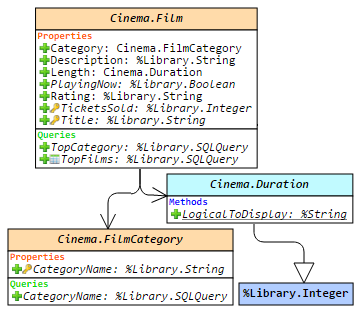
This article is a small overview of a tool that helps to understand classes and their structure inside the InterSystems products: from IRIS to Caché, Ensemble, HealthShare.
In short, it visualizes a class or an entire package, shows the relations between classes and provides all the possible information to developers and team leads without making them go to Studio and examine the code there.
If you are learning InterSystems products, reviewing projects a lot or just interested in something new in InterSystems Technology solutions — you are more than welcome to read the overview of ObjectScript Class Explorer!
Hi, this post was initially written for Caché. In June 2023, I finally updated it for IRIS. If you are revisiting the post since then, the only real change is substituting Caché for IRIS! I also updated the links for IRIS documentation and fixed a few typos and grammatical errors. Enjoy :)
In this post, I show strategies for backing up InterSystems IRIS using External Backup with examples of integrating with snapshot-based solutions. Most solutions I see today are deployed on Linux on VMware, so a lot of the post shows how solutions integrate VMware snapshot technology as examples.
The IKO allows for sidecars. The idea behind them is to have direct access to a specific instance of IRIS. If we have mirrored data nodes, the web gateway will (correctly) only give us access to the primary node. But perhaps we need access to a specific instance. The sidecar is the solution.
Building on the example from the previous article, we introduce the sidecar by using a mirrored data node and of course arbiter.
apiVersion: intersystems.We now get to make use of the IKO.
Below we define the environment we will be creating via a Custom Resource Definition (CRD). It lets us define something outside the realm of what the Kubernetes standard knows (this is objects such as your pods, services, persistent volumes (and claims), configmaps, secrets, and lots more). We are building a new kind of object, an IrisCluster object.
apiVersion: intersystems.The IKO documentation is robust. A single web page, that consists of about 50 actual pages of documentation. For beginners that can be a bit overwhelming. As the saying goes: how do you eat an elephant? One bite at a time. Let's start with the first bite: helm.
What is Helm?
Helm is to Kubernetes what the InterSystems Package Manager (IPM, formerly ObjectScript Package Manager - ZPM) is to IRIS.
It facilitates the installation of applications on the platform - in a fashion suitable for Kubernetes.
If you're running IRIS in a mirrored configuration for HA in GCP, the question of providing a Mirror VIP (Virtual IP) becomes relevant. Virtual IP offers a way for downstream systems to interact with IRIS using one IP address. Even when a failover happens, downstream systems can reconnect to the same IP address and continue working.
The main issue, when deploying to GCP, is that an IRIS VIP has a requirement of IRIS being essentially a network admin, per the docs.
To get HA, IRIS mirror members must be deployed to different availability zones in one subnet (which is possible in GCP as subnets always span the entire region). One of the solutions might be load balancers, but they, of course, cost extra, and you need to administrate them.
In this article, I would like to provide a way to configure a Mirror VIP without using Load Balancers suggested in most other GCP reference architectures.
Imagine the scene. You are working happily at Widgets Direct, the internet's premier retailer of Widgets and Widget Accessories. Your boss has some devastating news, some customers might not be fully happy with their widgets, and we need a helpdesk application to track these complaints. To makes things interesting, he wants this with a very small code footprint and challenges you to deliver an application in less than 150 lines of code using InterSystems IRIS. Is this even possible?
There are three things most important to any SQL performance conversation: Indices, TuneTable, and Show Plan. The attached PDFs includes historical presentations on these topics that cover the basics of these 3 things in one place. Our documentation provides more detail on these and other SQL Performance topics in the links below. The eLearning options reinforces several of these topics. In addition, there are several Developer Community articles which touch on SQL performance, and those relevant links are also listed.
There is a fair amount of repetition in the information listed below. The most important aspects of SQL performance to consider are:
We all know that having a set of proper test data before deploying an application to production is crucial for ensuring its reliability and performance. It allows to simulate real-world scenarios and identify potential issues or bugs before they impact end-users. Moreover, testing with representative data sets allows to optimize performance, identify bottlenecks, and fine-tune algorithms or processes as needed. Ultimately, having a comprehensive set of test data helps to deliver a higher quality product, reducing the likelihood of post-production issues and enhancing the overall user experience.
In this article, let's look at how one can use generative AI, namely Gemini by Google, to generate (hopefully) meaningful data for the properties of multiple objects. To do this, I will use the RESTful service to generate data in a JSON format and then use the received data to create objects.

A python script to keep your docker iris images in shape ;)

Witout changing your dockerfile or your code you can reduce the size of your image by 50% or more !
Name the builder image builder and the final image final and add this to end of your Dockerfile:
Modify your Dockerfile to use a multi-stage build:
ARG IMAGE=intersystemsdc/irishealth-community:latest
FROM $IMAGE as builder
Add this to end of your Dockerfile:
FROM $IMAGE as final

ADD --chown=${ISC_PACKAGE_MGRUSER}:${ISC_PACKAGE_IRISGROUP} https://github.com/grongierisc/iris-docker-multi-stage-script/releases/latest/download/copy-data.py /irisdev/app/copy-data.py

RUN --mount=type=bind,source=/,target=/builder/root,from=builder \
    cp -f /builder/root/usr/irissys/iris.cpf /usr/irissys/iris.cpf && \
    python3 /irisdev/app/copy-data.py -c /usr/irissys/iris.cpf -d /builder/root/
Boom! You're done!
When it comes to build an iris image, we can use the cpf merge files.
Here is an cpf merge example:
[Actions]
CreateDatabase:Name=IRISAPP_DATA,Directory=/usr/irissys/mgr/IRISAPP_DATA

CreateDatabase:Name=IRISAPP_CODE,Directory=/usr/irissys/mgr/IRISAPP_CODE

CreateNamespace:Name=IRISAPP,Globals=IRISAPP_DATA,Routines=IRISAPP_CODE,Interop=1

ModifyService:Name=%Service_CallIn,Enabled=1,AutheEnabled=48

CreateApplication:Name=/frn,NameSpace=IRISAPP,DispatchClass=Formation.REST.Dispatch,AutheEnabled=48

ModifyUser:Name=SuperUser,PasswordHash=a31d24aecc0bfe560a7e45bd913ad27c667dc25a75cbfd358c451bb595b6bd52bd25c82cafaa23ca1dd30b3b4947d12d3bb0ffb2a717df29912b743a281f97c1,0a4c463a2fa1e7542b61aa48800091ab688eb0a14bebf536638f411f5454c9343b9aa6402b4694f0a89b624407a5f43f0a38fc35216bb18aab7dc41ef9f056b1,10000,SHA512
InterSystems IRIS provides a complete application development environment for building sophisticated data- and analytics-intensive applications that connect data and application silos. It is designed to work with all of the common development technologies in an open, standards-based fashion and supports both server-side and client-side programming.
InterSystems IRIS supports server-side application development with both Python and InterSystems ObjectScript. InterSystems IRIS also supports client-side development using many popular development technologies, including Java, C#/.NET, Node.
How to create an ODBC connection on your native Windows laptop to IRIS running on a Windows VM on the same computer, test the connection, and pull data from IRIS into Excel.
Recently I learned that Excel can connect to external databases via ODBC. This includes basically any ODBC data source. Since IRIS speaks ODBC via the ODBC API, we can take advantage of the InterSystems ODBC Driver to establish an ODBC connection to IRIS on Windows that Excel can utilize.
Some of our applications provide SOAP services that use “DSTIME”-based SQL queries that return records that have recently been added or changed. Since the records don’t change often, these queries usually return a small number of records and therefore take little time.
However, we sometimes make a table change that affects all records in that table. When that happens, on the next SOAP request from a SOAP client the service will run its query which will take an extra-long time because all records are included (for our apps, the queries return hundreds of thousands of records in this case).