Is it possible to use a class parameter in class query?
Example:
Class SomeClass
{

Parameter SOMENAME = "Name1";

Query SomeQuery(As Is it possible to use a class parameter in class query?
Example:
Class SomeClass
{
Parameter SOMENAME = "Name1";
Query SomeQuery(As An exciting position has arisen for an Application Support Analyst 3rd Line, in an established support team. The role will suit candidates looking to work in the software industry who want to provide good customer service, enjoy finding solutions for problems and are enthusiastic about software and technology. http://codas.com
An exciting position has arisen for a Junior Application Support Analyst in an established support team. The role will suit candidates looking to enter, or are at the start of their career in, the software industry who want to provide good customer service, enjoy finding solutions for problems and are enthusiastic about software and technology. http://codas.com
Hello everyone,
I try excuting a SQL Query like this SELECT ID, CompanyName FROM Company WHERE CompanyName LIKE 'condition'
But if I want to search CompanyName have special char %, ex: '100% Co' , 'Group of Mr.%', 'The %TaxProp'...
How can I take % to query, with
SELECT ID, CompanyName FROM Table1 WHERE CompanyName LIKE '%%%' it'll get all record in table.
Someone give me an idea. Thanks so much!
In the previous article, I have demonstrated a simple way to record data changes. At this time I have changed the "Audit Abstract Class" which is responsible for recording audit data and the data structure where the audit log will be recorded.
I have changed the data structure to a parent and child structure where there will be two tables to record the "transaction" and the "fields its values" changed on that transaction.
Take a look at the new data model:
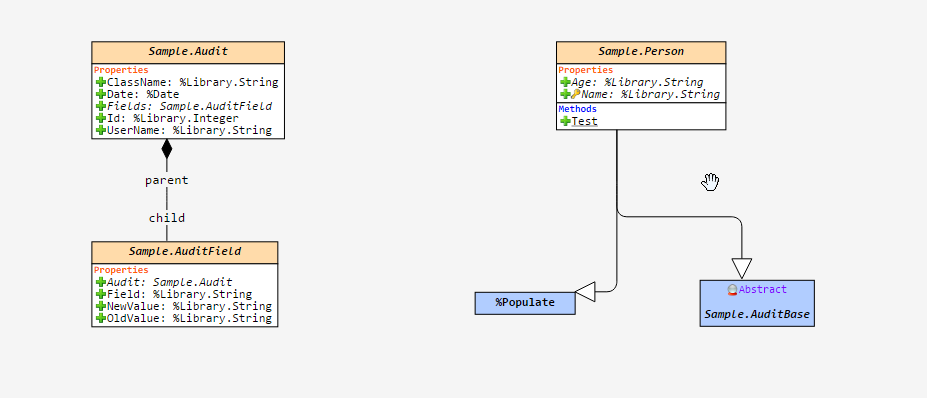
Take a look at the code changed from "Audit Class":
Pretty straight forward.
I'm tempted to hard-code ISO-8859-1 inside my VSCode extension when working with CSP because this seems to be the encoding used by default, but I need to know if there's any other possible configuration. So can you share your experience when working with CSPs? Like issues with encoding, discoveries regarding it, workarounds etc.
Also, can someone tell me if it's possible to work with UTF-8 encoded CSP files using Atelier without breaking the encoding of the output file?
Hello,
Astronaut, LLC needs Meaningful Use QRDA c1 requirement passed. We do not have a spare engineering team to write it all from scratch. Indian Health Service RPMS https://code.osehra.org/journal/journal/view/1576 has it in the public domain as a sub application called eCQM. We would like to backport eCQM to its close cousin our Veterans Affairs(VA) VistA variant Astronaut VistA. We would first like to simply get eCQM working in its native environment before attempting to back port to Astronaut VistA. RPMS currently uses Cache and Ensemble. I've been directed to use IRIS.
Hello good afternoon!
We're testing a REST Operation, to View Devices using OneSignal API
We are sending the request from Production's Operation Test tool, using the following code:
.png)
What happens is that it tells us error of SSL Configuration:
It should be noted that the test was done without https, to:
set path = http://onesignal.com/api/v1/players?app_id=.
Hi,
It turns out that on windows if you run a command with a windows command file you need to escape the % character as %%
In my case I could test freeze and thaw calls at the command line successfully as
..\bin\cache -s. -U%
...but when my freeze script ran it would fail.
it turns out that a single '%' is striped when run in a windows command file, and it must be escaped as '%%' windows gets:
..\bin\cache -s. -USYS ##Class(Backup.General).ExternalFreeze()
So make sure your freeze and thaw scripts and include a double %%;
..\bin\cache -s. -U%%
I hope this helps
Stephen
Hello.
I want to grant access only to the Message Viewer page to an specific user, in all Namespaces. I have created a rol with this privileges:
%Ens_MessageContent
%Ens_MessageHeader
%Ens_MessageTrace
%Ens_Portal
But if I want to see the list of messages, I have to grant SELECT access to the Ens.MessageHeader and Ens.MessageBody tables of each Namespace.
Is there anyway to grant access to this tables in all Namespaces at a time, even if new ones are created?
Thank you in advance.
Hi,
I believe the healthshare Debug module did this (if you added it) but I no longer have access to Healthshare to look so am asking here.
Suppose I have;
Set fruit="apple"
set person="john"
d ..Something(fruit, person)
quit
ClassMethod Something(objs...) {
; Names of variables passed in
}
In side "Something" how can I see the original name of the variable passed in (i.e.
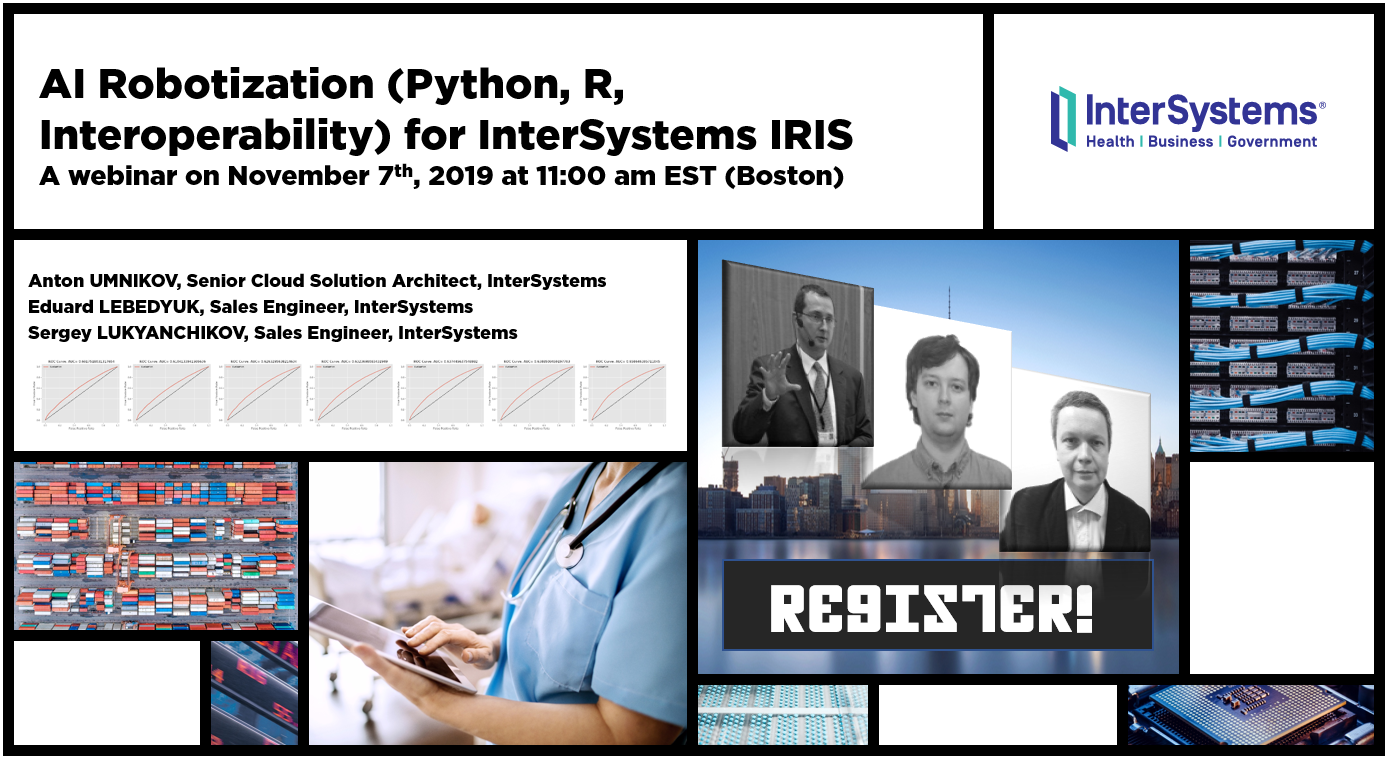
We're back with more AI, more ML and more presenters!
We are pleased to invite you to the upcoming webinar in English: AI Robotization (Python, R, Interoperability) for InterSystems IRIS on November 7 at 11:00 EST!
I have a task that has been working successfully for some time now but when I attempt to recompiled I get this error:
---------------------------
Studio
---------------------------
ERROR #5475: Error compiling routine: ACLIB.Utils.PurgeOrphanedMessages:PurgeOrphaned.  Errors:
ERROR:  source lines(38) : MPP5610 : Referenced macro not defined: 'vaExtentGbl'
 TEXT:  . Set segid=$G($$$vaExtentGbl(%tID,"segs",1),"0,0"), data=$S(segid[",":$G($$$vaSegment(segid)),1:$G($$$vaSegmentGbl(segid))), %C105172d(16)=$Case($$$vaDataSegName(data),"FHS":"FHS","BHS":"BHS",:$$$vaDataDocName(data))
ERROR:  source lines(38) : MPP5610 : Referenced macro not defined: 'vaSegment'
 TEXT:  . Set segid=$G($$$vaExtentGbl(%tID,"segs",1),"0,0"), data=$S(segid[",":$G($$$vaSegment(segid)),1:$G($$$vaSegmentGbl(segid))), %C105172d(16)=$Case($$$vaDataSegName(data),"FHS":"FHS","BHS":"BHS",:$$$vaDataDocName(data))
ERROR:  source lines(38) : MPP5610 : Referenced macro not defined: 'vaSegmentGbl'
 TEXT:  . Set segid=$G($$$vaExtentGbl(%tID,"segs",1),"0,0"), data=$S(segid[",":$G($$$vaSegment(segid)),1:$G($$$vaSegmentGbl(segid))), %C105172d(16)=$Case($$$vaDataSegName(data),"FHS":"FHS","BHS":"BHS",:$$$vaDataDocName(data))
ERROR:  source lines(38) : MPP5610 : Referenced macro not defined: 'vaDataSegName'
 TEXT:  . Set segid=$G($$$vaExtentGbl(%tID,"segs",1),"0,0"), data=$S(segid[",":$G($$$vaSegment(segid)),1:$G($$$vaSegmentGbl(segid))), %C105172d(16)=$Case($$$vaDataSegName(data),"FHS":"FHS","BHS":"BHS",:$$$vaDataDocName(data))
ERROR:  source lines(38) : MPP5610 : Referenced macro not defined: 'vaDataDocName'
 TEXT:  . Set segid=$G($$$vaExtentGbl(%tID,"segs",1),"0,0"), data=$S(segid[",":$G($$$vaSegment(segid)),1:$G($$$vaSegmentGbl(segid))), %C105172d(16)=$Case($$$vaDataSegName(data),"FHS":"FHS","BHS":"BHS",:$$$vaDataDocName(data))
---------------------------
OK
---------------------------
Hi Developers,
New challenge on Global Masters: Review InterSystems IRIS on G2 and get 3000 points!
The page for InterSystems IRIS is new on G2, and we need so much your voices and experience to be shared with the worldwide audience!
Write a review on G2 using this link, complete the challenge on Global Masters and get 3000 points after your review is published!
A few years ago, I was teaching the basics of our %UnitTest framework during Caché Foundations class (now called Developing Using InterSystems Objects and SQL). A student asked if it was possible to collect performance statistics while running unit tests. A few weeks later, I added some additional code to the %UnitTest examples to answer this question. I’m finally sharing it on the Community.
Hi Community,
New video, recorded by @Stefan Wittmann, is already on InterSystems Developers YouTube:
Is %CSP.BinaryStream compatible with %StreamGlobalBinary because reviewing the classes this doesn't look to be the case?
What I am trying to do is zip large documents before sending over a REST interface. I compress the file and add that to an Ens.StreamContainer which is then passed to the operation to build the REST payload. We are using %Net.MimePart class to build the payload and use the BodySet method to add the zipped Ens.StreamContainer.
The issue is when the REST interface receives the POST, it doesn't recognize the data as a zip compressed item.
Hello community!
I have a question about the %OnSave method of a class. We have a class that has two properties that are classes.
Class A
Class B
Class C
Class A.PropertyB as Class B
ClassA.PropertyC as Class C
Classes B and C also need to point back to Class A - it's just the way it is. We need to be able to use any one of these classes and get to the others (it's actually even more complicated than this, as Classes B and C also have a PropertyC and PropertyB as well, respectively) :
ClassB.PropertyA as Class A
ClassC.
Hi All,
I'm currently trying to modify the provider portal using Trak to add a new column. Using the column editor to get the column to display on the page is relatively simple, but where I'm running into problems is modifying what will display in the column.
Essentially, it just needs to run a simple "if value in column A is in this list, display x, else display y" which is easy enough to write in ObjectScript, but the ISC documentation is relatively sparse about how to get a specific column to run that bit of code to display what I need it to.
Appreciate any insights you all can provide.
Hello,
I loaded a WSDL from a webservice into my project where executing it returns me a series of Orders related.
My problem is that the provider of this webservice sometimes adds new fields, which I don't even use, and from then on it starts giving Iris a bug, so I need to import the updated WSDL again so that it creates the new property that the provider added.
Is there a way for me to set up after the first WSDL import so that it ignores if the provider makes a response schema change by adding 1 new field for example, and I always keep working with the first structure I imported functionally?
Hello Community,
We have two live servers running DeepSee dashboards for users. One of the servers can print a widget to a pdf file, and the other can't.
I learned that 1) a Java JRE needed to be installed on the second server, and 2) it's trying to run an OS command to render a pdf file (details below).
An audit log of the event shows this:
| Routine | convertXslToPdf+44^%SYS.cspServer2 |"^^c:\intersystems\ensembleprod\mgr\"| |
| O/S Username | CSP Gateway |
| Event Data | Execute O/S command Command: C:\InterSystems\EnsembleProd\fop\fop. |
We are currently implementing the Data Innovations Instrument Manager product. In setting up our backup process we are wanting to use Veam snapshots. The application runs in a Caché 2016.1/Windows Server 2016 instance. We are running an HA primary/secondary/arbiter config. The statement below is from DI. I am curious to see what others that have implemented the DI Instrument Manager in the same or similar config have in place for backup.
"DI recommends is recommending that we not perform snapshots, but if you do choose to do so, here is some important information to consider.
Hi There
I've created a new WebClient using Studio Addon-s Soap Wizard.
I've tried to send a soap request using InvokeMethod.
However the Body comes empty <soapenv:Body></soapenv:Body>
I needed it to be
<soapenv:Body>
<ns:Ping/>
</soapenv:Body>
I am sending a PUT FHIR message for a CodeSystem Resource using the defailt Service and server that was installed when I installed the FHIR on the NameSpace.
When I try to use the FHIR Request "id" property it is empty; e.g. pFHIRRequest.id is EMPTY. I really need to get this value, how can I get it?
I added a trace ion both the HS.FHIR.Service and HS.FHIR.Server.Process, details to follow:
The trace in HS.FHIR.Service is as follows, this is inside the OnProcessInput where the Id is validated I added the "else", it prints the line in the "else" and the result is an EMPTY input.
Hi Developers!
Those who use Dockerfile to work with InterSystems IRIS often need to execute several lines of ObjectScript. For me, this was a game of "escaping this and that" every time just to shoot a few commands on ObjectScript to IRIS. Ideally, I'd prefer to code ObjectScript without any quotes and escaping.
Recently I found a nice "hack" on how this could be improved to exactly this state. I got this from @Dmitry Maslennikov's repo and this lets you use Objectscript in a way as you would type it in IRIS terminal.
Here is what you have in dockerfile:
///
COPY irissession.sh /
SHELL ["/irissession.sh"]
RUN \
  do $SYSTEM.OBJ.Load("Installer.cls", "ck") \
  set sc = ##class(App.Installer).setup()
# bringing the standard shell back
SHELL ["/bin/bash", "-c"]
CMD [ "-l", "/usr/irissys/mgr/messages.log" ]
///InterSystems has corrected several critical defects that can result in data integrity issues. These defects were identified and corrected within a short time, so InterSystems has simplified the upgrade process by consolidating them into a single package. The effects of encountering these defects may not always be visible. These defects affect InterSystems IRIS, IRIS for Health, Health Connect, Caché, Ensemble, and HealthShare products. All of these defects relate to the application of journal data.
InterSystems recommends that you review this document.
Dear Community,
We're pleased to invite you to the InterSystems DACH Symposium 2019, which will take place from November 12th to 14th 2019 at The Westin Grand Hotel in Frankfurt am Main!

This year, we will focus on best practices and use cases for AI, ML as well as API management, microservices and the use of containers for DevOps.
You’ll experience exciting lectures, interactive sessions and hands-on coding exercises, which are suitable for both InterSystems experts and beginners.
I have a custom written date, setup as myDate in my application, which always behaved fine for years, and now it's acting a little weird.
When I run SQL in Display mode the date shows as 1/10/1841 for some but not ALL rows.
When I run the same exact query in logical Mode the date shows normal format, in my case, for example 10/1/2019. When the application is running is shows the incorrect date. When I run the terminal session and open a ref point and ask to write a date is shows 10/1/2019, but I am expecting internal format here - 65287.
I was wondering what is causing this issue.
How I can access identity column value in SqlComputeCode with property?
