TL;DR This article explains how to deploy InterSystems IRIS Community Edition on AWS using the AWS Marketplace and EC2. It covers prerequisites, instance selection, security settings, SSH access, and first verification steps. The deployment can be completed using the AWS Free Tier and is suitable for developers who want to quickly start working with IRIS in the cloud.

Who this guide is for.

This guide is intended for developers, solution architects, and DevOps engineers who want to deploy InterSystems IRIS Community Edition on Amazon Web Services (AWS). No prior AWS automation experience is required, but basic familiarity with EC2 and SSH is helpful.

What you will achieve.

After completing this guide, you will be able to:

  1. Launch InterSystems IRIS Community Edition on AWS
  2. Configure a secure EC2 instance
  3. Connect to IRIS using SSH and the Management Portal
  4. Verify that IRIS is running correctly

Prerequisites

Before you begin, make sure you have:

  1. An active AWS account
  2. Permissions to create EC2 instances and security groups
  3. An SSH key pair configured in AWS
  4. Basic knowledge of Linux command line

Deployment overview

The deployment process consists of the following steps:

  1. Launch IRIS Community Edition from AWS Marketplace
  2. Select an EC2 instance type
  3. Configure networking and security
  4. Connect to the instance via SSH
  5. Verify IRIS installation

Hi Gang!

Did you know you can deploy InterSystems IRIS Community Edition on the cloud without paying for a license? You can try for free, and it could even come in handy if you want to show off that shiny new app you've created (maybe for the full stack competition..?)

In this article I will provide a complete walkthrough on how to deploy IRIS on Amazon Web Services (AWS), and will also add a follow up for deploying on Azure.

Now before I begin the walkthrough, I want to admit that I was terrified of using AWS the first time because I'd seen memes about how easy it is to rack up costs on AWS. So if you're thinking the same, I suggest you start by signing up to a Free Tier Account, which gives you $100 free credit to evaluate, and automatically shuts off to prevent charges. InterSystems IRIS Community Edition has a free license so if you pair the two, you can deploy without risk and completely for free. (Disclaimer: although I'm sure this is true, please do read the free account terms and make your own decisions 😅 )

Note, this article walks through deploying IRIS Community on AWS, however the same guide can be followed to deploy IRIS for Health Community Edition, or with Bring-your-own-licence editions of IRIS and IRIS for Health, to deploy a fully licensed, production version of IRIS on AWS.
4 0
0 45

Hi developers!

There is a very neat variable in IPM ${ipmdir} that lets packages be installed on a particular IRIS server and ensures that the data and resources they bring don't mess around as ${ipmdir} variable during the installation transforms into:

iris installation dir/ipm/package_name/version/whatever_you_install_here

It is very convenient, e.g., to bring some data and resource files that can be useful during the installation setup, e.g., via FILECOPY. Indeed, suppose you bring some csv_file, e.g. titanic.csv via FILECOPY as:

<FileCopy Name="data/titanic.csv" Target="${ipmdir}data/titanic.csv"/>

or even the whole folder of data in the source code repo into the package:

<FileCopy Name="data/" Target="${ipmdir}data/"/>

And in the case of Iris in Docker it resides in:

/usr/irissys/ipm/package_name/1.0.0/data/titanic.csv

This is all great, but is there any way for the installed code to determine the location of the data files? It'd be neat to let the installed app know somehow where is the data that came with it? Could it be the method in the IPM client that will resolve ${ipmdir} for the app?

0 2
0 68

Table of Contents

  1. Purpose of the article
  2. What containers are and why they make sense with IRIS
     2.1 Containers and images in a nutshell
     2.2 Why containers are useful for developers
     2.3 Why IRIS works well with Docker
  3. Prerequisites
  4. Installing the InterSystems IRIS image
     4.1 Using Docker Hub
     4.2 Pulling the image
  5. Running the InterSystems IRIS image
     5.1 Starting an IRIS container
     5.2 Checking container status
     5.3 Executing code in the container terminal
     5.4 Accessing the IRIS Management Portal
     5.5 Connecting the container to VS Code
     5.6 Stopping or removing the container
     5.7 Setting a specific password with a bind mount
     5.8 Using durable %SYS volumes
      5.8.1 What gets stored with durable %SYS
      5.8.2 How to enable durable %SYS
  6. Using Docker Compose
     6.1 Docker Compose example
     6.2 Running Docker Compose
  7. Using a Dockerfile to run custom source code
     7.1 Dockerfile example
     7.2 Docker Compose example
     7.3 Understanding layers, image tagging and build vs. run time
     7.4 Source code and init script
     7.5 Building the image with Dockerfile
     7.6 Running instructions in the containerized IRIS terminal
  8. Conclusion and what’s next

16 9
10 447

We have created a CSP application in the path /csp/ourapp. Due to some session handling issues, we created a new web application /csp/ourapp/hl7mapping that points to the sane namespace, and we now access the CSP pages using this new URL. This works fine in the local system.

After deploying the app to server, we are facing issues around compiling CSP pages.

0 2
0 82

Over time, while I was working with Interoperability on the IRIS Data Platform, I developed rules for organizing a project code into packages and classes. That is what is called a Naming Convention, usually. In this topic, I want to organize and share these rules. I hope it can be helpful for somebody.

7 4
4 151

IKO Helm Status: WFH

Here is an option for your headspace if you are designing an multi-cluster architecture and the Operator is an FTE to the design. You can run the Operator from a central Kubernetes cluster (A), and point it to another Kubernetes cluster (B), so that when the apply an IrisCluster to B the Operator works remotely on A and plans the cluster accordingly on B. This design keeps some resource heat off the actual workload cluster, spares us some serviceaccounts/rbac and gives us only one operator deployment to worry about so we can concentrate on the IRIS workloads.

3 1
1 93

"Haul" a Portable Registry for Airgapped IrisClusters

Rancher Government Hauler streamlines deploying and maintaining InterSystems container workloads in air-gapped environments by simplifying how you package and move required assets. It treats container images, Helm charts, and other files as content and collections, letting you fetch, store, and distribute them declaratively or via CLI — without changing your existing workflows. Meaning your charts and what have yous, can have conditionals on your pull locations in Helm values, etc.

If you have been tracking how HealthShare is being deployed via IPM Packages, you can certainly appreciate the adoption of OCI compliance storage for the packages themselves using ORAS... which is core to the Hauler solution.

3 0
1 69

The Istio Service Mesh is commonly used to monitor communication between services in applications. The "battle-tested" sidecar mode is its most common implementation. It will add a sidecar container to each pod you have in your namespace that has Istio sidecar injection enabled.

11 3
2 354
Article
· Oct 10, 2025 9m read
IRIS install automation using Ansible

Deploying new IRIS instances can be a time-consuming task, especially when setting up multiple environments with mirrored configurations.

I’ve encountered this issue many times and want to share my experience and recommendations for using Ansible to streamline the IRIS installation process. My approach also includes handling additional tasks typically performed before and after installing IRIS.

4 2
3 141

I know the next ones:

1. Place all different settings in environment variables. You have a different .env file for each environment, and you must add some code to Production for reading and setting these values. It's good for deploying into containers, but challenging for management when we have a large production. I mean, we have many settings that can vary depending on the environment: active flag, pool size, timeouts, and so on. Not only endpoints.

1 10
0 184

Hey folks! Having recently onboarded to InterSystems, I realized that despite having a totally free and awesome Community Edition, it's not super clear how to get it. I decided to write up a guide highlighting all the different ways you can access the Community Edition of InterSystems IRIS:

Get InterSystems IRIS Community Edition as a Container

Working with a containerized instance of the Community Edition is the recommended approach for folks who are new to developing on InterSystems IRIS, and in my opinion it's the most straightforward. InterSystems IRIS Community Edition can be found on DockerHub; if you have an InterSystems SSO account, you can also find it in the InterSystems Container Registry.

In either case, you'll want to pull the image you want using the docker CLI:

docker pull intersystems/iris-community:latest-em
// or
docker pull containers.intersystems.com/intersystems/iris-community:latest-em

Next, you'll need to start the container: In order to interact with IRIS from outside the container (for example, to use the management portal) you'll need to publish some ports. The following command will run the IRIS Community Edition container with the superserver and web server ports published; note that you can't have anything else running that depends on ports 1972 or 52773!

docker run --name iris -d --publish 1972:1972 --publish 52773:52773 intersystems/iris-community:latest-em

6 0
2 338

Hello again,

We are still seeking feedback on our two new HealthShare Unified Care Record certification exam designs. This is your opportunity to tell us what knowledge, skills, and abilities are important for Certified HealthShare Unified Care Record Specialists.

The feedback surveys are open until July 20th, 2025. All participants are eligible to receive 7000 Global Masters points for each survey they complete!

2 0
0 63

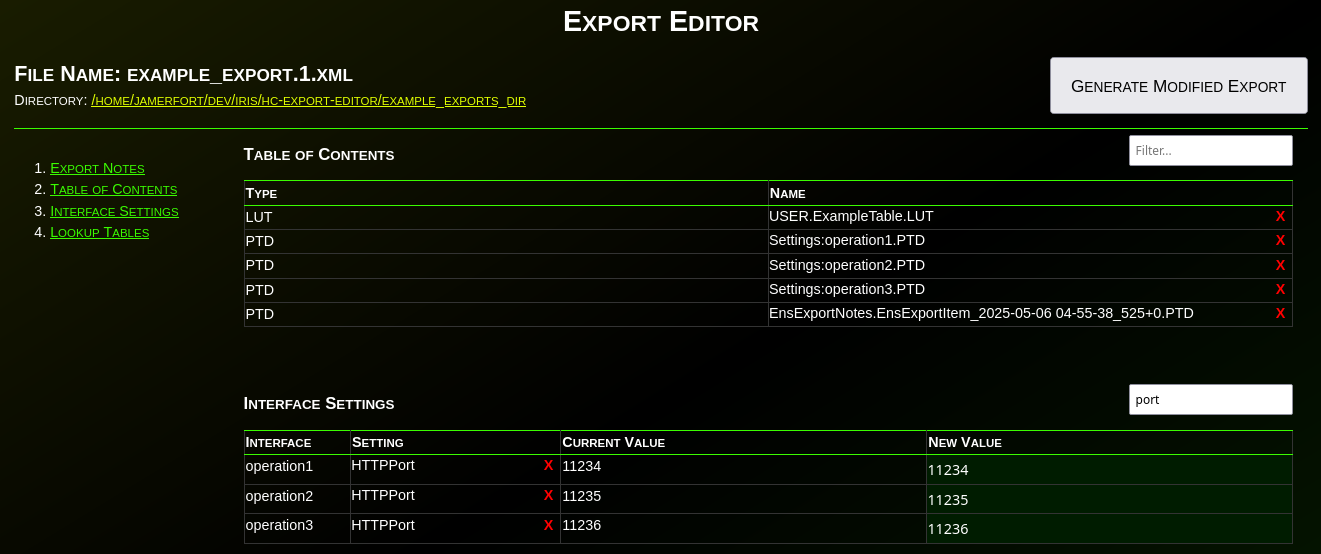
Have you ever needed to change an IP or port before deploying an interface to production? Needed to remove items from an export? What about modifying the value(s) in a lookup table before deploying? Have you wanted to disable an interface before deploying? What about adding a comment, category, or alert setting to an interface before deploying to production?

1 0
0 135

Hi developers!

While developing web apps the security practice I consider safe and convenient is to create a special Role (e.g. equal application name) which contains security resources which application will need (SQL tables, priviledges, database access, etc) and assign it to the Web Application.
So the user gets this role once it loggs in to the application (via password, no password or delegated).

Convenient, right?

So, the question is, when I deploy the app as an IPM module what should I put as a database access?

0 4
0 135

Hello Developers,

I have MacBook Pro M3 and I'm new to the IRIS for Health setup / installation with all pre-requisite / requirements so someone could please help me with detailed instructions on how to setup IRIS for Health (HL7 & FHIR) from scratch along with SQL Server? I have Windows 11 installed in parallel desktop if that's required and complete installation / setup is not possible on MacBook.

Thank you in advance.

Rushi

0 3
0 130

The IKO will dynamically provision storage in the form of persistent volumes and pods will claim them via persistent volume claims.

But storage can come in different shapes and sizes. The blueprint to the details about the persistent volumes comes in the form of the storage class.

This raises the question: we've deployed the IrisCluster, and haven't specified a storage class yet. So what's going on?

You'll notice that with a simple

10 1
1 430

Hi, this post was initially written for Caché. In June 2023, I finally updated it for IRIS. If you are revisiting the post since then, the only real change is substituting Caché for IRIS! I also updated the links for IRIS documentation and fixed a few typos and grammatical errors. Enjoy :)

23 29
9 12K

I have an operation using $ZF this operation ran and did not error but the job has been active and it can not be stopped I have tried stopping it from the front end and through the terminal using ##class(ENSLIB.Job).%New() Stop method. Now my production will not update even if I add a new item to the production I cannot update the item is there a way to force stop this job.

0 4
0 226

The IKO allows for sidecars. The idea behind them is to have direct access to a specific instance of IRIS. If we have mirrored data nodes, the web gateway will (correctly) only give us access to the primary node. But perhaps we need access to a specific instance. The sidecar is the solution.

Building on the example from the previous article, we introduce the sidecar by using a mirrored data node and of course arbiter.

7 1
1 448

All pods are assigned a Quality of Service (QoS). These are 3 levels of priority pods are assigned within a node.

The levels are as following:

1) Guaranteed: High Priority

2) Burstable: Medium Priority

3) BestEffort: Low Priority

It is a way of telling the kubelet what your priorities are on a certain node if resources need to be reclaimed. This great GIF below by Anvesh Muppeda explains it.

8 0
2 354

We now get to make use of the IKO.

Below we define the environment we will be creating via a Custom Resource Definition (CRD). It lets us define something outside the realm of what the Kubernetes standard knows (this is objects such as your pods, services, persistent volumes (and claims), configmaps, secrets, and lots more). We are building a new kind of object, an IrisCluster object.

9 1
2 627