As Bill has mentioned earlier in his post, we have carefully reviewed the JSON capabilities and made some adjustments to ensure they deliver the best benefit to you. In this post, I am going to describe the modifications in more detail and provide guidance for you to understand the implication for your code base.
In our last lesson, we added some formatting and validation to our Edit Widget form. So, now we are ready to add the ability to add new Widgets to our application. However, the great Widget Wars have come to an abrupt end, as Widget Direct has purchased its biggest competitor, WorldWideWidgets. In order to maintain some continuity, we need to display their catalog on our new application.
We finished our last lesson with our Widgets Direct page iterating over a list of widgets, displaying an ID and a Name value. While we have been able to achieve this with only a small amount of coding, the page itself is not the most visually appealing place to be. The AngularJS framework is providing a powerful Model-View-Controller framework for our structure and logic, but it does not implement anything that will provide a nice UI experience.
We finished our last lesson with our Widgets Direct page receiving a Welcome message as a property of a JSON object, which was unpacked and displayed on the page. However, we are on Lesson 3, and we still haven't had any talk of displaying widgets yet.
Hi everyone, I have and Zen Mojo application, it's all working but I have some doubts about what is recommended to use: There is some reports of employees, for example, and actually I'm using some plugins : "Excelent export" to generate Excel reports and "jspdf" to generate PDF reports in client side.
I have an REST service, that receives the request, process and returns JSON, after client side receive the response it's processed.
- This can be slow/bad in applications with large data?
- It's better/recommended to use ZenReports even with ZenMojo applications?
How can I prevent large number truncation when using the DynamicObject and DynamicArray classes to create JSON in objectscript and then parsing the result in javascript. Are there any global settings that configure the output when using these classes?
I am looking at converting to the new DynamicObject and DynamicArray classes to build JSON. Our current (homegrown) JSON library forces string representation of numbers too long because of errors we were seeing with long numbers being truncated on the client, I am hoping to accomplish the same with the new classes.
I have a project to convert a JSON message with two patient identifiers into an HL7 ADT^A31. Is there any documentation or training that you would think is appropriate?
Is there any way that I can check the native type of an object script variable? (similar to the typeof check in javascript)
I see that the DynamicArray class uses the type of the variable for its output, I would like to do something similar when I receive a value as an argument to my method.
I'm working on a REST service which will include a binary stream as a request property. I'm currently encoding the stream as BASE64 and passing it as a string value, but I was wondering if there is anything in the Caché JSON support that may be a better fit for encoding this data? Thanks Chris
My organization has been tasked with parsing raw EDI 271 messages into JSON strings in order to feed a downstream application. A few key details about the task:
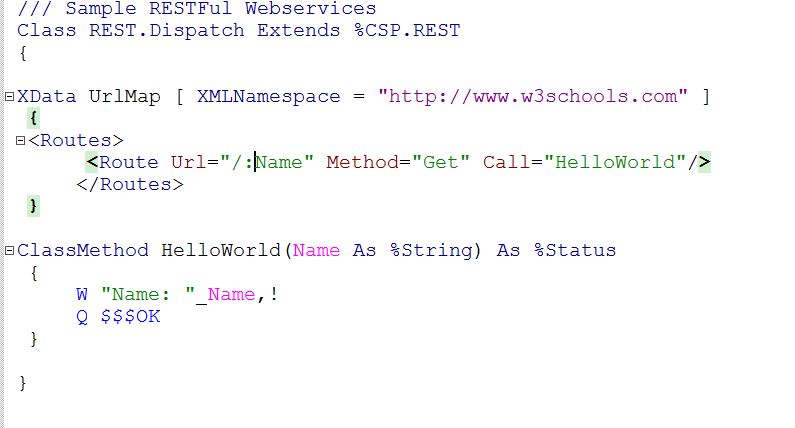
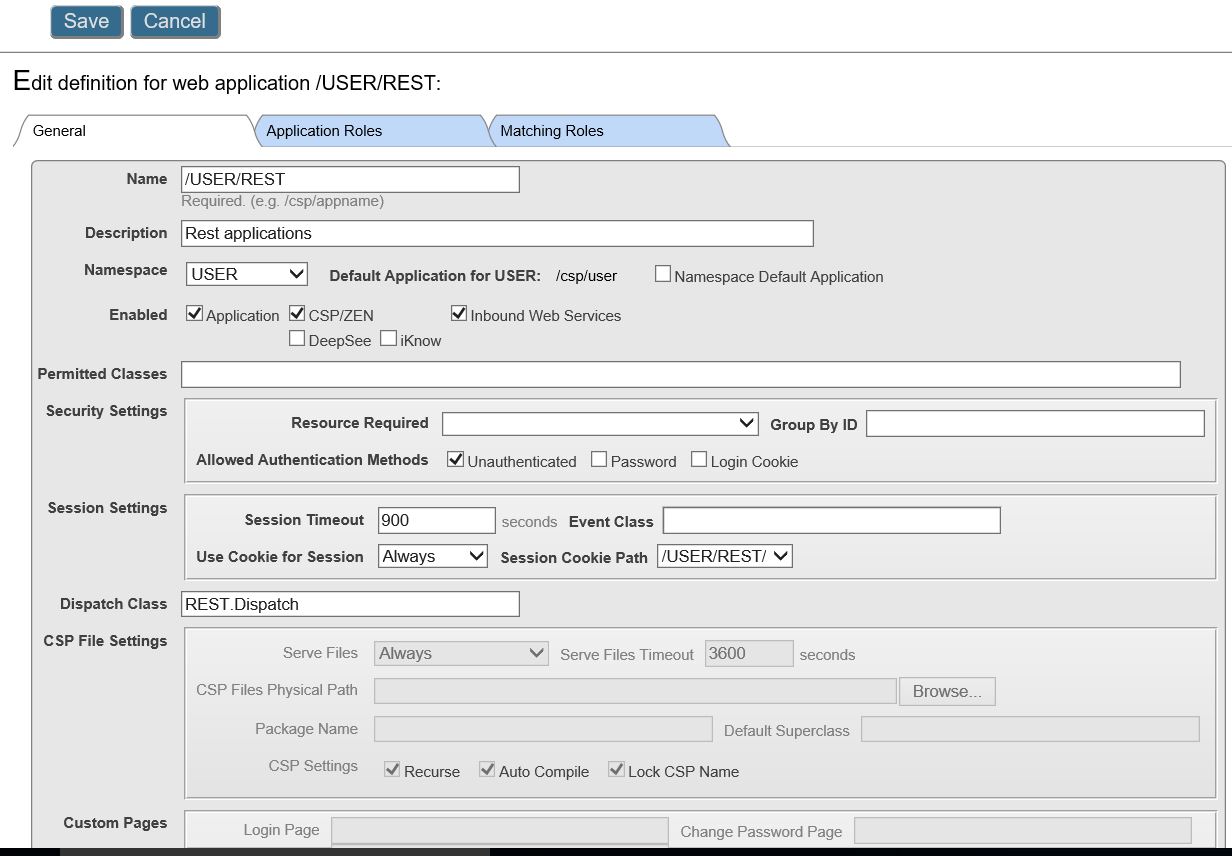
The article is a step by step guide for beginners to learn how to build a RESTful web service consumer (or client) in Ensemble. The provider can be any RESTful service, but the example is based on the service we made during the previous sessions.
We're creating a series of RESTful APIs that output data from a Cache database (made up of global storage that we've mapped to classes). I'm running into some problems with object-to-JSON conversions when relationships are involved. Eg:
ParentClass has children relationship to ChildClass
A beginners guide to develop Ensemble RESTful web services.
Background
Before you start reading this short introduction please go through the on-line documentation of Ensemble with special attention to chapter “Creating REST services and clients with Ensemble”.
The approach in the documentation is undisputable the fastest and easiest way to create RESTful services. As a beginner I went through the documentation and I had several questions. This short article is listing those questions plus my humble answers.
Hi, all.
I have CSP application and it needs to get and process data from ajax request with json-content. JSON can be very big.
In this case:
TRY
{
Set RequestObj = ##class(%Object).$fromJSON(%request.Content.Read())
} CATCH(Exception) {
Set Status=Exception.AsStatus()
}
I get just part of getting JSON and validate error in $fromJSON.
If I try to read it all in cycle:
TRY
{
While (%request.Content.AtEnd = 0) {
Recently I have been posting some updates to our JSON capabilities and I am very glad that so many of you provided feedback. Today I would like to focus on another facet: Producing JSON with a SQL query.
I am trying to use data transformation (DTL) to map a JSON to SDA. My elements in the source JSON is not one to one with SDA object. That means I have to add code to loop through these objects in order to complete the mapping. Can someone send me a sample that can look to create that? I am not very comfortable with scripting language used in Health Share. Appreciate your help.
The field test of Caché 2016.2 has been available for quite some time and I would like to focus on one of the substantial features that is new in this version: the document data model. This model is a natural addition to the multiple ways we support for handling data including Objects, Tables and Multidimensional arrays. It makes the platform more flexible and suitable for even more use cases.