9 Followers · 119 Posts

Git is a version control system for tracking changes in computer files and coordinating work on those files among multiple people.

Official site.

Question Reuben Formosa · Jul 15, 2024

We have installed IRIS on a separate server that we access remotely and copied all code and data to it so we can test IRIS before we do the move.We develop directly on the server.We Use VsCode to code but sometimes we might need to go to cache studio for some tasks.

We were interested in git for Shared Development Environments, we have installed it on a server with IRIS 2021 and configured it by following the instructions and videos of InterSystems summits we found online. We initialised a local repository on the server, added some files to start testing branches.

4
0 366
Question Token Ibragimov · Apr 2, 2024

Hello!

Trying to configure tortoise GIT in Linux System

NAME="Red Hat Enterprise Linux Server"
VERSION="7.9 (Maipo)"
My steps

1. Enable [write-access](http://docs.intersystems.com/ens20151/csp/docbook/DocBook.UI.Page.cls?K…) to CACHELIB database via the Management Portal. (This is required for csp-page with settings import.)
2. Import project in %SYS:

    %SYS> do $system.OBJ.ImportDir("/arch/cache-tort-git-master/","*.xml","ck",,1)

12
0 330
Question Alan Watts · Jan 2, 2024

We are trying to use Git for Source Code control in our existing application. Currently all Source Control is a manual process. We are running IRIS on a Windows server. The git extension has been installed and initial configuration done. We do get the git tab in Studio. We keep getting the following error:

Git Status:
fatal: detected dubious ownership in repository at 'C:/KBS/dev/server/db'
'C:/KBS/dev/server/db' is owned by:
'S-1-1-0'
but the current user is:
'S-1-5-18'
To add an exception for this directory, call:git config --global --add safe.directory C:/KBS/dev/server/db.

12
0 991
Question Mathew Rimmington · Jan 24, 2024

In VS Code using the InterSystems ObjectScript extensions, I'd like the indentation applied to match that of IRIS Studio. Specifically for comments and dot syntax, I'd like pressing enter (carriage return) to preserve the current dot depth and same comment beginning.

In IRIS Studio after changing the indentation settings to custom using " \t.#/;" without quotes (note the leading space), the behaviour looks like this:

And after pressing enter the leading comment is preserved:

For dot indented code:

After pressing enter the dot depth is preserved:

3
0 513
Question Mathew Rimmington · Jan 17, 2024

The company I work for have a repository for one of our products which already contains both InterSystems and non-InterSystems source code. I'm in the process of trying to migrate us over to using VSCode to edit the InterSystems source but am stuck on some issues surrounding the files on disk and the routines in the IRIS instance.

9
0 507
Article sween · Oct 20, 2023 6m read

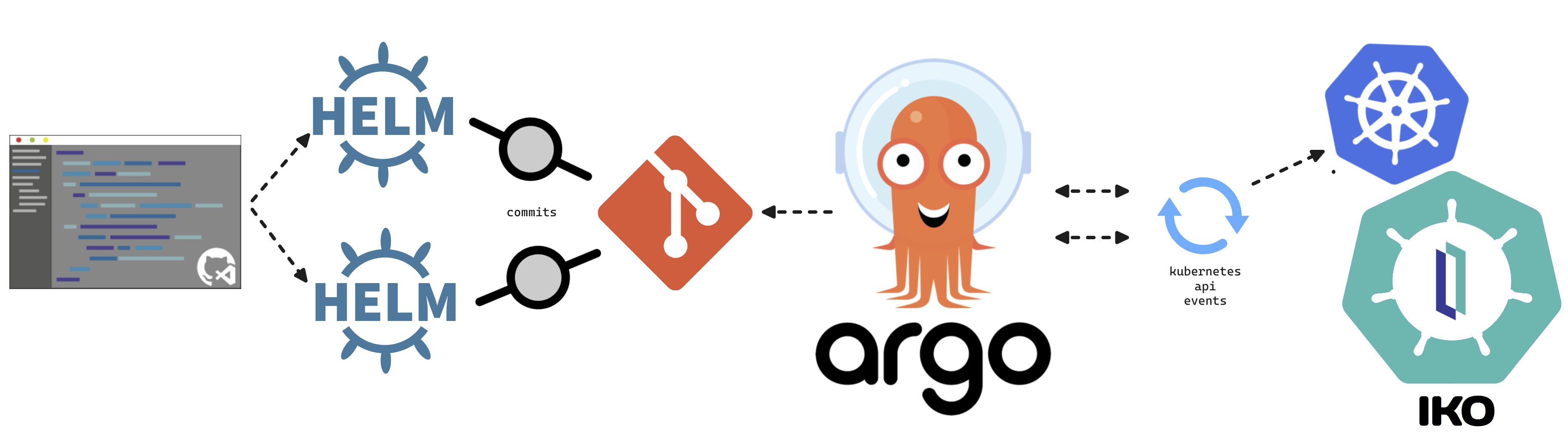
This article will cover turning over control of provisioning the InterSystems Kubernetes Operator, and starting your journey managing your own "Cloud" of InterSystems Solutions through Git Ops practices. This deployment pattern is also the fulfillment path for the PID^TOO||| FHIR Breathing Identity Resolution Engine.

Git Ops

3
1 878
Announcement Derek Robinson · Oct 16, 2023

Hi All! For those of you who are users of our cloud services, you may have been introduced to Health Connect Cloud. One topic within that cloud service that can be a little tricky is understanding how GitLab and the source control workflow fit seamlessly into your integration workflow in Health Connect Cloud. I recently presented a lightboard video explaining how this works, including the slightly different workflows for building interfaces via code versus building via the Management Portal UI. If you use Health Connect Cloud, let me know if this is helpful or if you have questions!

0
0 199
Article Eduard Lebedyuk · May 10, 2018 9m read

In this series of articles, I'd like to present and discuss several possible approaches toward software development with InterSystems technologies and GitLab. I will cover such topics as:

  • Git 101
  • Git flow (development process)
  • GitLab installation
  • GitLab Workflow
  • Continuous Delivery
  • GitLab installation and configuration
  • GitLab CI/CD
  • Why containers?
  • Containers infrastructure
  • CD using containers

In the first article, we covered Git basics, why a high-level understanding of Git concepts is important for modern software development, and how Git can be used to develop software.

In the second article, we covered GitLab Workflow - a complete software life cycle process and Continuous Delivery.

In the third article, we covered GitLab installation and configuration and connecting your environments to GitLab

In the fourth article, we wrote a CD configuration.

In the fifth article, we talked about containers and how (and why) they can be used.

In the sixth article let's discuss main components you'll need to run a continuous delivery pipeline with containers and how they all work together.

In this article, we'll build Continuous Delivery configuration discussed in the previous articles.

10
4 2862
Announcement Marcus Wurlitzer · Apr 21, 2021

Hi Developers, I am glad to announce Git for InterSystems IRIS, my first submission to OpenExchange and part of the current Developer Tools Contest.

Git for InterSystems IRIS is a source control package that aims to facilitate a native integration of the Git workflow with the InterSystems IRIS platform. It is designed to work as a transparent link between InterSystems IRIS and a Git-enabled code directory that, once setup, requires no user interaction. A detailed description can be found on GitHub.


10
4 1371
Article Eduard Lebedyuk · Apr 26, 2023 2m read

Git stores complete history - meaning you would never lose your files, even if they are deleted, they are still available. That, however, presents an issue if large or sensitive files have been committed. Deleting them DOES NOT remove them from history. Recently one of the repos I work on became unexpectedly large, so here's how you can resolve that:

0
0 267
Article Evgeny Shvarov · Feb 12, 2023 3m read

Hi Developers!

As you know InterSystems IRIS Interoperability solutions contain different elements of the solution, such as: production, business rule, business process, data transformation, record mapper. And sometimes we can create and modify these elements with UI tools.  And of course we need a handy and robust way to source-control the changes made with UI tools.

For a long time this was a manual (export class, element, global, etc) or cumbersome settings procedure, so the saved time with source-control UI automation was competing with lost time to setup and maintain the settings.

Now the problem doesn't exist any more. With two approaches: package first development and usage of IPM package git-source-control by @Timothy Leavitt 
.

Meme Creator - Funny WOW IT REALLY WORKS Meme Generator at MemeCreator.org!

The details are below!

8
3 1393
Article Muhammad Waseem · Apr 17, 2023 4m read

Hi Community,
In this article, I will introduce my application iris-mlm-explainer

This web application connects to InterSystems Cloud SQL to create, train, validate, and predict ML models, make Predictions and display a dashboard of all the trained models with an explanation of the workings of a fitted machine learning model. The dashboard provides interactive plots on model performance, feature importances, feature contributions to individual predictions, partial dependence plots, SHAP (interaction) values, visualization of individual decision trees, etc.

Prerequisites

6
1 475
Announcement Anastasia Dyubaylo · Mar 24, 2023

Hi Developers,

Often we create and edit InterSystems IRIS Interoperability solutions via a set of UI tools that is provided with IRIS. But it is sometimes difficult to setup the development environment to handle changes we make in the UI to source control.  

This video illustrates how git-source-control helps with source control Interoperability components while changing it in the UI.

⏯ Git Source Control for InterSystems IRIS Interoperability with Docker and VSCode

0
2 873
Discussion Colin Brough · Mar 10, 2023

In a healthcare setting we've an Ensemble namespace through which passes a key HL7 feed (the ADT feed from our PAS). It is split up, transformed and passed on to multiple downstream systems. We consider the feed going to each downstream system an interface. Each interface is developed as separately as possible - typically as a separate branch of our git repo (which we access via VS Code).

0
0 296
Article Eduard Lebedyuk · Sep 26, 2022 11m read

Welcome to the next chapter of my CI/CD series, where we discuss possible approaches toward software development with InterSystems technologies and GitLab.

Today, let's talk about interoperability.

Issue

When you have an active interoperability production, you have two separate process flows: a working production that processes messages and a CI/CD process flow that updates code, production configuration and system default settings.

Clearly, CI/CD process affects interoperability. But questions are:

  • What exactly happens during an update?
  • What do we need to do to minimize or eliminate production downtime during an update?
0
1 667
Article Eduard Lebedyuk · Mar 20, 2018 8m read

In this series of articles, I'd like to present and discuss several possible approaches toward software development with InterSystems technologies and GitLab. I will cover such topics as:

  • Git 101
  • Git flow (development process)
  • GitLab installation
  • GitLab Workflow
  • Continuous Delivery
  • GitLab installation and configuration
  • GitLab CI/CD

In the first article, we covered Git basics, why a high-level understanding of Git concepts is important for modern software development, and how Git can be used to develop software.

8
2 3256
Article Eduard Lebedyuk · Mar 13, 2018 4m read

In this series of articles, I'd like to present and discuss several possible approaches toward software development with InterSystems technologies and GitLab. I will cover such topics as:

  • Git 101
  • Git flow (development process)
  • GitLab installation
  • GitLab Workflow
  • Continuous Delivery
  • GitLab installation and configuration
  • GitLab CI/CD

In the first article, we covered Git basics, why a high-level understanding of Git concepts is important for modern software development, and how Git can be used to develop software.

In the second article, we covered GitLab Workflow - a complete software life cycle process and Continuous Delivery.

I this article we'll discuss:

  • GitLab installation and configuration
  • Connecting your environments to GitLab
2
1 2179
Article Lorenzo Scalese · May 30, 2022 3m read

Hi Community,

Recently, I migrated a series of Objectscript repositories from XML to UDL format.
After the migration, I was a bit disappointed by the presentation on the GitLab web interface.

Since Objectscript syntax is supported by GitHub, I thought It would be also supported by GitLab. Unfortunately, the library used by GitLab to highlight the code does not have an extension to support Objectscript.

1
2 631
Question Rajasekaran Dhandapani · Apr 9, 2022

I am new to Intersystems, in our project we are directly connecting to the server (environment) using  Intersystems VSCode extensions and publishing our changes from local machine. This is not the way we usually do as development process.

Is it possible to implement continuous integration ? So that developers can check-in their code in GIT Hub and can integrate Jenkins and automate the deployment?

Could you please help me on this ?

3
0 438