9 Followers · 120 Posts

Git is a version control system for tracking changes in computer files and coordinating work on those files among multiple people.

Official site.

Announcement Timothy Leavitt · Nov 8, 2021

If you're building solutions on IRIS and want to use Git, that's great! Just use VSCode with a local git repo and push your changes out to the server - it's that easy.

But what if:

  • You're collaborating with other developers on a shared, remote development environment and want to avoid concurrent editing of the same file
  • You're using editors based in the management portal for BPL, DTL, pivots, dashboards, etc.
50
15 5264
Article Pietro Di Leo · Sep 24, 2025 23m read

Table of Contents

  1. Purpose of the article
  2. What containers are and why they make sense with IRIS
     2.1 Containers and images in a nutshell
     2.2 Why containers are useful for developers
     2.3 Why IRIS works well with Docker
  3. Prerequisites
  4. Installing the InterSystems IRIS image
     4.1 Using Docker Hub
     4.2 Pulling the image
  5. Running the InterSystems IRIS image
     5.1 Starting an IRIS container
     5.2 Checking container status
     5.3 Executing code in the container terminal
     5.4 Accessing the IRIS Management Portal
     5.5 Connecting the container to VS Code
     5.6 Stopping or removing the container
     5.7 Setting a specific password with a bind mount
     5.8 Using durable %SYS volumes
      5.8.1 What gets stored with durable %SYS
      5.8.2 How to enable durable %SYS
  6. Using Docker Compose
     6.1 Docker Compose example
     6.2 Running Docker Compose
  7. Using a Dockerfile to run custom source code
     7.1 Dockerfile example
     7.2 Docker Compose example
     7.3 Understanding layers, image tagging and build vs. run time
     7.4 Source code and init script
     7.5 Building the image with Dockerfile
     7.6 Running instructions in the containerized IRIS terminal
  8. Conclusion and what’s next
9
10 522
Article Eduard Lebedyuk · Mar 1, 2018 6m read

Everybody has a testing environment.

Some people are lucky enough to have a totally separate environment to run production in.

-- Unknown

.

In this series of articles, I'd like to present and discuss several possible approaches toward software development with InterSystems technologies and GitLab. I will cover such topics as:

  • Git 101
  • Git flow (development process)
  • GitLab installation
  • GitLab WorkFlow
  • GitLab CI/CD
  • CI/CD with containers

This first part deals with the cornerstone of modern software development - Git version control system and various Git flows.

1
4 4985
Announcement Bill McCormick · Dec 1, 2016

I am pleased to announce the immediate availability of Atelier 1.0

This is the debut release of our new Eclipse based plugin for developing code on Cache and Ensemble.

Highlights include

  •     Integrated Source Management
  •     Debugging
  •     Context based documentation
  •     Server Side browsing of multiple systems
  •     Compilation and Testing facilities

Atelier will be released independently of various server releases. The first versions of Cache and Ensemble that fully support Atelier are 2016.2 and higher. Facilities within Atelier itself will manage updating as we make newer versions available.

7
0 1376
Article Lorenzo Scalese · May 30, 2022 3m read

Hi Community,

Recently, I migrated a series of Objectscript repositories from XML to UDL format.
After the migration, I was a bit disappointed by the presentation on the GitLab web interface.

Since Objectscript syntax is supported by GitHub, I thought It would be also supported by GitLab. Unfortunately, the library used by GitLab to highlight the code does not have an extension to support Objectscript.

GitLab uses the library Rouge, which can highlight over 200 languages. This is a library written in Ruby (see the GitHub page), but Objectscript is not in the list.

1
2 645
Article Timur Safin · Jan 16, 2017 15m read

Have you ever thought what could be a reason why some development environment (database, language) would eventually become popular? What part of this popularity could be explain as language quality? What by new and idioms approaches introduced by early language adopters? What is due to healthy ecosystem collaboration? What is due to some marketing genius?

2
2 1488
Article Eduard Lebedyuk · May 10, 2018 9m read

In this series of articles, I'd like to present and discuss several possible approaches toward software development with InterSystems technologies and GitLab. I will cover such topics as:

  • Git 101
  • Git flow (development process)
  • GitLab installation
  • GitLab Workflow
  • Continuous Delivery
  • GitLab installation and configuration
  • GitLab CI/CD
  • Why containers?
  • Containers infrastructure
  • CD using containers

In the first article, we covered Git basics, why a high-level understanding of Git concepts is important for modern software development, and how Git can be used to develop software.

In the second article, we covered GitLab Workflow - a complete software life cycle process and Continuous Delivery.

In the third article, we covered GitLab installation and configuration and connecting your environments to GitLab

In the fourth article, we wrote a CD configuration.

In the fifth article, we talked about containers and how (and why) they can be used.

In the sixth article let's discuss main components you'll need to run a continuous delivery pipeline with containers and how they all work together.

In this article, we'll build Continuous Delivery configuration discussed in the previous articles.

10
4 2873
Article Evgeny Shvarov · Feb 24, 2020 9m read

Hi Developers!

Many of you publish your InterSystems ObjectScript libraries on Open Exchange and Github.

But what do you do to ease the usage and collaboration to your project for developers?

In this article, I want to introduce the way how to introduce an easy way to launch and contribute to any ObjectScript project just by copying a standard set of files to your repository.

Let's go!

21
6 2517
Article Guillaume Rongier · Jul 17, 2025 5m read

img

This will be an introduction to Python programming in the context of IRIS.

Before anything I will cover an important topic: How python works, this will help you understand some issues and limitations you may encounter when working with Python in IRIS.

All the articles and examples can be found in this git repository: iris-python-article

How Python works

Interpreted Language

Python is an interpreted language, which means that the code is executed line by line at runtime even when you import a script.

What does this mean ? Let's take a look at the following code:

# introduction.
0
3 249
Article Evgeny Shvarov · May 28, 2021 1m read

Hi colleagues!

Often when we collaborate to someone's repo in GitHub we do the following cycle:

Fork-Clone-Change-Commit-Push-Pull-Request-Merge to the original repo.

This is all great and works fine!

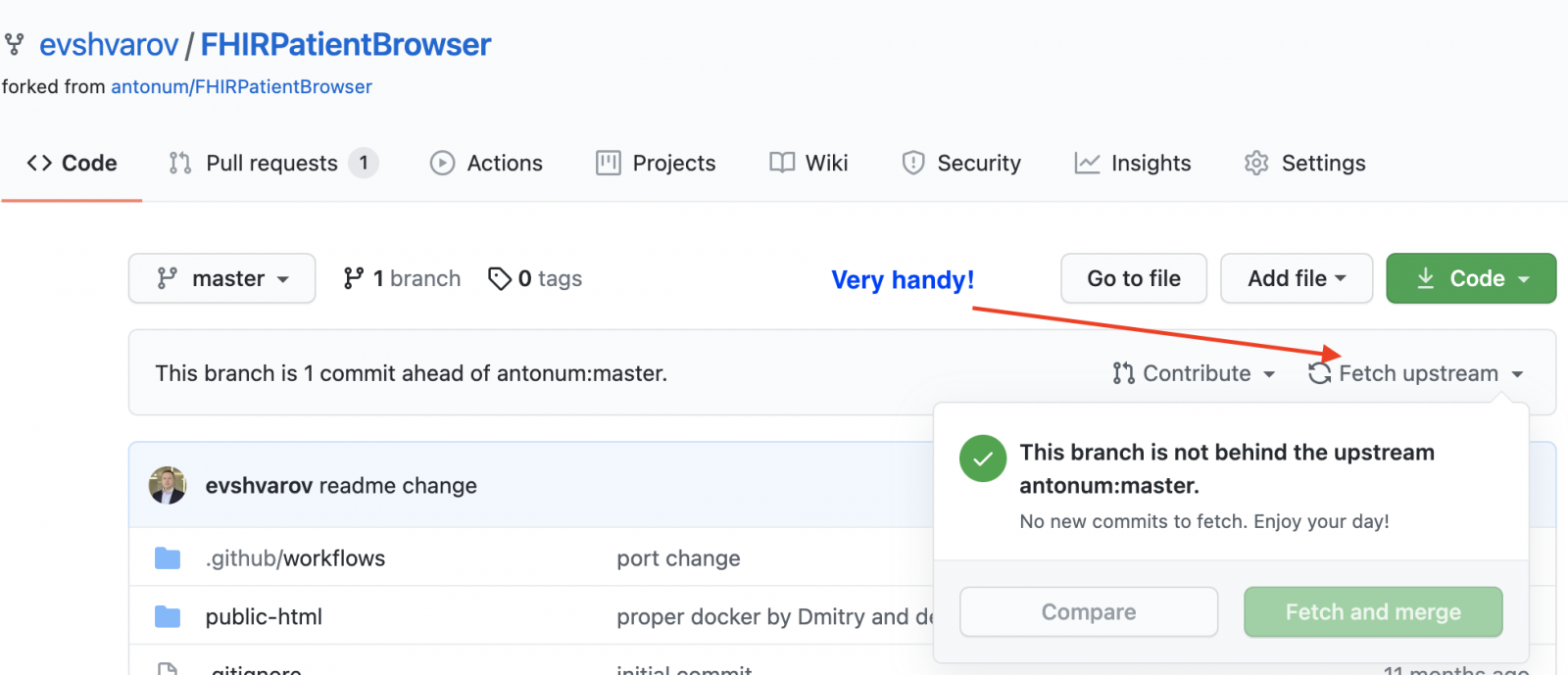
And if we want to make a second collaboration right after the merge you need to perform "Fetch upstream" to your forked repo first to "ingest" your own Pull-request in the original repo.

Geeky git-professionals do it with ease but this was always a headache for me so I usually simply deleted the fork and created a new one.

And today I figured that Github added a new UI feature that I can easily fetch-upstream for my fork with the original one and make it up to date and capable for pull-requests.

Here is where the button is:

This is a relief! )

Wanted to share this relief and productivity tip with you!

Bring more collaborations to Github repos!

And speaking of PR - I just made a PR with docker to Google Cloud Run deployment for the FHIRaaS demo made by @Anton Umnikov for the current FHIR Contest! Looking for more of your contributions!

0
3 564
Article Joel Solon · Jun 24, 2016 2m read

One of the benefits of Atelier is easy integration with source code management tools. Some Eclipse installations include the EGit plugin, or you can install it from the Eclipse marketplace. EGIt makes integration with Git and GitHub easy. Here are the steps I used to connect Atelier to a GitHub repository:

8
0 2513
Article Nicky Zhu · Oct 10, 2024 9m read

This demo program is used to show how a custom FHIR profile can be employed to validate data compliance. The custom FHIR implementation guide was developed based on FHIR Version R4, and in this example implements the Organization resource extension to validating data compliance.

Installation

  1. Download the project via Git clone.
  2. Execute docker-compose up -d to build and start the container, the initial execution will download required container images and executing the script will take another 5 to 10 minutes (depending on the machine).
0
1 447
Article sween · Oct 20, 2023 6m read

image

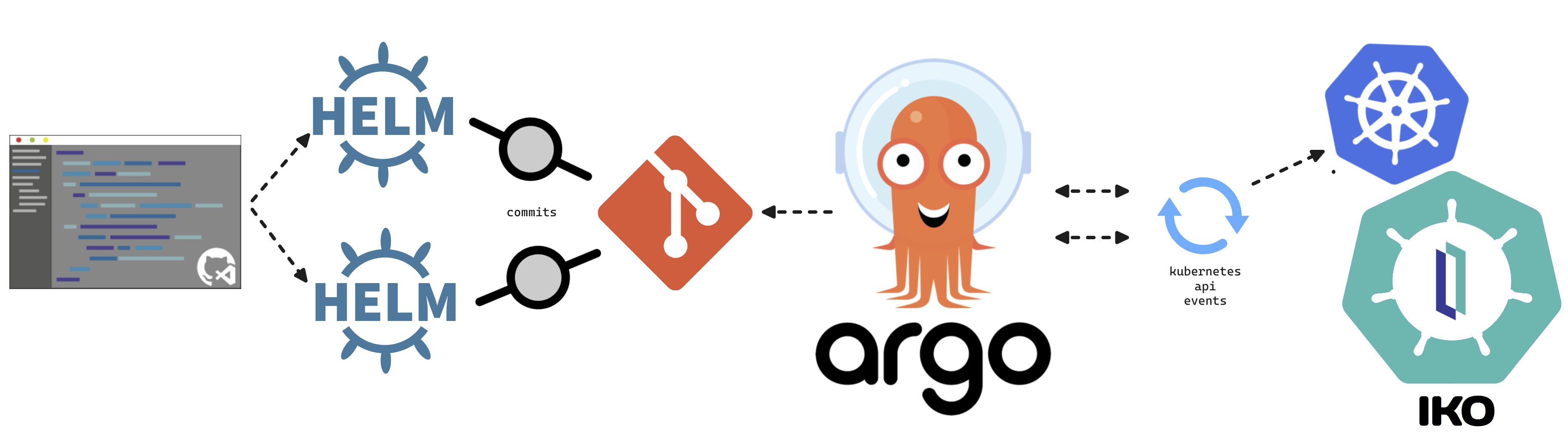
This article will cover turning over control of provisioning the InterSystems Kubernetes Operator, and starting your journey managing your own "Cloud" of InterSystems Solutions through Git Ops practices. This deployment pattern is also the fulfillment path for the PID^TOO||| FHIR Breathing Identity Resolution Engine.

Git Ops

I encourage you to do your own research or ask your favorite LLM about Git Ops, but I can paraphrase it here for you as we understand it.

3
1 887
Article Eduard Lebedyuk · Mar 7, 2018 7m read

In this series of articles, I'd like to present and discuss several possible approaches toward software development with InterSystems technologies and GitLab. I will cover such topics as:

  • Git 101
  • Git flow (development process)
  • GitLab installation
  • GitLab Workflow
  • Continuous Delivery
  • GitLab installation and configuration
  • GitLab CI/CD

In the previous article, we covered Git basics, why a high-level understanding of Git concepts is important for modern software development, and how Git can be used to develop software. Still, our focus was on the implementation part of software development, but this part presents:

  • GitLab Workflow - a complete software life cycle process - from idea to user feedback
  • Continuous Delivery - software engineering approach in which teams produce software in short cycles, ensuring that the software can be reliably released at any time. It aims at building, testing, and releasing software faster and more frequently.
1
3 3483
Article Guillaume Rongier · Jul 8, 2024 6m read

Flask_logo

Description

This is a template for a Flask application that can be deployed in IRIS as an native Web Application.

Installation

  1. Clone the repository
  2. Create a virtual environment
  3. Install the requirements
  4. Run the docker-compose file
git clone
cd iris-flask-template
python3 -m venv .venv
source .venv/bin/activate
pip install -r requirements.txt
docker-compose up

Usage

The base URL is http://localhost:53795/flask/.

Endpoints

  • /iris - Returns a JSON object with the top 10 classes present in the IRISAPP namespace.
  • /interop - A ping endpoint to test the interoperability framework of IRIS.
4
1 567
Article Andrew Sklyarov · Nov 2, 2025 7m read

Over time, while I was working with Interoperability on the IRIS Data Platform, I developed rules for organizing a project code into packages and classes. That is what is called a Naming Convention, usually. In this topic, I want to organize and share these rules. I hope it can be helpful for somebody.


Disclaimer: This guide is a good fit for Interoperability projects. When you have integrations, data flows, when you use IRIS for ETL processes, etc. Overall, when your code is combined with Productions.

4
4 179
Announcement Brett Saviano · Aug 7, 2024

The VS Code extension development team is looking for beta testers to provide feedback on a proposed overhaul of the client-side editing workflow. The full list of changes can be found in the GitHub pull request description. Here are the highlights:

  • Support the use of client-side editing in any non-isfs workspace folder, not just folders in your local file system. For example, with VS Code Remote Development.
  • Create an index of all Classes, MAC and INT routines, and Include files inside non-isfs workspace folders.
35
2 870
New
Article Tomo Okuyama · Mar 1 6m read

Why This Integration Matters

InterSystems continues to push AI capabilities forward natively in IRIS — vector search, MCP support, and Agentic AI capabilities. That roadmap is important, and there is no intention of stepping back from it.

But the AI landscape is also evolving in a way that makes ecosystem integration increasingly essential. Tools like Dify — an open-source, production-grade LLM orchestration platform — have become a serious part of enterprise AI stacks.

2
0 125
Article Jordan Simpson · Sep 26, 2025 2m read

Hi,

Just thought I'd share quite a handy hook that has helped me out when developing on Health Connect Cloud with VS Code and GitBash. When developing on Health Connect Cloud, if changes are made directly on the server such as routing rules or component deployments, they aren't automatically included in source control, therefore you must export from the server into your local files and push to your remote repo. I'm sure there are easier methods to deal with that which I'm in the process of testing, but as a quick solution I thought it would be handy have a pre-commit hook which triggers a reminder in GitBash - see below.

1
1 169
Article Guillaume Rongier · Jul 8, 2024 6m read

fastapi_logo

Description

This is a template for a FastApi application that can be deployed in IRIS as an native Web Application.

Installation

  1. Clone the repository
  2. Create a virtual environment
  3. Install the requirements
  4. Run the docker-compose file
git clone
cd iris-fastapi-template
python3 -m venv .venv
source .venv/bin/activate
pip install -r requirements.txt
docker-compose up

Usage

The base URL is http://localhost:53795/fastapi/.

Endpoints

  • /iris - Returns a JSON object with the top 10 classes present in the IRISAPP namespace.
  • /interop - A ping endpoint to test the interoperability framework of IRIS.
3
0 605
Article Timur Safin · Feb 2, 2017 19m read

This is the second part of my long post about package managers in operating systems and language distributions. Now, hopefully, we have managed to convince you that convenient package manager and rich 3rd party code repository is one key factor in establishing of a vibrant and fast growing ecosystem. (Another possible reason for ecosystem success is the consistent language design, but it will be topic for another day.)

In this second part we plan to discuss the practical aspects of creating a package manager in general and their projection to the Caché database environment.

23
1 1492
Article Evgeny Shvarov · Feb 12, 2023 3m read

Hi Developers!

As you know InterSystems IRIS Interoperability solutions contain different elements of the solution, such as: production, business rule, business process, data transformation, record mapper. And sometimes we can create and modify these elements with UI tools.  And of course we need a handy and robust way to source-control the changes made with UI tools.

For a long time this was a manual (export class, element, global, etc) or cumbersome settings procedure, so the saved time with source-control UI automation was competing with lost time to setup and maintain the settings.

Now the problem doesn't exist any more. With two approaches: package first development and usage of IPM package git-source-control by @Timothy Leavitt 
.

Meme Creator - Funny WOW IT REALLY WORKS Meme Generator at MemeCreator.org!

The details are below!

8
3 1406
InterSystems Official Timothy Leavitt · Dec 4, 2024

It's been a while since I've posted about Embedded Git on the Developer Community, and I'd like to provide an update on the massive amount of work we've done this year and where we're going next.

Context

If you're building solutions on IRIS and want to use Git, that's great! Just use VSCode with a local git repo and push your changes out to the server - it's that easy.

6
0 526
Article Dmitrij Vladimirov · Dec 16, 2025 6m read

Table of Contents

  1. Introduction
  2. Version Control
  3. Exporting Classes
  4. Exporting BI Analytics classes
  5. Exporting globals

Introduction.

In this article, we'll cover a quick start to Git development with the InterSystems Developer Community and version control practices when working with IRIS InterSystems. We'll cover scenarios where we need to export Interoperability classes, globals, and analytics elements such as cubes and dashboards. These scenarios encompass key version control practices with IRIS.

To get started, you'll need:

  1. Register and log in to GitHub
  2. Be a member of the intersystems-community organization on Git

Getting started with IRIS InterSystems is very simple!

0
6 253
Article Evgeny Shvarov · Sep 14, 2019 1m read

Hi Developers!

Often I find questions on how to install IRIS, connect to IRIS from IDE, setup the environment, compile, debug, maintain the repository.

Here below possibly the shortest way to set up all the environment and start development with ObjectScript on InterSystems IRIS.

Prerequisites

Make sure you have Git, Docker, and VSCode installed

Install Docker and ObjectScript extensions into VSCode

Sign in or Create an account on Github

Here we go!

9
6 1591
Announcement Elena E · Jul 20, 2023

Exciting news for developers using GitLab for their InterSystems applications repositories! Open Exchange has expanded its support to include GitLab, allowing you to submit your projects just as easily as you would do with GitHub repos. 

Submitting Your GitLab Repo app on Open Exchange:

  1. Start by navigating to Open Exchange and log in to your account.
  2. Head to the "Submit Application" 
  3. In the "GitHub/GitLab URL" field, include the link to your open GitLab repository.
  4. Make sure to check the "Use GitHub/GitLab README as long description" checkbox.
1
0 250
Article Patrick Jamieson · Apr 15, 2025 6m read

I know that people who are completely new to VS Code, Git, Docker, FHIR, and other tools can sometimes struggle with setting up the environment. So I decided to write an article that walks through the entire setup process step by step to make it easier to get started.

I’d really appreciate it if you could leave a comment at the end - let me know if the instructions were clear, if anything was missing, or if there’s anything else you'd find helpful.

The setup includes:

✅ VS Code – Code editor
✅ Git – Version control system
✅ Docker – Runs an instance of IRIS for Health Community
✅ VS Code REST Client Extension – For running FHIR API queries
✅ Python – For writing FHIR-based scripts
✅ Jupyter Notebooks – For AI and FHIR assignments

Before you begin: Ensure you have administrator privileges on your system.

In addition to reading the guide, you can also follow the steps in the videos:

For Windows

2
2 455