I am planning to implement Business Intelligence based on the data in my instances. What is the best way to set up my databases and environment to use DeepSee?

Post that includes the step by step explanation of the technical feature or solution.
I am planning to implement Business Intelligence based on the data in my instances. What is the best way to set up my databases and environment to use DeepSee?
Hi,
This is a quick tutorial how to install and use TFS in Atelier. It is based on my self experience and some tricks that I 've noted.
If you are used to using visual studio maybe you feel that is a bit slow and heavy, but you have the same TFS panel as you have in Visual Studio, so don't need any special "training" to use it 
It's important don't store the file .buildpath because it has the server definition that you are working in a team, each one have the personal configuration, so the name of the server could be different.
To prevent it, create a file called
Please note, this article is considered deprecated, check out the new revision over here: https://community.intersystems.com/post/tutorial-websockets
The goal of this post is to discuss working with Websockets in a Caché environment. We are going to have a quick discussion of what websockets are and then talk through an example chat application implemented on top of Websockets.
The following post outlines an architectural design of intermediate complexity for DeepSee. As in the previous example, this implementation includes separate databases for storing the DeepSee cache, DeepSee implementation and settings. This post introduces two new databases: the first to store the globals needed for synchronization, the second to store fact tables and indices.
This article was written as an attempt to share the experience of installing the InterSystems Caché DBMS for production environment. We all know that the development configuration of a DBMS is very different from real-life conditions. As a rule, development is carried out in “hothouse conditions” with a bare minimum of security measures, but when we publish our project online, we must ensure its reliable and uninterrupted operation in a very aggressive environment.
InterSystems IRIS supports publish and subscribe message delivery. Publish and subscribe refers to the technique of routing a message to one or more subscribers based on the fact that those subscribers have previously registered to be notified about messages on a specific topic.
This article demonstrates how several InterSystems IRIS capabilities can work together:
In this article we would send emails about:
Email recipients would be determined using Publish/Subscribe operation and each user would receive only digest email whenever possible.
The following post outlines a more flexible architectural design for DeepSee. As in the previous example, this implementation includes separate databases for storing the DeepSee cache, DeepSee implementation and settings, and synchronization globals. This example introduces one new databases to store the DeepSee indices. We will redefine the global mappings so that the DeepSee indices are not mapped together with the fact and dimension tables.
Generally speaking, InterSystems products supported dynamic objects and JSON for a long while, but version 2016.2 came with a completely new implementation of these features, and the corresponding code was moved from the ObjectScript level to the kernel/C level, which made for a substantial performance boost in these areas. This article is about innovations in the new version and the migration process (including the ways of preserving backward compatibility).
In this series of articles, I'd like to present and discuss several possible approaches toward software development with InterSystems technologies and GitLab. I will cover such topics as:
In this article, we'll build Continuous Delivery with InterSystems Cloud Manager. ICM is a cloud provisioning and deployment solution for applications based on InterSystems IRIS. It allows you to define the desired deployment configuration and ICM would provision it automatically. For more information take a look at First Look: ICM.
In this series of articles, I'd like to present and discuss several possible approaches toward software development with InterSystems technologies and GitLab.
The following post concludes the series with a list of all databases seen in the example for the fully flexible architecture.

The following post is a guide to implement a basic architecture for DeepSee. This implementation includes a database for the DeepSee cache and a database for the DeepSee implementation and settings.
This might be a very simple rookie question but I'm trying to create couple of web services in Ensemble and using document below as my tutorial, I do manage to do it:
http://docs.intersystems.com/latest/csp/docbook/DocBook.UI.Page.cls?KEY…
But instead of doing it as described above, where method signature is like this:
Method GetCustomerInfo(ID As %Numeric) As ESOAP.SOAPResponse [WebMethod]
Guys,
Can you please guide me to create a RESTful API in our cache with JSON response.
Greetings fellow Atelier users! To help new users get started, we are planning to make a list of video tutorials (e.g., how to create an Atelier project). The first one is "Introduction to Atelier", which is a brief tour of the Atelier user interface. We'd appreciate it if you could watch this video and let us know your comments. We'll be relying on your feedback to create more video tutorials to make it easier for new users to learn Atelier.
Please feel free to post your comments below. We look forward to hearing from you!
Hello again and welcome to the next tutorial on this series: Part 4 - Sharing data across router methods. Here we are going to learn how to share a object containing data that is available for read across every router methods.
You're required to complete at least the Part 1 before entering this one. Still, this is supposed to be a really short tutorial, since there isn't much to be said about data sharing.
Hello again and welcome to the Part 3 - Using the SQL API!
If you have been wondering about how to use SQL along with Frontier, you came to the right place. That's because since Frontier wraps the common Caché SQL API within it's own, you need to use the API provided from it. But you don't need to worry about its learning curve, because the Frontier SQL API is really simple.
If you arrived here without checking the Part 1, I'd recommend you doing so, because Part 1 covers the essential for getting started with Frontier routers.
Hello again! Welcome to the Part 2 - Handling payloads!
If you're new to this series, I'd recommend you to check out the Part 1 - Core concepts. You'll need a basic understanding about how Frontier works before continuing with the Part 2.
Hello.
The idea of this post is to introduce Frontier: An abstraction layer that allows Rapid REST development.
REQUIREMENTS:
Why?
Have you ever found yourself dealing with repetitive tasks like mounting objects, serializing them and eventually handling multiple errors for multiple cases? Frontier can boost your development by making you focus on what really matters: your application.
Frontier is made to stop you from WRITE'ing by instead forcing your methods to return values.
It's designed to make you code clean, and you'll see the why pretty soon.
This is the Part 1, where you'll learn he basics about how to work with Frontier. That means at the end of this part you should be capable of
creating GET requests without difficulties. Since this also serves as a way to introduce the framework, I'll be calling this part: Core concepts.
Hello, I've completed this tutorial: https://community.intersystems.com/post/deepsee-period-date-vs-same-per…
I've used the "year" level instead of a pivot variable.
I want to calculate something like the following variation: 100 * ([DateOfSale].[PTD] - [DateOfSale].[LYPTD]) / [DateOfSale].[LYPTD]
I create a new calculated member, under the same dimmension with the above expression.
I put the new calculated member under the Count measure and it tells me that "Two measures cannot be crossjoined"
What am I doing wrong?
Can you redirect me to some explanations and maybe a solution?
Thanks!
I am trying to go through the "Simple Project" in Atelier Workbench User Guide >>> Getting started >>> Basic tutorial.
(http://docs.intersystems.com/atelier/latest/index.jsp)
Under "Using the popup" it says:
Using the popup
Now that we have our project we will create a folder. We will create our folder using the Project Explorer view's popup menu.
Quite a few enhancements have appeared over recent months in QEWD for easing and simplifying the creation of REST-based services. It's now even more slick and powerful, allowing you to very quickly create very high-performance, highly-scalable REST (and Web) services that make use of Cache.
I've therefore updated the training presentation deck (Part 31 on developing REST Services with QEWD). It describes all the new features with worked examples. See:
https://www.slideshare.net/robtweed/ewd-3-training-course-part-31-ewdxp…
WebSockets look to be supported reasonably well in Cache. I have yet to use them in production so I am wondering how well it has worked for other developers.
In particular what happens when the browser does not support WebSockets, or when a firewall blocks the connection.
Have you had to write your own long polling fall-back?
I've read the documentation and found this interesting article...
https://community.intersystems.com/post/asynchronous-websockets-quick-tutorial
but no mention of long polling fall-backs that I can see.
I know there's a whole chapter on the subject but I would love a super simple video demo or sample configuration or training course. The myriad menu of options and unfamiliar prompts can make it a bit daunting. The challenge is simple. Send an email notification if the license usage exceeds n% LU consumption. Why? A recent software change seemed to be responsible for causing the LU total consumption to reach 100%. That means users can't get logged in and support staff can't access the System Management Portal. A pretty daunting situation I am sure you all would agree.
I have been following the online Zen Quickstart Tutorial using the lastest release documentation. In addition to playing around with the styling and making a few minor functionality tweaks, I wanted to add an additional column that shows a count of the number of phone numbers for that Contact (as shown in the image below).
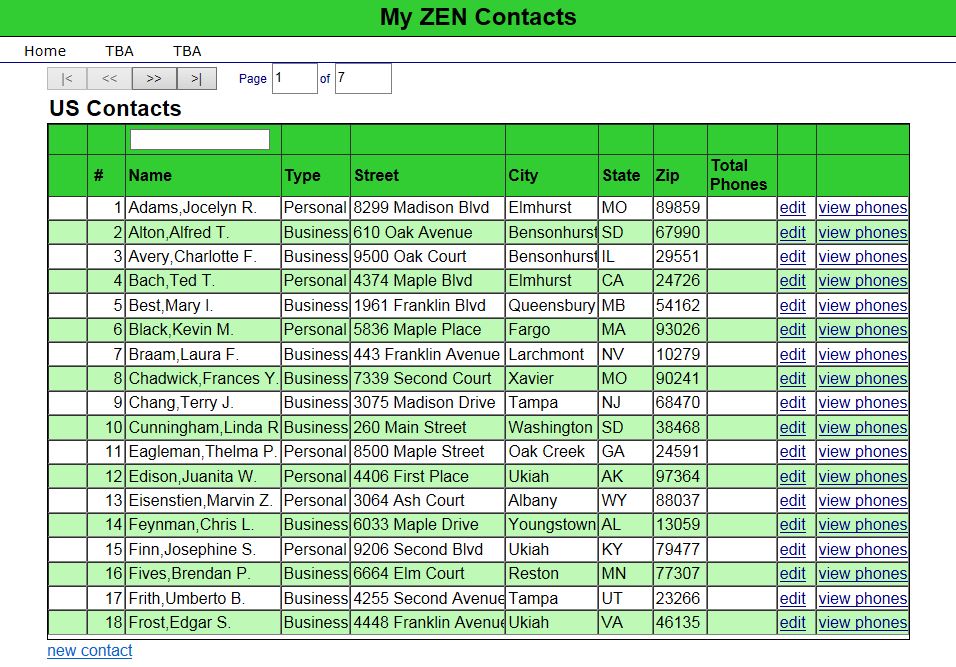
The idea here is that you can see what contacts have phone numbers without having to click on the "view phones" link. All I have done here is add a blank additional column to the %ZEN.Component.tablePane object
This article contains the tutorial document for a Global Summit academy session on Text Categorization and provides a helpful starting point to learn about Text Categorization and how iKnow can help you to implement Text Categorization models. This document was originally prepared by Kerry Kirkham and Max Vershinin and should work based on the sample data provided in the SAMPLES namespace.

The topic of reflection hasn't been raised in Caché forums or blogs too often. Perhaps, it happened because the notion of reflection is not explicitly defined in Caché. However, it exists in Caché and can be a very useful development tool.
This post is the direct result of working with an InterSystems customer who came to me with the following problem:
SELECT COUNT(*) FROM MyCustomTableTakes 0.005 seconds, total 2300 rows. However:
SELECT * FROM MyCustomTableTook minutes. The reason for this is subtle and interesting enough for me to write a post about. This post is lengthy, but if you scroll to the bottom I'll write a quick summary, so if you've gotten this far and think you've already read enough, scroll to the end to get the main point. Check for the sentence in bold.
I have to connect to an external database and I'd like to use the JDBC SQL Gateway.
I followed this tutorial [1] to create a JDBC SQL Gateway and after configured it works as expected, but I don't know
how use this connection into source code. Maybe these other tutorial is related [2] and [3].
[1] http://docs.intersystems.com/latest/csp/docbook/DocBook.UI.Page.cls?KEY…
[2] https://community.intersystems.com/product-documentation/intersystems-p…
[3] http://docs.intersystems.com/latest/csp/documatic/%25CSP.
Hi this is my first post, so a little about my background. I've been programming in PHP/JavaScript for about 10 years.
I've got quite a bit of knowledge surrounding object orientated programming and know the basics.
Last year I looked into the Mirth integration engine and did some work around that.
I've now moved jobs and I'm doing some work (surprise, surprise) with Ensemble.
I've done the tutorial and understand the basics of the web 'frontend' and what an integration engine can do.