#Ensemble

23 Followers · 2.3K Posts

InterSystems Ensemble is a complete and easy-to-use integration platform that enables users to connect people, processes, and applications in record

time.

Learn more

Documentation

Question Colin Brough · Apr 8, 2024

We are writing a custom Business Operation to interact with a downstream SOAP web-service. Classes for the SOAP operation were originally generated using the SOAP Wizard, then modified. This is functioning OK, but we'd now like to set the ReplyCodeActions setting on the operation and are struggling to make it visible via the management portal. How can we achieve this?

The classes are structured like this:

1
0 238
Question Julian Matthews · Apr 8, 2024

Hi everyone.

Is there a sensible approach to having a lookup table in Namespace A, and then accessing this from Namespaces B, C, D (etc)?

I'm trying to avoid creating a Global mapping of the lookup table global (^Ens.LookupTable) as I fear that it would then link all other lookups in that global and lead to some unexpected behaviour, but would be open to trying something in this realm if it's the best option.

Another approach I have considered is creating a custom lookup function that is run from the secondary namespaces that does some namespace hopping, but it feels messy. Something like:

4
0 414
Question Joe Jones · Mar 17, 2023

Hi Community,

I am trying to read a JSON file and convert into HL7 message.Please find the example below

Set Jsonobj={"Doctype":"ADT^A01","PatientId":"123","PatientName":"Alex"}

Set Dynjsonobj=##class(%Library.DynamicObject).%FromJSON(Jsonobj)

Error :<THROW>%FromJSON+37^%Library.DynamicAbstractObject.1 *%Exception.General READ error while reading input stream 10 Line 1 Offset 0

I am getting this error while reading the file,Can you please tell me where i am doing wrong in converting the file?

Joe

9
0 1261
Question Stefan Cronje · Apr 5, 2024

Hi all,

I have a situation where I am writing to global from different processes - let's call it an Event Queue.
There is then a different process that uses $order to read through the data - the PubSub processing BP.

Sometimes the writing of this global will form part of a transaction that also insert data into other tables, using tstart and tcommit.
If there is some issue, it will roll back, and the entry written to the global will also roll back.

6
0 240
Article Hiroshi Sato · Apr 4, 2024 1m read

InterSystems FAQ rubric

The Web/CSP Gateway management page is typically configured so that it cannot be accessed from client machines.

To access from any client, do the following:

  1. Launch a browser from a system with access to the Web/CSP Gateway management page and access the Management Portal.
  2. Under Management Portal > System Administration > Configuration > click CSP Gateway Management.
  3. Click Default Parameters that appear in the left pane of the page that appears.
  4. Enter *.*.*.* in the system management machine and press the Save Settings button.
0
0 317
Question Nezla · Apr 3, 2024

Hi Guys,

I'm converting our system from Ensemble 2014 to 2018 and we do have Security package of classes in deployed mode in our 2014 (eg. Users, Role, ...etc) which doesn't exist in our newly installed 2018, so how can I include those classes in 2018?  

Thanks

8
0 242
Question Nezla · Apr 3, 2024

Hi Guys,

After converting from Ensemble 2014 to 2018 and ran my application I get the below error message:

MSDS.ZEN.Component.imageclickbuttom exits and compiles fine and also compiled the Zen page extending the class successfully  but still getting the error so not sure why I'm still getting the error!?

Thanks

4
0 261
Question Nezla · Mar 27, 2024

Hi Guys,

I've upgraded from Ensemble 2014 to 2018 and copied all classes across, ran Upgrade & CompileAll and looks fine, but when trying to search on dataCombo I get the below error  

here is the definition of the Combo

<dataCombo id="dcLoc" enclosingStyle="font-size:14px;padding-bottom:5px;" placeholder="Choose Locations" controlClass="textLogin" valign="middle"  buttonImage="images/expand-v2.png" buttonImageDown="images/expand-v2.png" OnCreateResultSet="getLocations" 
searchKeyLen="15" editable="true" valueColumn="1" displayColumns="2,3"/>
 

and here is the Search method

3
0 180
Question Nezla · Feb 14, 2024

Hi Guys,

I’ve the below service that receives a request from a client requiring a pdf file to be sent back for printing.

Basically in this method I’m receiving a message “Yes” and if so I need to determine the length and put it in the Content-Length: or File-Length: fields and then append the byte block to the end of the 200 OK reply so they can print it

Any idea on how to do that?

1
0 370
Article Hiroshi Sato · Mar 21, 2024 2m read

InterSystems FAQ rubric

Properties defined in list collections (Property XXX As list of %String;) can be manipulated using SQL functions: $LISTBUILD(), $LISTFROMSTRING().

For each SQL function, please refer to the document page below.

InterSystems SQL Reference - $LISTBUILD() [IRIS]
IRIS SQL Reference - $LISTFROMSTRING() [IRIS]
Caché SQL Reference - $LISTBUILD()
Caché SQL Reference - $LISTFROMSTRING()

/// Class definition exampleClass ISJ.ListOfData Extends%Persistent
{
    Property listdata As list Of %String;
}

An example of SQL statement execution is as follows. 

1
1 320
Question Ting Wang · Oct 2, 2019

Hi all,

We are delivering files to SFTP server using EnsLib.FTP.PassthroughOperation class and EnsLib.FTP.OutboundAdapter. But we are facing error below:

ERROR <Ens>ErrFTPPutFailed: FTP: Failed to Put file '' (msg='Error in SFTP Put('/cachesys/mgr/Temp/HC4IZVmI6w9gEw.sftp','/directory1/directory2/directory3/') ERROR #7511: SFTP Error '4': SFTP Error [80102004]: Operation Failed [80102004] at SFTP.cpp:750,0',code=0).

The SFTP settings is as follows:

Basic settings:

3
0 2147
Article Hiroshi Sato · Mar 14, 2024 1m read

InterSystems FAQ rubric

Record maps are used to efficiently map files containing delimited records or fixed-width records to message classes used by the interoperability function, and to map files from interoperability function message classes to text files.

Record map mapping definitions can be created using the Management Portal, and we also provide a CSV record wizard that allows you to define while reading a CSV file.

To use a record map in production, just add a record map business service or business operation and specify the record map definition class you created.

0
1 530
Question Emil Odobasic · Mar 5, 2024

Hello everyone!
So, I am supposed to receive a REST-request into my production, and I need to send it, exactly as I received it, to another server.
I am struggling to find any good info on this, and have a hard time coming up with a good approach.
What would be the easiest way to do this?
- I have so far thought about possibly doing it with an EnsLib.REST.GenericService and then sending it with an EnsLib.REST.GenericOperation.
- I have also thought about manually creating a rest-service and somehow using %request and sending it directly if that would be possible.

4
0 336
Question water huang · Mar 3, 2024

hi there , when i convert a pdf to base64 data, and then restore the data to pdf,i find that ,i must read the same  as length of base64 data every time convert ,or i can't get the right pdf. the code is:

s pdf= ##class(%FileBinaryStream).%New()
pdf.Filename = $g(path)
len=24*30*2
byteList = pdf.Read(len)
while(byteList'=""){
baseStr = ##class(%SYSTEM.Encryption).Base64Encode(byteList)

length of baseStr  is 1970,

if len=24*30 length of baseStr  is 984,

when i covert the base64 data to pdf, the code is: 

3
0 381
Question Mathew Burt · Jul 13, 2020

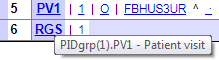
If you're viewing a HL7 message in the front end, with a schema correctly applied, you can mouse over a segment or a field and see the schema path, e.g:

Mousing over PV1 in the above message shows the schema path is "PIDgrp(1).PV1".

I'm writing a utility function which you pass an EnsLib.HL7.Message into. I'd like to loop through each segment and take action dependant on that schema path. How can I reference or determine that schema path in code?

Any help would be much appreciated!

2
0 835
Article Hiroshi Sato · Feb 29, 2024 1m read

InterSystems FAQ rubric

Global mappings can be registered using the system class Config.MapGlobals.

The method to globally map ^Sample.PersonD in a database SAMPLES other than the default database from the namespace USER is as follows (example executed in a terminal).

USER>zn"%SYS"%SYS>set ns="USER"%SYS>set glo="Sample.PersonD"%SYS>set vals("Database")="SAMPLES"%SYS>set st=##class (Config.MapGlobals).Create(ns,glo,.vals)

The third argument of the Create() method of the Config.MapGlobals class is passed by reference, so specify it by appending a period (.) to the variable name.

0
1 354
Question Token Ibragimov · Feb 28, 2024

Hello!

How I can call my Business process - "process.ReconciliationPayments" from method. Like this.

ClassMethod getReportPavlodarEnergoSbyt()
{

s sc = $$$OK

ensBS = ##class(Ens.BusinessService).%New()

requestObj.operationDate="2024-02-28"
requestObj.provider="Provider"
requestObj.processId=$SYSTEM.Util.CreateGUID()

ensBS.SendRequestAsync("process.ReconciliationPayments",requestObj"payment")

q sc

}

7
0 358
Question david clifte · Dec 2, 2016

How to remove accentuation of a word?

Ex:

Árvore = Arvore

você = voce

Então = entao

The words above are in brazilian portuguese, I need to get rid with the accentuation such that I can compare two sentences.

Thanks in advance.

5
0 1002
Article Mihoko Iijima · Feb 22, 2024 2m read

InterSystems FAQ rubric

To remove InterSystems products installed on your Windows system, use Add or Remove Programs in Control Panel (in Windows 10, select Apps from Windows Settings).

Since we will be making changes to the system, you will need to log in as a user with administrator privileges.

1) Log in to the system as an administrator.

2) From the system tray, exit the launcher of the InterSystems product instance you want to uninstall (click launcher → exit).

3) Add or Remove Programs in the Control Panel (for Windows 10, select Apps from Windows Settings)

0
0 509
Question Thomas Schroyen · Sep 20, 2021

Hi gentlemen,

It may be very easy but I'm currently battling with a stupid business operation.

Here is what I must do and what is already in place:

A business service scan every 5 sec the apparition of files and send it to a business process.

The business process (a routeur) don't let pass everything and a few of them go to a specific operation.

The operation must :

1 ) create the file with the same name of the original one (in the service) then save it.

2) change the original and resave it a second time (replacing the previous one but without using the function rename)
Hope you can help me.

2
0 1739
Article Michael Breen · Nov 9, 2016 5m read

The Ensemble Scheduler is used for automatically turning on and off business hosts at certain dates and times.   You could use it if, for example, you wanted to only run a business host from 9am to 5pm every day.    Conversely, if you want do to trigger an event to occurr at a specific time, for example, a job running at 1am to batch up and send off all the previous day's transactions in one file, we recommend other methods such as the Task Manager.

5
3 4071
Article Hiroshi Sato · Feb 15, 2024 2m read

InterSystems FAQ rubric

The $ZF(-100) command is used in the following format.

$ZF(-100, flags, command name, command arguments)

The "/shell" flag is required when running OS commands.
For example, use mkdir like this:

 // mkdir C:\temp\newdir
 Write$ZF(-100, "/shell", "mkdir", "C:\temp\newdir")


If a command has multiple arguments, enclose them in double quotes and separate them with commas, as in the example below.

0
3 371
InterSystems Official Fabiano Sanches · Feb 14, 2024

InterSystems announces the Maintenance Release (MR) of CachéEnsemble and Health Connect HSAP 2018.1.9. This is a maintenance release with many updates across a wide variety of areas.

Caché and Ensemble

Full product installation kits can be downloaded from the WRC Software Distribution website:

For information about the corrections in this release, refer to the Release Changes Notes. The documentation for Caché and Ensemble includes these as well as the Supported Platforms document, the Class Reference, and a full set of guides, references, tutorials, and articles.

0
0 277