Hey Developers,
Watch this video to learn how to use Embedded Python using applications from the Open Exchange app gallery:
Embedded Python refers to the integration of the Python programming language into the InterSystems IRIS kernel, allowing developers to operate with data and develop business logic for server-side applications using Python.
Hey Developers,
Watch this video to learn how to use Embedded Python using applications from the Open Exchange app gallery:
Hi Developers,
We are pleased to invite you all to the new InterSystems online programming contest focused on Python!
🏆 InterSystems Python Programming Contest 🏆
Duration: September 4 - 24, 2023
Prize pool: $14,000

Hi all,
I am trying to execute a query like the below code.
set statement = ##class(%ResultSet).%New("some_class:query_method"). // here query method is empty and with rowspec some columname
statement.Execute(param1)
I want to fetch data type of column value returned from above. eg - Name - VARCHAR, amount - INTEGER etc.
How can I get it. Or if not possible directly. Is there any other way to validate or get datatype of values returned. Line we have type() in python3
In a previous question, I have illustrated a few problems using Embedded Python
interactively as you would do from Docker console or IRIS terminal.
Investigation of the causes brought a rather clear picture. It's a classic impedance mismatch
For my Embedded Python ONLY demo package I need some user input.
Similar to ObjectScript
read "say somthing",reply
I use the Python equivalent
reply = input("say something")And this works excellent without problems from Terminal or Doker console
BAD SURPRISE:
withWebTermnial ObjectSscript works fine, but embedded Python fails badly.
.png)
I do not care about line terminators without <CR>
but it is just impossible to receive any input.
This is no improvement. The content is missing !!!!
.png)
QUESTION to the experts.
In my previous articles, I described my Command Line Extension to NativeAPI.
Of course, this is also available for any other NativeAPI package.
So I created this example in Python as a demo.
The online documentation contains a reference Defining and Using Class Queries -
Customizing Stored Procedures with ObjectScript directly has been useful to access NoSQL storage and external messaging via integration, to present output in tabular format.
For example: An application that already uses 90% SQL interaction from a front end, can then also extend this access to the other 10% of required platform functionality, via the same SQL access.
The purpose of this article is to explore how to achieve the same effect via Embedded Python methods.
We continue with the series of articles based on the QuinielaML application.
.png)
In today's article I will describe how to work with the Embedded Python functionality available in InterSystems products.
Embedded Python allows us to use Python as a programming language within our productions, being able to take advantage of all the features available in Python. Here you can expand information about it.
Welcome dear members of the Community to the presentation and first article of a small project that will demonstrate the capabilities of InterSystems IRIS to provide full backup functionality for a web application developed in Angular. This article will be limited to presenting the concept as well as the InterSystems IRIS functionalities used in a general way, going into more detail in subsequent articles.
.png)
Hi All,
We're doing our first babysteps with embedded Python and IRIS with an interoperability solution. We want to convert a CSV file to an Excel xlt file.
As service we've got a EnsLib.File.PassthroughService which picks up a csv file
As operation we've got a EnsLib.File.PassthroughOperation which writes the Excel file.
In the middle:
We've created an Business Process with an %Stream.GlobalCharacter in the Request and a %Stream.GlobalCharacter in the Response.
But how do we get the %Stream.GlobalCharacter in the Python ClassMethod?
Hello,
I need AES ECB with PKSC7 padding for an interface.
Unfortunately, the %SYSTEM.Encryption.AESEncode cannot do this.
Therefore I wanted to include the following python lib.
PyCrptydome -> https://pycryptodome.readthedocs.io/en/latest/index.html
We need to install the package offline on the system. So I downloaded it and put it in the MGR/Python/ directory.
However, when I try to install it, I get the following error message:
E:\HealthConnect\20201\bin>irispip install E:\HealthConnect\20201\Mgr\python\pycryptodome-3.18.0.tar.
This proof of concept aims to show how the iris interoperability framework can be used with embedded python.
_________ ___ ____
|__ / _ \_ _| _ \
/ /| |_) | || |_) |
/ /_| __/| || __/
/____|_| |___|_|
Starting in version 2021.1, InterSystems IRIS began shipping with a python runtime in the engine's kernel. However, there was no way to install packages from within the instance. The main draw of python is its enormous package ecosystem. With that in mind, I introduce my side project zpip, a pip wrapper that is callable from the iris terminal.

Previous post - Using AI to Simplify Clinical Documents Storage, Retrieval and Search
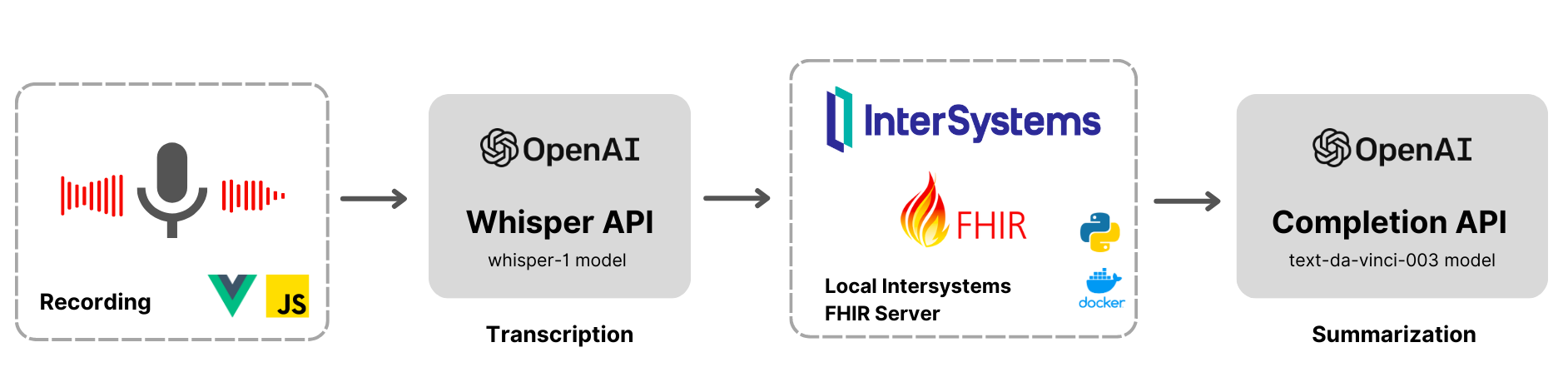
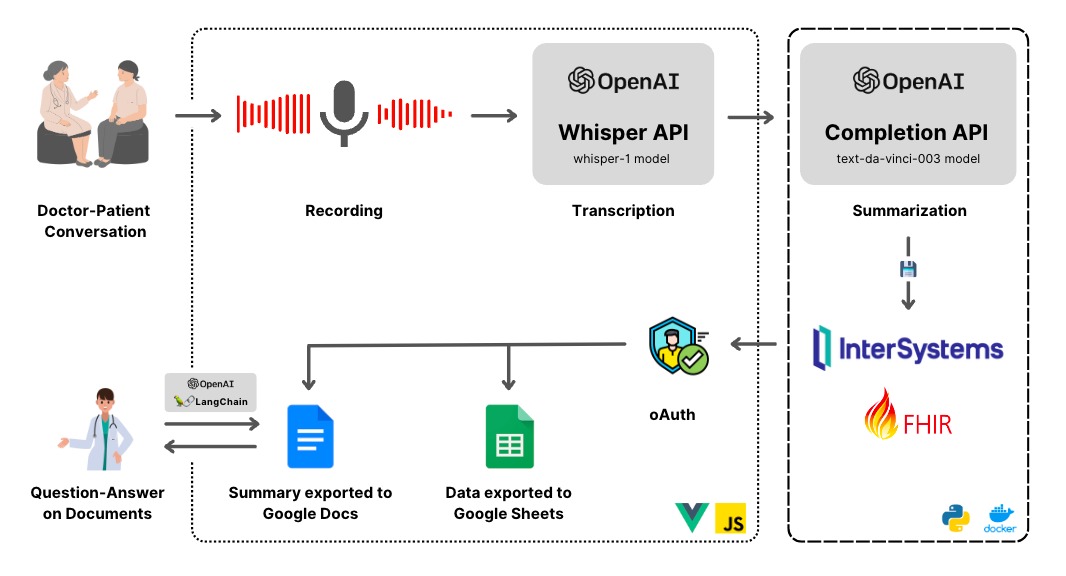
This post explores the potential of OpenAI's advanced language models to revolutionize healthcare through AI-powered transcription and summarization. We will delve into the process of leveraging OpenAI's cutting-edge APIs to convert audio recordings into written transcripts and employ natural language processing algorithms to extract crucial insights for generating concise summaries.
Hi Community,
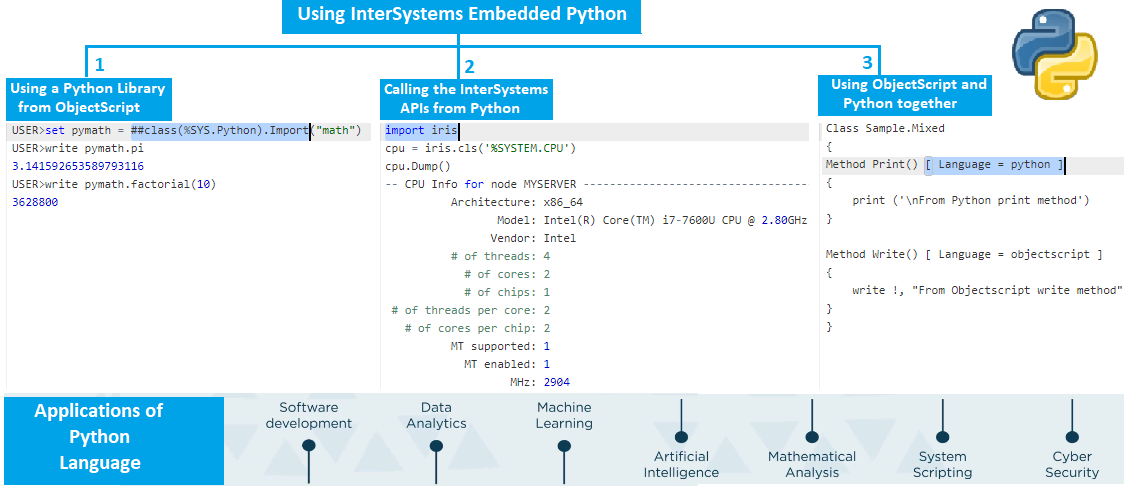
In this article I will demonstrate the usage of InterSystems Embedded Python, We will cover below topics:
Hi colleagues!
InterSystems Grand Prix 2023 unites all the key features of InterSystems IRIS Data Platform!
Thus we invite you to use the following features and collect additional technical bonuses that will help you to win the prize!
Here we go!

In a fast-paced clinical environment, where quick decision-making is crucial, the lack of streamlined document storage and access systems poses several obstacles. While storage solutions for documents exist (e.g, FHIR), accessing and effectively searching for specific patient data within those documents meaningfully can be a significant challenge.
AI has made document search remarkably powerful. Question and answering over docs has never been easier with open-source tools like Chroma and Langchain to store and use vector embeddings to query across Generative AI APIs.
My major interest is Working with Globals in Embedded Python.
So I checked the available official documentation.
#1 Introduction to Globals
an attempt of a generic description of what a global is. Pointing to
#2 A Closer Look at ObjectScript
But where is Embedded Python ?
Way down you see
3.1 Embedded Python Overview
3.1.1 Work with Globals
Great if you have never seen a Global before
Otherwise a shocking primitive example
3.2 Using Embedded Python
Last hope: >>> but there is just NOTHING visible.
This is more than just disappointing! Even IRIS Native API for Python is more detailed.
Hi folks!
How can I refer to a classmethod of the same class while coding another classmethod with Embedded python?
I know that I can call it with iris.cls(classname).MethodName(), but it's more cumbersome even comparing with ObjectScript, where I can call ..MethodName().
Compare ObjectScript:
do ..SetupGame()and the same call in EmbeddedPython:
iris.cls('eshvarov.sample.SeaBattle.GamePython').SetupGame()Thoughts?
Has anyone come across a good using Embedded Python to convert a Python List object to an IRIS %List object?
My use case is I want to open an SQL entry with an Objectscript class method, then pass some information from that row into a separate Python class method which will then create a Python List object, then have the Python class method return that list back to the Objectscript class method in such a way that the Python List can be converted to an IRIS %List object for me to then use in the Objectscript code.
Hi folks!
I have a need to use symilar to $property function from Python. Here is the code:
obj=iris.cls('some.persistent.class')._New()
for property, value in data.items():
$property(obj.property)=value ; I invented thisHow could I do this? Any trick?
For now I plan to implement a helper function in iris that I will call, but I doubt also how can I transfer oref to IRIS.
Thoughts?
Hi folks!
Just curious, how can I use $znspace in embedded python code?
How does other $functions work, e.g. $zv, $job, etc
Hi folks!
Consider I need to call a python function which name contains "_" symbol (which is quite often in Python). How it could be called from ObjectScript?
E.g. here is the code:
Set sm = ##class(%SYS.Python).Import("sample")
write sm.helloworld() ; function without _
white sm.hello_world() ; function with _ - won't compile.Thanks in advance!
How Job command can be used with Embedded Python code?
Excuse if this is obvious to Python programmers but for those crossing over from ObjectScript this may be a useful tip.
The scenario is developing some Embedded python commands.
Testing out functionality is being confirmed via the shell:
$SYSTEM.Python.Shell() Python 3.9.5 (default, Mar 14 2023, 06:58:44) [MSC v.1927 64 bit (AMD64)] on win32 Type quit() or Ctrl-D to exit this shell. >>>
When Python evaluates an expression in the shell, it prints the result of the expression to the terminal.
>>> 1 + 2 3
It is quite easy to accidentally evaluate and print out values
>>> iris.cls("%Dictionary.When I started this project I had set myself limits:
Though there is a wide range of almost ready-to-use modules in various languages
and though IRIS has excellent facilities and interfaces to make use of them
I decided to solve the challenge "totally internal" just with embedded Python, SQL, ObjectScript
Neither Java, nor Nodes, nor Angular, PEX, ... you name it.
The combination of embedded Python and SQL is preferred. ObjectScript is just my last chance.
Written in reply to community post for can Python create HL7 Message dynamically.
Use an integration enabled namespace.
Note: USER namespace is not enabled for interoperability by default.
If following suggest create a new interoperatibility namespace to explore functionality.
# Switch to
ZN "[Interoperability Namespace Name]"
# Launch interactive Python shell:
Do $SYSTEM.Python.Shell()
#Load dependencies import datetime as dt import uuid # Cache current time in CCYYMMDDHHMMss format hl7_datetime_now=dt.datetime.now().
Methods written in ObjectScript can use pass-by-reference arguments to return information to the caller. Python doesn’t support pass-by-reference arguments, so Embedded Python in IRIS doesn’t support them either. That's it, that's the end of the post, hope you liked it. 😉 But wait, what about the Classic Rock & Roll?
Actually, since returning values in method arguments can be useful, this post demonstrates several ways to do this, between ObjectScript and Embedded Python.

In this article, I will show you how one can easily create and read Microsoft Word documents using InterSystems IRIS with the leverage power of embedded Python.
First things first, let’s install the Python module called python-docx. There are a lot of modules to write MS Word files in Python. However, this one is the easiest one to use.
Just execute the following command on the terminal:
Hi folks!
Just want to introduce you a new util to import CSV into IRIS - csvgenpy!
Install
USER>zpm "install csvgenpy"
Use:
do ##class(shvarov.csvgenpy.csv).Generate("file or url","table","schema")Example:
USER>do ##class(shvarov.csvgenpy.csv).Generate("https://raw.githubusercontent.com/datasciencedojo/datasets/master/titanic.csv","titanic","data")This will create table and class data.titanic in IRIS and will load the data. you can proof it with:
USER>:sql [SQL]USER>>select * from data.titanic [SQL]USER>>select * from data.titanic 1. select * from data.