Hi, Community!
This week we have two videos. Check all new session recordings from Global Summit 2017:
1. Atelier and Automated Private Instances
An integrated development environment (IDE) is a software application that provides comprehensive facilities to computer programmers for software development.
The official IDE for InterSystems Data Platform products is Atelier.
Hi, Community!
This week we have two videos. Check all new session recordings from Global Summit 2017:
1. Atelier and Automated Private Instances
I am trying to create a routine in Atelier.
I go through and enter the necessary information but before I can save, it says I have an invalid project location.
I am not sure what this is referring to, a directory? a namespace? a website? something else? "Location" does not describe what is necessary here.
I had a screen shot but cannot seem to post it here.
It's been 6 months since InterSystems released Atelier 1.0 and we continue to roll out enhancements and new features through the beta channel (please see the Atelier Download page for details). In the meantime, we have received a lot of messages from the Developer Community with ideas for further improvements. Based on your feedback, we created a roadmap for Atelier 1.1 so you can conveniently track when specific features are going to be integrated.
Below is a list of the major improvements planned for 1.1, which we are expecting to demo at the Global Summit.
1.
We just faced an issue of the Atelier main menubar being disabled (greyed out) after upgrading the macOS development machine to High Sierra. I would like to share my findings about the issue and how to fix it.
This seems to be a known problem affecting several Java applications including Eclipse if the macOS user's primary language is not English: https://www.eclipse.org/org/press-release/20170925criticalbug.
One of the most important features during application development is the ability to debug your code easily. Because of the asynchrnous nature, a standard Node.js application server works single-threaded by default. When you are developing applications using an IDE like Visual Studio Code, you can very easily debug your Node.js process:
First, download the free Visual Studio Code IDE (@code) and install it on your development machine.
We will start with basic debugging using a very small test.
When I create a project and pull in files from the server, certain files (BPLs and DTLs) aren't synchronized, and when I try to sync them (without making any changes) I get a Resolve Version Conflict screen, with differences between the local copy and server copy. Sometimes the Parameters are in different places, or the Storage will be on top of one and on the bottom of the other, and sometimes the server copy will flat out have lines that aren't in the local copy at all.
I need to create a standards document for new developers who are coming to Cache from other backgrounds.
Does anyone have an in-house document they could share with me?
Regards
Mike
I have created a Atelier run configuration to start the unit test manager with the method DebugRunTestCase.
In the run configuration it is possible to add arguments.
In the list of arguments I want to put the select class file as argument.
How can this be achieved?
Suppose I want to create an Eclipse plugin designed to be added to Atelier, and my plugin needs to perform some processing on the server that the current Atelier project is configured to connect to.
Is there a way I can use the connection credentials that have already been entered by the user? I don't really want to make them enter these again into my own plugin.
Is it possible to exclude certain folders from validating (i.e. generating errors/warnings in the Problems tab)? For example, I have *.js files from ckeditor and jquery libraries that are generating multiple errors that I'd like to suppress.
Hi
When trying to sync a class to the server where the server class has been updated by another user, I, as expected, get the Conflict Resolution Wizard.
I can then use the wizard to copy code from the server side to my local copy using the arrows also as expected.
But when I have integrated the remote code into what I think is my local copy how do I save it so that it gets integrated into my local copy and synchronised to the server.
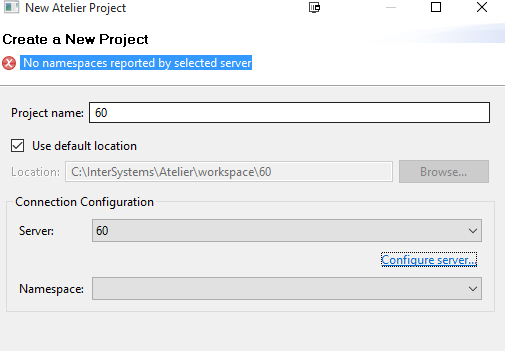
I'm trying to add a new project in atelier following the introduction video
But I get a " No namespaces reported by selected server" error:
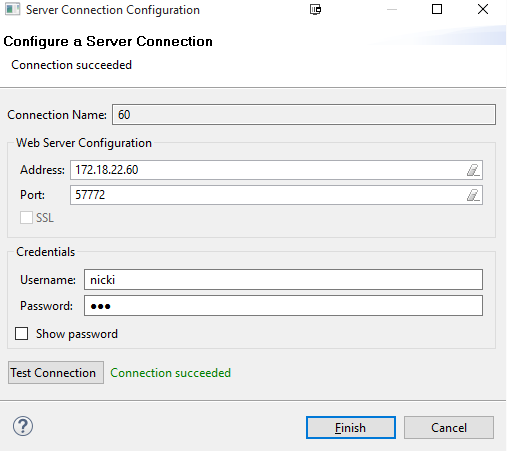
I can connect to the server though:
Is anyone using Atelier with 3 environments (instances with multiple namespaces) (DEV, TEST, PROD) using GitHub as the source control.
I would be interested in how its all setup. So for example;
Would you have three branches for the code or 3 repo's.
Would you have three projects in Atelier to communicate with the environments and GitHub?
I have 3 existing environments that I wish to put under source control and also provide the ability to promote code between the environments in a controlled manner.
Is your development team following best practice now that source control and continuous integration testing are better supported by InterSystems new IDE Atelier?
Many teams are turning to Git as their version control system of choice because it never locks files, among other reasons. These teams may also be following a multi-server development workflow where changes are migrated from a DEV server to a TEST server to a PROD server. How should these teams organize their repository given this configuration?
This 'feature' have been around for a long time, but I don't see any articles on it so I thought I would make everyone aware.
A method is provided to customize the appearance of the Cache cube icon in the system tray so different instances can be visually distinguished. When csystray.exe, the Cache/Ensemble cube program, starts, it will look for files named "up.ico" and "down.ico" in the \bin directory below the instance installation directory. If these .ico files are present, csystray.exe will load the icons and display them in place of the default blue and gray Cache/Ensemble cube icons.
I wanted to share a little tidbit which is in the Studio documentation (http://docs.intersystems.com/cache20152/csp/docbook/DocBook.UI.Page.cls…) but many people who have been using the InterSystems Studio for a long time missed the addition of this *very* useful feature, and every time I mention this to an audience I see at least one face light up because of how excited they are to learn about it!
Within Studio, the Output pane (View -> Output) is actually misnamed. It is actually an Input/Output window which can be used to run Caché ObjectScript commands!
Ok, I am trying to do my homework here but seem to be sinking.
I installed Atelier from the link atelier-1.0.0AT.262.0-win_x64.exe from at Atelier home page
(https://download.intersystems.com/download/atelier.csp)
Then I install Java from https://java.com/en/download/win10.jsp
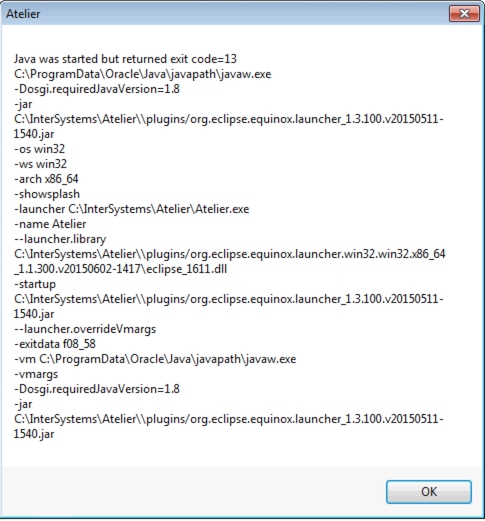
I found the Atelier App but it gives this whole page of stuff and at the top it says I have an exit status code of 13.
I have looked through a number of post on Atelier and now am lost.
Any direction please?
I just installed Atelier, but when I tried to start it, I got the error "Java was started but returned exit code = 13". What's the issue here? How can I fix it?
Please see the screenshot below:-
Thanks,
Joyce
I understand this is a rather broad topic (and at times involves religious sentiments) yet I would like to look at it from the Caché perspective:
Hi, folks!
I need to get the source code of a class installed on a remote server. I have no Studio or Atelier access to it but I can manage REST and Web terminal access.
What is the easiest way for me to make it?
Hi!
Recently GitHub introduced topics for the projects.
So you can change your InterSystems related projects introducing the topics to let it be categorized, more visible and searchable. Here is the list of good examples for your projects (some of them are clickable already):
intersystems, intersystems-cache, intersystems-ensemble, intersystems-healthshare, healthshare, intersystems-iknow, iknow, intersystems-deepsee, deepsee, cache-objectscript, csp, intersystems-zen, zen.
If you have any good ideas for topics or already using something, please introduce it here in the comments?
The Atelier beta update channel:
https://atelier.artifactoryonline.com/atelier/updates/beta/1.1
offers the latest features and bug fixes. It now updates your installation of Atelier to build 1.1.291 for Mac, Windows, Red Hat and SUSE.
Hi,
Cache Studio's inspector window can show me a Cache class's properties,methods parameters, XDATA blocks, Triggers, Foreign Keys, Queries and more, in a table in the Inspector window. Additionally, for properties, where the property accepts parameters, these parameters are listed together with possible value choices.
Hi All,
Am working on integrating our code with source control.
To make some security, I want to ask a password prompt from the studio itself while check in and checkout a code.
Is it possible to ask input in the studio like login page. Please suggest me.
Thanks,
Archunan K.
Can You please let us know the end to end procedure to accept SOAP messages in Ensemble Production.
We at George James Software are pleased to announce the release of version 2.6 of Serenji, our editor and debugger for Caché, Ensemble and HealthShare.
The main enhancement in 2.6 is the ability to run on a Linux <edit> or OS X </edit> workstation using Wine 1.8. More release details are here.
This is a free upgrade to users already holding an activation key. For new users a free 30 day evaluation period is granted upon installation.
John Murray
Senior Product Engineer
George James Software
Design a production in a development environment using best practices.
Hi, Community!
You are very welcome to watch just uploaded InterSystems Atelier Welcome video on the InterSystems Developers YouTube Channel!
Subscribe and stay tuned!
I've got an issue trying to write a code which should add some global mapping to already existing namespace. Here is its skeleton:
I'm moving *D globals from DatabaseA to DatabalseB.
After importing globals I need to rebuild indices for all the imported persistent classes.
Colleagues, maybe you know one command which does it for all the classes in Namespace?