Hi devs!
What is the best way to return JSON in IRIS for a GET request in a REST app?
This is how I do it now:
An integrated development environment (IDE) is a software application that provides comprehensive facilities to computer programmers for software development.
The official IDE for InterSystems Data Platform products is Atelier.
Hi devs!
What is the best way to return JSON in IRIS for a GET request in a REST app?
This is how I do it now:
To VSCode experts - see the screenshot. When right-click on a method with intentions to proceed to the source code:
I am always confused about what to choose: declaration or definition. What is the difference?
The VS Code extension development team is looking for beta testers to provide feedback on a proposed overhaul of the client-side editing workflow. The full list of changes can be found in the GitHub pull request description. Here are the highlights:
Have you ever been editing files in VS Code, but needed to check a global value or run a few ObjectScript commands? Now you can, with no setup required! If you have vscode-objectscript extension version 2.10.0 or later and are connected to InterSystems IRIS 2023.2 or later, you can now open a terminal connection to your server, regardless of where it's located.
There are three ways to open this new terminal:
Visual Studio Code releases new updates every month with new features and bug fixes, and the February 2025 release is now available.
There have been enhancements to GitHub Copilot with predictive editing, autonomous task completion, smarter code search, improved terminal and notebook support, and UI and workflow refinements.
If you need help migrating from InterSystems Studio to VS Code, or want to advance your knowledge of VS Code, take a look at the training courses George James Software offers > georgejames.com/vscode-training/
Highlights from version 1.98:
Hi colleagues!
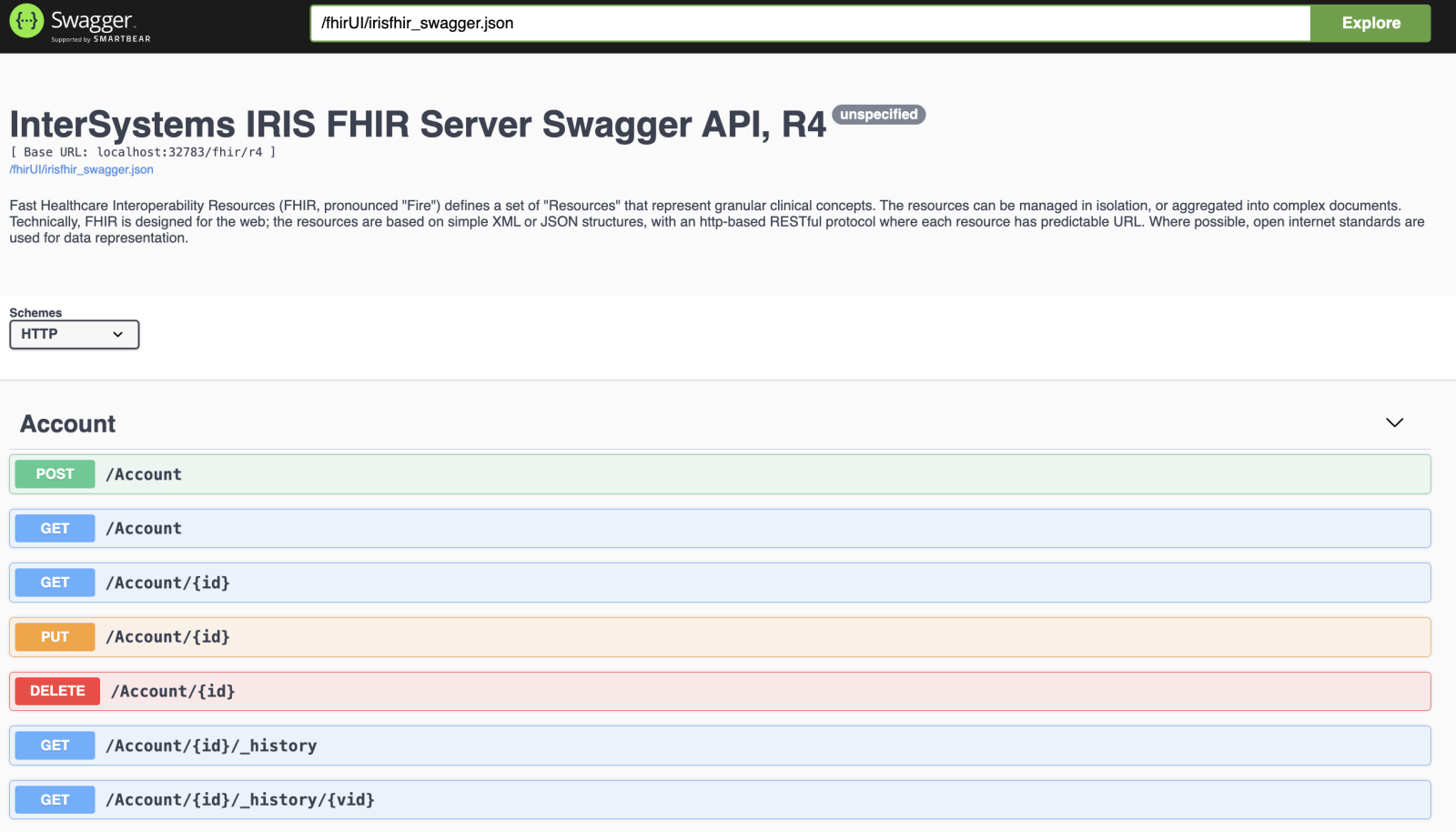
Often, while developing a frontend app or any other communication vs REST API, it is worth having a Swagger UI - a test UI for the REST API that follows Open API 2.0 spec. Usually, it is quite a handful as it lets have quick manual tests vs REST API and its responses and the data inside.
Recently I've introduced the Swagger support to the InterSystems IRIS FHIR template for FHIR R4 API:

How to get it working.
In this article I'll show you how to set up in your laptop, very quickly, a cluster of IRIS nodes in sharding. It's not the goal of this article neither to talk about sharding in detail nor define a deployment of a production ready architecture, but to show how to set up quickly, in your own machine, a cluster of IRIS instances configured as shard nodes, with which you'll able to play and test this functionality. If you're insterested in knowing more about sharding in IRIS, take a look at the documentation clicking here.
First and foremost, I want to remark that IRIS sharding will allow us 2 things:
So, as I said, we let for other article playing with shard or federated tables, and just focus now in the previous step, that is, setting up the cluster of shard nodes.
Visual Studio Code releases new updates every month with new features and bug fixes, and the January 2025 release is now available.
Hello everyone! This is my first post into the developer community and one that I hope is fairly simple to answer. In our environment we currently have 3 different Test environments for testing before migrating code to our Prod environment. Currently we are working on establishing a source control method using Git in house which has been a bit of a struggle. We have also had developers that had used different test and migration methods in the past which has caused some issues with keeping the different test environment in sync.
Another VSCode "Tips & Tricks" entry -
.png)
Do you want to see this option in VSCode?
Hi fellow developers in InterSystems IRIS!
I'm often being asked, especially related to technical bonuses we encourage for every Open Exchange contest why do we constantly give bonuses for Docker, IPM and ObjectScript Quality pass.
In fact, this is very easy to answer.

Last Chapter: Creating a REST client to get Tracks from Spotify REST API - Part1 Check out token
Git link: https://github.com/ecelg/InterSystems-IRIS-as-a-Spotify-REST-client
Ok... Now we can check out a token but it will be expired in 3600 seconds.
There are 2 questions come up🤔
1. How to save this token????🙄
2. How to refresh this token????🤨🤔
Lets come back to the API document https://developer.spotify.com/documentation/web-api/tutorials/getting-started
Base on my understanding, this piece of API do not have a token called refresh_token, as a result, we can assume the logic like following
The InterSystems platforms have always offered dynamic documentation of the packages and classes in a namespace, a feature known informally as Documatic. But what if you need to publish this class reference information on a website without requiring the site to be connected to an IRIS server containing the actual classes?
Visual Studio Code releases new updates every month with new features and bug fixes, and the November 2024 release is now available.
InterSystems IRIS provides a complete application development environment for building sophisticated data- and analytics-intensive applications that connect data and application silos. It is designed to work with all of the common development technologies in an open, standards-based fashion and supports both server-side and client-side programming.
Hello,
Please, we would need your help 🙂:
In a development environment, we have added quite a few presentation contexts to the DICOM configurations (the associations). We would need to find a way to export them from this environment to make it easier for us to import them in PRO (and avoid doing it by hand one by one).
I’m trying to connect to an InterSystems Caché database from my local development environment using an IPv4 address. Most examples I’ve found show how to connect using the ODBC driver with the localhost or the default IP address (127.0.0.1). However, I want to know how to connect using my local IPv4 address.
Here’s what I need help with:
Visual Studio Code releases new updates every month with new features and bug fixes, and the September 2024 release is now available.
Version 1.94 now includes:
It has been asked a few times recently, how one can make Laravel Framework work with InterSystems IRIS Data Platform. It's been a while since this post about Laravel and InterSystems Caché was published. To bring it up to date, the article gives a brief instruction set on how to setup and configure a Laravel project for use with InterSystems IRIS through ODBC.
What is Laravel?
Hi folks!
Often, when we develop commercial solutions, there is a necessity to deploy solutions without source code, e.g., in order to preserve the IP.
One of the ways how this can be achieved is to use InterSystems Package Manager.
Here I asked Midjourney to paint an intellectual property of software:

How this can be achieved with IPM?
In fact, this is very simple; just add the Deploy="true" clause in the Resource element in your module.xml manifest. Documentation.
I decided to provide the simplest possible example to illustrate how it works and also to give you a development environment template to let start building and deploying your own modules without source code. He we go!
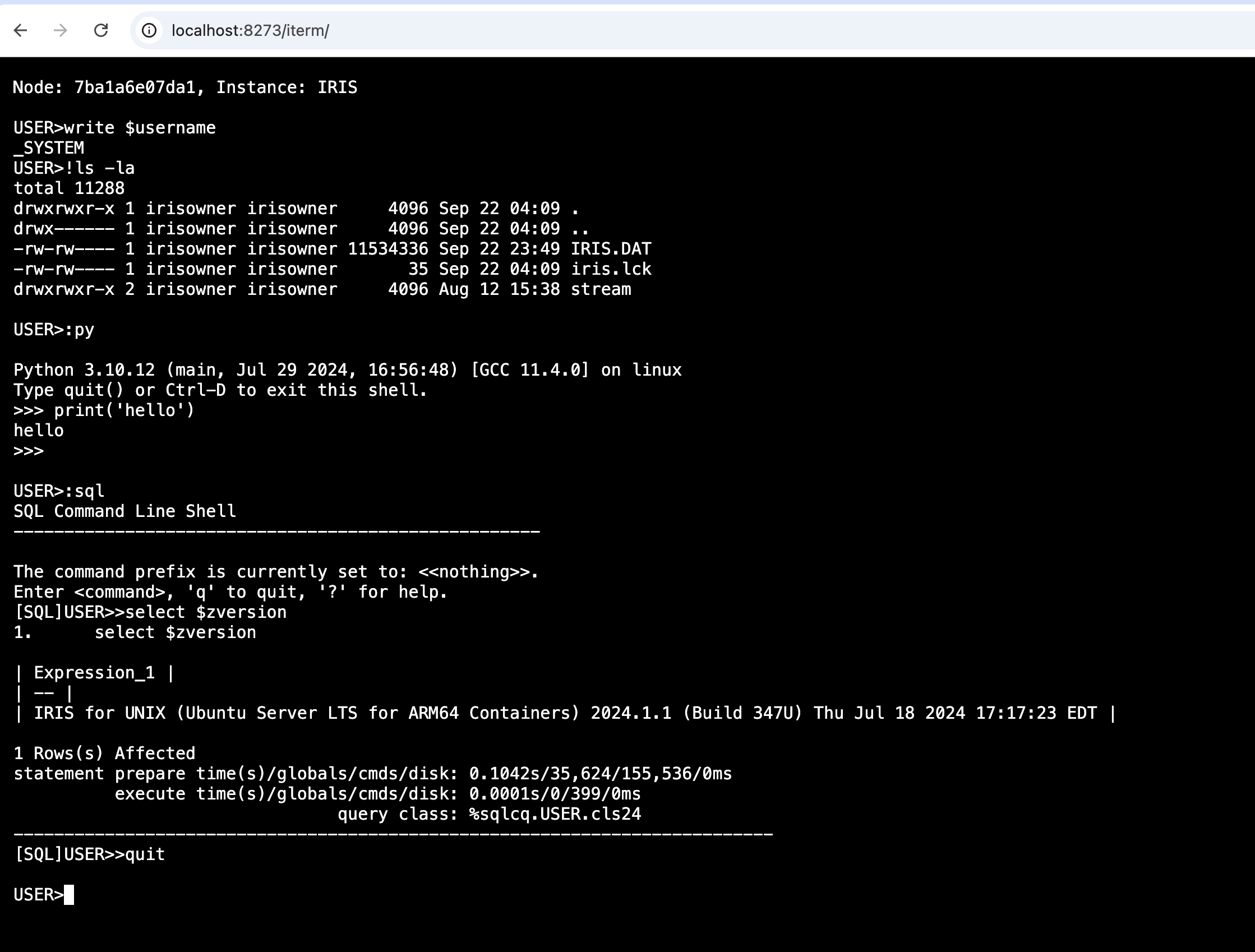
We have Webterminal around for quite a while, but it was limited, not all features worked there. There was no shell support or the latest feature as embedded Python support. There are some issues with tools that require programmer mode. Basic Authorization, not as handy as simple login page, where you could have options to add own login page, in case if you would wish to change the way how to login to the application, such as using SSO.
With the original iris terminal, wrapped into a web form, using most used in the web world xterm.js, used in tools like VSCode as well, with some magic from Python, which helped with interprocess tty. We can get the the terminal in the web, in the full capacity.
There are many applications for working with HL7 V2 messages, but the tools for working with XML in IRIS Management Portal and Cache Studio are limited. While plenty of external utilities and IDEs work with XML messages and even C-CDA documents, there is a compelling case for being able to test directly against the IRIS C-CDA framework.
Testing within the IRIS environment provides the necessary context:
We are doing healthcare interface development.
Developers have Ensemble installed locally on their laptops - code will be developed locally then deployed to integration, test/UAT and ultimately production servers in due course.
One of the other applications we are developing around happens to utilise an Iris desktop client to a remote Iris server. We want to have the application available on the developers laptops alongside the local Ensemble instance.
✅ It appears that if we install their desktop client then install our local Ensemble server, things work.
Hi Developers!
We are happy to present the bonuses page for the applications submitted to the DevTools Contest 2024!
Hi everyone,
In this article, I’m excited to introduce CodeInspector, a tool designed to simplify code validation by applying custom rules tailored to your development requirements. Whether you're managing a large codebase or working in an agile environment, CodeInspector helps ensure code quality by offering flexibility and adaptability to specific project needs.
Here are the technology bonuses for the InterSystems Developer Tools Contest 2024 that will give you extra points in the voting:
See the details below.
Visual Studio Code releases new updates every month with new features and bug fixes, and the August 2024 release is now available.
Version 1.93 includes:
Hi, Community!
Ready to create a retrieval-augmented generation (RAG) architecture for your next GenAI application? See how to get started:
Visual Studio Code releases new updates every month with new features and bug fixes, and the July 2024 release is now available.
Version 1.92 includes:
Not so while ago GitHub introduced, ability to very quickly run VSCode in the browser for any repository hosted there. Press the . key on any repository or pull request, or swap .com with .dev in the URL, to go directly to a VS Code environment in your browser.

This VSCode is a light version of the Desktop version but works entirely in Browser. And due to this, it has a limitation for extensions which was allowed to work this way. And let me introduce the new version 1.2.1 of VSCode-ObjectScript extension which now supports running in Browser mode.