Hi Community,
We're excited to invite you to the next Community webinar presented by George James Software, an InterSystems partner:
🗓️ Date & Time: Thursday, April 9th, 4 pm BST | 11 am EDT
Hi Community,
We're excited to invite you to the next Community webinar presented by George James Software, an InterSystems partner:
🗓️ Date & Time: Thursday, April 9th, 4 pm BST | 11 am EDT
The PACELC theorem was created by Daniel Abadi (University of Maryland, College Park) in 2010 as an extension of the CAP theorem (created by Eric Brewer - Consistency, Availability, and Partition Tolerance). Both help design how to architect the most suitable operation of data platforms in distributed environments under the aspects of consistency versus availability. The difference is that PACELC also allows analysis of the best option for non-distributed environments, making it the gold standard for considering all possible scenarios to define your deployment topology and architecture.
The CAP theorem states that in distributed systems, it is not possible to have consistency, availability, and partition tolerance simultaneously, requiring a choice of two out of three, according to the following diagram.
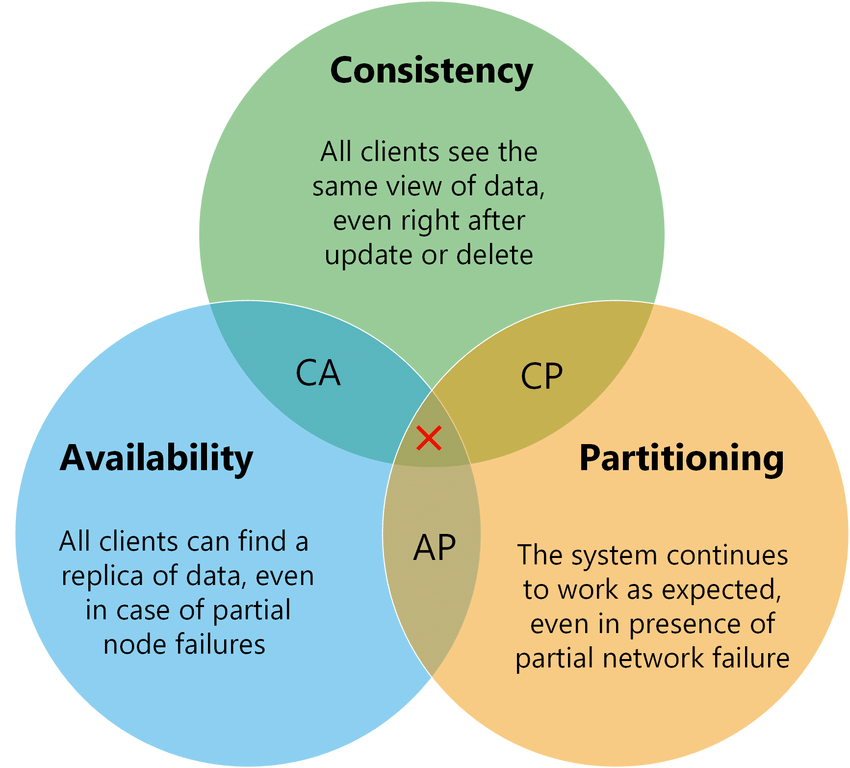
Source: https://medium.com/nerd-for-tech/understand-cap-theorem-751f0672890e
Hi Community!
We’re building a series of short, hands-on Instruqt tutorials to help newcomers get up to speed with InterSystems technologies faster and more effectively. To kick things off, we’ve just released a new tutorial, “Data Models of InterSystems IRIS,” covering the fundamentals of the IRIS multimodel approach. This is exactly the type of focused, concise, practical learning experience we want to expand. And this is where you come in!
We’d love to hear your ideas for other tutorial topics to help developers new to InterSystems IRIS take their first steps with confidence. Please welcome the new sweepstakes:
💡 Topics for hands-on Instruqt Tutorials 💡

hi 😊,
i'm able to LOAD DATA in IRIS from a rather complex, say Oracle's, query. It works pretty well but requires a target table created aforehand:
LOAD DATA FROM JDBC CONNECTION SOME_OTHER_SERVER QUERY 'complex query here' INTO TargetTableis there a way to base such target table on the same query ?
CREATE FOREIGN TABLE seems to require a column definition which I would prefer to be taken from the query
CREATE TABLE AS SELECT seems to be for local queries and other methods, like Linked Table Wizard or %SYSTEM.SQL.Schema.
Hi Developers!
Currently I have 2000+ lines in a class, and I think it's a lot already? What are the best practices?
if 10K lines OK? How do you cope with it? Please share?

Hello,
I am working on integrating a CELL-DYN Ruby hematology analyzer (Abbott) with InterSystems Ensemble using the ASTM E1394 protocol over TCP/IP via a Digi One SP serial-to-TCP converter. I am facing a persistent issue where the Link Test keeps failing on the CDRuby side and the Transmit button remains greyed out. I have overridden EOTOptional=1 in the service class file as Ensemble was not able to send ACK after ENQ. Now I am getting below logs like Machine sends ENQ, Ensemble sends back ACK and Machine sends EOT instead of STX.
Hey Developers,
Thank you for being part of the InterSystems Developer Ecosystem!
We truly appreciate your participation across the Developer Community, Open Exchange, Global Masters, and the Ideas Portal.
Each year we run a short survey to understand how we can improve our platforms and better support developers like you. Your feedback helps us shape the future of the ecosystem.
Please take a few minutes to complete the survey:
👉 InterSystems Developer Ecosystem Annual Survey 2026 (3-5 min, 12 questions)

Note: The survey takes less than 5 minutes to complete.
Hey Community,
We're bringing our Developer Ecosystem session back to READY 2026.
👥 Streamlining Development Workflow with InterSystems Developer Community and Ecosystem
🗓️ Wednesday, April 29, 2026
🕑 3:30 PM – 3:50 PM ET
📍 Cherry Blossom, Gaylord National Resort & Convention Center, National Harbor, MD


A question that quickly arises when configuring IAM (aka Kong Gateway) is how many routes should be created to reach all the business objects in an IRIS API.
A common mistake is to create one route per business object, unnecessarily multiplying the number of routes.
If you already know Java (or .Net) and perhaps also have used other document databases (or looking for one), but you are new to the InterSystems world, this post should help you.
InterSystems IRIS Cloud Document is a fully managed document database that lets you store JSON documents and query them with familiar SQL syntax, delivered as a cloud service managed by InterSystems.
In this article pair I’ll walk you through:
The goal is to give you a smooth “first run” experience.

Starting with InterSystems IRIS 2025.1, the way dependent cubes are handled in cube builds and cube synchronizes was changed.
This change may require modifying custom build/synchronize methods. If you are using the Cube Manager, these changes are already considered and handled, which means no action is needed.
Prior to this change, cubes were required to be built and synchronized in the proper order and account for any cube relationships/dependencies. With this change, dependent cubes are automatically updated as needed when using the %BuildCube or %SynchronizeCube APIs.
Please, provide Code example to build a %Library.DynamicObject or a %Library.DynamicArray from Resultset followed by converting to JSON
Hi everyone,
I was wondering if it is possible to use the InterSystems Server VSCode Extension to work in client side mode but importing locally the content of a project without having to choose the files manually.
It would be awesome to have all project-related assets synchronized in one go. Relying on InterSystems Projects (.prj files) would be convenient for several reasons:
Claude Code has a strong understanding of IRIS, but unexpected issues still occur.
The first issue is one that has already happened several times and is likely to continue occurring if not properly addressed.
In IRIS, the collation for string data (%String) is set to SQLUPPER by default. As a result, when data is retrieved via SQL, it may be returned in uppercase (for example, when sorting and aggregating with GROUP BY).
Hi developers!
In a method I need to return a result as a dynamic object aka JSON Object. And here is my logic:
Classmethod Planets() as %DynamicObject {

 set val1="Jupiter"
 set val2="Mars"
// this doesn't work! cannot compile
 return {"value1":val1, "value2":val2}

}
So I need to do the following:
Dynamic Entities (objects and arrays) in IRIS are incredibly useful in situations where you are having to transform JSON data into an Object Model for storage to the database, such as in REST API endpoints hosted within IRIS. This is because these dynamic objects and arrays can easily serve as a point of conversion from one data structure to the other.
HealthShare Unified Care Record Fundamentals – Virtual* May 4-8, 2026
*Please review the important prerequisite requirements for this class prior to registering.
Hi Community!
Welcome to Issue #28 of the InterSystems Ideas newsletter! Let's look at the latest news from the Ideas Portal, such as:
✓ General Statistics
✓ Update on the current sweepstakes
✓ Your ideas implemented by InterSystems

And a little teaser: look forward to an exciting initiative linking Ideas Portal, Open Exchange, Global Masters, and Developer Community!
Hi Community!
It's time to share the Top InterSystems Ideas Portal Contributors of 2025 🌟
(1).jpg)
Hi, Community!
Need help setting up OAuth on the FHIR Server? We'll guide you through the workflow:
Since I started using Claude Code, my motivation to create things has skyrocketed.
Previously, even if I wanted to build something, actually doing the coding felt like a hassle, so unless there was a very strong need, I rarely went as far as programming. But now, if I just jot down the specifications, Claude Code handles the rest automatically, resulting in a dramatic improvement in productivity.
I come from a generation native to ObjectScript, so I used to feel some hesitation when it came to switching to Python.
The first quarter of the year was full of exciting activities in the InterSystems Developer Ecosystem. In case you missed something, we've prepared a selection of the hottest news and topics for you to catch up on!
Recently, I replaced my old laptop with a new one and had to migrate all my data. I was looking for a guide but couldn’t find anything that explained in detail how to migrate server connections from InterSystems Studio and Visual Studio Code from one PC to another. Simply reinstalling the tools is not enough, and migrating all the connections manually seemed like a waste of time. In the end, I managed to solve the problem, and this article explains how.
Migrating Studio connections was the most challenging part.
Is there a way to delete a message in a routing rule? For example, an HL7 message doesn't qualify for a rule, but instead of the message being passed on to the next rule, you delete the message.
Hello all,
I have a EnsLib.HTTP.GenericMessage inbound from a webhook with a GC stream.
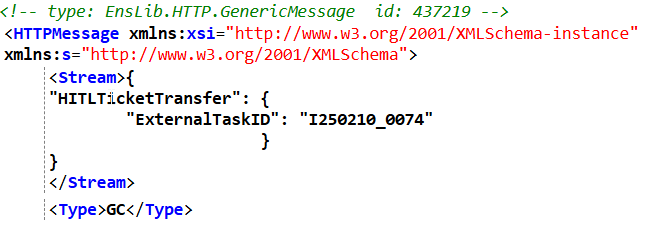
My router is defined as the following:
Modern platforms usually treat observability as three core signals:
OpenTelemetry (OTel) is the standard way to produce and ship all three signals.
Hey Community!
We're happy to share the next video in the "Code to Care" series on our InterSystems Developers YouTube:
We’re excited to announce the first mini hackathon“Building AI Agents with InterSystems”, taking place on a pre-conference day as part of InterSystems READY 2026.
In this hands-on challenge, participants will design and build AI agents using upcoming InterSystems capabilities, exploring how intelligent automation, orchestration, and reasoning can be applied to practical use cases.
📅 Event date: 27 April 2026
📍 Location: Gaylord National Resort & Convention Center, National Harbor, Maryland
🔗 Learn more here: Building AI Agents with InterSystems mini-hackathon at InterSystems READY 2026
I am trying to built a Task that kicks off a Workflow to pull data into HSPD, and when I try to test the Task
I keep getting TestTask+3^OSU.Workday.TerminationsTask.1 *%Exception.StatusException ERROR <Ens>ErrConfigDisabled: Configuration item 'OSU.DataSource.Workday.TermService' is disabled
But within the Namespace the OSU.DataSource.Workday.TermService shows enabled.
Here is my Task that I am using...
Class OSU.Workday.TerminationsTask Extends %SYS.Task.Definition
{

Parameter TaskName As STRING = "OSU - Workday Termination Update";

Property DaysBack As %Integer [ InitialExpression = 1 ];

Method OnTask() As %Status
{
    #Dim sc as %Status
    #Dim ex as %Exception.AbstractException

    set sc = $$$OK

    try{
        // create the service
        #Dim tService As OSU.DataSource.Workday.TermService
        Set tServiceConfigName = "OSU.DataSource.Workday.TermService"

        // Call BusinessService
        $$$ThrowOnError(##class(Ens.Director).CreateBusinessService(tServiceConfigName,.tService))

        // Create Request
        set tRequest = ##class(OSU.Workday.Messages.InactivatedRecordsRequest).%New()
        set tRequest.DaysBack = ..DaysBack

        set (tHint) = ""

        // Send Request to tService
        $$$ThrowOnError(tService.OnProcessInput(tRequest))

    }catch ex{
        set tSC = ex.AsStatus()
    }
    quit tSC
}

ClassMethod TestTask()
{
	set tTask = ##class(OSU.Workday.TerminationsTask).%New()
    set tTask.DaysBack = 1
    $$$ThrowOnError(tTask.OnTask())
}

/// Location and Revision of this file in Perforce (Auto-updating)
Parameter SrcVer = "$Id$";

}
Hi all,
I'm trying to learn Intersystems Iris. And I have a question.
How can I use left arrow key with if function. Also if it is possible, teach me that how can I make backspace to edit data?
P.S Sorry for bad English.
new var,key,curPos
w $char(27)_"[2J"_$char(27)_"[H"
s var="12345abcde"
s curPos=$length(var)+1
w $char(27)_"[3;1H"_"First var= "_var
for {
read *key
#; Left Arrow Key
if key="?" {
}
#; Right Arrow Key
elseif key="?" {
}
#; Backspace
elseif key=8 {
}
elseif key=9 {
quit
}
}
w !,"Last var= ",var
Kind Regards,
Ikh

