The PACELC theorem and the InterSystems IRIS
The PACELC theorem was created by Daniel Abadi (University of Maryland, College Park) in 2010 as an extension of the CAP theorem (created by Eric Brewer - Consistency, Availability, and Partition Tolerance). Both help design how to architect the most suitable operation of data platforms in distributed environments under the aspects of consistency versus availability. The difference is that PACELC also allows analysis of the best option for non-distributed environments, making it the gold standard for considering all possible scenarios to define your deployment topology and architecture.
The CAP theorem states that in distributed systems, it is not possible to have consistency, availability, and partition tolerance simultaneously, requiring a choice of two out of three, according to the following diagram.
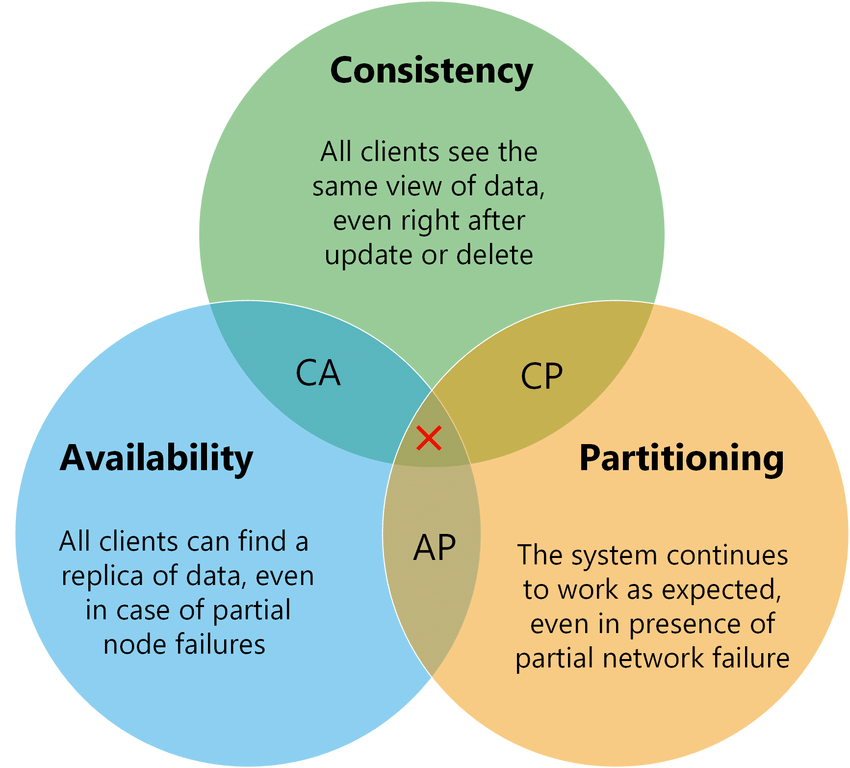
Source: https://medium.com/nerd-for-tech/understand-cap-theorem-751f0672890e
The PACELC, being an extension, confirms the CAP, but adds the non-partitioned scenario (E - Else):
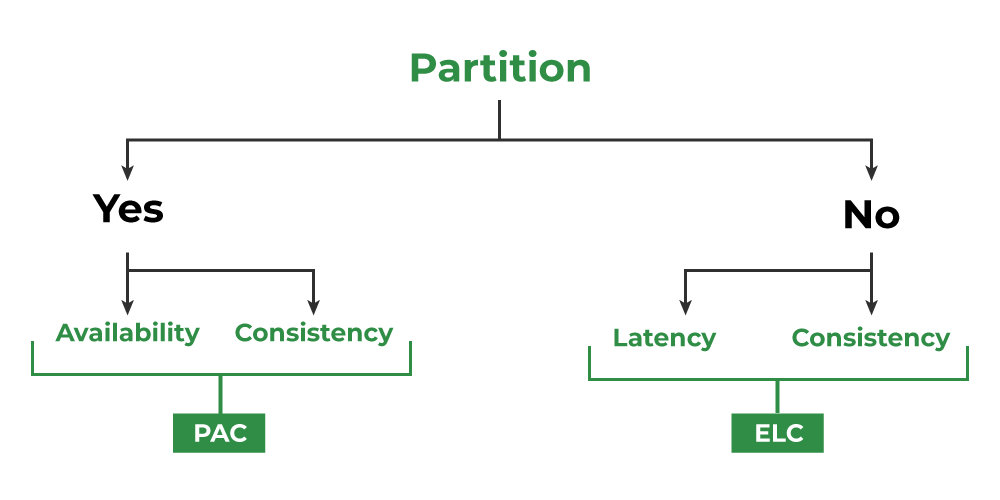
Source: https://www.geeksforgeeks.org/operating-systems/pacelc-theorem/
InterSystems IRIS components to meet PACELC
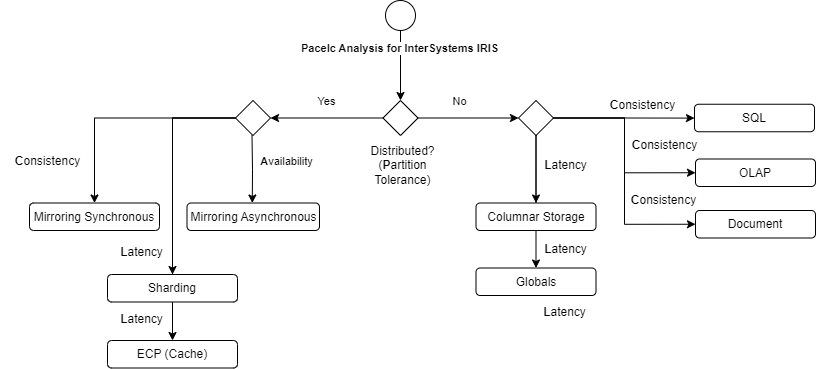
The following diagram illustrates how the components of the InterSystems IRIS architecture can fully meet any of the PACELC characteristics:
|
PACELC classification |
IRIS Architecture |
Analysis |
|
PC / EC |
Synchronous Mirroring with SQL or Document for transactional and OLAP for analytics |
High consistency and regular latency |
|
PC / EL |
Asynchronous Mirroring with Globals for transactional and Columnar storage for latency |
Regular consistency and high latency |
|
PL / EL |
Mirroring with ECP Sharding for high data volume |
Good consistency and good latency (hybrid strategy) |
When use IRIS resources to improve latency and availability
Some resources in IRIS are used for some well-known purposes:
- Synchronous Mirror:
- High Availability with consistency.
- Distributed processing with regular latency.
- Asynchronous Mirror:
- Disaster recovery.
- Report or analytics isolated instance.
- Distributed processing with very good latency.
- ECP - Enterprise Cache processing:
- Distributed processing with good latency.
- High Availability with good latency.
- Sharding:
- Data distributed processing for big data volume with good latency.
- Good latency for big data.
- Columnar Storage:
- Good latency for denormalized data.
- Good latency for analytics, data lake and report scenarios.
Tuning strategies to improve latency
In addition to architectural components that greatly improve latency, even in distributed processing scenarios, it is possible to apply several tuning configurations:
- Memory Optimization (Shared Memory & Buffers)
- Database Buffers (Global Buffers): You should allocate enough memory to keep "hot" data (frequently accessed globals) in RAM. In 64-bit systems, this should be as high as possible to prevent the system from hitting the disk.
- Routine Buffers: If your application runs heavy ObjectScript or legacy routines, increase the routine cache to avoid the overhead of loading and compiling code at runtime.
- Huge Pages (Linux): Always configure Huge Pages at the OS level. This reduces the kernel overhead of managing page tables for large memory allocations.
- Disk I/O Tuning:
- Disk Separation: For best results, use separate physical disks (or LUNs) for:
- WIJ (Write Image Journal): Requires high burst throughput.
- Journals: Require low-latency sequential writes.
- Databases: Where the actual .dat files reside.
- Global Architecture: IRIS stores data in B-Tree structures. Large, haphazardly grown globals can become fragmented. Use the ^GBLOCKCOPY utility to compact globals and improve data locality.
- Ensure the use of high-speed SSD or NVMe disks.
- Optimize block allocation and striping for database volumes.
- Monitor and adjust disk cache allocation parameters.
- Disk Separation: For best results, use separate physical disks (or LUNs) for:
- Database Cache Settings:
- Increase the size of the Main Cache to keep more data and indexes in memory, reducing the need for disk I/O.
- Monitor cache hit rates and adjust the size dynamically if necessary.
- Query Optimization:
- Tune Table: Regularly run the GATHER_TABLE_STATS command (via the Management Portal or SQL). The IRIS query optimizer relies on these statistics to choose between a Full Table Scan and an index.
- Review and rewrite slow SQL queries, ensuring they use indexes efficiently.
- Use the IRIS Query Plan Viewer to identify bottlenecks and force optimal execution plans.
- Efficient Index Usage:
- Create compound indexes that correspond to WHERE and ORDER BY clauses.
- Avoid excessive use of indexes, which can degrade write performance (insert/update).
- Network Tuning:
- Ensure a low-latency, high-bandwidth network, especially for ECP and Sharding connections.
- Optimize operating system TCP/IP parameters for IRIS traffic.
- Transaction Optimization:
- Keep transactions short to release locks faster and increase concurrency.
- Adjust the frequency of database checkpoints to balance consistency and I/O performance.
- Thread and Process Synchronization:
- Adjust IRIS job and thread-related parameters to optimize parallelism according to the server hardware.
- Interoperability Tuning (Productions):
- For systems acting as an ESB (Enterprise Service Bus):
- Event Log Levels: In a production environment, avoid "Debug" logging. Excessive writing to the management databases (IRISSYS or ENSLIB) can significantly degrade the performance of the main message flow.
- Pool Size: Adjust the Pool Size of your adapters. If the pool is too small, messages get queued; if it's too large, you might cause resource contention or overwhelm the external system.
- Async Processing: Use asynchronous calls in Business Processes whenever possible to avoid blocking execution while waiting for slow external systems.
- Summary of iris.cpf parameters used to get performance:
|
CPF Section |
Parameter |
Suggested Value (Example 32GB RAM) |
Objective |
|
[config] |
globals |
16384 (16GB in 8K buffers) |
Reduce Read IO |
|
[config] |
routines |
1024 (1GB) |
Speed up code execution |
|
[config] |
gmheap |
524288 (512MB) |
Stability in Productions |
|
[config] |
locksiz |
67108864 (64MB) |
Support high concurrency |
|
[config] |
wijsize |
1024 (1GB) |
Improve Write performance |
Articles and documentation references
- High Availability Guide: https://docs.intersystems.com/irislatest/csp/docbook/DocBook.UI.Page.cls?KEY=GHA
- Scalability Guide: https://docs.intersystems.com/irislatest/csp/docbook/DocBook.UI.Page.cls?KEY=GSCALE
- Data integrity Guide: https://docs.intersystems.com/irislatest/csp/docbook/DocBook.UI.Page.cls?KEY=GCDI
- InterSystems IRIS Example Reference Architectures for Amazon Web Services (AWS): https://community.intersystems.com/post/intersystems-iris-example-reference-architectures-amazon-web-services-aws#:~:text=Large%20Production%20Configuration,massive%20horizontal%20scaling%20of%20users.
- InterSystems Data Platforms Capacity Planning and Performance Series Index: https://community.intersystems.com/post/intersystems-data-platforms-capacity-planning-and-performance-series-index
- Robert Cemper articles: https://community.intersystems.com/user/69016/posts?filter=articles