Hi Blaise!
Check RESTFORMS2 - it has examples of pagination. And it has an implementation for Angular I believe. Tagging @henry , @Eduard Lebedyuk , @Sergei Sarkisian , @Alberto Fuentes for more info.
- Log in to post comments
Hi Blaise!
Check RESTFORMS2 - it has examples of pagination. And it has an implementation for Angular I believe. Tagging @henry , @Eduard Lebedyuk , @Sergei Sarkisian , @Alberto Fuentes for more info.
Added the slide deck for my session: Slides on InterSystems Developers resources presentation
Tagging @Luca Ravazzolo and @Steven LeBlanc
Sure, Andre!
What's wrong with %CONTAINS?
I think it deserves a separate question/discussion
Link to Management portal from is corrected: http://localhost:52773/csp/UtilHome.csp
Right link is: http://localhost:52773/csp/sys/UtilHome.csp
Thanks @Artem Reva
This is pretty old version of Cache.
Check the alternative JSON library Planet Cache - HTH.
Hi Vitaly!
Why can't you check it? IRIS 2020.1 Docker version is available for everyone with a community edition.
Also, the Cloud version of Try IRIS is available too, but it is 2019.3 though.
we implemented it.
Thanks Hao Ma, this sounds reasonable. Inviting @Benjamin De Boe , @Raj Singh to comment on this.
Thanks, Robert!
> keep in mind: Caché is built for speed, not for the comfort of the average programmer
We work hard to make IRIS not only fast but comfortable too for any backend, full-stack, AI developer. Pinging @Raj Singh , our Product Manager on Developer Experience.
The issue is, if you keep it Github shows that it is "Behind the remote origin". How do you fix this? Or how do you deal with this?
Alex, just published an article, which could help to Dockerise your repo just by introducing a few files - everyone will be able to launch you project with docker. And maybe even collaborate.
Consider a simple exercise:
1. Install Docker desktop (if you don't have it).
2. Run in OS terminal the following:
docker run --rm -p 52773:52773 --init --name iris store/intersystems/iris-community:2020.1.0.199.0
Then open Management portal in your host browser on:
http://localhost:52773/csp/UtilHome.csp
Works?
Why do you think so?
IRIS running in docker exposes its ports to a host machine and can be accessed used by any other application on a machine, e.g. Excel
Alex, the easiest (for tester) way to test an arbitrary module is to embed (for developer) the module into docker container cause this will work in any case on any machine with Docker installed.
Why not install your staff in a docker container? Check the template. Another option - make a ZPM module - the template for ZPM module.
Hi Stuart!
No worries, this is often situation.
Register with the new member profile and refer to @Anastasia Dyubaylo e.g. with Direct Message. Anastasia will copy all the content from one of your previous profile to a new one and will deactivate the previous profile when you are satisfied with the setup of a new one.
Hi Mathew!
Nice! Thanks for sharing!
If you have Docker addon installed and use docker-compose files the another option to connect to a local IRIS instance on docker in VSCode is:
1. Run the docker container (right-click on docker-compose.yml -> restart)
2. Open terminal to a running container and start IRIS session:
$ iris session iris

You can reproduce the approach with this template repo on Open Exchange.
The live stream for the AI conference on InterSystems Iberia event!
Published "Developer Resources" slides from InterSystems Iberia Summit in Barcelona.
ObjectScript Package Manager presentation is attached
Nice!
Any screencast on how to reproduce it?
This article describes all the details about <invoke> elements.
Here is objectscript package template, which has an example module.xml with almost everything which could happen in a package.
Take a look on invoke tag:
      <Invokes>
        <Invoke Class="community.objectscript.PersistentClass" Method="CreateRecord"></Invoke>
        <Invoke Class="community.objectscript.ClassExample" Method="SetToTheGlobal">
          <Arg>42</Arg>
          <Arg>Text Data</Arg>
        </Invoke>
      </Invokes>
Place calls elements <Invoke> in <Invokes> tag. You can pass parameters if you need.
Tried in VSCode with docker-compose: works like a charm, great job!
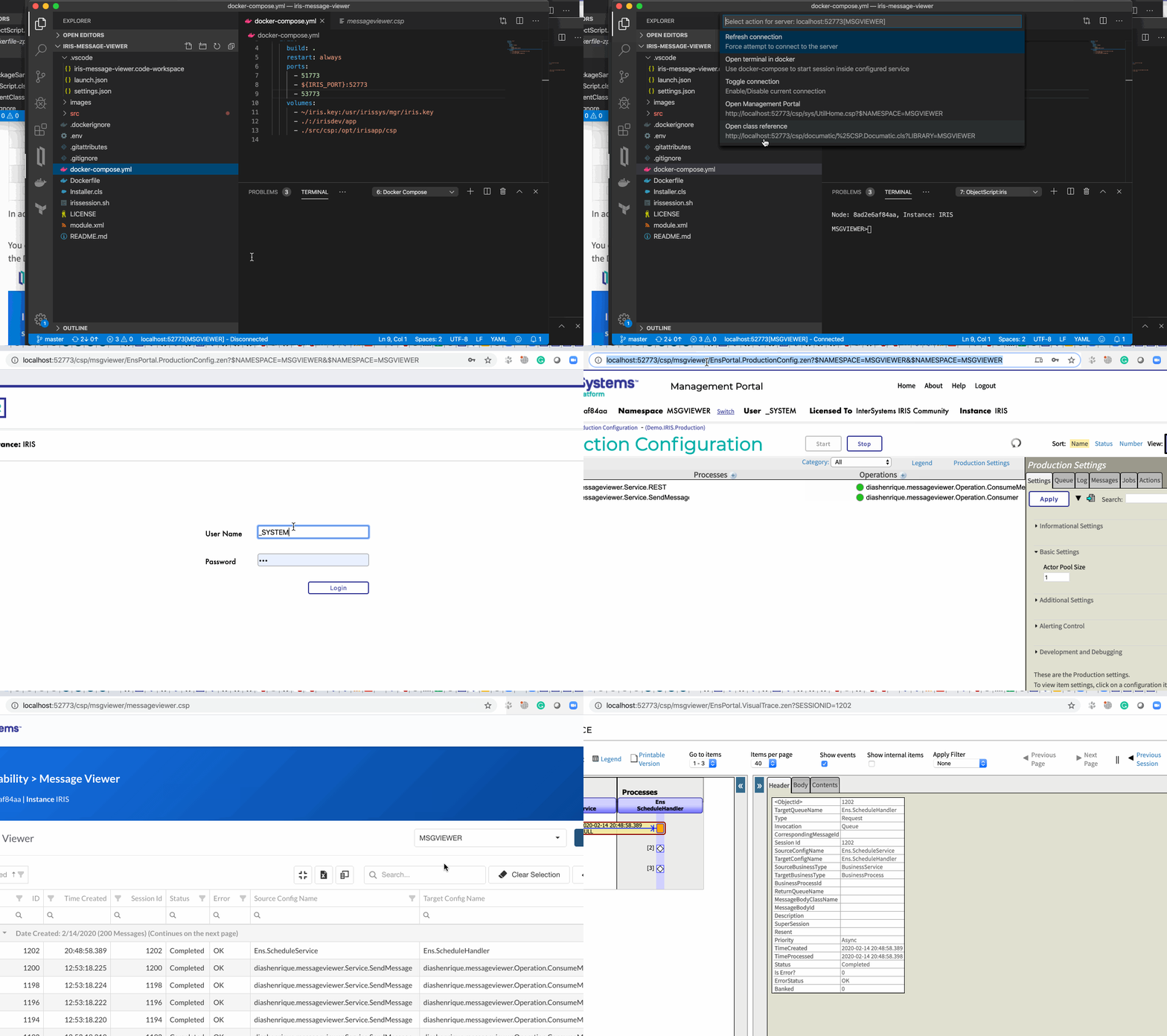
Henrique!
Thank you so much for sharing this fantastic addon! I hope developers will benefit from it very much and even contribute!
Small hint: I haven't found the link in the article where the Enhanced Viewer can be opened - here is the link if you run with docker: http://localhost:52773/csp/msgviewer/messageviewer.csp
This is fantastic, Henrique!
Looking forward install IRIS History Monitor via ZPM!
Thanks, @Henrique Dias !
Hi @Henrique Dias!
We updated the interface and now it's the matter of click Upload Image menu in the App Editor. See the article. Let me know if this works!
Will have two sessions on Feb 12th on during InterSystems Benelux Summit on behalf of CUG meetup.
See you there!