#VSCode

14 Followers · 449 Posts

VSCode is a short name form for a popular cross-platform editor VisualStudio Code from Microsoft.

Learn more.

Question Scott Roth · Dec 9, 2020

I am fairly new to using VSCode. I have used VSCode to create some files on our Test Server, now I need to move them to Production.

Looking through the VSCode extension documentation, maybe I missed it but how to I migrate code from one workspace to another. In Studio I was use to exporting the code into an XML and just being able to import it on the Production server version of Studio.

Thanks

Scott
9
0 1050
Question Sam Duncan · Nov 12, 2020

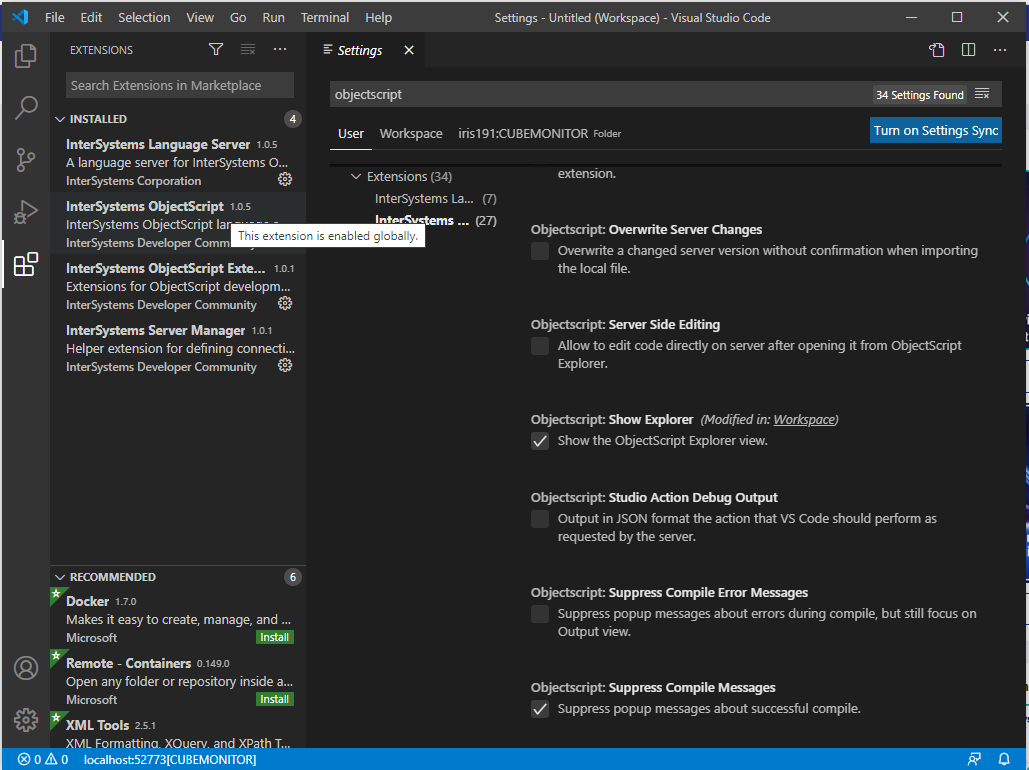
I've just installed Visual Studio Code, installed the InterSystems ObjectScript Extension Pack as documented here, connected it to a local InterSystems IRIS instance, and created a workspace associated with one of that instance's namespaces. However, after doing this, I don't see the ObjectScript button on the left toolbar when opening the workspace.

The ObjectScript extensions are installed and enabled as shown below; I've tried reinstalling them and restarting VSCode, but this doesn't make a difference:

Has anyone seen behavior like this before?

5
0 619
Question Scott Roth · Nov 2, 2020

This may not be the right place to ask, but I am having some issues with the VSCode setup. I have installed the InterSystems Extensions but I am not seeing the InterSystems icon on the Action Bar long the left side of the screen.

Can someone point me in the correct direction of what I need to do to fix this issue?

Thanks

Scott

1
0 1655
Article Eduard Lebedyuk · Dec 3, 2019 1m read

One of the most useful features in Studio is code snippets.

Here's how to add snippets to VSCode.

Here's a generalized instructions.

1. Go to File - Preferences - User Snippets and choose objectscript.

2. Add your snippet, here's an example:

"SQL Statement": {
    "prefix": ["sql"],
    "body": ["#dim rs As %SQL.ISelectResult",
            "set rs = ##class(%SQL.Statement).%ExecDirect(,\"SELECT * FROM\")",
            "while rs.%Next() {",
            "\twrite rs.ID, !",
            "}"]
}
1
5 866
Article John Murray · Oct 27, 2020 2m read

Now that 1.0 has shipped and is featuring in various sessions at Virtual Summit 2020 it seems like a good time to offer some guidance on how to report problems.

InterSystems ObjectScript for VS Code consists of three collaborating VS Code extensions. For ease of installation and management there's a fourth entity, the InterSystems ObjectScript Extension Pack. It's a great way to get started with minimum clicks, and handy to have even if you have already installed the other extensions.

This modular architecture also means there are three different GitHub repositories where issues can be created.

0
0 717
InterSystems Official Raj Singh · Oct 20, 2020

Hello Developer Community!

Once again I'm here to talk about the ObjectScript extension for Visual Studio Code, and this time we are excited to announce the release of version 1.0!

The community has come together in an unprecedented way to deliver this product with InterSystems, and its only fitting that a tool so critical to  developer productivity would be built with community testing, feedback and source code from the very beginning.

What's New

Most of the features in this release have been present since 0.9 and were announced earlier in this post. They have all been enhanced and polished.

0
0 1186
Question David E Nelson · Sep 30, 2020

Hi, 

In Atelier I can click File --> New --> Class File, and File --> New --> Custom File etc to launch various wizards and templates to help me quickly create DeepSee KPI classes, %Installer manifests, Web Services and the like. Of course, all these are available through Studio as well. Is there anything similar in VSCode? If so where? I've looked at several videos and the documentation, but I haven't seen anything.

Thanks!

David

3
0 890
Announcement Raj Singh · Sep 1, 2020

Hello Developer Community!

I’m pleased to announce the 0.9 release of the ObjectScript extension for Visual Studio Code. Earlier this year I announced that InterSystems would be joining the community in evolving this already popular tool. Since then, we have been hard at work solidifying the code base and building a slew of new features.

Before I get into the details, I’d like to take a moment to thank @Dmitry Maslennikov, @John.

9
2 989
Discussion Dmitry Maslennikov · Sep 4, 2020

The use of Source Code Control systems in development is important. And there are a few systems known in the world, like GIT, SVN (Subversion), Perforce, Mercurial. Where the most popular nowadays is the git. Using it is very useful in many cases, but mostly it depends on the code as text, which can be compared between commits, branches, or versions of releases and so on.

0
0 396
Question David.Satorres6134 · Jun 16, 2020

Hi!

As Atelier for Eclipse seems that will be discontinued, I decided to start moving my coding environment to Visual Studio Code. I kind of like it, and I'm getting used to it.

But I can't find the way to have several server connections as I do in Eclipse, and so creating projects based on that servers. Is there any way to do it?

Thanks a lot

14
0 3774
Question Elize VdRiet · Jul 27, 2020

My VS Code plugin "InterSystems Objectscript" upgraded to version 0.8.7 but the server settings no longer visible in extension settings and can no longer connect to our InterSystems server.

What has chnaged and how do we set the server connectio up? I checked the JSON file and it still has the settings as it was before but it is not connecting.

Screenshot of the settings json and then on the left a timer icon on the InterSystems icon and blue line running from left to right at top as it tries to conenct to server. I downgraded to version 0.8.

2
0 433
Question Marc Mundt · Jul 2, 2020

I'm working with VS Code on Centos 8. When I install the ObjectScript extension the installation succeeds, but the InterSystems icon never appears in the left-side panel. I can change settings for the extension - set the server info, etc. No errors show-up in the VS Code debug log.

UPDATE: the same thing happens on MacOS when using VS Code 1.46.1 and InterSystems ObjectScript extension 0.8.6

Can anyone suggest next steps for me to troubleshoot? Is there another log I should check?

VS Code version:
Version: 1.46.1
Commit: cd9ea6488829f560dc949a8b2fb789f3cdc05f5d
Date: 2020-06-17T21:13:08.

3
0 982
Question Omar Ali Ateen · Jun 21, 2020

Good day all

I am a new developer in cache, I am trying to connect vscode to healthshare but i get the following error:

////Error: Error: Parse Error: Expected HTTP/////

Please help me on this.

My setting like this:

{

    "objectscript.conn": {

      "active": true,

      "label": "LOCAL",

      "host": "****",

      "port": 57772,

      "username": "***",

      "password": "***",

      "ns": "***",

      "https": false,

    },

    "objectscript.export.folder": "src", 

    "objectscript.serverSideEditing": false

  }

4
0 485
Article Evgeny Shvarov · Jun 12, 2020 3m read

Hi Devs!

Last weekend I had been testing the newborn csvgen module and was looking for a CSV file to test - thus I came across an interesting datafile on Data.World  with Game of Throne episodes statistics. Death statistics. These folks documented all the murders through all the 8 seasons and noted where, who, from what clan with what weapon had killed another one.

So I imported it and made an IRIS Analytics dashboard.

You Know Nothing, Jon Snow | You Know Nothing, Jon Snow | Know ...

Don't worry, Jon,  with this dashboard we can figure out something ). See the details below.

0
2 836
Announcement Anastasia Dyubaylo · May 19, 2020

Hi Community!

We are glad to invite every developer who uses ObjectSript and VSCode plugin to the second webinar hold by the VSCode ObjectScript plugin developer on May 26  at 11:00 EDT. 

You will learn how to develop InterSystems IRIS solutions using GitHub Development Flow with VSCode ObjectScript and Docker.

Speaker: @Dmitry Maslennikov, InterSystems Developers Advocate, CTO at CaretDev.

6
1 797
Announcement Anastasia Dyubaylo · May 5, 2020

Hi Community!

We're pleased to invite all the developers to the upcoming "Enterprise-grade Source Code Management" webinar on May 21st at 11:00 AM EDT. 

You will learn how Deltanji from George James Software can control large scale InterSystems applications throughout the development, testing, deployment and maintenance cycle.

Presenters: 
@George James, CEO, George James Software
@John Murray, Senior Product Engineer, George James Software

What is Deltanji and what will be demonstrated at this webinar?

8
0 622
Announcement Anastasia Dyubaylo · May 8, 2020

Hi Community,

We're pleased to invite you to join the upcoming InterSystems IRIS 2020.1 Tech Talk: Integrated Development Environments on May 19 at 10:00 AM EDT!

In this edition of InterSystems IRIS2020.1 Tech Talks, we put the spotlight on Integrated Development Environments (IDEs). We'll talk about InterSystems latest initiative with the open source ObjectScript extension to Visual Studio Code, discussing what workflows are particularly suited to this IDE, how development, support, and enhancement requests will work in an open source ecosystem, and more.

1
0 505
Question Max Abrahams · Apr 27, 2020

i've noticed a strange bug in the 'problem highlighting' of VSCODE and i wasn't sure if this is a problem with the internal library definitions of iris, or with the plug-in itself.

The first line is the correct macro call, but the second one is the one throwing the error. (preprocess vs prepOrocess)

How is this syntax checker's list of strings compiled?

1
0 262
Article Eduard Lebedyuk · Apr 22, 2020 1m read

One of the things I want from VSCode is to have a familiar Studio look.

Thankfully VSCode is easily customizable so you can choose any color for any element.

Here's what I got so far:

To get the same look add to your settings.json:

"workbench.colorTheme": "Default Light+",
"editor.tokenColorCustomizations":{
    "textMateRules": [
        {
            "scope": "entity.other.attribute-name.objectscript_class",
            "settings": {
                "foreground": "#000000"
            }
        },
        {
            "scope": "string.quoted.double.objectscript",
            "settings": {
                "foreground": "#068306"
            }
        },
        {
            "scope": ["comment.block.documentation.objectscript_class"],
            "settings": {
                "foreground": "#040482"
            }
        }
    ]
}
0
1 516
InterSystems Official Raj Singh · Apr 12, 2020

I’m excited to announce that InterSystems will be joining the open source community for InterSystems ObjectScript extension to Visual Studio Code. Early this year I posted that we were on a journey to redefine the future of our IDE strategy, and what came out of that is Visual Studio Code is the IDE that can support that future.

3
6 1912