.png)
Visual Studio Code is a compatible IDE for InterSystems technology!
Visit the resource guide to learn more about the VS Code IDE and how to use the ObjectScript extensions.
VSCode is a short name form for a popular cross-platform editor VisualStudio Code from Microsoft.
Visual Studio Code is a compatible IDE for InterSystems technology!
Visit the resource guide to learn more about the VS Code IDE and how to use the ObjectScript extensions.
There is a error when I try to use VSCODE to connect to my Ensemble Server. What's wrong with me?How can I Configure this /api/atelier web application
.png)
Hi Developers,
Please welcome the new video on InterSystems Developers YouTube:
⏯ Building REST API with InterSystems IRIS Docker Container in 5 Minutes
Hi -
I know this is very "newby" of me, but here goes..
I have moved some classes onto my server, but these have never been in VSCode as edited files, and I'm just not finding the magic command or button or drop-down that says "pull this file from the server and make me a local copy to edit. I can see the class files on the server using the ObjectScript plugin - but I just can't find out where to make a local copy for editing
Thanks
Hi,
When wanting to use VS-Code for server-side editing.. - In VS-code I can right click on a server item (eg a class) to see a set of menu options including 'Server Source Control... ' and 'Server Command Menu...' at the bottom.
I noticed that these options are somewhat connected to my server-side source control hooks class that inherits from %Studio.SourceControl.Base, however, I am seeing different behavior between my custom subclass of this, and, the provided %Atelier.SourceControl subclass.
How should the subclass of %Studio.SourceControl.
On a default VS Code installation, when you create a new file its language mode is 'Plain Text'
.png)
You have to click there to set another mode.
Luckily, there's a setting you can tweak to change this. It is called files.defaultLanguage
Set it to the ID of the language you want. Those IDs display in parentheses after each entry on the language mode selector.
Even better, you can set it to use the same language as the file you're currently focused on:
"files.defaultLanguage": "${activeEditorLanguage}"Hi All,
I'm starting to use VSCode for most of my day to day stuff and there's something that has me stumped. Is there a way to override a method or property that's inherited from a superclass?
Coming up this Wednesday (27th January 2021), two and a half hours of online sessions by members of the product team at Microsoft.
Join the Visual Studio Code team and community at a live event just for VS Code users. Get a glimpse of things to come and meet the team who works on VS Code every day.
It's free, starts at 8am PST, and sessions will be available for replay after the event.
Hi all, By using VS code, I want to copy multiple files to local directory, then sync them to server, but I can't find where local directory is stored? In Atelier IDE, I could open a view of server and can copy the code to the project, then code is saved in the local directory. When I copy multiple files to the local directory -> choose sync in Atelier -> the code will be synchronized to the server How to do this from VS Code? Thanks!
I am currently evaluating Source Control systems that we can use for both MS SQL, MS Visual Studio, and InterSystems IRIS. For both MS SQL and MS Visual Studio we do have the option of either Azure or GitHub. I understand when we upgrade to IRIS 2019.1 we have options for Source Control, and in previous Global Summit's I have heard GitHub discussed. So why can't I user GitHub for both MS SQL/MS Visual Studio and IRIS?
I am fairly new to using VSCode. I have used VSCode to create some files on our Test Server, now I need to move them to Production.
Looking through the VSCode extension documentation, maybe I missed it but how to I migrate code from one workspace to another. In Studio I was use to exporting the code into an XML and just being able to import it on the Production server version of Studio.
Thanks
Scott
Hi Developers,
Watch the new video on InterSystems Developers YouTube to learn how to develop with InterSystems ObjectScript using the Visual Studio Code plug-in.
Hey Developers,
Please welcome the first session from InterSystems Virtual Summit 2020:
⏯ Creating InterSystems IRIS Analytics Solutions Using Docker & VSCode
I've just installed Visual Studio Code, installed the InterSystems ObjectScript Extension Pack as documented here, connected it to a local InterSystems IRIS instance, and created a workspace associated with one of that instance's namespaces. However, after doing this, I don't see the ObjectScript button on the left toolbar when opening the workspace.
The ObjectScript extensions are installed and enabled as shown below; I've tried reinstalling them and restarting VSCode, but this doesn't make a difference:
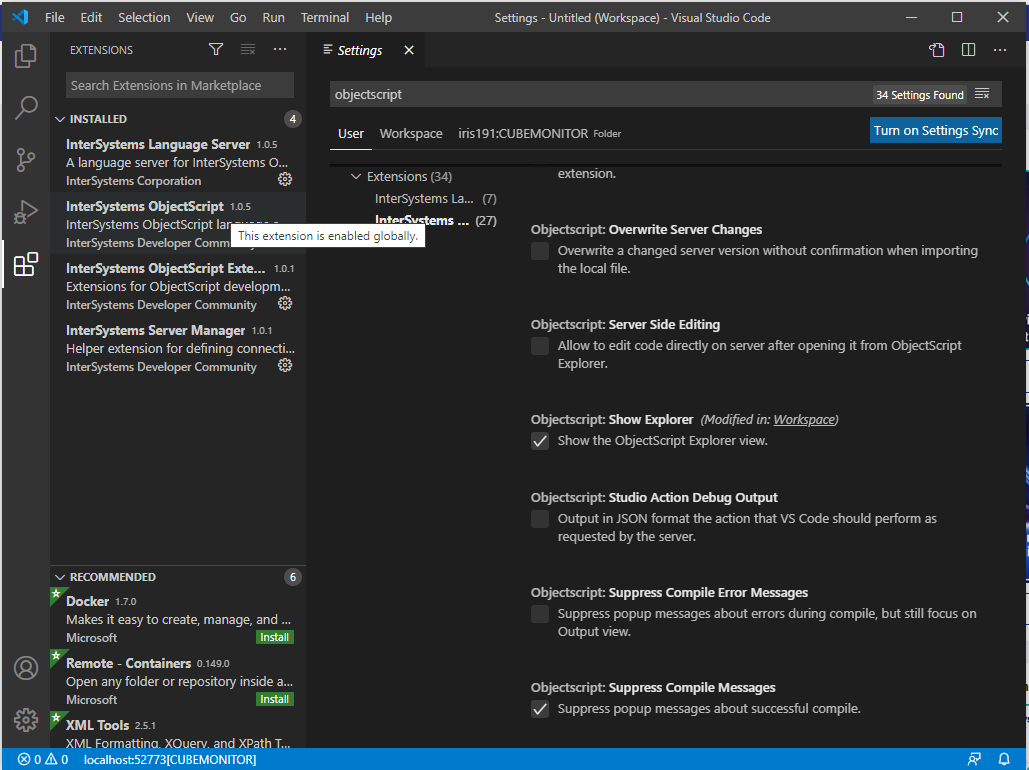
Has anyone seen behavior like this before?
Hi Community,
Please welcome the new video recorded by @Evgeny.Shvarovon InterSystems Developers YouTube:
⏯ Developing InterSystems IRIS solution using GitHub Codespaces
This may not be the right place to ask, but I am having some issues with the VSCode setup. I have installed the InterSystems Extensions but I am not seeing the InterSystems icon on the Action Bar long the left side of the screen.
.png)
Can someone point me in the correct direction of what I need to do to fix this issue?
Thanks
Scott
One of the most useful features in Studio is code snippets.
Here's how to add snippets to VSCode.
Here's a generalized instructions.
1. Go to File - Preferences - User Snippets and choose objectscript.
2. Add your snippet, here's an example:
"SQL Statement": {
    "prefix": ["sql"],
    "body": ["#dim rs As %SQL.ISelectResult",
            "set rs = ##class(%SQL.Statement).%ExecDirect(,\"SELECT * FROM\")",
            "while rs.%Next() {",
            "\twrite rs.ID, !",
            "}"]
}Now that 1.0 has shipped and is featuring in various sessions at Virtual Summit 2020 it seems like a good time to offer some guidance on how to report problems.
InterSystems ObjectScript for VS Code consists of three collaborating VS Code extensions. For ease of installation and management there's a fourth entity, the InterSystems ObjectScript Extension Pack. It's a great way to get started with minimum clicks, and handy to have even if you have already installed the other extensions.
This modular architecture also means there are three different GitHub repositories where issues can be created.
Hello,
In Atelier IDE, there is option to import source from XML, how to do this from VS Code?
.png)
Thanks
Today we are pleased to publish a new extension pack for Visual Studio Code. This pack provides a convenient way to install and manage a set of extensions which together make VS Code a great tool for ObjectScript developers.
Hello Developer Community!
Once again I'm here to talk about the ObjectScript extension for Visual Studio Code, and this time we are excited to announce the release of version 1.0!
The community has come together in an unprecedented way to deliver this product with InterSystems, and its only fitting that a tool so critical to developer productivity would be built with community testing, feedback and source code from the very beginning.
Most of the features in this release have been present since 0.9 and were announced earlier in this post. They have all been enhanced and polished.
Hi,
In Atelier I can click File --> New --> Class File, and File --> New --> Custom File etc to launch various wizards and templates to help me quickly create DeepSee KPI classes, %Installer manifests, Web Services and the like. Of course, all these are available through Studio as well. Is there anything similar in VSCode? If so where? I've looked at several videos and the documentation, but I haven't seen anything.
Thanks!
David
Currently when 'Importing and Compiling' multiple files I have to click 'Overwrite on Server' for each file. Is there a way of choosing 'Overwrite on Server' for all files I have selected.
Hello Developer Community!
I’m pleased to announce the 0.9 release of the ObjectScript extension for Visual Studio Code. Earlier this year I announced that InterSystems would be joining the community in evolving this already popular tool. Since then, we have been hard at work solidifying the code base and building a slew of new features.
Before I get into the details, I’d like to take a moment to thank @Dmitry Maslennikov, @John.
The use of Source Code Control systems in development is important. And there are a few systems known in the world, like GIT, SVN (Subversion), Perforce, Mercurial. Where the most popular nowadays is the git. Using it is very useful in many cases, but mostly it depends on the code as text, which can be compared between commits, branches, or versions of releases and so on.
Hi!
As Atelier for Eclipse seems that will be discontinued, I decided to start moving my coding environment to Visual Studio Code. I kind of like it, and I'm getting used to it.
But I can't find the way to have several server connections as I do in Eclipse, and so creating projects based on that servers. Is there any way to do it?
Thanks a lot
My VS Code plugin "InterSystems Objectscript" upgraded to version 0.8.7 but the server settings no longer visible in extension settings and can no longer connect to our InterSystems server.
What has chnaged and how do we set the server connectio up? I checked the JSON file and it still has the settings as it was before but it is not connecting.
Screenshot of the settings json and then on the left a timer icon on the InterSystems icon and blue line running from left to right at top as it tries to conenct to server. I downgraded to version 0.8.
Hello Community members, am newbie here
Already learning and working through Studio & Terminal and since am from C# background and trying to use VS Code for ObjectScript coding, appreciate you help, unable to edit files, please see below snapshot
.png)
I'm working with VS Code on Centos 8. When I install the ObjectScript extension the installation succeeds, but the InterSystems icon never appears in the left-side panel. I can change settings for the extension - set the server info, etc. No errors show-up in the VS Code debug log.
UPDATE: the same thing happens on MacOS when using VS Code 1.46.1 and InterSystems ObjectScript extension 0.8.6
Can anyone suggest next steps for me to troubleshoot? Is there another log I should check?
VS Code version:
Version: 1.46.1
Commit: cd9ea6488829f560dc949a8b2fb789f3cdc05f5d
Date: 2020-06-17T21:13:08.
Hi Developers!
Looking for a fast, efficient IDE for developing ObjectScript code? Watch the new video on InterSystems Developers YouTube for more:
⏯ ObjectScript with Visual Studio Code