Hi All,
In my DB, it has more than 10,000 files. I tried to search for a particular file (mac), but there is no search option to find it. Can you help me find that option to search for a file?
VSCode is a short name form for a popular cross-platform editor VisualStudio Code from Microsoft.
Hi All,
In my DB, it has more than 10,000 files. I tried to search for a particular file (mac), but there is no search option to find it. Can you help me find that option to search for a file?
If you have already built unit tests using the %UnitTest framework, or are thinking about doing so, please take a look at InterSystems Testing Manager.
Without leaving VS Code you can now browse your unit tests, run or debug them, and view previous run results.
InterSystems Testing Manager works with both of the source code location paradigms supported by the ObjectScript extension.Your unit test classes can either be mastered in VS Code's local filesystem (the 'client-side editing' paradigm) or in a server namespace ('server-side editing').
Since InterSystems has recently announced the discontinuation of support for InterSystems Studio starting from version 2023.2 in favor of exclusive development of extensions for the Visual Studio Code (VSC) IDE, believing that the latter offers a superior experience compared to Studio, many of us developers have switched or are beginning to use VSC. Many may have wondered how to open the Terminal to perform operations, as VSC does not have an Output panel like Studio did, nor an integrated feature to open the IRIS terminal, except by downloading the plugins developed by InterSystems.
UPDATE: since version 0.0.4 of the extension was published on 2025-11-23 it is now possible to use gj :: configExplorer directly in VS Code on Windows.
In my previous article introducing gj :: configExplorer I flagged up how an apparent bug in the Windows elements of the Native API for Node.js means it's not currently available to run in VS Code on a Windows desktop. In a comment on that article I offered a workaround, but this requires a Docker-equipped Linux host you can SSH to.
If you don't have a suitable target it's now possible to leverage your local Windows Docker Desktop. Here's how:
Hi,
Just thought I'd share quite a handy hook that has helped me out when developing on Health Connect Cloud with VS Code and GitBash. When developing on Health Connect Cloud, if changes are made directly on the server such as routing rules or component deployments, they aren't automatically included in source control, therefore you must export from the server into your local files and push to your remote repo. I'm sure there are easier methods to deal with that which I'm in the process of testing, but as a quick solution I thought it would be handy have a pre-commit hook which triggers a reminder in GitBash - see below.
.png)
Hi
With this servers definition in VSCode:
Access to 2023.1.2 works just fine, 2024.1 stubbornly
We're excited to announce a new version release of the SQLTools VS Code extension.
SQLTools connects VS Code users to the most commonly used databases using drivers, including InterSystems IRIS. With over 3.5 million downloads, it is helping users work with their data much more easily.
Version 0.28.2 is now available and includes:
- New CSV export format options.
- Improved connection quickpick and status bar item.
- Query error strings now wrap.
- Document settings that require a restart after changing.
- Resolve contradictory SSL settings in MySQL driver.
- Fix connecting to AWS RDS by PostgreSQL
Visual Studio Code releases new updates every month with new features and bug fixes, and the August 2025 release is now available.
This release features smarter AI model selection, enhanced security for sensitive edits and terminal commands, and productivity enhancements such as streamlined chat editing and customizable context with AGENTS.md.
If you’re migrating from InterSystems Studio to VS Code, or want to deepen your knowledge, check out the VS Code training courses from George James Software.
Updates in version 1.104 include -
Model flexibility
Hi,
so we introduced GIT in our workflow and we exported all files with $SYSTEM.OBJ.ExportUDL
Everything fine so far. But for some reason the export adds an extra line for classes (Routines are OK as far as I can see):
.png)
On Serverside it isn't there
.png)
The Problem is now that when we checkout a branch and a class changed we automatically compile it from the repository to a namespace that is made for the developer. E.g. DEV_001, DEV_002 and so on.
Now when the class get's compiled the objectscript plugin replaces the local version with the version that the server compiled, so the last line get's
InterSystems IRIS interoperability production development involves using or writing various types of components. They include services (which handle incoming data), processes (which deal with the data flow and logic), and operations (which manage outgoing data or requests). Messages flowing through those components constantly require being adapted to consuming applications. Therefore,Data transformations are by far the most common component in interoperability productions.
In the early stages of data transformation development, thetest tool from the Management Portal becomes quite handy.
Trying to import a .csp with VS code appears to do nothing.
Making a change to the file, saving it and then doing "Import and compile" results in no output and there is no change to the file on the server.
Plugin version is 3.0.5
Recently, I replaced my old laptop with a new one and had to migrate all my data. I was looking for a guide but couldn’t find anything that explained in detail how to migrate server connections from InterSystems Studio and Visual Studio Code from one PC to another. Simply reinstalling the tools is not enough, and migrating all the connections manually seemed like a waste of time. In the end, I managed to solve the problem, and this article explains how.
Migrating Studio connections was the most challenging part.
SQLTools is a Visual Studio Code (VS Code) Extension with over 3.5 million downloads that provides connections to many of the most used databases, including InterSystems IRIS, using drivers.
For developers new to VS Code, or those already familiar with it but are looking to streamline their connections to InterSystems IRIS, this tutorial will take you through installing the SQLTools extensions and the InterSystems IRIS drive. It then guides you on how to establish a connection to your instance of InterSystems IRIS and run a query.
You will need: VS Code installed on your system and access to
Visual Studio Code releases new updates every month with new features and bug fixes, and the July 2025 release is now available.
Enhancements include revamped tool picker and expanded tool limits for MCPs, Chat GPT-5 integration and chat checkpoints, and multi-branch Git worktrees plus coding agent session management to improve productivity.
If you need help migrating from InterSystems Studio to VS Code, or want to advance your knowledge of VS Code, take a look at the training courses George James Software offers > georgejames.com/vscode-training/
Updates in version 1.103 include -
MCP:
When I open a class in VS Code and I want to save it I'm getting the following error : Non-JSON response to /api/atelier/v7/DEV/doc/API.Mollie.Execute.cls?ignoreConflict=0 request. Is the web server suppressing detailed errors?
Also I always get a popup when I open VS Code "The extension wants to sign in using InterSystems Server Credentials."
If you like what you see please support this in the Developer Tools 2025 contest. Voting closes at midnight EDT on Sunday 3rd.

If you’ve ever watched a true artisan—whether a potter turning mud into a masterpiece or a luthier bringing raw wood to life as a marvelous guitar—you know that magic isn’t in the materials, but in care, craft, and process. I know this firsthand: my handmade electric guitar is a daily inspiration, but I’ll admit—creating something like that is a talent I don’t have.
Yet, in the digital world, I often see people hoping for “magic” from generative AI by typing vague, context-free prompts like “build an app.” The results are usually frustratingly shallow—no artistry, no finesse.
Thirteen years ago, I attained dual undergraduate degrees in electrical engineering and math, then promptly started full-time at InterSystems using neither.One of my most memorable and stomach-churning academic experiences was in Stats II.On an exam, I was solving a moderately difficult confidence interval problem.I was running out of time, so (being an engineer) I wrote out the definite integral on the exam paper, punched it into my graphing calculator, wrote an arrow with “calculator” over it, then wrote the result.
The extension and source code are now available
After having some discussions at Global Summit and using a lot of package managers in my day to day development (npm,nuget,Chocolatey, etc) in addition to recently using the InterSystems Package Manager for some CICD process I'm building using Intersystems IRIS and IRIS 4 Health, I wanted an easy and integrated way to search/view/install packages related to the Intersystems tech stack.
I recently built a VSCode extension for IPM repositories that I will be open sourcing and publishing to the marketplace but wanted create this post to get
Hi,
I have a code that copy a method to another class for analysis purpose.
I also want this method to appear first in the source code to easily use it in VSCode with the classmethod debug button and not search it in the numerous method of the modified class.
Is there a way to do such a thing?
I tried the placeAfter keyword but I can't find a way to make it really work as I want. Is their other ways to control the order of methods?
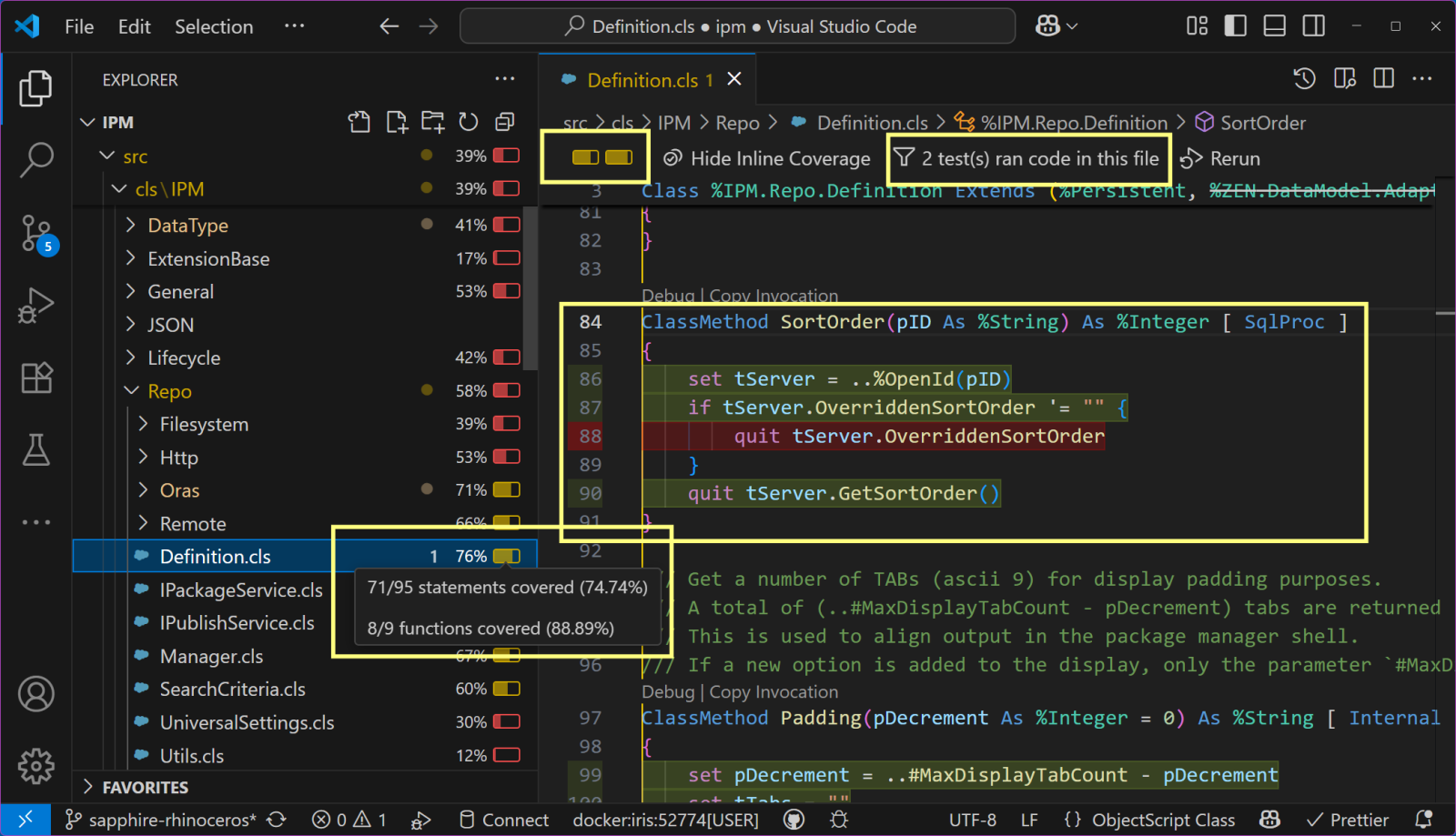
The new version of InterSystems Testing Manager which I released last week brings @Timothy Leavitt's cool
Test Coverage Tool to VS Code, and is my entry for the 2025 Developer Tools contest.
Here's a teaser screenshot showing how the unit tests of the IPM project don't yet cover a feature that apparently allows an IPM repository to override its sort order.

Users of the %UnitTest framework can now get test coverage information inside VS Code by combining the latest release (v2.0.0) of the InterSystems Testing Manager extension with @Timothy Leavitt's impressive Test Coverage Tool.

Above you can see the Test Coverage pane, which I have moved to the secondary sidebar on the right so it can more easily be explored in conjunction with the Test Explorer on the left.
Notice how the most recent test run (of all Test Coverage Tool's own unit tests) covered the BitValue method of TestCoverage.Procedures but not the BitCount method (nor 6 other methods).
InterSystems is pleased to announce that version 3.0.5 of the VS Code - ObjectScript extension has been released. This release includes many bug fixes, as well as changes to the telemetry data we collect. Collecting more product usage data helps InterSystems identify and prioritize fixes and enhancements that will have the most positive impact for you, our users. Personally identifiable information (PII) will never be collected, and telemetry can be disabled using the telemetry.telemetryLevel setting. The full list of data points that are collected can be found here. Thank you for using our
Hello my friends,
I have a problem with logi report,
in my store procedure, I create code like this?
$ListToString(%DLIST(DISTINCT (ARCIM_Desc)),'<br/>') as "ARCIM_Desc", -> this is the problem
$ListToString(%DLIST(DISTINCT (MRDIA_ICDCode_DR)),'<br/>') as "MRDIA_ICDCode_DR", -> it's works fine
.png)
as you see there's a <br/> in the display of the report
I have no idea about this, maybe someone can help me fix this problem ?
Thank You
Best Regards,
Steven Henry
VSCode version:
Version: 1.101.2 (user setup)
Commit: 2901c5ac6db8a986a5666c3af51ff804d05af0d4
Date: 2025-06-24T20:27:15.391Z
Electron: 35.5.1
ElectronBuildId: 11727614
Chromium: 134.0.6998.205
Node.js: 22.15.1
V8: 13.4.114.21-electron.0
OS: Windows_NT x64 10.0.26100
-----------------------
I'm working with a CSP legacy system.
When a csp file is newer in Caché them my local version, I try to do a compare with the server and receive the error in VSCode.png)
Looking the Windows Log a I see the message:
2025-06-26 10:57:13.054 [error] [Window] {"statusCode":400,"message":"Bad Request","errorText":"ERRO #16006:
Hello everyone,
I’m using VS Code with the InterSystems ObjectScript extension and I want to keep my local folder (client-side) as the “source of truth” while still using the built-in Server Source Control features (diff, stage, commit, etc.) against my IRIS/Ensemble instance.
So far:
.cls and .mac files."objectscript.serverSourceControl.respectEditableStatus": true and "objectscript.serverSourceControl.disableOtherActionTriggers": false in my .vscode/settings.json.Are you using Jupyter Notebooks with IRIS? Are you using the vscode-iris-jupyter-server VS Code extension for your notebooking? If so, please let me know either via direct message or with a comment on this post. I'd like to hear more about how our customers are working with tool specifically, and with data science more generally.
Thanks!
I currently have an issue with a failed connection in VSCode and need some help.
It doesn't work when using ports 80, 1972, and 7038.
We have classes in a Production environment that are causing us some issues - example attached.
When we export them from the production environment the XML contains a snippet like the following:
<UDLText name="T"> <Content><![CDATA[ //Property any As list Of %XML.String(XMLNAME = "any", XMLPROJECTION = "ANY") [ SqlFieldName = _any ]; ]]></Content> </UDLText>
When imported and compiled into an Ensemble instance this class works as expected.
When viewed/edited in a development environment we run into issues - the presentation is similar with both Studio and VS Code.
On first viewing in Studio
Windows 10/Windows Server 2016:
I am currently monitoring our license use with a new rest-service I am implementing when I noticed my licenses on my instance being consumed and never released by Visual Studio Code.
For this I restarted my Instance, watched the licenses for a while, which remained at 1 during idle (I am guessing my MMGT Portal session uses 1)
But when I connect to my Instance using Visual Studio Code (with my Instance setup in the extension already), suddenly 2 licenses are used. (I am guessing 1 for the "studio" and 1 for a terminal session, so far so good)
But then when I open