 Beginning - see Part 1.
3. Variants of structures when using globals
A structure, such as an ordered tree, has various special cases. Let's take a look at those that have practical value for working with globals.
InterSystems IRIS is a Complete Data Platform
InterSystems IRIS gives you everything you need to capture, share, understand, and act upon your organization’s most valuable asset – your data.
As a complete platform, InterSystems IRIS eliminates the need to integrate multiple development technologies. Applications require less code, fewer system resources, and less maintenance.
Beginning - see Part 1.
A structure, such as an ordered tree, has various special cases. Let's take a look at those that have practical value for working with globals.
Created by Daniel Kutac, Sales Engineer, InterSystems
Part 3. Appendix
In the previous part of our series we have learned about configuring InterSystems IRIS to act as an OAUTH client as well as authorization and authentication server (by means of OpenID Connect). In this final part of our series we are going to describe classes implementing InterSystems IRIS OAuth 2.0 framework. We will also discuss use cases for selected methods of API classes.
The API classes implementing OAuth 2.0 can be separated into three different groups according to their purpose. All classes are implemented in %SYS namespace. Some of them are public (via % package), some not and should not be called by developers directly.
In this post, I am going to detail how to set up a mirror using SSL, including generating the certificates and keys via the Public Key Infrastructure built in to Caché. The goal of this is to take you from new installations to a working mirror with SSL, including a primary, backup, and DR async member, along with a mirrored database.
By default, Analyzer executes queries as components are added. Often, there are times where you may know exactly what you are looking to do, and you do not want Analyzer to execute 5 queries as you drag and drop items onto rows/columns and select your filters. This is where toggling Auto-execute off can help.
When an error occurs in your application, simply logging it might be enough. But for certain errors, you might want to send a notification to people right away. There are three ways to generate custom email notifications from InterSystems IRIS.
Is there a better way to iterate through all properties of an object than the following? Perhaps without needing to open a definition of the class but directly against the object?
SAMPLES>set t=##class(HoleFoods.Transaction).%OpenId(1)
SAMPLES>set def=##class(%Dictionary.ClassDefinition).%OpenId("HoleFoods.Transaction")
SAMPLES>for i=1:1:def.Properties.Count() {  w def.Properties.GetAt(i).Name_":"_$property(t,def.Properties.GetAt(i).Name),!  }
Actual:0
AmountOfSale:4.One of the great availability and scaling features of Caché is Enterprise Cache Protocol (ECP). With consideration during application development distributed processing using ECP allows a scale out architecture for Caché applications. Application processing can scale to very high rates from a single application server to the processing power of up to 255 application servers with no application changes.
ECP was used widely for many years in TrakCare deployments I was involved in. A decade ago a 'big' x86 server from one of the major vendors might only have a total of eight cores.
This is a list of all the posts in the Data Platforms’ capacity planning and performance series in order. Also a general list of my other posts. I will update as new posts in the series are added.
You will notice that I wrote some posts before IRIS was released and refer to Caché. I will revisit the posts over time, but in the meantime, Generally, the advice for configuration is the same for Caché and IRIS. Some command names may have changed; the most obvious example is that anywhere you see the
^pButtonscommand, you can replace it with^SystemPerformance.
|
The information in this document is current as versions of InterSystems products released through 2024-06-06. This update date covers errors in that discovered up to 2024-08-12, but not changes present in new versions of InterSystems products. Nevertheless, the details for existing products are not subject to frequent change. The WRC can supply you with a .PDF version of this article suitable for printing on either US 8½″ × 11″ or A4 210 mm × 297 mm paper. |
|---|
In this post I would like to talk about the syslog table. I will cover what it is, how you look at it, what the entries really are, and why it may be important to you. The syslog table can contain important diagnostic information. If your system is having any problems, it is important to understand how to look at this table and what information is contained there.
Whether you are accessing DeepSee for the first time ever or you are configuring DeepSee on a new instance, there are two common issues that are encountered after clicking on the “DeepSee” option in the System Management Portal.
Issue #1: Architect/Analyzer is grayed out!
Issue #2: DeepSee must be enabled before use.
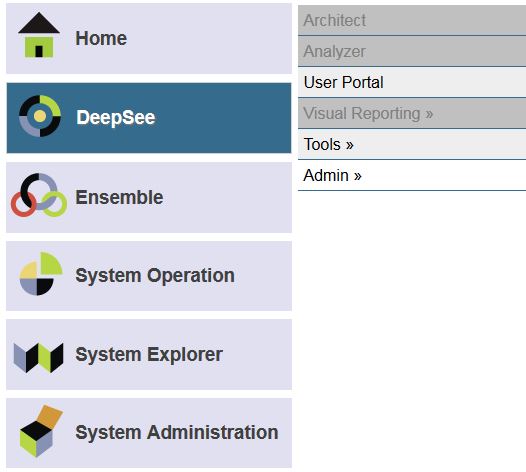
There are two common causes for this problem.
The first common cause is that the license does not have these DeepSee options enabled.
A short post for now to answer a question that came up. In post two of this series I included graphs of performance data extracted from pButtons. I was asked off-line if there is a quicker way than cut/paste to extract metrics for mgstat etc from a pButtons .html file for easy charting in Excel.
See: - Part 2 - Looking at the metrics we collected
pButtons compiles data it collects into a single html file to make it easier to send to WRC and review the collated data.
I saw someone recently refer to ECP as magic. It certainly seems so, and there is a lot of very clever engineering to make it work. But the following sequence of diagrams is a simple view of how data is retrieved and used across a distributed architecture.
For more more on ECP including capacity planning follow this link: Data Platforms and Performance - Part 7 ECP for performance, scalability and availability
Date range queries going too slow for you? SQL Performance got you down? I have ANOTHER weird trick that SQL Developers don't want you to know!*
++Update: August 2, 2018
This article provides a reference architecture as a sample for providing robust performing and highly available applications based on InterSystems Technologies that are applicable to Caché, Ensemble, HealthShare, TrakCare, and associated embedded technologies such as DeepSee, iKnow, Zen and Zen Mojo.
Azure has two different deployment models for creating and working with resources: Azure Classic and Azure Resource Manager. The information detailed in this article is based on the Azure Resource Manager model (ARM).
Post updated in August 2025 to include links to IRIS.
I have seen customer problems where the use of a virus scanner running over Caché or IRIS databases was causing intermittent application slowdowns and bad user response times.
This is a surprisingly common problem, so this short post is just a reminder to exclude key Caché and IRIS components from your virus scanning.
Generally, virus scanning must exclude the CACHE.DAT or IRIS.DAT database files and the InterSystems binaries. If an anti-virus is scanning *.
Hi!
Want to share with you code snippet of try catch block I usually use in methods which should return %Status.
{
 try {
  	$$$TOE(sc,StatusMethod())
 }
 catch e {
 	set sc=e.AsStatus()
 	do e.Log()
 }

Quit sc
}
Here $$$TOE is a short form of $$$TROWONERROR macro.
Inside macro StatusMethod is any method you call which will return %Status value. This value will be placed into sc variable.
In case of sc contains error execution will be routed to try catch block. You can wrap any Status methods calls in your code if you need to catch the errors coming from them.