#Docker

6 Followers · 385 Posts

Docker is a software technology providing containers, promoted by the company Docker, Inc. Docker provides an additional layer of abstraction and automation of operating-system-level virtualization on Windows and Linux.

Article Mikhail Khomenko · Jan 20 18m read

As applications grow, every database eventually hits scaling limits. Whether it's storage capacity, concurrent users, query throughput, or I/O bandwidth, single-server architectures have inherent constraints. This guide explains fundamental approaches to database scalability and shows how InterSystems IRIS implements these patterns to support enterprise-scale workloads.

We'll explore two complementary scaling strategies: horizontal scaling for user volume (distributing computational load) and sharding for data volume (partitioning datasets). Understanding the general principles behind these approaches will help you make informed decisions about when and how to scale your IRIS applications.

The examples in this guide use InterSystems IRIS in Docker containers.
4
5 469
Article Jorge Jaramillo Herrera · Jan 9 9m read

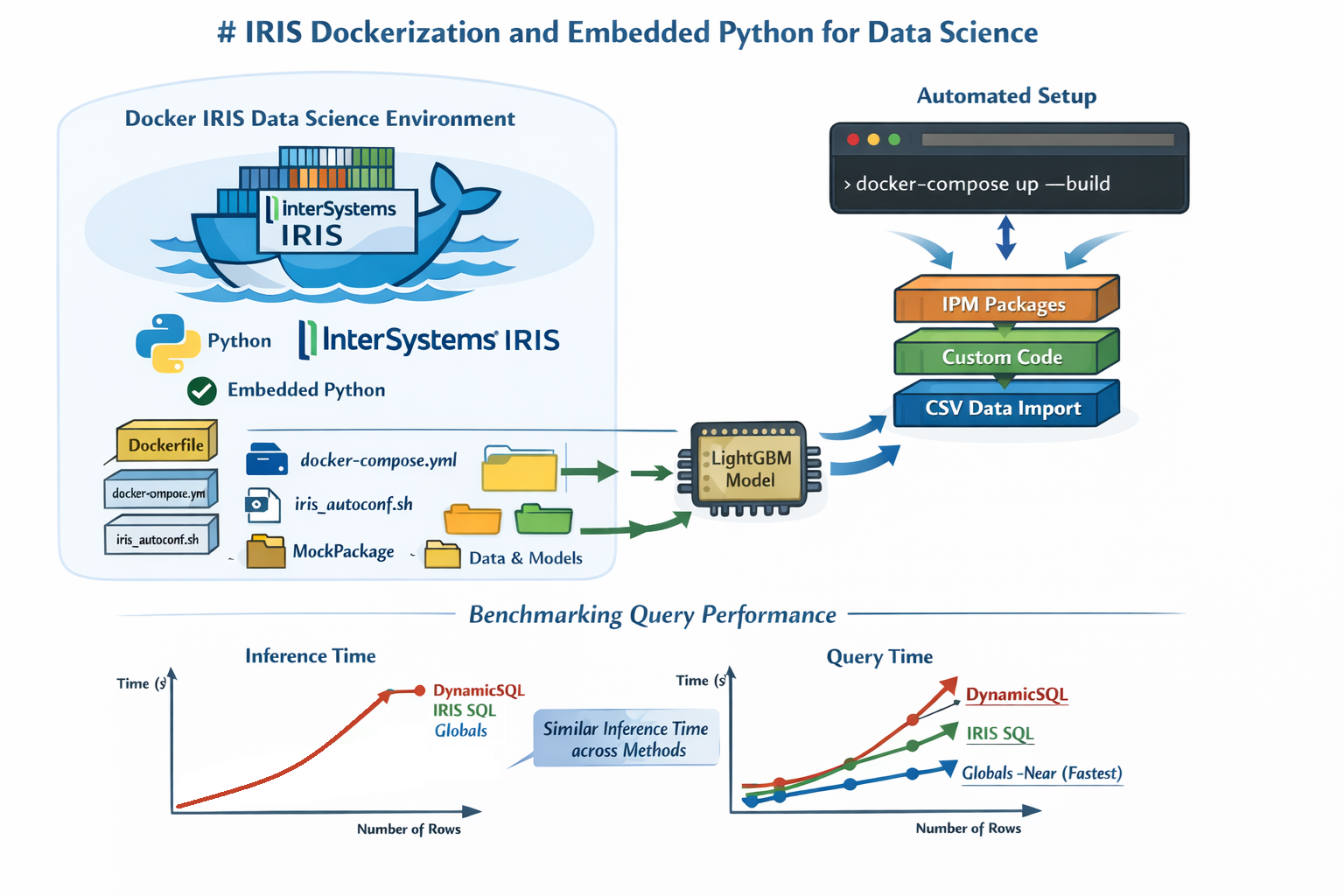
1-command only required for an entire IRIS instance for Data Science projects, and leveraging this to compare query methods' speed (Dynamic SQL, Pandas Query, and Globals).

Before joining InterSystems, I worked in a team of web developers as a data scientist. Most of my day-to-day work involved training and embedding ML models in Python-based backend applications through microservices, mainly built with the Django framework and using Postgres SQL for sourcing the data.

3
1 95
Article Pietro Di Leo · Sep 24, 2025 22m read

Table of Contents

  1. Purpose of the article
  2. What containers are and why they make sense with IRIS
     2.1 Containers and images in a nutshell
     2.2 Why containers are useful for developers
     2.3 Why IRIS works well with Docker
  3. Prerequisites
  4. Installing the InterSystems IRIS image
     4.1 Using Docker Hub
     4.2 Pulling the image
  5. Running the InterSystems IRIS image
     5.1 Starting an IRIS container
     5.2 Checking container status
     5.3 Executing code in the container terminal
     5.4 Accessing the IRIS Management Portal
     5.5 Connecting the container to VS Code
     5.6 Stopping or removing the container
     5.7 Setting a specific password with a bind mount
     5.8 Using durable %SYS volumes
      5.8.1 What gets stored with durable %SYS
      5.8.2 How to enable durable %SYS
  6. Using Docker Compose
     6.1 Docker Compose example
     6.2 Running Docker Compose
  7. Using a Dockerfile to run custom source code
     7.1 Dockerfile example
     7.2 Docker Compose example
     7.3 Understanding layers, image tagging and build vs. run time
     7.4 Source code and init script
     7.5 Building the image with Dockerfile
     7.6 Running instructions in the containerized IRIS terminal
  8. Conclusion and what’s next
9
12 775
Article Thomas Dyar · Dec 27, 2025 10m read

The Rut

Up until early this year, I haven't been not doing much coding at all -- I had gotten sick of it.

After many years as a hands-on software engineer and data scientist, I got burned out around 2015. I switched to business development roles focused on "external innovation," then joined InterSystems in 2019 as a product manager. I missed the creative aspects of coding, but not the tedium. The endless cycle of boilerplate, debugging, and context-switching had left me creatively depleted.

0
1 159
Article Dmitrij Vladimirov · Dec 1, 2025 5m read

In this article, we will discuss all the debugging tools included in the Microsoft Visual Studio Code IDE.

What will be covered:

  • Breakpoints
  • Watch window
  • Call Stack

Let's start by learning about debugging requirements!

Prerequisites

There are two plugins (extensions) for debugging ObjectScript:

The first is part of the InterSystems ObjectScript Extension Pack. The second is Serenji, a standalone plugin that provides an editor, file manager, and debugging functionality. Both plugins can be installed from the plugin store. To activate key functionality, Serenji requires a license. For this article, we'll use the InterSystems ObjectScript Extension Pack to reduce the learning curve. After you've mastered the basics, you can consider purchasing a paid license for Serenji.

2
5 447
Article Dmitrij Vladimirov · Dec 16, 2025 6m read

Table of Contents

  1. Introduction
  2. Version Control
  3. Exporting Classes
  4. Exporting BI Analytics classes
  5. Exporting globals

Introduction.

In this article, we'll cover a quick start to Git development with the InterSystems Developer Community and version control practices when working with IRIS InterSystems. We'll cover scenarios where we need to export Interoperability classes, globals, and analytics elements such as cubes and dashboards. These scenarios encompass key version control practices with IRIS.

To get started, you'll need:

  1. Register and log in to GitHub
  2. Be a member of the intersystems-community organization on Git

Getting started with IRIS InterSystems is very simple!

0
6 419
Article Mikhail Khomenko · Dec 3, 2025 28m read

Security is fundamental to enterprise application development. InterSystems IRIS provides a comprehensive security framework that protects data, controls access, and ensures compliance. This guide introduces essential security features for developers new to IRIS, covering authentication, authorization, encryption, and practical implementation strategies.

Throughout this guide, we'll use Docker containers to demonstrate security configurations in a practical, reproducible environment.

0
3 425
Article Yuri Marx · Dec 2, 2025 2m read

The Load Data utility it is an excellent tool to load data from CSV/TXT files into an IRIS SQL Table, but it is required send the target file to the IRIS server and write the Load Data sentence to ingest the file content. Now it is possible select a file in VSCode, set the table destination and submit the request. The vscode-load-data utility will send the file to the IRIS server and run the Load Data command to you! Very simple:

0
1 193
Question Robert Dingwell · Nov 12, 2025

Hi,

I'm using the iris for health community edition and I cannot seem to get the FHIR server configuration UI to show up.  I was able to create a FHIR server programaticlly but none of the user interface features that the installation guide talks about are available.  Once I was created the server I was able to see a Bulk FHIR Coordinator in the management portal, ut that's it.  Are the UI features not available in the community edition or do they need to be enabled somehow? 

This is the guide that I am using   https://docs.intersystems.com/irisforhealth20251/csp/docbook/DocBook.UI.Page.cls?KEY=HXFHIRINS_server_install_new#HXFHIRINS_server_install_new_portal  

4
0 143
Article Pietro Di Leo · Nov 16, 2023 5m read

Introduction

Since InterSystems has recently announced the discontinuation of support for InterSystems Studio starting from version 2023.2 in favor of exclusive development of extensions for the Visual Studio Code (VSC) IDE, believing that the latter offers a superior experience compared to Studio, many of us developers have switched or are beginning to use VSC. Many may have wondered how to open the Terminal to perform operations, as VSC does not have an Output panel like Studio did, nor an integrated feature to open the IRIS terminal, except by downloading the plugins developed by InterSystems.

10
12 2574
Article Derek Gervais · Sep 8, 2025 3m read

Hey folks! Having recently onboarded to InterSystems, I realized that despite having a totally free and awesome Community Edition, it's not super clear how to get it. I decided to write up a guide highlighting all the different ways you can access the Community Edition of InterSystems IRIS:

Get InterSystems IRIS Community Edition as a Container

Working with a containerized instance of the Community Edition is the recommended approach for folks who are new to developing on InterSystems IRIS, and in my opinion it's the most straightforward. InterSystems IRIS Community Edition can be found on DockerHub; if you have an InterSystems SSO account, you can also find it in the InterSystems Container Registry.

In either case, you'll want to pull the image you want using the docker CLI:

docker pull intersystems/iris-community:latest-em
// or
docker pull containers.intersystems.com/intersystems/iris-community:latest-em

Next, you'll need to start the container: In order to interact with IRIS from outside the container (for example, to use the management portal) you'll need to publish some ports. The following command will run the IRIS Community Edition container with the superserver and web server ports published; note that you can't have anything else running that depends on ports 1972 or 52773!

docker run --name iris -d --publish 1972:1972 --publish 52773:52773 intersystems/iris-community:latest-em
0
4 806
Question Oliver Wilms · Apr 21, 2025

I am brand new to using AI. I downloaded some medical visit progress notes from my Patient Portal. I extracted text from PDF files. I found a YouTube video that showed how to extract metadata using an OpenAI query / prompt such as this one:

ollama-ai-iris/data/prompts/medical_progress_notes_prompt.txt at main · oliverwilms/ollama-ai-iris
 

I combined @Rodolfo Pscheidt Jr https://github.com/RodolfoPscheidtJr/ollama-ai-iris with some files from @Guillaume Rongier https://openexchange.intersystems.com/package/iris-rag-demo.

I attempted to run

python3 query_data.

1
0 220
InterSystems Official Daniel Palevski · Jul 23, 2025

The 2025.1.1 maintenance releases of InterSystems IRIS® data platform, InterSystems IRIS® for Health, and HealthShare® Health Connect are now Generally Available (GA). Please share your feedback through the Developer Community so we can build a better product together.

Documentation

You can find the detailed change lists & upgrade checklists on these pages:

Early Access Programs (EAPs)

There are many EAPs available now. Check out this page and register to those you are interested.

How to get the software?

1
0 238
Article Vishal Pallerla · Jul 17, 2025 3m read

At hackathons that InterSystems participated and I supported, many students were asking how all their teammates could use the same IRIS database that they spun up in a container. I suggested using ngrok to expose their localhost IRIS and realized we don't have documentation on that. Hence, I thought this would be great to let more people knwo about this powerful technique for enhancing collaboration during development and testing.

Step-by-Step Guide to Exposing InterSystems IRIS with ngrok

This guide will walk you through the process of exposing your local InterSystems IRIS instance using ngrok.

0
2 312
Article Guillaume Rongier · Jul 8, 2024 6m read

Flask_logo

Description

This is a template for a Flask application that can be deployed in IRIS as an native Web Application.

Installation

  1. Clone the repository
  2. Create a virtual environment
  3. Install the requirements
  4. Run the docker-compose file
git clone
cd iris-flask-template
python3 -m venv .venv
source .venv/bin/activate
pip install -r requirements.txt
docker-compose up

Usage

The base URL is http://localhost:53795/flask/.

Endpoints

  • /iris - Returns a JSON object with the top 10 classes present in the IRISAPP namespace.
  • /interop - A ping endpoint to test the interoperability framework of IRIS.
4
1 653
Question Laura Blázquez García · Jun 9, 2025

I have created a new docker stack with webgateway and IRIS for Health 2025.1. I have mapped the posts of wegateway like this:

  • 8743:443
  • 8780:80

I can access IRIS portal through 8743 without problems.

I also have created a FHIR repository, and I'm able to access it through 8743 port.

I have a web application, in another server with another domain, that connects to this FHIR repository. I have configured in FHIR endpoint the allowed origin to the domain of this application.

3
0 223
Article Evgeny Shvarov · Feb 15, 2020 4m read

Hi Developers!

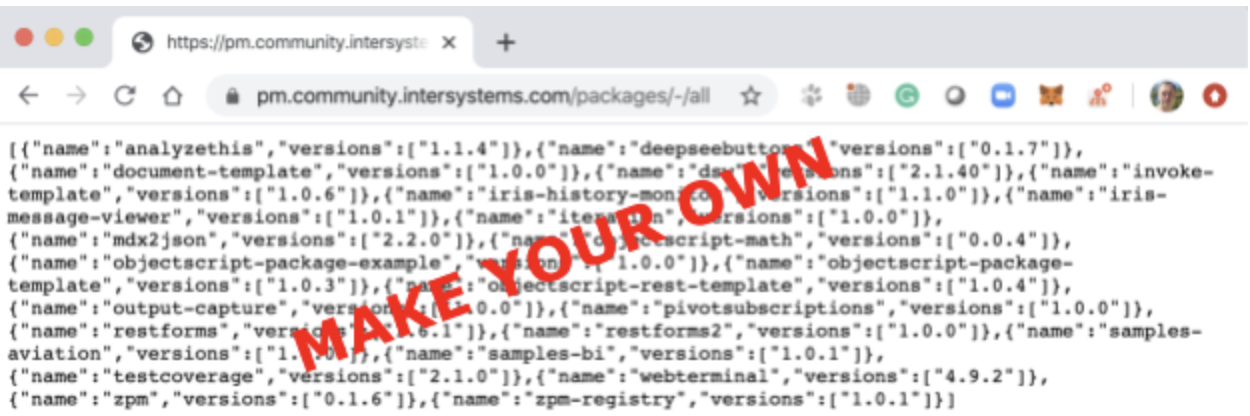
As you know the concept of ObjectScript Package Manager consists of ZPM client - client application for IRIS which helps you to install packages from the registry. And the code which works "on the other side" is  ZPM Registry - server which hosts packages and exposes API to submit, list and install it. Now when you install the ZPM client it installs packages from community package registry, which si hosted on pm.community.intersystems.com

But what if you want your own registry? E.g. you produce different software packages for your clients and you want to distribute it via private registry?  Also, you may want to use your own registry to deploy solutions with different combinations of packages.

Is it possible? The answer is YES! You can have it if you deploy ZPM registry on your server with InterSystems IRIS.

To make it happen you would need to set up your own registry server.

How to do that?

2
1 1353
Article Laura Blázquez García · May 23, 2025 1m read

Let me introduce you to FHIRCraft, a lightweight tool to generate synthetic FHIR resources.

Now, you might be thinking:
“But wait — doesn’t Synthea already do that, and with tons of resources?”
Exactly — and that’s precisely why I created this app.

FHIRCraft is designed to generate simpler, smaller, and more focused FHIR resources. Unlike Synthea, it doesn’t aim to simulate entire patient histories or clinical workflows. Instead, it helps when you’re just getting started with FHIR — when you want to test things incrementally, or explore how specific resources behave in isolation.

2
2 310
Question Flávio Lúcio Naves Júnior · Nov 7, 2023

Hello everyone,

I am attempting to implement continuous integration using Docker with Caché 2018.1, and I am in the process of creating an image for our client. I have already installed Caché 2018.1 on the RedHat server, but I am working on a script to create the database and namespace. For the database, I used the following code:

do ##class(SYS.Database).CreateDatabase("/usr/cachepoc/cache2018/mgr/poc/")

However, I have encountered some issues with this code.

4
0 661
Article Kunal Pandey · May 12, 2025 1m read

Introducing Smart Clinical Sidechick — the intelligent, no-drama partner your EHR wishes it could be. She reads FHIR data in real time, interprets lab results without ghosting, and explains clinical alerts like she actually cares. Built with GPT-4 brains and YAML sass, she’s not here to replace your main EHR—just to make it look bad. Tired of irrelevant alerts and cryptic warnings? Sidechick serves up real, explainable insights, not vague “elevated risk” vibes. And when your backend crashes, she doesn’t panic—she self-heals.

0
1 272
Question Oliver Wilms · Apr 27, 2025

I combined @Rodolfo Pscheidt https://github.com/RodolfoPscheidtJr/ollama-ai-iris with some files from @Guillaume Rongier https://openexchange.intersystems.com/package/iris-rag-demo.

My own project is https://github.com/oliverwilms/ollama-ai-iris

I can run load_data.py and it connects to IRIS (same container).

When I try to run query_data.py https://github.com/oliverwilms/ollama-ai-iris/blob/main/query_data.py , it cannot connect to ollama:

ConnectionError: Failed to connect to Ollama. Please check that Ollama is downloaded, running and accessible.

I wonder if I need to add in query_data.

3
0 208
InterSystems Official Daniel Palevski · Apr 22, 2025

The 2024.1.4 and 2023.1.6 maintenance releases of InterSystems IRIS® data platform,InterSystems IRIS® for HealthTM, and HealthShare® Health Connect are now Generally Available (GA). These releases include the fixes for the following alert recently issued - Alert: SQL Queries Returning Wrong Results | InterSystems. Please share your feedback through the Developer Community so we can build a better product together.

0
0 246
Discussion Oliver Wilms · Apr 20, 2025

I read the article by @Rodolfo Pscheidt:

https://community.intersystems.com/post/ollama-ai-iris

I forked his app and copied selected files from @Guillaume Rongier iris-rag-demo to make it containerized:

oliverwilms/ollama-ai-iris
 

I ran load_data.py and I got this output:

irisowner@e10968e4da42:/irisdev/app$ python3 load_data.py
Document ID: cbfa2f20-6627-407b-bbad-31722d18ca13
modules.json: 100%|█████████████████████████████████████████████████████████████| 349/349 [00:00<00:00, 778kB/s]
config_sentence_transformers.

0
0 159
Question Oliver Wilms · Apr 19, 2025

I cloned iris-rag-demo from Open Exchange and issued docker-compose up -d. I went to the front end and type in the chat message:

Who was the 46th President of United States of America?

I got a run time error:

RuntimeError: ERROR <Ens>ErrBPTerminated: Terminating BP ChatProcess # due to error: ERROR #5002: ObjectScript error: <PYTHON EXCEPTION> *<class 'RuntimeError'>: <PYTHON EXCEPTION> <class 'ValueError' > ERROR #5002: ObjectScript error: <PYTHON EXCEPTION> *<class 'RuntimeError'

Traceback:

File "/irisdev/app/src/python/rag/app.py", line 28, in process_input agent_text = _service.ask(user_text, rag_enabled) ^^^^^^^^^^^^^^^^^^^^^^^^^^^^^^^^^^^^

0
0 120
Article Patrick Jamieson · Apr 15, 2025 6m read

I know that people who are completely new to VS Code, Git, Docker, FHIR, and other tools can sometimes struggle with setting up the environment. So I decided to write an article that walks through the entire setup process step by step to make it easier to get started.

I’d really appreciate it if you could leave a comment at the end - let me know if the instructions were clear, if anything was missing, or if there’s anything else you'd find helpful.

The setup includes:

✅ VS Code – Code editor
✅ Git – Version control system
✅ Docker – Runs an instance of IRIS for Health Community
✅ VS Code REST Client Extension – For running FHIR API queries
✅ Python – For writing FHIR-based scripts
✅ Jupyter Notebooks – For AI and FHIR assignments

Before you begin: Ensure you have administrator privileges on your system.

In addition to reading the guide, you can also follow the steps in the videos:

For Windows

2
2 546
Discussion Alex Woodhead · Apr 10, 2025

Background

Embeddings is a new IRIS feature empowering the latest capability in AI semantic search.
This presents as a new kind of column on a table that holds vector data.
The embedding column supports search for another existing column of the same table.
As records are added or updated to the table, the supported column is passed through an AI model and the semantic signature is returned.
This signature information is stored as the vector for future search comparison.
Subsequently when search runs, a comparison of the stored signatures occurs without any further AI model processing overhead.

0
2 172
Question Kurro Lopez · Mar 25, 2025

Hi all.

I'm trying to create an indexed table with an vector field so I can search by the vector value.
I've been investigating and found that to get the vector value based on the text (token), use a Python method like the following:

ClassMethodAs%String

The model all-MiniLM-L6-v2 is downloaded from https://ollama.com/library/all-minilm and installed into my Docker instance.

When I've tryed to test this métod (from Visual Studio), it throws the following error:

<THROW>DebugStub+40^%Debugger.System.1 *%Exception.PythonException <PYTHON EXCEPTION> 246 <class 'OSError'>: It looks like the config file at '/opt/irisbuild/all-MiniLM-L6-v2/config.json' is not a valid JSON file. 
2
0 192