29 Followers · 56 Posts

The InterSystems Change Control Record (CCR) application is used to help manage changes to deployed applications, both within InterSystems as well as at healthcare end-user sites (i.e. TrakCare and HealthShare customers).  It is a tool that helps to document changes, enforce best practice workflow, and automate source control integration and change promotion between different environments.

The CCR tag on the InterSystems Developer Community is intended to allow CCR users around the world to connect with each other to ask how-to questions, share best practices, and engage with InterSystems developers who maintain the application and tools.  NOTE - usage of CCR is limited to sites implemented by or hosted by InterSystems (it is not available to all customers of InterSystems products).  

When posting a CCR related Question or Article to the Developer Community, please select the Group based on your product (HealthShare or TrakCare) and then select "CCR" as one of the tags.  

Helpful Links:
CCR Application
ICC Training Reference Material 
ICC Online Training (search for "ICC")
CCR Tech Specialist Professional Certification

InterSystems staff + admins Hide everywhere
Hidden post for admin
Article Ben Spead · Oct 17, 2024 2m read

Users of the InterSystems Change Control Record application (CCR) often ask for useful resources which can help them learn CCR and stay in the loop on updates.  Please see this list of resources below and post ideas for additional resources or questions you may have!

0
4 276
Announcement Ali Nasser · Jan 29

Hello InterSystems EHR community, 

InterSystems Certification is currently developing a certification exam for CCR Tier 2 users, and if you match the exam candidate description below, we would like you to beta test the exam! The exam will be available for beta testing starting January 27, 2026. 

Beta testing will be completed March 28, 2026.

What are my responsibilities as a beta tester?

0
0 87
Announcement Maria-Sophia Fedyk · Jan 14

CCR now includes an AI-powered 'CCR Assistant', available to beta testers. The CCR Assistant helps you quickly get answers about common CCR workflows, terminology, or best practices. Every response includes references to relevant ICC Training courses, making it easy to dive deeper into any topic. As a future improvement, the links will point directly to the specific page of the ICC Training PDF that was used to generate the response.

4
0 166
Article Matthew Giesmann · Jan 15 2m read

Over the last year, the CCR development team has prioritized changes to the CCR application to better expose and encourage best practices for using CCR. This article will highlight some of the areas that we've focused on:

  • Organization Dashboard
  • System Alerts
  • Branch Hygiene

In each of these areas, we have increased the visibility of potential CCR usage issues and given users tools to proactively address them.

Organization Dashboard

We have continued to build out the available information on the Organization details page

0
0 54
Article Iskander Shangareev · Feb 14, 2025 2m read

CCR users can now take advantage of an enhanced syntax for substituting pre-defined tokens with live URL links within phase-related text fields. In addition to the existing <env> token which automatically updates to reflect the Environment of the relevant CCR Record, CCR now introduces three new keywords: <smp> , <smpPrefix> , and <homepage>.

3
0 246
Announcement Ben Spead · Jul 17, 2025

Hello CCR Users at TrakCare sites!

The Certification team at InterSystems Learning Services is currently developing an InterSystems CCR EHR (aka TrakCare) Specialist certification exam, and we are reaching out to our community for feedback that will help us finalize the exam contents.

How do I provide my input? Complete our Job Task Analysis (JTA) survey! We will present you with a list of job tasks, and you will rate them on their importance as well as other factors.

1
0 121
Announcement Ben Spead · Jun 23, 2025

All,

At READY 2025 we will have a CCR User Group Breakfast for HealthShare and TrakCare customers on Wednesday at 7:30am (presentation starts at 7:45am).  Topics will include:

  • Review of Self Service Best Practice Dashboard
  • Recent CCR New Features and Enhancements
  • Active CCR Feature Beta Programs
  • Summer and Fall Roadmap
  • Q&A 

We will meet in the Jackson meeting room.  Visit the Meeting Counter to have it added to your schedule or comment below to request an invite.

0
0 84
Article Maria-Sophia Fedyk · May 21, 2025 1m read

We're excited to announce the first-ever UI update for CCR Client Tools. The Client Tools UI has been upgraded to match the modern CCR UI, aiming to create a more seamless experience across both applications. The color scheme, fonts, and style elements have all been updated accordingly in the new UI:

1
0 157
Discussion Nick Petrocelli · Jun 21, 2024

Hello everyone, 

My team is currently developing guidance and best practices for the generation, storage, and deployment of TUNE TABLE statistics across development and production environments. With that in mind, we want to get an idea of what methods teams in the field have developed for handling this data. In particular, we’d like to know the following: 

3
1 294
Question Ben Spead · Mar 8, 2024

Last year we introduced our new angular-based View page for CCR as part of the UI refresh for the application.  This has been used very effectively by close to 1000 users around the world as the default UI for viewing CCR, and as a result we're getting ready to completely disable the "classic" View page. 

Benefits of the new page include:

  • modern look and feel
  • reworked UX   
  • dynamic data updates
  • new tabbed access to reduce scrolling
  • dynamic workflow visualization (coming soon)
6
1 343
Announcement Vivian Lee · Mar 11, 2024

Now users can filter the CCR table by multiple conditions for the CCR tables displayed on the home page and the CCR tab of the System Details page.

Previously users were only able to filter the rows by one condition at a time. This made it cumbersome for users to quickly find CCRs that they knew met multiple conditions, as they would have to choose the condition that would produce the least number of results for them to then manually filter through. 

1
1 262
InterSystems Official Evan Gabhart · Aug 23, 2023

CCR Client ItemSets now have a "stale" cut-off time. When a client-bound ItemSet is created in CCR, a user has 24 hours to deploy it to any environments. After 24 hours, this ItemSet is no longer deployable or downloadable. The deploy links will be disabled and instead the user will notice a "Refresh ItemSet" option which will create a new ItemSet. Users can then use this fresh ItemSet to deploy their changes, see below:

Stale ItemSet:

Fresh ItemSet:

1
0 200
Announcement Ben Spead · Aug 4, 2023

There is an exciting new Organizational Dashboard feature available within CCR.  This new functionality allows users to get a wholistic view of the CCR usage within their organization, allowing things like:

  • See warnings for when organizational usage patterns need to be adjusted
  • View total CCR volume
  • Explore the most active CCR Systems
  • Identify DB version of various Environments
  • Discover which Systems are no longer active and are candidates for Depreciation
  • List the CCR Client Tool update dates to see what is out of date (to be released shortly)
  • Examine number of active CCR users, their CCR activity volume and which of them are Perforce users
  • Correct ItemSets which are troubled across all Systems
8
0 339
Announcement Alexander Obolenskiy · Jul 6, 2023

Hello,

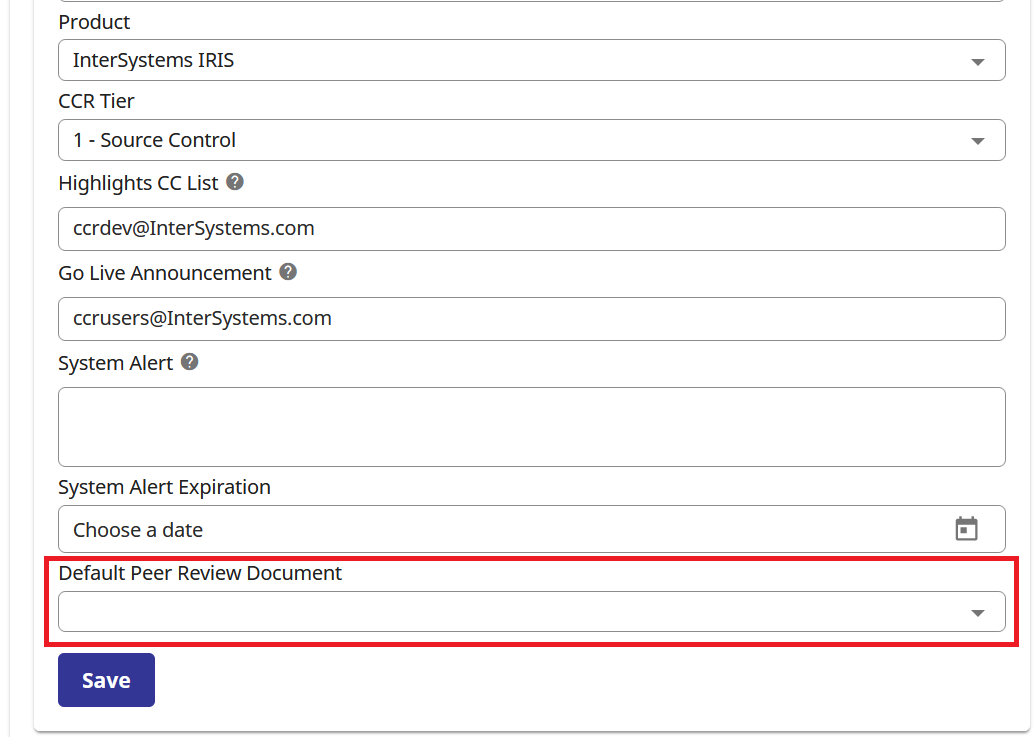
We have added the ability to select a default Peer Review Document for a System. To select it, open the CCR Systems page, and pick the desired Document from the dropdown.

The System-level default document overrides the Organization-level document when reviewing a CCR. The User-level document has precedence over both. The introduction of a System-level default peer review document allows different Systems within an Organization to follow different Peer Review practices.

1
0 256
Announcement Matthew Giesmann · May 1, 2023

Hello,

As of today, all CCR users default to the new view UI on new logins. We don't expect any issues, but please report anything that you encounter.  

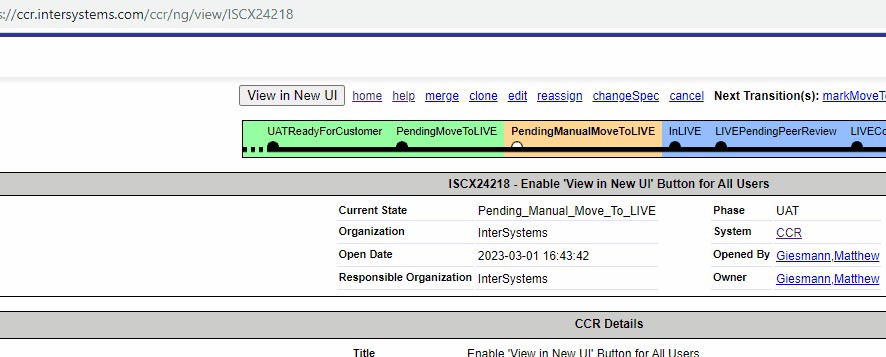
All users will continue to have access to the classic UI for some time via a button at the top and bottom of the view page (see below).

1
0 239
Announcement Ben Spead · Apr 3, 2023

With the InterSystems Global Summit 2023 coming up, I wanted to ensure that our users of CCR hear that there will be an opportunity at Global Summit to take the CCR Technical Implementation Specialist Certification for Free!!    If you haven't been certified yet, this is a great opportunity to do so if you will be attending the conference.

See https://summit.intersystems.com/event/c9b5de9f-aa57-4a05-810b-236fd5a1a… for details on how to register for a free exam sitting.  Good luck!

0
0 322
Announcement Matthew Giesmann · Mar 6, 2023

Hello CCR Users,

The new CCR view page is now available to all users via an opt-in toggle a at the top and bottom of the view page.

We hope all users will give the new UI a try and provide us with any feedback that you have through your normal support channels.

Thank you to the beta users who have been using this page for a while, making sure its full release goes smoothly! You can always update your beta user status here.

Thanks!

Matt

1
0 334
Announcement Emily Geary · Dec 27, 2022

While you don't need to take your exam before the end of 2022, the vouchers provided to the UK&I Summit 2022 must be redeemed before January 1, 2023. Please register for an exam before time runs out. 

You can find additional information about the InterSystems Certification Program here.

0
0 241
Announcement Matthew Giesmann · Dec 12, 2022

Today we have made the new CCR view page the default for CCR beta users.   

The option to toggle back to the classic UI is available in the navigation bar at the top and bottom of the page.

Please let us know of any issues you encounter or general feedback you have on the page, and thank you to everyone who tried the page in its initial release and provided us with great feedback already! 

1
0 270
Announcement Matthew Giesmann · Oct 19, 2022

Starting today, we have release the new CCR view page to beta users! 

As the view page contains a lot of functionality, we are giving users the ability to toggle their session between the new UI and the classic UI view pages.   Your sessions will default to the classic UI for now, but beta users will see a "View in New UI" button in the nav bar for Tier 0 and 1 CCRs:

Similarly, the new UI page will have a "View in Classic UI" button at the top:

At any time, disabling your beta user flag will return you to the Classic UI for viewing CCRs.

1
0 215