#VSCode

14 Followers · 440 Posts

VSCode is a short name form for a popular cross-platform editor VisualStudio Code from Microsoft.

Learn more.

InterSystems staff + admins Hide everywhere
Hidden post for admin
Announcement John Murray · Jun 29, 2023

VS Code has a powerful snippets capability, and its Marketplace offers a way for developers to publish their snippets so others can use them. However, publishing on Marketplace takes some effort and snippets targeting InterSystems coders will realistically only be of interest to a very small number of Marketplace visitors.

This inspired me to create oex-vscode-snippets-template, a GitHub template for creating repositories dedicated to publishing code snippets for InterSystems devs.

5
0 434
Article Muhammad Waseem · Jul 4, 2023 6m read

As an AI language model, ChatGPT is capable of performing a variety of tasks like language translation, writing songs, answering research questions, and even generating computer code. With its impressive abilities, ChatGPT has quickly become a popular tool for various applications, from chatbots to content creation.
But despite its advanced capabilities, ChatGPT is not able to access your personal data. So in this article, I will demonstrate below steps to build custom ChatGPT AI by using LangChain Framework:

0
1 13125
Announcement Laurel James (GJS) · Jun 1, 2023

As the announcement of Studio's deprecation has been made, users may be wondering about making a smooth transition to VS Code. 

George James Software has extensive experience in VS Code, through regularly contributing to VS Code itself and building and maintaining a number of Extensions. This, combined with our expert knowledge of InterSystems technologies, gives us an in-depth understanding of what the process involves and means we have the unique capabilities to ensure a smooth migration from InterSystems Studio to VS Code. 

We offer bespoke consultation, with recommendations that are tailored to your organization's specific needs. Alternatively, we will be hosting a monthly public webinar that is designed specifically for users migrating from Studio to VS Code. 

If you're ready to make the switch and would like to find out more, please come and speak to us at the Global Summit next week - you'll be able to find George James Software in the Partner Pavilion. Our team will be happy to chat with you about how you can ensure your migration is seamless. 

Alternatively, you can send me a direct message here on the Developer Community, or email us at info@georgejames.com

3
0 489
Question Gautam Rishi · Jun 17, 2023

I want to connect IRIS system as it has all the database tables. on top of that I am creating a REST API in python. How can I connect to IRIS DB. here is my example code for connection

def connect():

connection_string = "localhost:1972/USER"

username = "_SYSTEM"

password = "SYS"

conn = iris.connect(connection_string, username, password)

after this connection is created but how can I get tables data. Please let me know more about how we can integrate IRIS database into a python REST API.

1
0 471
Question Michael Gosselin · Jun 15, 2023

I am trying to set up VS Code so that it will connect to a new server running IRIS 2023.1, and I can't seem to get the setup to accept my errors. I enter all the requested information, and at the end I receive a message:

Failed to store server '$(name)' definition.

Source: InterSystems Server Manager (Extension)

I've submitted a bug log with VSCode, but then I noticed the source, and figured it might be related to the extension instead of the program, and was wondering if others have received this message. The VSCode is 1.79.1, for the record.

Thanks as always.

10
0 397
Question Eduard Lebedyuk · Jun 15, 2023

How to import Custom Schemas from VSCode? They look like this:

<?xml version="1.0"?><Categoryname="ITK"description="xmlns:hl7='urn:hl7-org:v2xml' xmlns:xsi='http://www.w3.org/2001/XMLSchema-instance'"std="1"><MessageTypename='ACK'structure='ACK'returntype='ACK'description='xsi:schemaLocation="urn:hl7-org:v2xml ACK.xsd"'/></Category>

Instead of wrapped XML export produced by $system.OBJ:

2
0 368
InterSystems Official Raj Singh · May 10, 2023

InterSystems is committed to providing a high quality developer experience including a great IDE (Integrated Developer Experience). For the past several years we have been evolving Visual Studio Code's ObjectScript tooling in parallel with our long-standing IDE, InterSystems Studio. There have been over 46,000 downloads of the VSCode-ObjectScript plugin, and the feedback from developers is that this is a great developer experience, and now superior to InterSystems Studio.

67
2 3585
Article Lucas Enard · Aug 2, 2022 8m read

On this GitHub you can find all the information on how to use a HuggingFace machine learning / AI model on the IRIS Framework using python.

1. iris-huggingface

Usage of Machine Learning models in IRIS using Python; For text-to-text, text-to-image or image-to-image models.

Here, models as example :

5
1 894
Article John Murray · Feb 6, 2023 2m read

Strap on this jetpack to boost your developer experience in Visual Studio Code.

DX Jetpack for VS Code was my entry for the 2023 Developer Tools Contest, where it achieved 2nd place in the Experts vote and 5th place in the Community vote. It is an extension pack for VS Code, bundling three entirely new extensions created by me, plus a couple that we at George James Software published previously.

The new extensions are:

If you're reluctant to install DX Jetpack right away, why not try it using a dev container? In the dev container is an InterSystems IRIS Community environment augmented with InterSystems Package Manager (IPM) and the isc-codetidy package.

2
1 620
Question Brendan Blackford · May 17, 2023

Hi,

I'm trying out VS Code with IRIS for Health 2023.2 (not available in above dropdown) in a local container.  I can open read-only files in the Objectscript viewer and have a local folder connected to the correct namespace.  However, when I make changes and try the "import and compile" option, I get:

ERROR #16006: Document <filepath> name is invalid

The first four chars of <filepath> appear to have been truncated

Here is my settings.json

{

    "security.workspace.trust.untrustedFiles": "open",

    "workbench.colorTheme": "InterSystems Default Dark",

    "intersystems.servers": {

4
0 556
Announcement Laurel James (GJS) · Apr 26, 2023

Deltanji 7.1 is now available.

Key updates include: 

* Interoperability Production component driver included, for customers who have purchased the add-on. You can watch a short demo of it here.
* Implement multi-select delete of objects and components
* Add setting to give a passable Beyond Compare launch command line
* Support simplified Locations & Routes diagram 

For more information, read the release notes here >> https://bit.ly/3mHyJHc

Please get in touch with support@georgejames.com for your release kit. 

The update is also available for Serenji debugger users on VS Code, which has the Deltanji solo edition embedded. Simply update the Serenji extension to version 3.2.3 or later and load the server-side code. 

0
0 228
Article Evgeny Shvarov · Oct 15, 2022 1m read

Hi Devs!

For me, one of the most painful things about ObjectScript is ##class(Class).Method() typing to call a class method in code or in a terminal. I even submitted an idea to simplify it in ObjectScript.

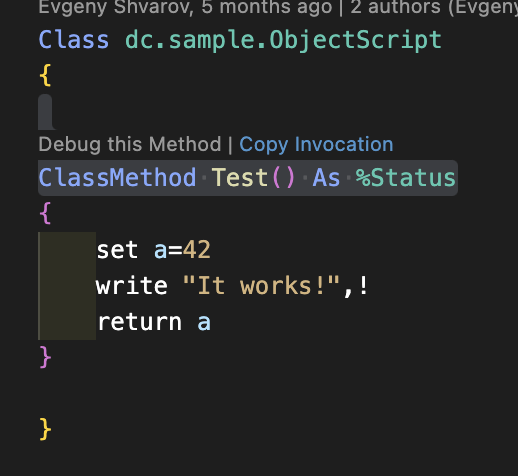
But! There is a new feature in VSCode ObjectScript that was just introduced to the plugin - Copy Invocation!

Just hover Copy Invocation link above every classmethod in a code, click on it and the invocation is copied to the buffer:

Paste it anywhere you want it to execute!

USER>w ##class(dc.sample.ObjectScript).Test()

Bazinga!

Here is the video that shows how it works.

7
2 762
Announcement John Murray · Apr 21, 2023

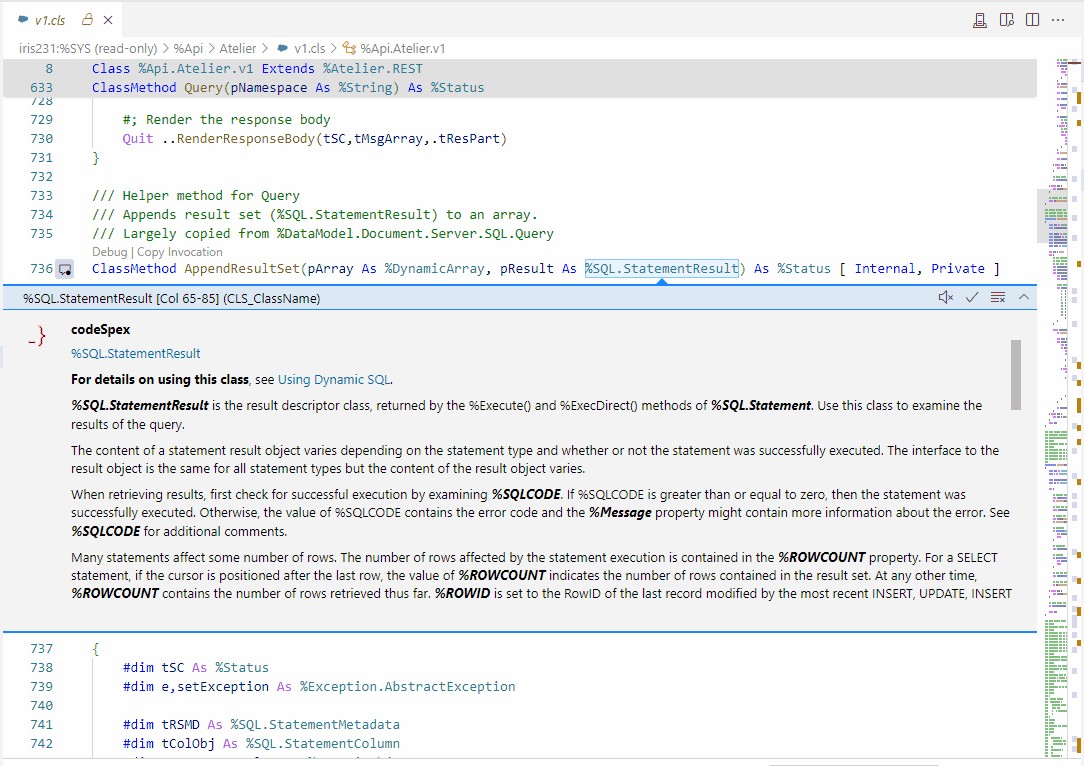
Our gj :: codeSpex extension for VS Code, which is part of the DX Jetpack, allows documentation to be displayed inline while you are coding classes. In some cases the documentation is extensive, and the lack of scrolling support in the VS Code comment element we are using was degrading the DX.

By contributing a pull request to the VS Code project (my 94th accepted in the past four years) I was able to get this resolved. It landed in today's Insiders and will reach the general release (a.k.a. Stable) next month when 1.78 ships. Here's the result:

0
0 201
Article Zhong Li · Mar 28, 2023 10m read

​Keywords: ChatGPT, COS, Lookup Table, IRIS, AI 

Purpose


Here is another quick note before we move on to GPT-4 assisted automation journey. Below are some "little" helps ChatGPT had already been offering,  here and there, during daily works. 

And what could be the perceived gaps, risks and traps to LLMs assisted automation, if you happen to explore this path too. I'd also love to hear anyone's use cases and experiences on this front too. 

Lookup tables

3
2 718
Announcement Anastasia Dyubaylo · Mar 24, 2023

Hi Developers,

Often we create and edit InterSystems IRIS Interoperability solutions via a set of UI tools that is provided with IRIS. But it is sometimes difficult to setup the development environment to handle changes we make in the UI to source control.  

This video illustrates how git-source-control helps with source control Interoperability components while changing it in the UI.

⏯ Git Source Control for InterSystems IRIS Interoperability with Docker and VSCode

0
2 873
Article Yuri Marx · Sep 26, 2022 9m read

Visual Studio Code (VSCode) is the most popular code editor on the market. It was created by Microsoft and distributed as a free IDE. VSCode supports dozens of programming languages, including ObjectScript, Until 2018, Atelier (based on Eclipse). It was considered as one of the main options to develop InterSystems products. However, in December 2018, when the InterSystems Developer Community launched support for VSCode, a relevant portion of InterSystems professionals started actually using this editor and have been doing it ever since, especially the developers working with new technologies

4
5 2390
Discussion Colin Brough · Mar 10, 2023

In a healthcare setting we've an Ensemble namespace through which passes a key HL7 feed (the ADT feed from our PAS). It is split up, transformed and passed on to multiple downstream systems. We consider the feed going to each downstream system an interface. Each interface is developed as separately as possible - typically as a separate branch of our git repo (which we access via VS Code).

0
0 296
Article Luis Angel Pérez Ramos · Feb 20, 2023 4m read

Dear community members!

A very common problem of our users is to use an external database as data source in an IRIS production. As many of you already know, we have two ways to connect directly to an external database, the first one is using an ODBC connection, the second is using JDBC.

In our example we are going to create a connection using JDBC, and we are going to build a simple Docker's project, in this way you will be able to modify the example as you wish.

The code is available from this URL: https://github.com/intersystems-ib/workshop-sql-jgw

0
0 553
Question Mark OReilly · Jan 11, 2023

Is there an easy way to open classes in VS Code?

In studio you go open and just type the class name and it opens up the class. 

In VS Code need to know the full path, is there a quick way? It is probably the one thing preventing from using VSCode full time (apart from not seeing the .luts or csp files)

15
0 5596
Announcement John Murray · Feb 12, 2023

It's not too late to strap into the DX Jetpack for VS Code, take it for a test flight, and consider voting for it.

Online demo on Gitpod is HERE.

Ignore any initial notifications about ports being opened.

The ServerDiff extension will ask for permission to reinstall itself in order to use the `quickDiff` API proposal that it relies on. Click 'Yes'.

Open the README.md by double-clicking on it, thenshow as a preview (command is "Markdown: Open Preview", shortcut is Ctrl + Shift + V).

Enjoy your flight! Comments welcome below.

0
0 109