#Tips & Tricks

12 Followers · 325 Posts

Pieces of experience in InterSystems Technology which solve some particular problem in elegant or unusual way.

Article Luis Angel Pérez Ramos · Jul 17, 2023 10m read

Hello again everyone.

In our previous article we saw how to configure our EMPI to receive FHIR messages. To do this we installed the FHIR Adapter that InterSystems made available to us that configured a REST endpoint to which we could send our FHIR message. We would then get the message and transform it to a %String that we would send via TCP to the output of our EMPI configured in our HSPIDATA namespace.

Alright, it's time to see how we retrieve the message, transform it back to a %DynamicObject and parse it to the class used by the EMPI to store the information.

Message reception by TCP

As we

0
0 352
Article Mihoko Iijima · Jul 13, 2023 2m read

InterSystems FAQ rubric

It can be obtained by using the Size query of the system-provided %SYS.GlobalQuery class.

See the sample code below for usage examples.
*Please check the class reference for specifying columns and parameters.

 set dir="C:\intersystems\iris\mgr\user" // IRIS.DAT(or CACHE.DAT) folder
 set rs = ##class(%ResultSet).%New("%SYS.GlobalQuery:Size")
 do rs.Execute(dir) // You can also specify a mask with the 3d parameter
 while (rs.Next()) { 
   set gname= rs.Get("Name") // global name
   set gsize= rs.Get("Used MB") // global size (MB)
   write gname," : ",gsize,!
 }

If

0
2 662
Article Hiroshi Sato · Jul 6, 2023 1m read

InterSystems FAQ rubric

The InterSystems ObjectScript language does not allow you to define methods of the same name with different arguments. It is generally classified as a programming language called a dynamic language.

In ObjectScript, you can freely control which arguments are used when executing a method, so unlike languages ​​such as Java, which are not dynamic programming languages, there is no need to strictly distinguish methods by the number of arguments at the compilation stage.

The ObjectScript language, therefore, does not contain a language specification commonly called

0
1 376
Article Ben Spead · Apr 25, 2018 6m read

NOTE:  This content was originally presented at the InterSystems Global Summit in 2014, however related topics often come up on the Developer Community so I have decided to turn this into an article for easier reference and discussion.  However, much of the content was pulled directly from the presentation slides so the article format resembles that of a PPT deck more than paragraphs.

Introduction

Teams that deal with many environments (e.g. for development, testing and production) multiplied by many systems (e.g. billing app, hr app, support app) can face a number of changes:

  • Getting to a
1
4 1144
Article Mihoko Iijima · Jun 29, 2023 3m read

InterSystems FAQ rubric

For volatile tables (tables with many INSERTs and DELETEs), storage for bitmap indexes can become inefficient over time.

For example, suppose that there are thousands of data with the following definition, and the operation of bulk deletion with TRUNCATE TABLE after being retained for a certain period of time is repeatedly performed.

Class MyWork.MonthData Extends (%Persistent, %Populate)
{
/// Level of satisfaction
Property Satisfaction As %String(VALUELIST = ",満足,やや満足,やや不満,不満,");
/// Age
Property Age As %Integer(MAXVAL = 70, MINVAL = 20);
Index AgeIdx On Age [
0
0 379
Article Hiroshi Sato · Jun 22, 2023 1m read

InterSystems FAQ rubric

Countermeasures against SQL injection have been published on various websites, but we believe that it is possible to prevent SQL injection in applications using InterSystems SQL as well as other RDBMS by implementing these countermeasures appropriately. In addition, InterSystems Data Platform (hereinafter referred to as IRIS) incorporates several measures that make SQL injection more difficult than general RDBMS.

  1. InterSystems SQL does not allow multiple SQL statements to be executed in a single request, so the technique of adding a malicious command as input after a
0
0 626
Article Megumi Kakechi · Jun 15, 2023 1m read

InterSystems FAQ rubric

Query cache can be purged programmatically using the Purge* methods of the %SYSTEM.SQL class.

*For details of each method, please refer to the following documents.

%SYSTEM.SQL class【IRIS】

%SYSTEM.SQL class

① When deleting all query caches in the system

Do $SYSTEM.SQL.PurgeAllNamespaces()


② When deleting the query cache in the namespace

// delete all cached queries in namespace
Do $SYSTEM.SQL.Purge()
// when deleting the query cache specified by date
// the following deletes the cache not used in the last 30 days

Do $SYSTEM.SQL.Purge(30) 

③ When specifying and deleting the query

0
0 414
Article Hiroshi Sato · May 25, 2023 2m read

This is an article on the InterSystems FAQ site.

 1. Export API

a. Use $system.OBJ.Export() to specify individual routines to export. For example:

do $system.OBJ.Export("TEST1.mac,TEST2.mac","c:\temp\routines.xml",,.errors)

The format to specify is routine name.extension, and the extension is mac, bas, int, inc, obj.

Errors during export are stored in errors.

See the class reference %SYSTEM.OBJ for details on $system.OBJ.Export().

b. Use $system.OBJ.Export() even when exporting with wildcards. For example:

do $system.OBJ.Export("*.mac",c:\temp\allmacroutines.xml")

*Before version 2008.1, use $system.OB

2
2 827
Article Mihoko Iijima · Jun 8, 2023 1m read

InterSystems FAQ rubric

Since SELECT ... FOR UPDATE is implemented in many RDBMS as a method of explicit row lock acquisition, I think there are many cases where this function is used.

This syntax is not an error for InterSystems products, but it does not acquire row locks as expected.

This article will show you how to achieve equivalent functionality.

DECLARE CURSOR C1 IS
SELECT Name FROM Person WHERE Name LIKE 'A%' FOR UPDATE
OPEN C1
LOOP FETCH C1 INTO name 
... show name
... EXIT the LOOP when finished
END LOOP
CLOSE C1

The above SQL statement can be substituted with the following SQL

0
0 396
Article Hiroshi Sato · May 18, 2023 2m read

InterSystems FAQ rubric

Using the Config.Configuration class and SYS.Database class methods, you can create and register a namespace database from the terminal.

Below is a series of execution examples that create database file /CacheDB/AAA/cache.dat and register database AAA and namespace AAA in the configuration file (cache.cpf).
* Execute in the %SYS namespace. *

* Make sure that this script runs as the user  that is used for all IRIS processes to ensure that the directory has appropriate ownership and permissions *

Set Directory="/CacheDB/AAA/"
Set
3
0 536
Article David Hockenbroch · Jun 2, 2023 5m read

We are looking at what we need to do to migrate from our current usage of Zen reports to InterSystems Reports. One of the hurdles for us is figuring out ways to interact with InterSystems reports programmatically from ObjectScript routines. There is a Java API for it, but it is possible to generate a report from InterSystems reports to a stream object in ObjectScript without diving into Java by using a %Net.HttpRequest. Here is a code example, followed by an explanation:

#include %cspIncludeGetStream(catalog="",report="",type="2",paramnames,paramvalues,str) public{
     try{
        set nam
0
0 278
Article Luis Angel Pérez Ramos · May 25, 2023 4m read

You may have already heard that, starting with IRIS and HealthShare HealthConnect 2023.2 versions, the internal Apache Server will be removed from the default installation, so it will be necessary to have an external application server such as Apache Server or NGINX.


In this article I am going to proceed to install a HealthShare HealthConnect 2023.1 so that it works with a pre-installed Apache Server. For this I will use a virtual machine on which I have installed an Ubuntu 22.04.

Installing Apache Server

As we have indicated, we must previously install our Apache Server and we will do so

0
2 702
Article Michael Angeleri · May 12, 2023 4m read

In this brief article I would like to share a few strategies to run objectscript code in debug mode.

How to enter debug mode

There are two ways to launch the debugger.

Launching a command

Let's suppose that we have to debug the following method

Class Custom.Example Extends%RegisteredObject
{

/// check if a string can be a valid STP code ("STP" + 13 digits)/// w ##class(Custom.Example).isValidSTPCode("STP1234567891011")ClassMethod isValidSTPCode(code As%String) As%Boolean
{
	set STPPrefixCode= "STP"if ($extract(code,1,$length(STPPrefixCode)) = STPPrefixCode) {
		set tmpDX=$piece(cod
4
2 1029
Article Mihoko Iijima · May 11, 2023 2m read

InterSystems FAQ rubric

You can use the system routine ^DBSIZE to estimate the backup file size (see also Note 1).

^DBSIZE estimates the file size of full, cumulative, and differential backups of the databases selected in the database backup list.

The database backup list is created from [System Administration] > [Configuration] > [Database Backup] > [Database Backup List] in the Management Portal.

For more information, please refer to the document below.

Estimate backup size with ^DBSIZE [IRIS]

Estimate backup size with ^DBSIZE

An execution example is as follows.

USER>set $namespace="%SYS"   //or zn
0
0 391
Article Megumi Kakechi · May 4, 2023 2m read

InterSystems FAQ rubric

In Windows, set the processes with the following image names as monitoring targets.

[irisdb.exe]

contains important system processes.
* Please refer to the attachment for how to check important system processes that should be monitored.

[IRISservice.exe]

This is the process for handling IRIS instances via services.
When this process ends, it does not directly affect the IRIS instance itself, but stopping IRIS (stopping the service) is no longer possible.

[ctelnetd.exe]

%Service_Telnet Starts when the service is enabled and becomes a daemon process to access IRIS via Telnet.
Once

0
1 426
Article Hiroshi Sato · Apr 27, 2023 2m read

InterSystems FAQ rubric

Migrating data to another system takes two steps.

1. Migrating class definitions

To migrate the class definition to another system, export it to a file in XML format or UDL format (extension .cls).

The export procedure in Studio is as follows.

Tools > Export

> Select multiple classes you want to migrate with the [Add] button

> Check [Export to local file]

> Confirm that the file type is XML, enter a file name, and click [OK].

After this, import the exported XML and UDL files in the studio on another system. The import procedure in Studio is as follows.

Tools > Import from Local

>

4
0 435
Article Evgeny Shvarov · Oct 15, 2022 1m read

Hi Devs!

For me, one of the most painful things about ObjectScript is ##class(Class).Method() typing to call a class method in code or in a terminal. I even submitted an idea to simplify it in ObjectScript.

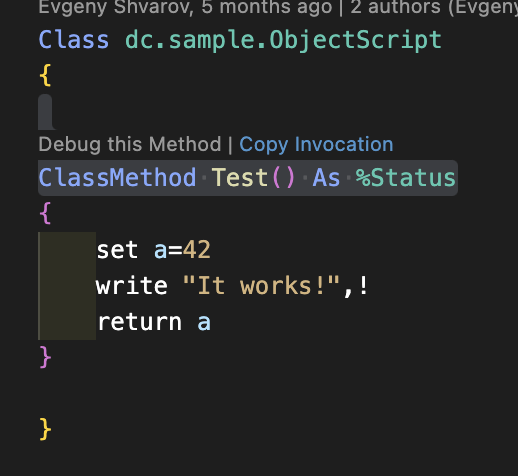
But! There is a new feature in VSCode ObjectScript that was just introduced to the plugin - Copy Invocation!

Just hover Copy Invocation link above every classmethod in a code, click on it and the invocation is copied to the buffer:

Paste it anywhere you want it to execute!

USER>w ##class(dc.sample.ObjectScript).Test()

Bazinga!

Here is the video that shows how it works.

Many thanks to the VSCode

7
2 766
Article Luis Angel Pérez Ramos · Apr 25, 2023 12m read

A common need for our customers is to configure both HealthShare HealthConnect and IRIS in high availability mode.

It's common for other integration engines on the market to be advertised as having "high availability" configurations, but that's not really true. In general, these solutions work with external databases and therefore, if these are not configured in high availability, when a database crash occurs or the connection to it is lost, the entire integration tool it becomes unusable.

In the case of InterSystems solutions, this problem does not exist, as the database is part and the core

4
4 981
Article Mihoko Iijima · Apr 13, 2023 6m read

InterSystems FAQ rubric

In this article, we will introduce how to deal with the situation: "I accidentally deleted a global!"

Backup files and journals are used to recover specific globals that have been accidentally deleted. Restoration is performed by specifying conditions and restoring journal records using the ^ZJRNFILT utility. In this way, you can apply a point-in-time backup of the database up to and including deleting a specific global for journal records that contain deletions. For more information on the ^ZJRNFILT utility, please refer to the document below:

Filter Journal Records

2
1 764
Article Luis Angel Pérez Ramos · Mar 2, 2023 5m read

I've been working for some days in the connectivity between NodeJS client applications and IRIS as server using web sockets.

You can get all the information in relation to the web socket connections using IRIS as a client or as a server from this URL: https://docs.intersystems.com/irislatest/csp/docbook/DocBook.UI.Page.cl…

For this example we are going to configure an asynchronous server, that would be really usefull to create a subscription manager for our productions.

First of all, we have created a really simple persistent object in which we are going to store the session

2
0 586
Article Hiroshi Sato · Mar 23, 2023 1m read

InterSystems FAQ rubric

You can programmatically retrieve routine dates and sizes using the RoutineList query of the %Library.Routine (or just %Routine) class.

The RoutineList query has an argument, and the routine name to be searched can be specified by prefix match or middle match. (For wildcards, specify * or ?)

In the example below, *.MAC is specified as an argument.

SET tStatement =  ##class(%SQL.Statement).%New()
 DO tStatement.%PrepareClassQuery("%Routine" , "RoutineList") 
 SET rs = tStatement.%Execute("*.MAC",,0) 
 DO rs.%Display() 

In addition to the routine list, you can also get

2
0 689
Article Peter Steiwer · Jan 17, 2020 1m read

If you are seeing this error during import: ERROR #6301 Line: 2 Offset: 118 This does not appear to be a Cache exported file, unable to import.

This error is caused by exporting from InterSystems IRIS and trying to import into Caché. If you plan on exporting from IRIS to Caché, you can use the following qualifier to export your classes so that Caché does not throw an error on import:

w $SYSTEM.OBJ.Export(<items>,<filename>,"/exportversion=cache2018.1")

Please see the Documentation for more information about this Export Qualifier

3
0 937
Announcement Anastasia Dyubaylo · Mar 17, 2023

Hey Community,

Tired of entering login-password during the docker build with your InterSystems IRIS every time?

There is a handy way to turn it on and off – use the passwordless zpm module.

Watch this video to explore how to use the passwordless ipm module to turn on and off entering login-password during docker build with your InterSystems IRIS:

⏯️ Passwordless mode for development with InterSystems IRIS

0
0 432
Article Bob Binstock · Sep 6, 2016 19m read

Mirroring 101

Caché mirroring is a reliable, inexpensive, and easy to implement high availability and disaster recovery solution for Caché and Ensemble-based applications. Mirroring provides automatic failover under a broad range of planned and unplanned outage scenarios, with application recovery time typically limited to seconds. Logical data replication eliminates storage as a single point of failure and a source of data corruption. Upgrades can be executed with little or no downtime.

Deploying a Caché mirror does, however, require significant planning, and involves a number of different

22
3 7872
Article Andreas Schneider · Jan 2, 2022 3m read

The last days I've work with the great new feature: LOAD DATA With this post I would like to share my first experiences with you. The following points do not contain any order or other evaluation. These are only things that I noticed when using the LOAD DATA command. It should also be noted that these points are based on the IRIS Version 2021.2.0.617 which is a preview release. So it may be that my observations do not apply to newer IRIS versions. But maybe they are helpful for others.

1) The file path is on server side

I have done my first tests via JDBC.

5
2 1253
Article Robert Cemper · Jan 30, 2023 2m read

The similarity between JSON objects + arrays and Globals in IRIS or Caché is evident.
With small and medium size JSON objects navigation across %Dynamic Objects is comfortable.
But with large and/or deep cascaded objects it becomes a challenge.

The presented tool offers 3 variants

  • loading an already existing %Dyamic object or Array into a global of your choice
  • loading a %Stream containing a JSON object into a global of your choice
  • loading an external File containing a JSON object into a global of your choice
1
2 351
Article Murray Oldfield · Nov 10, 2022 7m read

Overview

Predictable storage IO performance with low latency is vital to provide scalability and reliability for your applications. This set of benchmarks is to inform users of IRIS considering deploying applications in AWS about EBS gp3 volume performance.

Summary

  • An LVM stripe can increase IOPS and throughput beyond single EBS volume performance limits.
  • An LVM stripe lowers read latency.
1
0 2709