A function iterates global ^data(a,b,c) with $order using 3 nested for-loops. At certain point, for example with a=10, b=20, c=30, the function exits and later has to resume the iteration from the same point. What could be easiest way for it? My solution looks too ugly.
Hi! I have a local project written on Cache and Atelier on my PC. I need to move it to notebook. Tried to export globals, classes, MAC-programms and csp with frontend stuff, but after I created my apps on notebook and imported my set, it just didn't work. I think it's because I have some settings on Management Portal, so how can I export portal settings and what I should export to have my working apps on another computer?
Hi everyone!
I want to share four functions with you. I hope that you can use it at some time.
DNI: the initials of the type of national identity document, is composed of different series of numbers and letters. That proves the identity and personal data of the holder, as well as the Spanish nationality. Example: 94494452X
NIE: The NIE or foreigner identity number is a code for foreigners in Spain.
In this page you can generate examples of DNI or NIE https://generadordni.es/
The first function calculates the letter of a DNI number.
I am using the EnsLib.RecordMap.Operation.BatchFileOperation to write a batch to a file but for some reason this has been working fine as of yesterday I had a problem with the cache databases filling up running out of memory so had to compact my database and gain space now when I run the operation I get the above error .Of course in my batch table there is no batch record with ID 1.The message is passed with the correct header information but still get this error any suggestions why?
Hi,
I have a service that I need to receive notifications from when the service has started. Usually this service will be off, but when started a need a method to be called so I can email and be alerted. The only method I know I can use is " OnProcessInput" but this is when an input is received (new file, new message...) but I could not find any events to deal when the service starts...I tried "OnInit" but does not seems to work...any ideas?
Class xxxx Extends Ens.BusinessService
{
Method OnInit() As %Status
{
$$$LOGINFO("INIT")
}
Method OnProcessInput() As %Status
{
// do something here
}
}
{
Method OnInit() As %Status
{
$$$LOGINFO("INIT")
}
Method OnProcessInput() As %Status
{
// do something here
}
}
Hi,
I'm using ensemble and when I try to export from the production I get the following error:
ERROR #5803: Failed to acquire exclusive lock on instance of '%Studio.ProjectItem'
May you please help me?
When hovering over a method call in a CLS file, I can use the F3 as a shortcut to open the source code of the class being called.
Why cannot I not do this from within a script section in a CSP file?
Hi Community!
Please welcome a new session recording from Global Summit 2017:
Shared Development in the 21st Century
Hello,
I'm restating a new posted as its seems that the old was closed but still having problems.
as I mentioned in a previous post and with one of our clients, experiencing different crushing errors when running Crystal Reports and sometimes crystals running but not generating data.etc and we are temporarily fixing them by opening the related classes in Studio and recompiling them and as i mentioned compiling them with $System.OBJ.
Background : We are now using server side shared developer pool via Studio.
I have setup Atelier on my local and forked the code from the server to workspace on my local. Meanwhile another developer made a change in some class and I want to see the changes.
So I went to Atelier Explorer found the class with "small yellow triangle" (this says that the code changed at the server). So right clicked and did a diff against the server version and found the changes. Now I tired to sync my local with server code by clicking right click and "Synchronize". Got following error.
ClassName
Hi, folks. I have an HL7 SIU message inbound that is missing a few fields, such as patient ID and provider ID. I insert this HL7 message and a few of the fields into a SQL database. My SQL team then runs a stored procedure to retrieve the patient ID and provider ID and insert the found values into fields in the table. I would like to then do a select from the table, load the HL7 message and add the fields that were found by the SQL stored procedure into the HL7 message. I'm attempting to use a DTL to accomplish this. My sourceclass is CustomEDI.SQLSIUInRequest and targetClass is EnsLib.HL7.
We need to process 01B edifact files, INVOICE / CREDIT NOTE / DEBIT NOTE, ORDER, MESSAGE STATUS
Does anyone have SEF files or scheme to import , this EDIFACT version or other to use it at Ensemble?
Thanks in adavance!
"Telegram" is a well-known instant messenger, which provides an API for creating bots.  The features of this API allow you to create bots with a wide range of functionality including receiving payments.
With the help of the telegram bot, I solved a simple task - sending Alerts from Ensemble to Telegram.
Advantages: Alerts come to the mobile phone, a notification appears, so there is no need to install any additional applications (in contrast to the solution https://community.intersystems.com/post/sending-alerts-mobile-phone-using-pushover- httpoutboundadapter).
The bot can be extended by adding new commands, for example, for managing the Production or for solving other tasks in Iris, Ensemble or Cache.
Is there a function in Atelier that's equivalent to Studio's "Find in Files"? Namely, to search for assets containing a given search pattern across an entire namespace -- not just across files that are currently in the local project.
I've been playing with the search functions in Eclipse, and so far haven't found a combination of options that will search against assets that are only on the server -- I can only get results for assets that are already in my workspace.
We have multiple developer, multiple edge servers environment. And we are planning to move to Atelier from Studio. I was wondering if someone have suggestions about the followings.
- Should we install Atelier on each server and the developers should edit code on each server instance directly.
- Or each developer should get Atelier on their local machine and map each server instance separately.
- What if we have multiple namespaces on a single server and each namespace is a facility of its own.
Hi,
The following sql statement is working through the SMP but couldn't make it work through the code.
The table is a linked table to oracle db.
Tried to change the date property in the linked table class from %Date to %String and also tried using %SQL.Statement and %Library.ResultSet
this work through SMP:
INSERT INTO PACKAGE.SOME_TABLE_NAME

(EFFECTIVE_START_DATE,MORE,DATA,HERE)

VALUES (to_date ('2018-04-01','yyyy-mm-dd'),123,456,789)
In the code i'm using '?' in the statement for the parameters.
Hi,
Trying to work with REST protocol, using IIS 8, both client and server are Cache servers,
I have the following problem-
When I send a PUT command, I get the following error:
<HTML><HEAD><TITLE>Length Required</TITLE>
<META HTTP-EQUIV="Content-Type" Content="text/html; charset=us-ascii"></HEAD>
<BODY><h2>Length Required</h2>
<hr><p>HTTP Error 411. The request must be chunked or have a content length.</p>
</BODY></HTML>
Get , Post , Delete - work OK.
This problem does not happen if I use Apache, so it's a IIS problem , not a Cache problem.
Hi,
I have a ZEN application that displays PDF files in an 'iframe', embedded on a ZEN popup dialog. embedded in a ZEN page running on IE 11 with its document mode set to 5, which is enough to make most reasonable people give up and start selling hot dogs in the park.
I can display the PDF all day long without issue but when the "window.print()' command is issued all I get for the PDF is an empty area on the printed page when a single page of the PDF should be displayed. The PDF arrives as a normal PDF file and is NOT base64 encoded. I have had limited success using the PDF.
Hi
Made a request for API REST.
Using HTTP Request adapter.
Adapter As EnsLib.HTTP.OutboundAdapter
Outside the Ensemble an API response is JSON (CORRECT)
Answer in Ensemble: =?Á
Â0
?_eä,cÒ
'=
*^<YÙF¡í$í¼ÈÞÝt
oÉ÷ý$?|
¤1¡{Dâhà°Ý?Öù)2ós??R?¸¼?ºd?$,ñD+»??
?
ÔºQZéýNÕ V{C?óò?b¢?éÍ )$
²5Å?wEë? ??©tÖã1z×2FëÊnôeË æ??]Zßq ܺ?á
Help me.
Thank you
Hi,
I would like to add my favourite template at the template menu (Studio): Tools→Templates→Template 1
But I'm unable to find how to do it.
Thanks
Manel
Hi Guys,
We experiencing a strange problem with one of the clients on Cache 2008, for time to time they can't run any of their Crystal reports and each time we had re-compile the classes used in the affected report to get it running, then it happens again for the same reports.
I was wondering if there was a way to easily identify the node depth of a global.
Take the following global example. Is there way to determine the depth is 3?
s ^global("first","second","third")="some^info^here"For those who don't have a chance to vote elsewhere today, or for those who want to vote more than once  , here's a poll for Ensemble users.
Hi Community,
It is my first post and I hope it is the first of many.
I would like to know if any of you knows how to use Tasks Managment in Atelier with .cls class. I think that is a important tool for productivity. Can this tool be used in Atelier? How to use it? I have tried to configure in Atelier preferences and I have not seen the option.

Many thanks in advance.
Regards,
We are going to start using Git within Cache.
One question came up - if the branch that you checked out does not have the class or mac file, what is the correct thing to do?
Should we delete from Cache or should we just keep it?
I'm leaning more towards deleting it because Cache should reflect what is in your work folder in git. But other team members are saying to keep it.
Hello.
We have a request message with properties that has underscore. This is because we need to convert that request to JSON.
The problem is when we try to assign a value in a Business Process with the editor. It doesn't work, it doesn't compile.
How can we fix this?
This is the object used in the request:
Class test.msg.struct.TestXML Extends (%SerialObject,%XML.Adaptor)
{
Property "status_id" As %String(MAXLEN = "");
Property service As %String(MAXLEN = "");
}
{
Property "status_id" As %String(MAXLEN = "");
Property service As %String(MAXLEN = "");
}
And this is the error:
Compilación iniciada en 04/20/2018 11:17:01 con calificadores 'k'
Compilando clase test.bp.
Compilando clase test.bp.
Does developing a RESTful API in Caché remove the requirement to use the InterSystems.Data.CacheClient.dll and generate proxy classes using the Caché Object Binding Wizard for .NET web development? If anyone has links to sample applications using .NET with Caché and REST Services, I would be grateful if you could share them.
Effective immediately InterSystems will no longer support Health Connect on Solaris. Previously released products starting with 2017.1 will also no longer offer this combination. This is in line with InterSystems HealthShare, which is not available on this platform.
Hi,
We have a PAS that accepts HL7v2 QBP^Q21 requests, and returns patient details in an RSP^K21.
We have a clinical system that wants to sent an http GET request of the form http://server/getpatientbyid?pid=M1234567
So I think I need to convert the query url into a QBP^Q21 (HL7) message, then take the response in HL7v2, convert to SDA, convert to FHIR, and put that in the response to the original GET.
Does anyone have any experience doing this? is there an approach you would recomend?
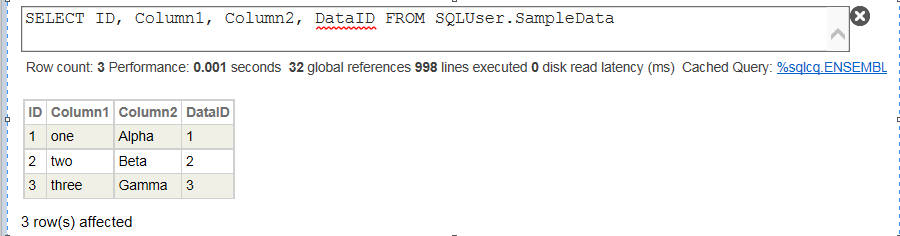
How to convert SQL persistent classes to JSON output - I have tried 1 option but appears to be very lengthy process.
I have many other SQL storage's defined and have to expose them as well to JSON. Can anyone please suggest a better approach.
My column names usually match with my Json properties.
My User.TestClass is the class with GetJsonList() as my method to return /output JSON formatted data.
The Code tried and SQL storage structure are as follows -
Class User.TestClass Extends %RegisteredObject
{
ClassMethod GetJsonList() As %Status
{
Set SQL="SELECT ID, Column1, Column2, DataID FROM SQLUser.
