It was encouraging to see more people building VS Code extensions for the recent contest. However I noticed that of of the three extensions requiring credentials with which to make their connections only mine, gj :: dataLoader, leverages the long-established and officially-supported InterSystems Server Manager extension to obtain the connection definitions and to handle credentials securely.
I'm pleased to announce the publication of gj :: dataLoader, a new VS Code extension that simplifies the task of loading data from local CSV files into SQL tables on your InterSystems IRIS servers.
Here's an introductory video:
gj :: dataLoader is now available on Marketplace for direct installation into VS Code. It is my entry in the "Bringing Ideas to Reality" Contest 2025 and implements this idea - https://ideas.intersystems.com/ideas/DPI-I-667
Feedback is welcome.
UPDATE: since version 0.0.4 of the extension was published on 2025-11-23 it is now possible to use gj :: configExplorer directly in VS Code on Windows.
In my previous article introducing gj :: configExplorer I flagged up how an apparent bug in the Windows elements of the Native API for Node.js means it's not currently available to run in VS Code on a Windows desktop. In a comment on that article I offered a workaround, but this requires a Docker-equipped Linux host you can SSH to.
If you don't have a suitable target it's now possible to leverage your local Windows Docker Desktop. Here's how:
- Op
gj :: configExplorer is a new VS Code extension integrating with Server Manager and leveraging Structurizr to produce configuration diagrams of your servers.
Here's a short introductory video.
By using the InterSystems IRIS Native API for Node.js it avoids the need for any support code to be installed on the servers. This technology choice also qualifies it for entry into the current Developer Community contest.
The initial release focuses on two aspects of server configuration:
- Namespaces and databases
- ECP connectivity
Suggestions for what to add next are welcome, as is general feedback.
If you like what you see please support this in the Developer Tools 2025 contest. Voting closes at midnight EDT on Sunday 3rd.
The new version of InterSystems Testing Manager which I released last week brings @Timothy Leavitt's cool
Test Coverage Tool to VS Code, and is my entry for the 2025 Developer Tools contest.
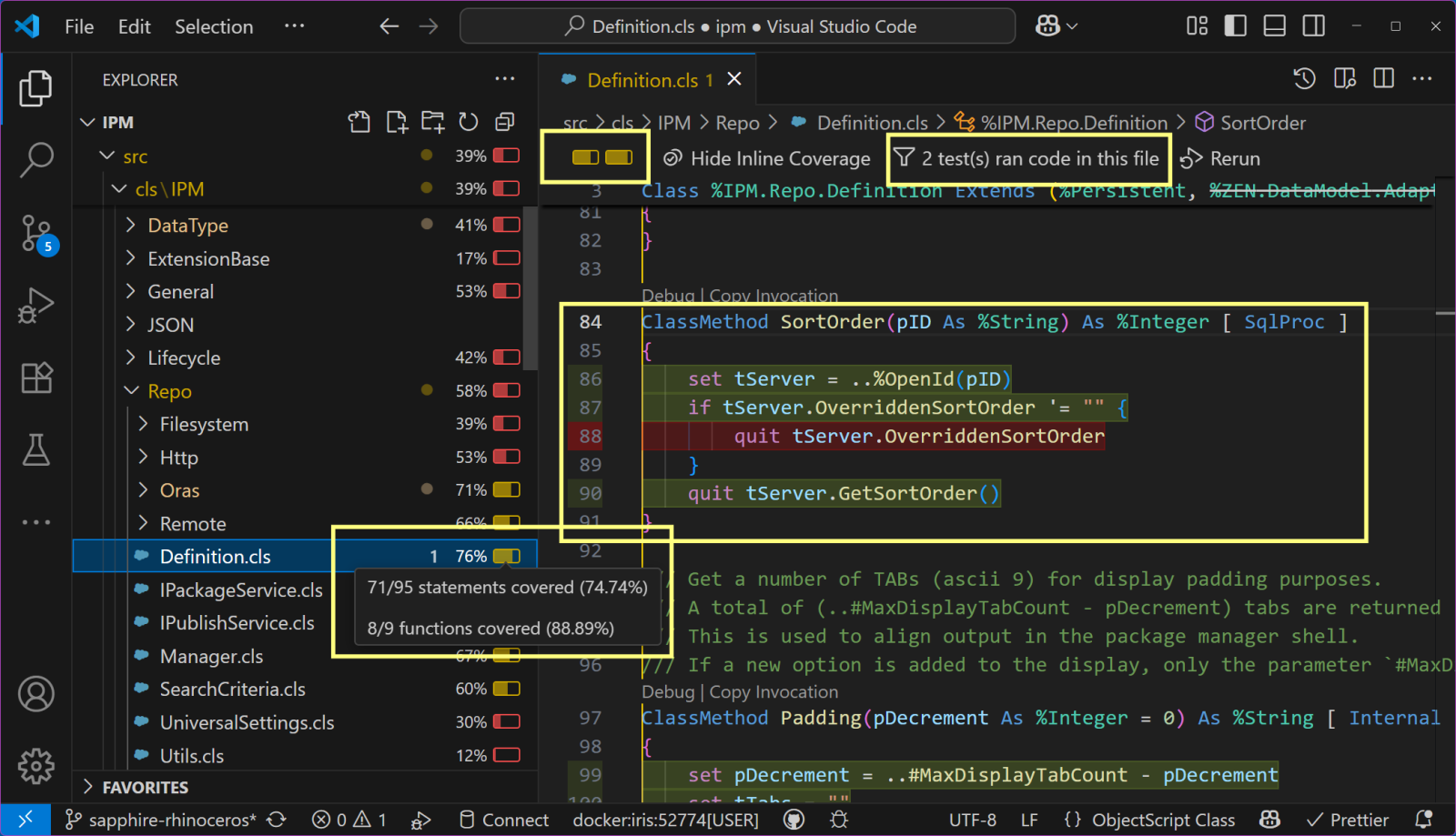
Here's a teaser screenshot showing how the unit tests of the IPM project don't yet cover a feature that apparently allows an IPM repository to override its sort order.

Users of the %UnitTest framework can now get test coverage information inside VS Code by combining the latest release (v2.0.0) of the InterSystems Testing Manager extension with @Timothy Leavitt's impressive Test Coverage Tool.

Above you can see the Test Coverage pane, which I have moved to the secondary sidebar on the right so it can more easily be explored in conjunction with the Test Explorer on the left.
Notice how the most recent test run (of all Test Coverage Tool's own unit tests) covered the BitValue method of TestCoverage.Procedures but not the BitCount method (nor 6 other methods).
A benefit of using Doxygenerate is that Doxygen does more than just HTML output. Tweak the Doxyfile that tells Doxygen what to do and you can easily create a PDF. Our example MARINA application yielded a 524-page PDF. Here's what page 94 looks like:
.png)
You can browse the whole file here.
In the screenshot above, notice how we only get details of the superclass that is part of the app (AuditHistory). The primary superclass, %Library.SerialObject, is shown faded and with no details of what BankDetails inherits from it.
With another tweak to the Doxyfile we can show full inheritance detail in a 586-pag
The InterSystems platforms have always offered dynamic documentation of the packages and classes in a namespace, a feature known informally as Documatic. But what if you need to publish this class reference information on a website without requiring the site to be connected to an IRIS server containing the actual classes?
For my entry to the December 2024 Developer Community “Bringing Ideas to Reality” contest I decided to implement the idea of a generator that produces a static set of class reference pages . And since I chose to leverage the well-established Doxygen tool I named my tool Doxyge
We've just made a change to Server Manager with the aim of it coping better when a stored password is no longer valid, for example because it has been changed.
We plan to include this in the next published version (no release date yet set), but if you'd like early access please download the v3.6.3-beta.3 VSIX and install it, for example by dragging it from your file explorer onto the Extensions view in VS Code.
If you encounter problems with this beta you can easily revert to the most recent published version (3.6.2) by means of the "Install Specific Version..." option on the gearwheel of the
This is a consequence of work being done by the VS Code team to improve Find in Explorer.
Symptoms without proposed APIs:
.png)
Note the continual clock badge and progress bar.
With proposed APIs enabled you will require v2.12.9-beta.4 or later, otherwise the find runs but returns no results.
See https://github.com/intersystems-community/vscode-objectscript/issues/14… for more information.
If you are using the client-side development paradigm (i.e. editing code in local files that get imported and compiled onto the IRIS server your `objectscript.conn` settings point to) you can now use IPM in VS Code to manage the packages in your IRIS target by launching it from the Explorer view. Just make sure the extension you are using is at least version 1.0.4, then use this button:
.png)
Thanks to @Evgeny.Shvarovfor suggesting this enhancement, which is particularly useful when using Docker.
See the new team members in action:
Try them online for yourself:
https://gitpod.io#snapshot/b31bdf9c-4657-402a-a2d
Get it from the Extensions view inside VS Code, or here in Marketplace.
Vote for it here in the current Developer Tools 2024 contest (voting ends: 29 Sep, 2024, 11:59:59 PM EST).
Discuss it below.
Most of all, enjoy DX Jetpack with its added booster rockets!
Please allow me to introduce you to a new way of interacting with IPM (InterSystems Package Manager), also known as ZPM,directly from inside Visual Studio Code.
First, install into VS Code the free InterSystems Package Manager extension, published to Marketplace by George James Software. A quick way is to use the search field in VS Code's Extensions view and look for 'ipm zpm' (without the quotes). Alternatively browse to https://marketplace.visualstudio.com/items?itemName=georgejames.iris-pa…
Here's a short video showing the extension in action.
If you like it please vote for it in
A nice feature that we recently added to version 2.12.6 of the VS Code ObjectScript extension is controlled by this new setting:
objectscript.serverSourceControl.respectEditableStatus
When set true in JSON, or checked in the Settings Editor, a server-side file will be read-only if the source control class for the namespace reports that it is not editable.
This option may be of particular interest to users of our Deltanji source control product, particularly when used in combination with the Deltanji extension for VS Code. Once set, managed documents have to be explicitly checked out via the
I'm posting this for the benefit of WebTerminal users who have upgraded to the recently-released IRIS 2024.2 -- (Build 247U) Tue Jul 16 2024 09:52:30 EDT -- or are considering doing so.
That version of 2024.2 contains a change (DP-432503) which requires that the user under which the Web Gateway initially connects to IRIS (usually CSPSystem) must have READ permission on the database hosting the dispatch class of the REST web application.
For cases where that is not true an error is raised, but this returns an HTTP 404 status to the caller instead of the expected HTTP 401.
Apparently the problem
I encountered this quirk when investigating an unrelated issue affecting how Studio projects are handled in VS Code.
When you add the top level of the webapp to a %Studio.Project this inserts a %Studio.ProjectItem with a .DIR suffix. For example, if Studio or VS Code is connected to the USER namespace and you add the /csp/user webapp to a project the new ProjectItem name is "csp/user.DIR".
When you export this project to XML from the project's context menu in Studio, or by calling the %Studio.Project.Export classmethod, the file contains the project definition plus all of the files in the
If you use VS Code and ZPM / IPM, and would like a GUI-type alternative to the CLI of the latter, please upvote https://ideas.intersystems.com/ideas/DPI-I-602
Suggestions about how you think this new UX should look and behave are welcome, so feel free to add your comments to the idea.
When you use VS Code to edit source code, the settings model allows you to specify folder-specific values for some settings by using a settings.json file located in a .vscode sub-folder of the workspace root folder. A value set here takes precedence over one from your personal settings when you are working within that workspace root folder.
If you use an isfs-type workspace to operate directly in a namespace on a server, you first need to configure that server to support a special .vscode folder for each of its namespaces, present and future. The folder can also provide folder-specific code
Until a couple of days ago the most downloaded bookmark extension for VS Code, Bookmarks by Alessandro Fragnani, wasn't able to handle the isfs file references that the InterSystems ObjectScript extension uses when you are operating in a Studio-like way and editing classes & routines directly in a namespace.
In support of our efforts at George James Software to facilitate migration from Studio I raised the issue with Alessandro and helped him resolve the incompatibility. So if you are a Studio migrant and have been missing its bookmarking capabilities, install this:
.png)
If you had installed it
Earlier this year I announced availability of a VS Code extension for coding in ObjectScript, Embedded Python or SQL using the notebook paradigm popularized by Jupyter. Today I published a maintenance release to correct a "getting started" problem.
Here's a video of the installation steps from the extension's README:
(video superseded by an update in a later comment)
Why not try it for yourself?
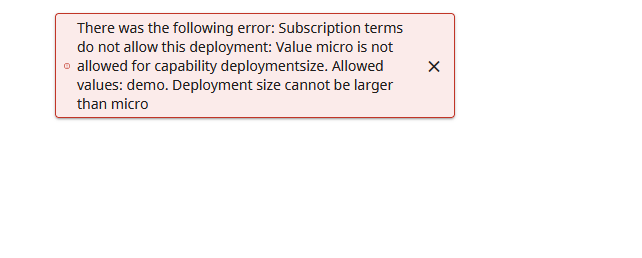
Earlier today I enrolled at Cloud Services Portal and clicked "Start trial" for the "Health Connect Cloud" service. Next step was "Create Deployment". The only deployment size offered was "Micro", so I picked that, completed the other required details and clicked "Create".
Response was:

I reported this using the "Submit Feedback" option on the dropdown from my username in the top right of Cloud Services Portal but haven't yet received a response. Hence this DC post, in case someone here can tell me what I'm doing wrong.
This scenario showed up yesterday at a client site when I was delivering bespoke consultation on migration from Studio to VS Code.
The site's servers had been configured to use delegated authentication, but the "Delegated" checkbox hadn't been set against the /api/atelier web application, which is what the members of the InterSystems ObjectScript Extension Pack use to make their connections.
As soon as the we application got its checkbox set and the Server Manager refresh button was clicked, namespaces could be enumerated on the server.
Documentation here explains how IRIS Portal can be launched in a tab in the VS Code editing area from Server Manager. One limitation though is that if you then perform an action in Portal which needs to invoke a modal message box in the browser (e.g. window.alert() or window.confirm()) this doesn't work.
I created this issue on the VS Code repository requesting a change that will unblock this. The issue needs more evidence of community support within the next week if it is to stand a chance of progressing. If you are willing to add your vote please go to the issue (you will need to be logged
VS Code has a powerful snippets capability, and its Marketplace offers a way for developers to publish their snippets so others can use them. However, publishing on Marketplace takes some effort and snippets targeting InterSystems coders will realistically only be of interest to a very small number of Marketplace visitors.
This inspired me to create oex-vscode-snippets-template, a GitHub template for creating repositories dedicated to publishing code snippets for InterSystems devs.
Also published on Open Exchange and installable using IPM / ZPM is a snippets example repository called oex-vscode-
In the discussions at https://community.intersystems.com/post/intersystems-studio-deprecated-starting-20232 one notable topic has been that some Studio users make regular use of its facilities for exporting multiple code artifacts (e.g. classes and routines) into a single XML file on the workstation, then exporting that file into a different server namespace.
Unless / until equivalent features are added to the VS Code ObjectScript extension, can these people fill the gap by using the System Explorer section of Management Portal?
Migrants from Studio will typically be using VS Code
I am trying to write the module.xml for a package that creates a web application associated with the %SYS namespace.
I didn't find a way of specifying that the CSPApplication tag should create the app for a specific namespace. It apparently gets set up to use the namespace in which the package install command gets run. This contrasts with how an installer manifest works, where the <CSPApplication> tag is put inside a <Namespace> tag.
So I wondered if I could make my package fail installation if the current namespace isn't %SYS.My package doesn't need to load anything, only create the web app.
For several years now Visual Studio Code has supported the notebook coding paradigm with a maturing UX and an API that is enabling a notebook extensions ecosystem to grow. One of the best-known notebook platforms is Jupyter Notebooks. A Microsoft team publishes an extension that allows VS Code to handle .ipynb notebook files. These can either work against a local Python environment or connect to a Jupyter Server, which typically hosts remote Python environments with beefier resources.
What if your InterSystems IRIS environments, whether local on your workstation or remote in your organization / cloud, could operate as Jupyter Servers? And not only for Embedded Python but also for ObjectScript and SQL
"If we build it, will they come?"
If you have already built unit tests using the %UnitTest framework, or are thinking about doing so, please take a look at InterSystems Testing Manager.
Without leaving VS Code you can now browse your unit tests, run or debug them, and view previous run results.
InterSystems Testing Manager works with both of the source code location paradigms supported by the ObjectScript extension.Your unit test classes can either be mastered in VS Code's local filesystem (the 'client-side editing' paradigm) or in a server namespace ('server-side editing').