1 Follower · 70 Posts

A comma-separated values (CSV) file is a delimited text file that uses a comma to separate values. Each line of the file is a data record. Each record consists of one or more fields, separated by commas. The use of the comma as a field separator is the source of the name for this file format. A CSV file typically stores tabular data (numbers and text) in plain text, in which case each line will have the same number of fields.

Article Evgeny Shvarov · May 30, 2020 2m read

Hi Developers!

Sometimes we need to import CSV data programmatically to InterSystems IRIS either from CSV or from URL. And we expect the class with proper datatypes to be created and the data to be imported.

I published a module csvgen on Open Exchange which does exactly that.

If you just need the CSV file be imported into IRIS you can do the following:

USER>do ##class(community.csvgen).Generate("/usr/data/titanic.csv",,"Data.Titanic")

Class name: Data.Titanic
Header: PassengerId INTEGER,Survived INTEGER,Pclass INTEGER,Name VARCHAR(250),Sex VARCHAR(250),Age INTEGER,SibSp INTEGER,Parch INTEGER,Ticket VARCHAR(250),Fare MONEY,Cabin VARCHAR(250),Embarked VARCHAR(250)
Records imported: 891
USER>

Or if you have the CSV on the internet, e.g. COVID-19 Data on Github you can get the data in the following way:

USER>d ##class(community.csvgen).GenerateFromURL("https://raw.githubusercontent.com/CSSEGISandData/COVID-19/master/csse_covid_19_data/csse_covid_19_daily_reports/05-29-2020.csv",",","Data.Covid19")

Class name: Data.Covid19
Header: FIPS INTEGER,Admin2 VARCHAR(250),Province_State VARCHAR(250),Country_Region VARCHAR(250),Last_Update DATE,Lat MONEY,Long_ DOUBLE,Confirmed INTEGER,Deaths INTEGER,Recovered INTEGER,Active INTEGER,Combined_Key VARCHAR(250),Incidence_Rate DOUBLE,Case-Fatality_Ratio DOUBLE
Records imported: 3522
USER>
16
1 1477
Article Evgeny Shvarov · Sep 20, 2021 3m read

Hi folks!

Sometimes we need to import data into InterSystems IRIS from CSV. It can be done e.g. via csvgen tool that generates a class and imports all the data into it.

But what if you already have your own class and want to import data from CSV into your existing table?

There are numerous ways to do that but you can use csvgen (or csvgen-ui) again! I prepared and and example and happy to share. Here we go!

2
0 1252
Question Aaron Vail · Oct 14, 2019

I'm trying to create a new Record Map but I keep getting a ZEN Exception error.  I actually go this to work the very first time I did it and have a record map.  But I need to do more.

I'm working on my local machine so I can grab a CSV (or txt in this case as it's pipe delimited) from the local directory.  I pick the file I want to use but when I click OK i get a popup and the following error:

ZEN EXCEPTION
 
A
1
0 421
Article Oliver Wilms · Oct 17, 2021 3m read

I work as an Integration Engineer for United States Department of Veterans Affairs (VA). I work on a Health Connect production which processes many RecordMap files. I do not fully understand RecordMaps and I wanted to develop an application for the Interoperability contest where I could learn more about working with RecordMaps. I browsed InterSystems documentation for inspiration on how to start. I was happy to find CSV Record Wizard. I had created a CSV file for my Analytics contest entry. I wanted to use it to test the CSV Record Wizard. It was not obvious how to use it. The dialogue in Port

0
0 501
Article Julio Francisco · Mar 31, 2019 3m read

Hello

I made for fun a bash script that creates csv files from a %GOGEN exported file. %GOGEN, the utility for exporting globals for Cache 5.xx

First I thought it would be very simply with bash, but ...

  • if I want a header in the csv file
  • if you export with GOGEN more globals together not only one
  • if I want a csv file for every global/indexes has the global ..

The simply bash script goes up 100 lines of code. If I will start again with this, I would use Python or Go, not bash.

Example:

For a EXPORTED.GLO file

    Transferring files on Mar 30 2019 at 10:24 AM
    ^ALD(20190330

    ^ALD(201903
5
0 829
Announcement Guillaume Rongier · Oct 2, 2020

Introduction

This is a csvgen UI frontend in Angular 8. The aim of this project is to easily import csv file to Iris from a web ui.

Demo

Demo

Install with ZPM

It will automatically install the dependency of csvgen and sslclient

zpm "install csvgen-ui"

This will create two new endpoints :

  • One for the Rest API for uploading files

  • /api/{namespace}/csvgen/

  • One for the UI

  • /csp/{namespace}/csvgen/index.html

Stand alone demo on docker

Run the server

docker-compose up -d

UI

The UI is per-namespcae, this mean it will be available only for the namespace where csvgen-ui is install. For example :

2
0 475
Article Evgeny Shvarov · Mar 20, 2020 3m read

Hi colleagues!

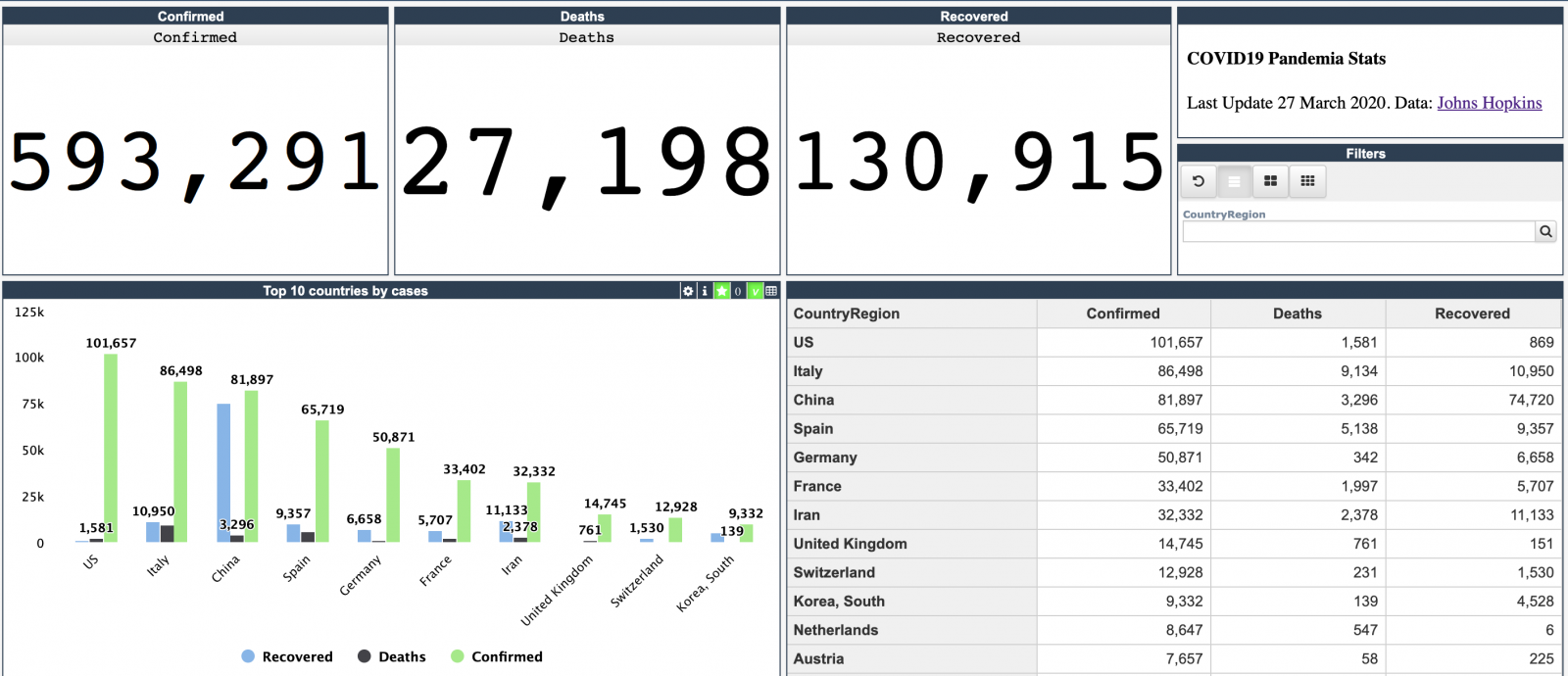
Every day Johns Hopkins University publishes new data on coronavirus COVID-19 pandemic status.

I built a simple InterSystems IRIS Analytics dashboard using InterSystems IRIS Community Edition in docker deployed on GCP Kubernetes which shows key measures of the disease outbreak.

This dashboard is an example of how information from CSV could be analyzed with IRIS Analytics and deployed to GCP Kubernetes in a form of InterSystems IRIS Community Edition.

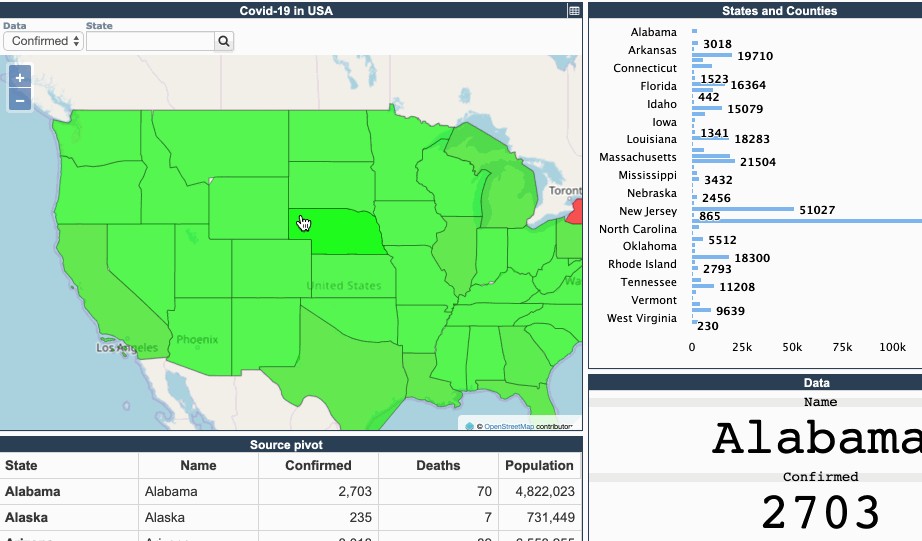
Added the interactive map of the USA:

13
3 1118
Question Joe Schra · Jan 18, 2021

Hello!

I have created a record map that I am going to use to parse a flat file coming into Ensemble. From there I am trying to send the parsed out data as emails to patients. I am getting this error when the Service tries to locate the file and send it through...it finds the file (as it states in the error message). So why does it say it does not exist?

15:16:09.420 ERROR #5012: File '/ens/mgr/interfacefiles/test/test22forOPBHSHAWD.txt' does not exist

Thanks for your insight!

2
0 494
Article Renan Lourenco · Jan 12, 2021 2m read

Tiny web application that allows you to anonymize CSV files. Based on InterSystems IRIS®

Version:store/intersystems/iris-community:2020.3.0.221.0

Application

Sample CSV where Date of Birth and Sex will remain untouched, while the rest should be anonymized.

The application recognizes the header columns and allows the user to chose which ones to ignore.

After processing.

after

Setup

Make sure you have Docker up and running before starting.

Option 1

Recommended in case you just want to get the application up and running.

docker run --name anonymizer --publish 9091:1972 --publish 9092:52773 rlourenc
0
0 353
Question Guilherme Emmerick · Sep 23, 2020

I need to get a file in a directory and when clicking on the download button, this file will be downloaded on the client side.

</head>
<csp:class super="%CSP.Page,Relatorio.GeraCSV">
<body><input type="button" value="Gera Relatório" onClick="#server(..serve())#"></body>

ClassMethod serve() As %Status
{
set name = "C:\Users\gpemm\Desktop\myfile.csv"
    #dim sc As %Status = $$$OK
    #dim %response As %CSP.Response
    kill %request.Data
    set %request.Data("STREAMOID",1)= ##class(%CSP.StreamServer).Encrypt(##class(%CSP.StreamServer).GetOidForFile(name))
    if ##class(%CSP.StreamServer).OnPre

2
0 659
Question ED Coder · Sep 17, 2020

Is there a way to bulk load csv into a global? I have a csv with 283 lines in the following pattern

123, first text

234, second text

456, third text

I want to load them into a global ^loader(code, text). Is there a way to upload them using code?

4
0 416
Question Lawrence Williams · Aug 23, 2019

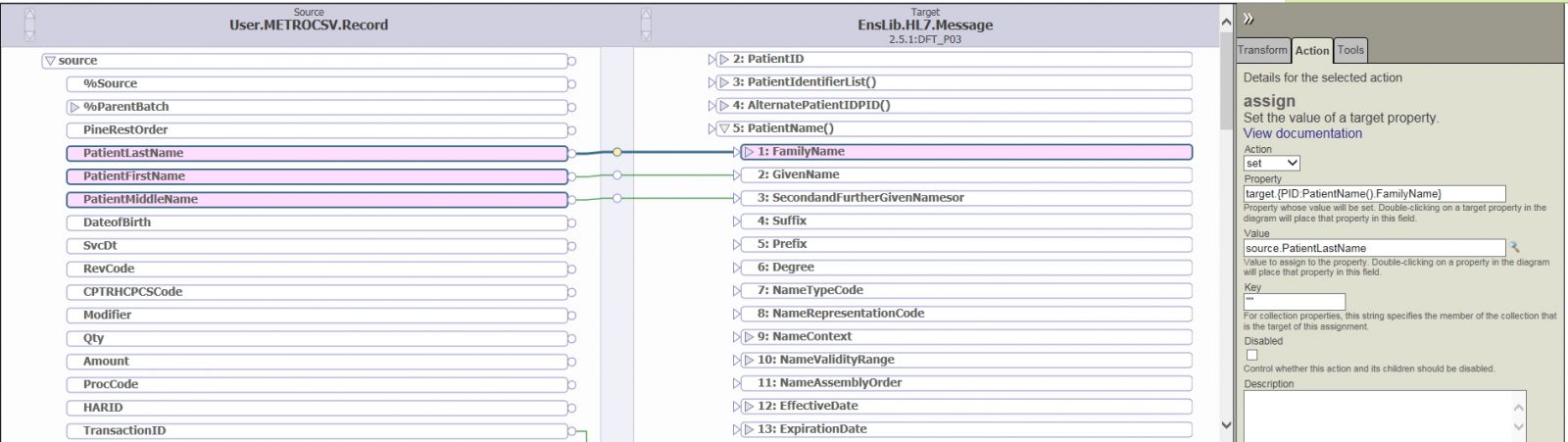
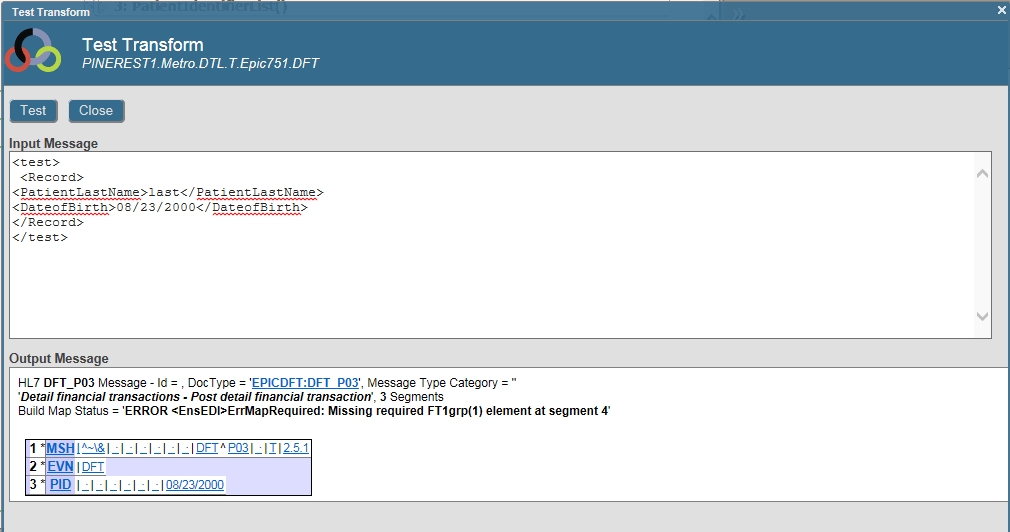
I am putting together a new interface to take in a CSV file and output an HL7 message.

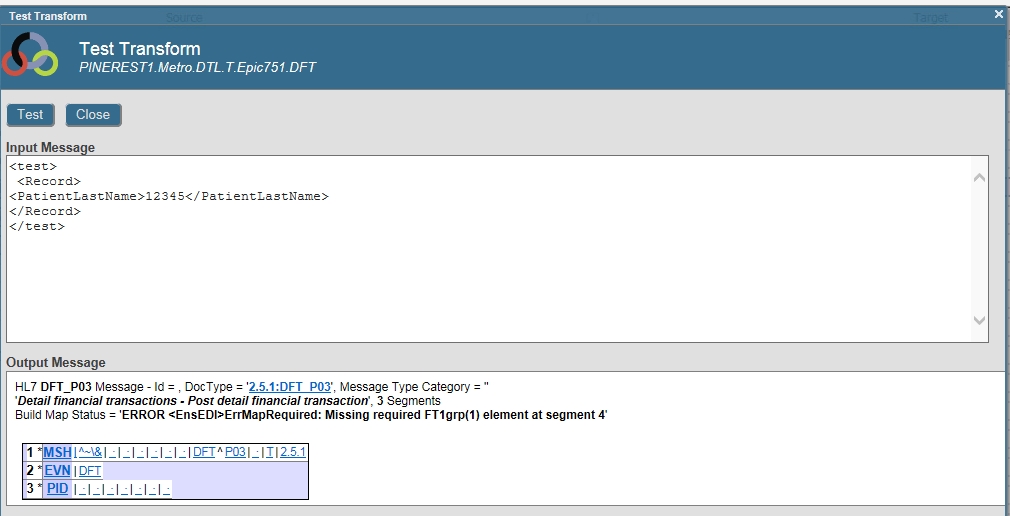
I have used the record mapper to create the source class and I am putting together the transform, but when trying to test it I am not seeing the data populate the HL7 as intended.

Also.... if I put a <DatofBirth> in the tester, it shows up in the HL7 as I would expect..... that's what really has me scratching my head here.

4
0 1171
Article Evgeny Shvarov · Jun 12, 2020 3m read

Hi Devs!

Last weekend I had been testing the newborn csvgen module and was looking for a CSV file to test - thus I came across an interesting datafile on Data.World  with Game of Throne episodes statistics. Death statistics. These folks documented all the murders through all the 8 seasons and noted where, who, from what clan with what weapon had killed another one.

So I imported it and made an IRIS Analytics dashboard.

You Know Nothing, Jon Snow | You Know Nothing, Jon Snow | Know ...

Don't worry, Jon,  with this dashboard we can figure out something ). See the details below.

0
2 805
Article Evgeny Shvarov · May 11, 2016 1m read

Hi!

I believe the simplest is (to work with csv delimited by ";"):


set file = ##class(%File).%New( "data.csv" )
    set sc = file.Open( "R" ) 
    if $$$ISERR(sc) quit    ; or do smth

    while 'file.AtEnd {
        set str=file.ReadLine() 
        for i=1:1:$length( str, ";" ) {
            set id=$piece( str, ";" ,i ) 
            write !, id  // or do smth
        }
    }
    do file.Close()

Possible options:

different variants of error handling with sc code.

Embrace while loop into try/catch block.

And what's yours?

16
0 7272
Question Martin Browne · Apr 7, 2020

Hi,

I've setup an operation that pulls text from an MDM message and uses it to generate a csv file. I'm having issues as our vendor is sending the file with a carriage return (as shown below) to signify the next line but Healthshare is recognising this as a new segment which causes an error.

MSH|^~\&|TIE|PATHPOINT|LNWH|PAS|20200407061001||MDM^T02|PATHPOINT2020040706100154094|P|2.4|||NE|AL|GBR|UTF-8|EN|
EVN||20200407061001|
PID|1|123456789^PAS^PAS|02572543^^^INT^XR~6111111111^01^^NHS^NH~4111111^^^NWL^NWL||TEST^PATIENT||19010101000000|M|
PV1|1|E||||||||190^ANAES|
TXA||TS||20200407061001|||||PAT

2
0 458
Question Matthew Martinez · Dec 2, 2019

Hello,

I am reading in an X12 document into my production that needs to be processed and returned as a CSV file.  I have created a record map to support the fields I want to extract with a batch class to store headers.  I have a DTL mapping the data to the appropriate fields in the record map and am sending the record map to a EnsLib.RecordMap.Operation.BatchFileOperation.

None of my components error out and in fact report that the message was processed without any errors but I am not getting an output file in my expected output folder. 

Is this an appropriate use of this operation class? 

2
0 1042
Question Jude Mukkadayil · Dec 11, 2019

Hi,

     I have written a procedure with the help of object scripting to export data to a csv file. There is more data than  the csv limit.

Can anyone please tell me how to get the row count of csv file using object scripting, so that I can write an if condition and write to a second csv file.

Please find the code writing to the csv given below.

while (ind '= ""){
set row = ^CacheTemp(repid,"MAIN",ind)
use filemain write row,!
; Get next row index for MAIN report
set ind = $order(^CacheTemp(repid,"MAIN",ind))
}close filemain
}

Thanks

Jude

14
0 1244
Question Aaron Vail · Oct 8, 2019

I'm trying to read in a CSV file and map to MFN^M16.  The first problem I'm having is getting the Service to read the file without causing errors (see below).  I'm using EnsLib.File.PassthroughServicebecause (as I understand it) it allows for anything.

ERROR <Ens>ErrBPTerminated: Terminating BP CSVtoHL7M16 # due to error:

ERROR <Ens>ErrException: <PROPERTY DOES NOT EXIST>zOnRequest+1^EnsLib.MsgRouter.VDocRoutingEngine.1 *DocType,Ens.StreamContainer -- logged as '-' number - @'' >
ERROR <Ens>ErrException: <PROPERTY DOES NOT EXIST>zOnRequest+1^EnsLib.MsgRouter.VDocRoutingEngine.1 *DocType,Ens.

1
0 564
Article Ponnumani Gurusamy · Mar 11, 2019 1m read
Class User.samplexlsconversion Extends (%Persistent, %Populate) [ Owner = {_PUBLIC} ]{Property name As %String;Property DOB As %Date;Property address As %String;Property PhoneNumber As %Numeric;Property BloodGroup As %String(DISPLAYLIST = "", VALUELIST = "A A- B B- O");ClassMethod ExtractXls(){Set file=##class(%Library.File).%New("C:\Users\Ponnumani\Desktop\Ponnumani Tasks\file.csv")Do file.Open("WSN")Do file.WriteLine("""Name"",""Address"",""Phone Number"",""Blood Group"",""Date""")s id=""f {
4
1 940
Question ED Coder · Nov 19, 2018

Hi, I have a CSV file with a list of 5000 records in the following format

Name, Acc, division

Eric, 1234, 567

John, 1235, 987

Peter, 3214, 879

I just want to copy the Acc, division to a global so eventually the global would be like the following:

^People("Customers", "Acc.division")

Can you advice on how I can perform this from the terminal? This is a one time task. I want to read all the values from the csv file and insert them into the global

Regards,

Eric

7
0 1129
Question Thembelani Mlalazi · Oct 9, 2017

I have this code here;I am trying to read a csv file but when I run this code I get  <LIST>%open+3^%stream.Object.1 would anyone have a look and tell me where I am going wrong .Record mapper is fine but I need a custom csv Importer

ClassMethod ImportCSV()
{
   set adapter =##class(%File).%New()
  
  set status=adapter.%Open("C:\In\in.csv")
  
  if $$$ISERR(status)
  {
   do $System.Status.DisplayError(status)
  }
  
  set counter =1
  
  while 'adapter.AtEnd
  {
   set line=adapter.ReadLine()
   
   set rec= ##class(CSVRecord).%New()
   
   set rec.ID=$piece(line,",",1)


13
0 4924
Question Confused Developer · May 4, 2017

Hi All,

I need urgent help,

I want to export the values from Global to CSV file.

Values are in global are :

^Global1(1)="1,2,3,4"
^Global1(2)="5,6,7,8"
.
.
.
^Global1(n)="n,n,n,n"

I want output in CSV File as:
1,2,3,4
5,6,7,8
.
.
.
n,n,n,n

I made a class:

ClassMethod ExportNewSchemaGlobals(pFile)
{
    Set ary("^Global1")=""
    Set pFile = "C:/Test.csv"
      
    Set ary = ##class(%Library.Global).Export(,.ary,pFile)
}

5
0 2234
Question Galena Teneva · Jul 5, 2018

Hi,
it is possible to convert a csv file to json file?

I want to stream json files and output the data as it comes in from the files. So my files are "csv" type and I want to convert these files to "json" type.


I can read csv file as follows:

ClassMethod ReadFile()
{
    set stream = ##class(%Stream.FileCharacter).%New()
    set sc = stream.LinkToFile("*.csv")
    do stream.Rewind()
    while'stream.AtEnd {
        set line=stream.ReadLine()
        write line,!
}
What should I add to convert it to "json" and read it again?

Thank you

7
1 1854
Question Nezla · Jun 5, 2018

Hi Guys,

have a file located in \\servername\Myfiles\pull.csv but for some reason my cache routine can't file, but can when using the local drive C:\servername\Myfiles\pull.csv.

FYI I can access \\servername\Myfiles\pull.csv via Win explorer with no problems. 

anyway how I can fix this?

Thanks Guys

4
0 595