7 Followers · 187 Posts

Open Database Connectivity (ODBC) is a standard application programming interface (API) for accessing database management systems.

Learn more.

Question Nilson Cupertino · May 10, 2022

Hello,

I have an error connecting the InterSystems cache with the odbc driver with the ODBC-2017.2.2.865.0-lnxrhx64.tar version using the ubuntu versions 20.04 and version 18.04 (which works with the .Net Core 3.1 version) with the Net 6.

Error:

System.Data.Odbc.OdbcException (0x80131937): ERROR [HY000] [ODBC Cache][State : S1000][Native Code 417]
[libcacheodbc.so]
Access denied
   at System.Data.Odbc.OdbcConnection.HandleError(OdbcHandle hrHandle, RetCode retcode)
   at System.Data.Odbc.OdbcConnectionHandle..ctor(OdbcConnection connection, OdbcConnectionString constr, OdbcEnvironmentHandle

2
0 421
Question Stefan Cronje · Nov 10, 2021

Hi,

We need a web-based SQL tool to connect to Ensemble/Cache, that will offer more functionality than what the Management Portal offers.
It needs to be web based, so that we can host it on a machine that has connectivity to the server via the superserver port. We (the devs and support) only have browser access to the environment via Remote Desktops, hence the requirement.

Has anyone gotten OmniDB to connect to Ensemble/Cache? If so, can you please advise on how to configure it?

Any other suggestions for such a tool are also welcome.

Kind regards,
Stefan
1
0 343
Question Alex Cashell · Apr 22, 2022

I have a linked procedure class and SQL gateway setup and I can't seem to get any response, status or error from using the stored procedure, I think it must be something big I'm missing to not even get a status.

Can someone see what my problem is please, any help would be very much appreciated.

Class generated by linked procedure wizard:

Include %occInclude /// 
Class dbo.MrnLookup [ Not ProcedureBlock ]
{ ClassMethod MrnLookup(pp01 As %String(MAXLEN=8), ByRef mrn As %String(MAXLEN=20)) As %Integer [ ProcedureBlock = 1, ReturnResultsets, SqlName = MrnLookup, SqlProc ]
{
    if
1
0 315
Question Rahul Reddi · Apr 2, 2022

Hi Team,

We are facing an issue connecting to a remote Cache DB server using CacheODBC 2018 on the client side.

The connection works fine without SSL on the Cache server, but when SSL is enabled, we are getting the below error - "Failed to load cconnect executable!, SQL state 08S01 in SQLConnect"

Also, the connection works fine when the PHP script is run through CLI on client server, but fails with the above error when the script invoked from a client browser.

Could you please help us with any pointers in resolving the issue?

0
0 214
Question Delab guz · Feb 11, 2022

Hello,

I'm using the InterSystems Iris odbc driver (DriverODBCVer=02.10) to get data from Iris table but it is slow.

Is there any options to improve performance ? Increase the packet size ?

Change to do in odbcinst.ini / odbc.ini to make it quicker ?

Thanks

8
0 719
Question Thembelani Mlalazi · Mar 16, 2021

I have  a SQL query that I want to run against MS SQL from cache ensemble using the SQL outbound adapter.If I run this query direct from MS SQL Studio it take about 7 seconds MAX and returns about half a million rows.The row only contains one column it is a number all same size and if I run this query in the production in ensemble it takes for ever the production finishes without getting the response back.The same query run in cache outside the ensemble environment writing results to a file it returns results taking about 3minutes to complete.

1
0 346
Question Michael Lundberg · Dec 27, 2016

Hi!

I'm trying to connect to one of our Ensemble servers Cache database from a C#-windows form . I'm running the client from my local computer with OS win7.  Using .NET FW ver 4.5.2 in the client.

ODBC local setup using "InterSystems ODBC35"

In this ODBC konfigurationview i can put my userID and password and try a testconnect (or ping). And that run successful.

However, we don't want to leave credentials in the ODBC-configuration it self (open up for anybody to use the source) but instead send it from the klients.

I have try all three ways from https://www.connectionstrings.com/cache/ and they all

1
0 494
Question Matthew Shepherd · Jan 6, 2022

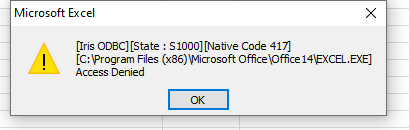
I use Microsoft Query via Excel to query an Intersystems database. 

Since upgrading from CACHE to Intersystems, lots of reports fail to refresh twice - by which I mean I can open the report (which may have several separate queries) and query the database once, and then it will refuse to reconnect.

I get:
[IRIS ODBC][State : S1000][Native Code 417] .... Access denied

If I then close and reopen excel, I can run the query again.

If I test the odbc connection between refresh attempts, the connection is successful.

To make matters more confusing, this happens on almost all devices, but not a few high

6
0 437
Question Sehinde Raji · Dec 29, 2021

I am a newbie who is trying to learn how to set up a basic connection to Iris using a node js application. I am astounded at the lack of documentation there is on how to do this and even more concerning there are a few errors within the documentation. For example I am on the Native API application within the below link.

https://docs.intersystems.com/irislatest/csp/docbook/DocBook.UI.Page.cl…

And it says that you need to create a directory the thing is that it doesn't state which directory this needs to be or any other history.

6
0 382
Question Sap Help · Apr 4, 2019

Hi All,

I would like to download odbc drivers for Cache database to be able to install it on our SQL server.

I am trying to create a linked server to Cache database.

I couldn't find a link for the drivers, there was one post with FTP reference to download but it doesn't seem to work.

I will be grateful for any help.

Thank you

Sap.

8
0 18722
Article Muhammad Waseem · Nov 17, 2021 2m read

In my previous articles I demonstrated the steps to connect, retrieve and save data to Caché from Appeon PowerBuilder by using ODBC.
In this article I will demonstrated how to Delete data from Caché with Appeon PowerBuilder (https://www.appeon.com/products/powerbuilder) by using ODBC 

I am using Company.cls from Samples-Data (https://github.com/intersystems/Samples-Data/tree/master/cls/Sample

So Let's start:
 

Step 1 : First of all we need to establish a connection (https://community.intersystems.com/post/connecting-cach%C3%A9-appeon-po…)


Step 2 : We need to create datawindow

0
0 343
Article Muhammad Waseem · Nov 7, 2021 1m read

In my previous article I demonstrated the steps to connect to Caché from Appeon PowerBuilder by using ODBC.
In this article I will demonstrated how to Retrieve data from Caché with Appeon PowerBuilder (https://www.appeon.com/products/powerbuilder) by using ODBC

I am using Company.cls from Samples-Data (https://github.com/intersystems/Samples-Data/tree/master/cls/Sample

So Let's start:

Step 1 : First of all we need to establish a connection (https://community.intersystems.com/post/connecting-cach%C3%A9-appeon-po…)

Step 2 : We need to create datawindow object which will link

0
0 547
Article Jean Millette · Nov 5, 2021 2m read

One of our apps uses a class query to support a ZEN Report and works just fine in that report, producing the expected results every time. We’ve since migrated to InterSystems Reports and noticed that, for a report using the same class query, 100s of extra rows with the same column values appear at its bottom.

We eliminated InterSystems Reports as the source of the problem by recreating the same “extra rows” issue with an Excel spreadsheet calling the same class query as a stored procedure.

What was the issue?

0
1 374
Question jennifer mccallum · Jun 10, 2021

Hi

We have ODBC 32bit Encryption working on our database with a SSLDEFs.ini file.  However 64 bit ODBC Encryption will not work and give generic error, same error if the ini file is not there for 32BIT.

We have copied the ini file to the 64bit folder?  Any ideas please?

thanks

2
0 359
Article Muhammad Waseem · Sep 28, 2021 1m read

https://www.appeon.com/products/powerbuilder

Appeon PowerBuilder is an enterprise development tool that allows you to build data-driven business applications and components.
It is one of a suite of Appeon products that together provide the tools to develop client/server, Web, mobile, and distributed applications.
 

In this article I will show the steps to connect to Caché with Appeon PowerBuilder by using ODBC

Step1 :
Make sure ODBC Driver option is selected while installing IRIS

Step 2:
Configure ODBC IRIS Data Source by using ODBC Data Source Administrator 

Step 3: Configure InterSystems ODBC Data

0
0 554
Question Mark Runyan · Jul 6, 2021

How strange this is to me.  I'm querying a table against a numeric(15,2) column call max_client_resp_service.  When I query max_client_resp_service > 0 or any number, I get results, but they are not always right, for example where max_client_resp_service > 5 returns values less than 5, e.g. 2.00.  When I query < 110 of any higher number I get zero results.  It's as though the comparison operator, especially less than function is not working.  See attachments for screen shots.  I'm stumped.  Ok looking at this further, it appears ">" returns all records, "<" returns no results.

6
0 349
Question Kevin Pickering · Jul 14, 2021

Apologies if this isn't the correct forum but here goes..

I'm accessing an Intersystems database from MS SQL Server using Intersystems ODBC driver and using OPENQUERY statement to read metadata of tables using

SELECT * FROM OPENQUERY([<linked server name>], 'SELECT * FROM INFORMATION_SCHEMA.COLUMNS')

but I get an error message saying INFORMATION_SCHEMA.COLUMNS cannot be found.

Intersystems SQL documentation does reference this table so is there some other way to access this table or is it maybe a permissions issue?

3
0 826
Question Steve DiQuattro · Jun 9, 2021

I have created a custom role in IRIS for users to provide limited view-only access for querying tables in the HSANALYTICS namespace. WinSQL has been installed on a Windows server (WinSQL Lite version 14.0.244.784) and an ODBC connection entry has been created in WinSQL for the users to log in and run SQL queries. The custom role provides the roles/resources included in the attached file. The WinSQL System DSN entry defined is:

Health Insight UAT HSANALYTICS    64-bit    InterSystems ODBC35

The ODBC35 driver is defined as:

InterSystems ODBC35    2018.01.00.184    CACHEODBC3564.DLL    9/19/2018

When

7
0 750
Question Adel Elsayed · May 14, 2021

I'm trying to connect to a database (outside Cache) using the examples here:

https://docs.intersystems.com/irislatest/csp/docbook/DocBook.UI.Page.cl…

and https://docs.intersystems.com/latest/csp/docbook/Doc.View.cls?KEY=BGOD_…

and i'm still getting an error on running the Connect method (Connect(pDSN,usr,pwd,0))

"0 "_$lb($lb(6022,"DSN/User Connect",,,,,,,,$lb(,"TRAK",$lb("e^zConnect+15^%Library.SQLGatewayConnection.1^2","d^zConnect+13^%Library.SQLGatewayConnection.1^2","e^^^0"))))/* ERROR #6022: Gateway failed: DSN/User Connect. */

i verified the

1
0 530
Question Jerry Petrole · Feb 5, 2021

Hello,

I have established an ODBC connection with our client based on credentials they provided.    The test connection was successful and after using the Link Table wizard I can now see the client's tables and properties.    However when we try to execute a query in IRIS we are getting error code -226.   I'm trying to determine if this could be just a simple setting problem in IRIS or something with the client.   

We have tried with PostgreSQL as well as with TSQL.  Same result for each.

Has anyone seen this error before and could it be pointing me in a certain direction?

3
0 460
Question Stephen Carter · Nov 30, 2020

I'm running Windows 10 x64 Pro 20H2 with Intersystems Cache ODBC driver v2018.01.00.184. I've setup a System DSN using the 64-bit of ODBC Administrator.

I've been getting inconsistent results using my regular application (Microsoft Power BI) which I use through ODBC to query my hosted TrakCare T2017 instance.

Using Microsoft ODBC Test Tool (part of MDAC 2.8 SDK) I can verify I get the same errors as in Power BI. They seem to be ODBC driver related but I can't pin it down.

ODBC Test Tool GUI shows:

Full Connect(Default)

    Successfully connected to DSN 'Test DB'.
SQLExecDirect:
In:

1
0 2758
Article Zhong Li · Jan 27, 2020 7m read

Keywords: Python, JDBC, SQL, IRIS, Jupyter Notebook, Pandas, Numpy, and Machine Learning 

1. Purpose

This is another 5-minute simple note on invoking the IRIS JDBC driver via Python 3 within i.e. a Jupyter Notebook, to read from and write data  into an IRIS database instance via SQL syntax, for demo purpose. 

Last year I touched on a brief note on Python binding into a Cache database (section 4.7) instance.

1
2 3106
Question Ewan Whyte · Jul 8, 2020

Hi,

I'm trying to ultimately create a function that I can use with HL7 messages that calls a stored procedure held on a SQL Server.

Initially I triedextending the function class to use the sql inbound adapter and/or EnsLib.SQL.Common, but this wouldn't work from the class method for the function.

Then I attempted to use the linked stored procedure using the wizard where it connected fine and I could find the sp but but it wouldn't return any data when ran. The test sp should just return an int.

The class document produced is this.

I suppose my question is, is it even possible to call a sp on a

5
0 1244