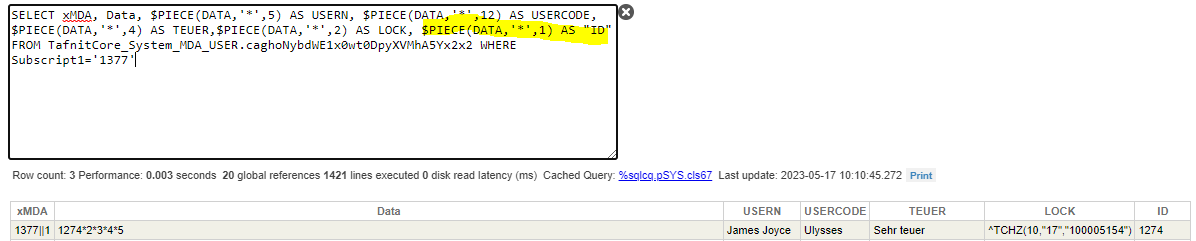
During a migration from a rather old Caché Version (2016.1) to IRIS I met the problem to migrate Streams. The difference in the storage Global is minimal It's not a big effort to do it manually for a few streams. But for some thousand streams I hope there is a tool already available. But where?
we get HL7 MDM messages with embedded PDF documents that are Base64 encoded. When the embedded PDF document exceeds the size of 3.6 MB the following error occurs:
FEHLER <Ens>ErrBPTerminated: BP Main HL7 MDM # wird wegen folgenden Fehlers beendet: FEHLER #5002: Caché-Fehler: <MAXSTRING>zgetAtFromArray+46^EnsLib.HL7.Segment.1 > FEHLER #5002: Caché-Fehler: <MAXSTRING>zgetAtFromArray+46^EnsLib.HL7.Segment.1
I have a question regarding the Intersystems Caché Database and its jdbc driver. I need to set the connection timeout for the database, but I couldn't find any documentation stating that the jdbc driver for Caché supports setting the connection timeout. However, I noticed that the jdbc driver for the Intersystems Iris Database appears to support this feature.
My question is, can I use the Iris jdbc driver to set the connection timeout for the Caché Database?
I am trying to pinpoint and troubleshoot an issue we have been seeing lately. We have several SQL Outbound Adapter Operations that are seeing issues trying to connect to our MS SQL Servers using the JDBC Gateway for calling insert, select, update, and stored procedure calls.
You can programmatically retrieve routine dates and sizes using the RoutineList query of the %Library.Routine (or just %Routine) class.
The RoutineList query has an argument, and the routine name to be searched can be specified by prefix match or middle match. (For wildcards, specify * or ?)
In the example below, *.MAC is specified as an argument.
Say you have a receiving system that accepts HL7 and provides error messages in field ERR:3.9 in the ACK it returns. You require a different reply code action depending on the error message, however the Reply Code Actions settings for the operation do not provide this level of granularity. One option could be to create a process that takes the ACK and then completes the action you were expecting, however things can get a bit messy if the action is to retry the message, especially when trying to view a message trace.
If you are seeing this error during import: ERROR #6301 Line: 2 Offset: 118 This does not appear to be a Cache exported file, unable to import.
This error is caused by exporting from InterSystems IRIS and trying to import into Caché. If you plan on exporting from IRIS to Caché, you can use the following qualifier to export your classes so that Caché does not throw an error on import:
w $SYSTEM.OBJ.Export(<items>,<filename>,"/exportversion=cache2018.1")
When connecting to the database using a client-server architecture, for example using language binding, the machine name of the client can be obtained using the following code:
set client=##CLASS(%SYS.ProcessQuery).Open("P"_$j).ClientNodeName
InterSystems is committed to providing high quality product support to customers for all products, new and old. As products age – Caché is now 25 – that support will evolve.
1.1 I met a few project that their interface servers were crashed. Cutoms wanted resume server as fast as we can. their servers are running at lan,and they can't use git,there are some namesapce in the server running different service,and usualy there is only one server.
1.2 In the message,it has property in typeof characterstream,as you know,the message search page doesn't support filtering with property of characterstream,so it's so hard to find the messge you want.
The task of handling office documents, namely docx documents, xlsx tables and pptx presentations is quite complicated. This article offers a way to parse, create and edit documents using only XSLT and ZIP.
Why? docx is the most popular document format, so the ability to generate and parse this format would always can be useful. The solution in a form of a ready-made library, can be problematic for several reasons:
library may not exist
you do not need another black box in your project
library restrictions : platforms, features, etc.
licensing
processing speed
In this article, I would use only basic tools for work with the docx documents.
One of the reasons why I love Cache and Iris is that not only you can do anything you can imagine, also you can do it in a lot of different ways!!.
Imagine that you have an integration running with IRIS connected by ODBC you probably only run SQL queries but you can also create stored procedures and inside write the code to do everything you can imagine.
I'm going to give you some examples but the limit is your imagination!!
I would like to Validate token signature with public key i have in pem format, i am using below code but i get error message. Could you please tell me what i am doing not right? FOUT #5002: Caché fout : <DIRECTORY>zLinkToFile+2^%Stream.FileBinary.1 *-----BEGIN PUBLIC KEY----- MIIBIjANBgkqhkiG9w0BAQEFAAOCAQ8AMI ...
InterSystems announces the Maintenance Release (MR) of Caché, Ensemble and HSAP 2018.1.8. This is a maintenance release with many updates across a wide variety of areas.
Caché and Ensemble
Full product installation kits can be downloaded from the WRC Software Distribution website:
I'm having trouble using the Certificate in my BO.
It started to occur after updating the certificate.
I have 2 configurations and 2 certificates, the first one was updated and no error occurs, the second one, the bad certificate or Handshake failure errors occurs. Both have the same configuration. I already tried marking SSLV3, handshake error occurs. When I unchecked it, a Bad Certificate error occurs.
Those of you that worked already with ECP might know that it operates not only across operating systems, processor technologies (big-little-endian), but also -with limits- across versions in C/E. This cross-version feature also includes IRIS (verified for 2020.1) and C/E (2018.3)
Hello, I am using the power bi report builder tool to create a report with dynamic parameters. Every time I try to create and apply a parameter in power bi query editor. I get the below listed error message.
FYI: I have created a Data source connection using "InterSystems ODBC" Version 2015.01.00.429. I am getting data without any issue.
Query: select Payment_History.OCCURENCE_DATE from Payment_History where Payment_History.OCCURENCE_DATE >= @BeginDate
I need a copy of cache 2017.1x as this is the last version supported by the VA on their network. Any support here would be greatly appreciated. I have been a member of the M community since 1984. Thanks in advance