Question Sam Duncan · Aug 20, 2025

I've been trying to set up a script I can run after installing an instance to enable IPM across all namespaces. I have been able to install IPM successfully using

set r = ##class(%Net.HttpRequest).%New(),
    r.Server="pm.community.intersystems.com",
    r.SSLConfiguration="ISC.FeatureTracker.SSL.Config" 
d r.Get("/packages/zpm/latest/installer"),
    $system.OBJ.LoadStream(r.HttpResponse.Data,"c")

and then running the zpm commands

repo -r -n registry -url https://pm.community.intersystems.com/ -user "" -pass ""
enable -map -globally
4
0 150
Article Sam Duncan · May 6, 2021 4m read

When you have been using cubes for business intelligence in a namespace for some time, you may find that there are many cubes in the namespace, only some of which are actively being used. However, it can be difficult to tell which cubes users are or are not querying, and maintaining unused cubes can be costly both in terms of storage and of computation to keep them up to date. This article provides some suggestions and examples for monitoring which cubes are in active use, and for removing cubes that you determine are no longer necessary.

2
3 641
Article Sam Duncan · Dec 2, 2020 2m read

InterSystems IRIS Business Intelligence provides the Cube Registry as an interface for managing and scheduling build and synchronize tasks for your cubes. The Cube Event Monitor is a new tool on Open Exchange to help you keep track of those events' status and performance, the number of records being updated, and any build errors (errors when processing individual records) that have occurred. The tool consists of the following components:

1
1 457
Question Sam Duncan · Nov 12, 2020

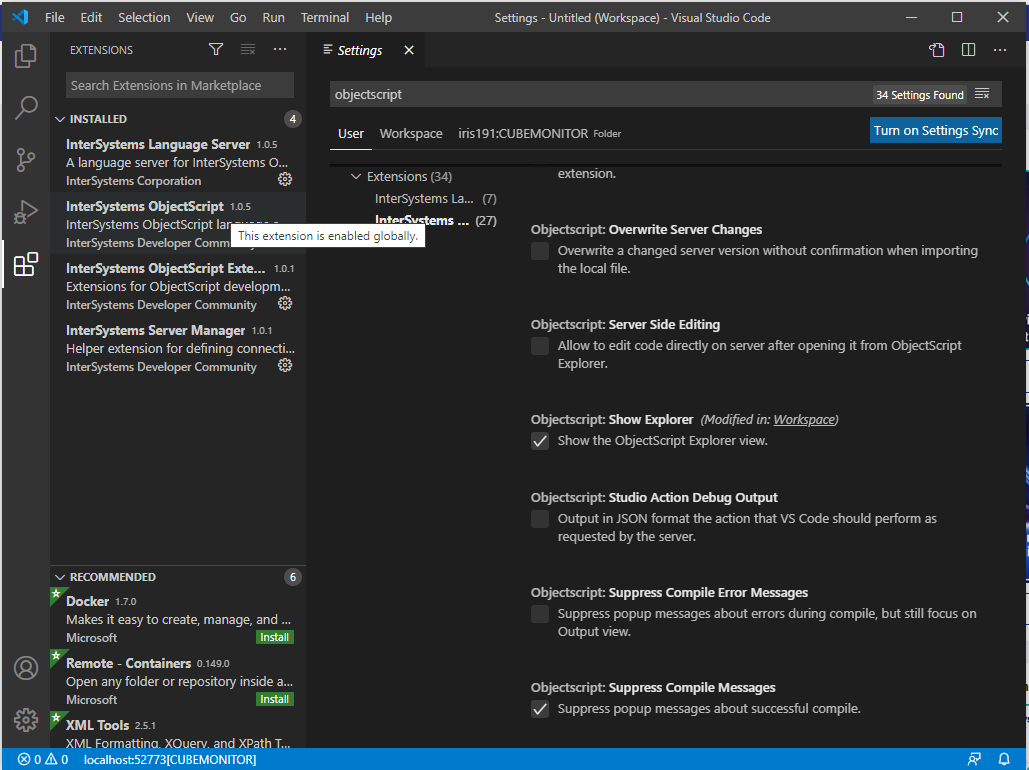
I've just installed Visual Studio Code, installed the InterSystems ObjectScript Extension Pack as documented here, connected it to a local InterSystems IRIS instance, and created a workspace associated with one of that instance's namespaces. However, after doing this, I don't see the ObjectScript button on the left toolbar when opening the workspace.

The ObjectScript extensions are installed and enabled as shown below; I've tried reinstalling them and restarting VSCode, but this doesn't make a difference:

5
0 590
Article Sam Duncan · Nov 9, 2016 2m read

This post provides further detail on the suggestions from the DeepSee Troubleshooting Guide about what to do if a user is not able to view a listing in a DeepSee cube, but instead sees errors like this:

ERROR #5540: SQLCODE: -99 Message: User <username> is not privileged for the operation [zfindStatement+118^%SQL.DynamicStatement.1:<namespace>] (8)

1
0 1006