My guess is that it has something to do with a recent Eclipse upgrade. Photon is Eclipse version 4.8, which is the last officially supported version for use with Atelier.
- Log in to post comments
My guess is that it has something to do with a recent Eclipse upgrade. Photon is Eclipse version 4.8, which is the last officially supported version for use with Atelier.
If your code base is especially large, you might want to consider creating projects like
Keep in mind that Atelier projects don't play nicely with XML files that aren't supported by the UDL transformation engine. The community should be able to steer you in the right direction if that becomes a blocker for you.
try copying the 1.3 stable update site (jfrog.io) into your browser - if you can't access it, then verify your connection settings
Atelier uses this task to update its cache of your namespace(s). It might also be doing some validation. Does this task always need to be killed?
You could try playing with your user preferences for caching and validation. Otherwise, I'd go to the WRC. I believe others have had trouble like this before in the past.
I agree that this sounds like a configuration issue. I recommend you contact the WRC and an expert will help you diagnose and resolve your issue. They'll have you coding in no time.
Hello Michel,
You might want to keep an eye out for some new content that the Learning Services are planning on publishing soon.
Building Custom Business Services Course
This course will be updated for IRIS for Health and includes an FTP example that will include the Attributes property. If you check out the current offering, you'll see that it consumes a file called Appointments.txt from ftp.intersystems.com. See exercise in 3.5 (creation) and 4.3 (implementation). The video uses the File adapter, but the exercise uses FTP.
Hope this helps!
FYI We've updated the product to automatically point to jfrog.io rather than artifactoryonline.com - see our announcement here.
Hi Anthony,
This is not expected behavior and might point to your environment configuration. I recommend you contact the WRC so the team can dig into the details with you.
When I go to the stable update site for 1.3, I can see that the proper version is available. You can see this yourself by pasting the update site URL in your browser.
Hope this helps!
Looks to me like there is a problem with your server connection. I recommend you contact the WRC who will be able to resolve the problem quickly.
We plan to do one better! Expect a 1.3 beta release this week with additional bug fixes.
The link you provided unfortunately won't work any more. Please point your browser here instead.
Atelier 1.2 update site is https://atelier.artifactoryonline.com/atelier/updates/stable/1.2.
Based on the screen shot, it looks like you tried to save a MAC routine in the RemoteSystemsTempFiles project. This project is not related to Atelier in any way, but should not be blocking you from persisting your change to the file system.
I encourage you to watch the getting started videos pointed to in other comments and to use the "Cheat Sheets" within the product itself. Go to Help > Cheat Sheets... > Atelier and click the first one. Go through them in order to get a good understanding of Atelier basics.
If after you've done this you are still having trouble, please contact the WRC who are best able to help you troubleshoot.
Let us know what fixed the problem as an answer here as well please.
Atelier embeds the web editor accessible from the Management Portal into an Eclipse editor, so it works the same way.
The feature is supported in class files only in Atelier 1.1 and in routine files as well in Atelier 1.2. Support in CSP pages is not a high priority at this time. If this is something that you feel is a blocker or that the team should increase its priority, please contact the WRC.
This sounds like a problem that has been reported previously. I recommend you contact the WRC with your environment details (Eclipse version, Atelier version, Cache'/Ensemble/InterSystems IRIS version, OS flavor) and they should be able to get you sorted quickly.
Thomas, could you please open a WRC ticket? It might have something to do with Eclipse internals. Support would know what to look for on your system so that we can squash this issue for you.
The servers are up again.
We've confirmed that the servers are up again.
Latest news is that the Artifactory cloud is down partially in the North East. You can monitor progress here: http://status.artifactoryonline.com/.
Thank you for bringing this to our attention, Kishan. Our technical services team is working on bringing the server up again. We'll let you know when it is available. Apologies for any inconvenience.
Robert is correct that you need to install the terminal plugin. I would recommend using the most recent version which is available from the Eclipse release update site associated with the version of Eclipse you have installed.
If you are using Oxygen, then go to http://download.eclipse.org/releases/oxygen.
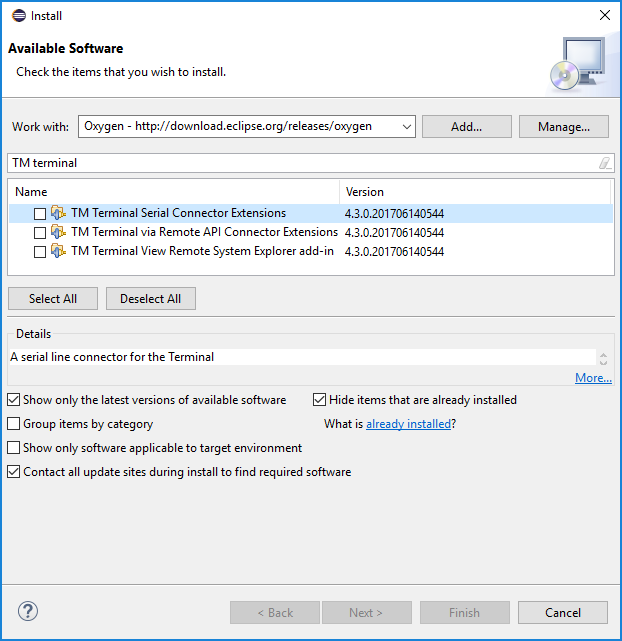
You can find product documentation on the topic from Atelier as well. Go to Help > Help Contents > InterSystems Atelier User Guide > Tasks > Installing the Eclipse Terminal Plug-in.
Based on Kenneth's comment, it seems the problem is fixed in the 1.1 beta release. If this doesn't work for you, I recommend contacting support.
Hello, Jan. It seems you are having a problem with the Java class loader. The team responsible for the Java Gateway forwarded the following suggestion. Could you please give it a try? If it doesn't help, please contact the WRC for further support.
java.lang.NoClassDefFoundError: Could not initialize class com.tieto.dataLake.content.data.Content_Data_Record is a Java class loader error typically means that the class loader ran into an exception when trying to load (read) the class. To make sure this is not a user error, I would suggest they try to write a small Java program that simply loads the above class (use Class.forName()), they might get the same error. If not, then it’s probably something to do with the static initializer, I imagine there must be one. They should try to catch an exception in it and that should provide more info on the actual error. A good example of what can go wrong is that they might try to access the file system, right there in the static initializer, and that the path or permissions are different in their dev environment, and on the machine where they try to import the class using the Java Gateway.
To avoid these kinds of errors, we have been advocating the use of a so called ‘façade approach’, where the user makes sure to build most of the app on the Java side, hiding all sorts of things like massive dependencies, big jar files, file system dependencies etc. etc. and exposing only that small app to Cache/Ensemble via the JG
Which version of Atelier were you using before? Did you install it to an Eclipse instance using the update site or were you using the 1.0 standalone application?
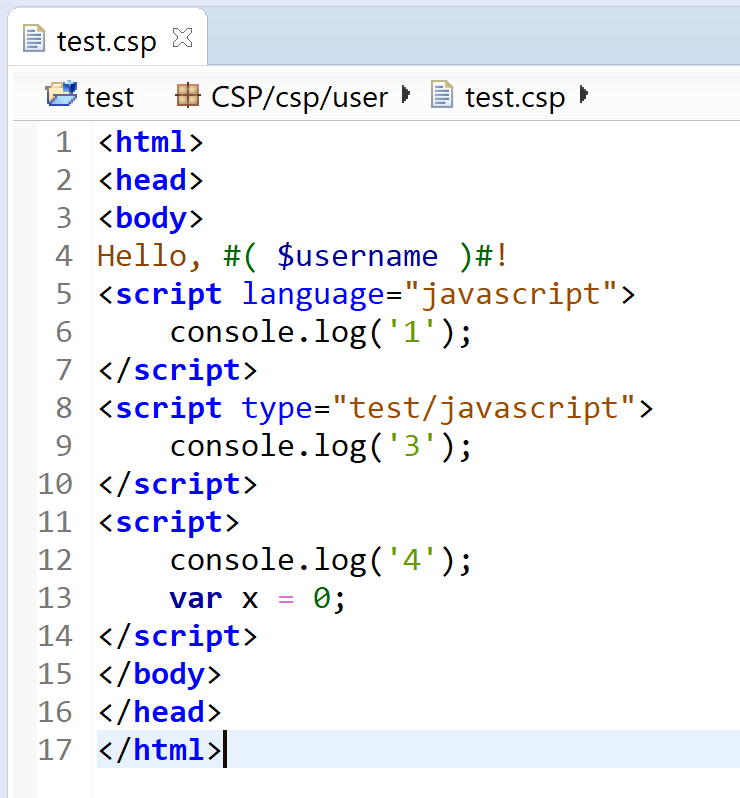
Atelier 1.0 does not provide a way to customize the color used for JavaScript code in CSP files. I recommend installing the Web Tools Platform (WTP) HTML editor which provides some JavaScript support. You can install it from the Eclipse release update site along with other web development related editors that you may find useful. http://download.eclipse.org/releases/neon
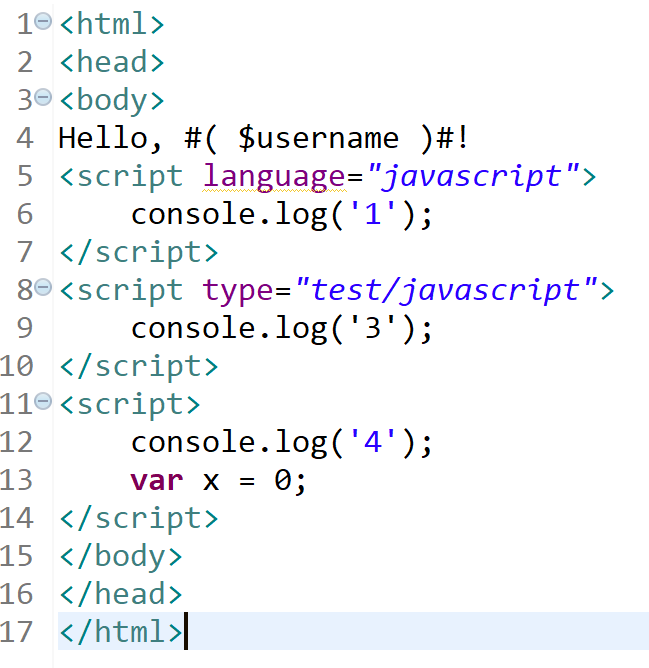
You can find instructions in the product documentation to make this editor your default when opening CSP files. Go to Help > Help Contents > InterSystems Atelier User Guide > Tasks > Editing HTML in CSP Files.
If you are interesting in upgrading to the Atelier 1.1 beta, you will see that your JavaScript code will no longer be colored green when opened in the Atelier Web Editor.
These menu items are context enabled, so you should have an Atelier editor open or have a file selected from the Atelier Explorer view. I suspect that the selection context wasn't an Atelier "element", so the menus were disabled.
The Server Explorer view from the Atelier perspective provides a shortcut to the Management Portal.
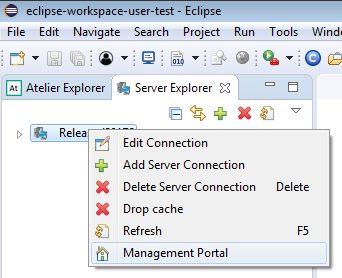
The Management Portal will be opened in an external browser.
Fixed!
Here's my slide deck - The Power Boost of Atelier!
Hi, Mike. That error is referring to your file path. I recommend you contact the WRC with these sorts of problems as they will be able to quickly solve the problem.