Evgeny Shvarov · May 19, 2020 go to post

So, assuming @Vitaliy Serdtsev and @Robert Cemper answers we have:

Index ext [type = bitmap; Extent];

Is the must for every Persistent class, with standard ID, if we want to have fast answer on "How many records"

And the easiest and fastest "How many records" in this case is:

ClassMethod HowManyRecords(ByRef recordsCount as %Integer) As %Status

{
&sql(SELECT Count(1) INTO :recordsCount FROM schema_package.table)

IF SQLCODE<0 {WRITE "SQLCODE error ",SQLCODE," ",%msg QUIT}

}

Evgeny Shvarov · May 17, 2020 go to post

And if I make the Extent index a bitmap will it be faster to get the amount of records?

Evgeny Shvarov · May 16, 2020 go to post

Hi David!

Did you use docker up, or docker-compose up? Like this:

docker-compose up -d --build

This works for me. I'm on Mac, and have Docker Desktop installed.

Evgeny Shvarov · May 16, 2020 go to post

Fixed the issue with double "/" in DeployPath: ${cspdir} ends with "/"

And renamed all {$param} -> ${param}, to have this be used same as in %Installer. But you can use both variants.

Evgeny Shvarov · May 15, 2020 go to post

BTW, if you want to turn back to Community Registry, call:

zpm:USER>repo -n registry -r -reset-defaults
Evgeny Shvarov · May 15, 2020 go to post

Hi Tani!

Though /_spec endpoint can provide more info, indeed we can use the embedded /api/mgmnt/ entry, which is avaialble for your REST API on:

"http://localhost:9092/api/mgmnt/v1/USER/spec/pbuttons" , if you install it in NAMESPACE USER, and run docker with:

docker run --name my-iris -d --publish 9091:51773 --publish 9092:52773 intersystemsdc/irishealth-community:2020.2.0.196.0-zpm

To visualise the API I installed the module "swagger-ui":

USER>zpm

zpm: USER>install swagger-ui

[swagger-ui] Reload START

[swagger-ui] Reload SUCCESS

[swagger-ui] Module object refreshed.

[swagger-ui] Validate START

[swagger-ui] Validate SUCCESS

[swagger-ui] Compile START

[swagger-ui] Compile SUCCESS

[swagger-ui] Activate START

[swagger-ui] Configure START

[swagger-ui] Configure SUCCESS

[swagger-ui] Activate SUCCESS

and got the nice interface to the API on: 

http://localhost:9092/swagger-ui/index.html

All set )

Evgeny Shvarov · May 15, 2020 go to post

So, it works for me! 

But, another "issue" I'm facing here that I need to submit "login/pass" two times. One for CSP app, another for REST app called from CSP. Is it a 'groupid' case, or common cookie folder?

Evgeny Shvarov · May 15, 2020 go to post

Hi Tani!

I fixed the issue with deploy path - see the PR. Could you please republish the module on OEX?

It turned out we don't need "/" after {cspdir}. Will update the templates, thank you!

Evgeny Shvarov · May 12, 2020 go to post

Hi Tani!

In fact /_spec endpoint is not a part of Open API specification. I was wrong.

But this approach to tell where is the Open API specification could be found is quite popular, so InterSystems spec-first /api/mgmnt/ service generates such an endpoint.

That's why we did this for the REST-API template too.

Evgeny Shvarov · May 12, 2020 go to post

We updated the test zpm server to 1.0.5 version and now the problem with updating the same-version packages is solved. 

Evgeny Shvarov · May 10, 2020 go to post

Regarding the application error.

I installed the package via ZPM:

% docker run --name my-iris -d --publish 9091:51773 --publish 9092:52773 intersystemsdc/irishealth-community:2020.2.0.196.0-zpm

% docker exec -it my-iris iris session IRIS

Node: 18aa9f2b084c, Instance: IRIS

USER>zpm

zpm: USER>docker exec -it my-iris iris session IRIS

zpm: USER>install sys-perf-restapi                 

[sys-perf-restapi] Reload START

[sys-perf-restapi] Reload SUCCESS

[sys-perf-restapi] Module object refreshed.

[sys-perf-restapi] Validate START

[sys-perf-restapi] Validate SUCCESS

[sys-perf-restapi] Compile START

[sys-perf-restapi] Compile SUCCESS

[sys-perf-restapi] Activate START

[sys-perf-restapi] Configure START

[sys-perf-restapi] Configure SUCCESS

[sys-perf-restapi] Activate SUCCESS

zpm: USER>

Then opened http://localhost:9092/pbuttonsUI/index.csp
and got this error.

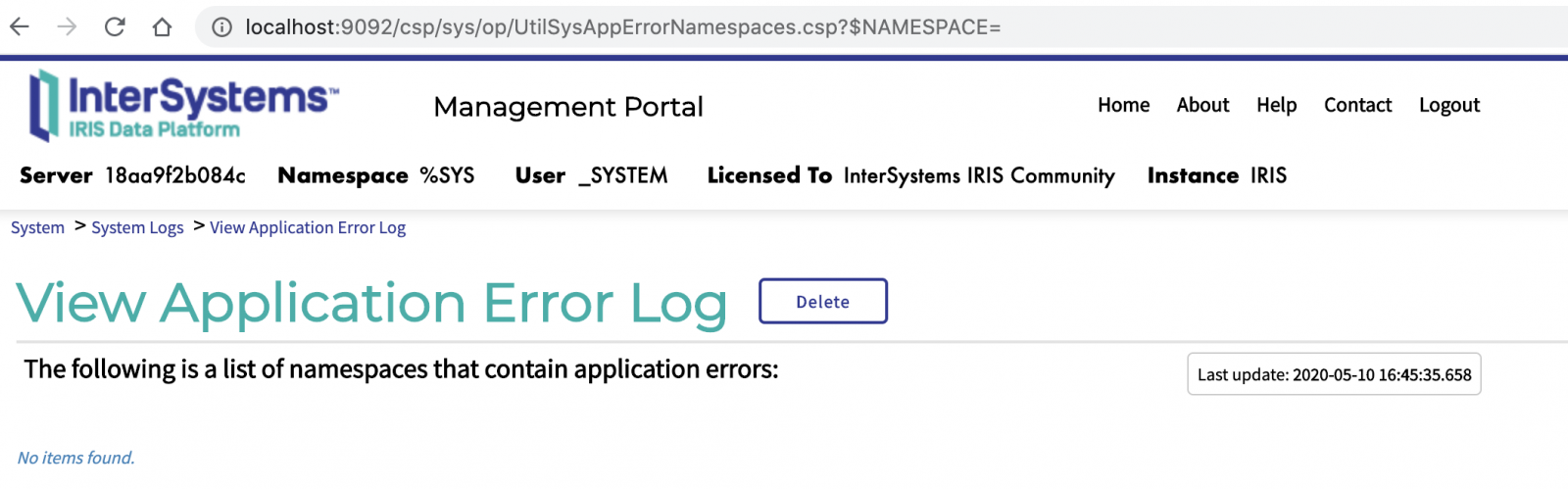
The application error log is empty:

Evgeny Shvarov · May 10, 2020 go to post

Hi Tani!

About swagger-spec.

According to the Open-API standard your API should expose /_spec end-point, where it exports JSON in Open API format.

I tried to refer to /pbuttons/_spec - and got 404.

To make this happen you need to introduce a GET endpoint /_spec and a method that implements it. Here is an example of the endpoint and the method which could be almost the same for any REST API.

Evgeny Shvarov · May 10, 2020 go to post

Made an update on technology bonus and sample application:

Technology bonuses

1. Docker container - 1 expert point

The application gets a 'Docker container' bonus if it uses InterSystems IRIS  running in a docker container. 

When cloned or downloaded the application should be runnable with:

$ docker-compose up -d

Sample Applications
Native API Contest Template - demonstrates all 4 NativeAPIs setup and work. The template satisfies the "Docker container" technology bonus. 

Evgeny Shvarov · May 7, 2020 go to post

Thanks, @Guillaume Rongier for sharing this helpful lib!

And I appreciate you noticed how easy the code could be tested with ZPM. Like this ZPM feature. 

USER>zpm
zpm:USER>module-action objectscript-json-patch test

BTW, module-action could be omitted to have:

zpm:USER>objectscript-json-patch test

Join to chat about ZPM in Discord.

Evgeny Shvarov · May 6, 2020 go to post

Hi Tani!

I'm having the error when open the UI.

Also, it's not clear where I can find the Open API spec endpoint or UI.