worth to go!
- Log in to post comments
worth to go!
Hello @Oliver Wilms I have test using the original Dockerfile:
# Stage 1
FROM node:8.17.0-alpine3.9 as node
LABEL maintainer "david.reche@intersystems.com"
WORKDIR /usr/src/app
COPY package*.json ./
RUN npm install
COPY . .
RUN npm run build

# Stage 2
FROM nginx:1.13.12-alpine
COPY --from=node /usr/src/app/dist/ /usr/share/nginx/html/
COPY ./nginx.conf /etc/nginx/conf.d/default.conf
and the image for web app is build ok
➜ docker images
REPOSITORY TAG IMAGE ID CREATED SIZE
iris-explorer v1.1.0 066bda214946 19 minutes ago 20.8MB
Hello @Oliver Wilms
Can you share here logs of the problem and more detail. Or if you want you can open a Issue at https://github.com/drechema/iris-explorer
The SQL Inbound Adapter is normally used in such a way that produces a new message per Row.
The File Outbound Adapter is normally used in such a way that produces a new File per received message. Check the overwrite setting (put it to false to append new lines) and verify that when you use PutLine you are using the same file name.
Not for a simple SQL adaptor using JGW my friend...
version: '3.6'
services:
  db:
    image: postgres
    restart: always
    environment:
      POSTGRES_USER : demo
      POSTGRES_DB: demo
      POSTGRES_PASSWORD: demo
    container_name: demo-pg
    volumes:
      - ${PWD}/pg-scripts:/docker-entrypoint-initdb.d/
    ports:
      - 5432:5432
The Docker file is a bit messy because testing... sure you can clean it:
FROM openjdk:8 AS builder
ARG APP_HOME=/tmp/app

# copy JDBCTest
COPY src $APP_HOME/src

# copy JGW jars
COPY --from=intersystemsdc/jgw:latest /jgw/*.jar $APP_HOME/jgw/

# compile and create JDBCTest
WORKDIR $APP_HOME/src
RUN javac -classpath $APP_HOME/jar/*:$APP_HOME/jgw/* JDBCTest.java && \
    mkdir $APP_HOME/jar && \
    jar -cvf $APP_HOME/jar/JDBCTest.jar JDBCTest.class

WORKDIR $APP_HOME/jar/
ADD https://jdbc.postgresql.org/download/postgresql-42.2.18.jar .

FROM openjdk:8u252-jre

ENV GWDIR /jgw
ENV PORT 55555
# add LOG
ENV LOG /tmp/jgw-trace.log
ENV ISC_PACKAGE_INSTALLDIR /usr/irissys
ENV ISC_JARDIR $ISC_PACKAGE_INSTALLDIR/dev/java/lib/JDK18

COPY --from=store/intersystems/iris-community:2020.2.0.211.0 \
     $ISC_JARDIR/intersystems-gateway-3.1.0.jar \
     $ISC_JARDIR/intersystems-jdbc-3.1.0.jar \
     $ISC_JARDIR/intersystems-utils-3.1.0.jar \
     $ISC_PACKAGE_INSTALLDIR/dev/java/lib/gson/gson-2.8.5.jar \
     $GWDIR/

CMD java $JVMARGS -Xrs -classpath "$GWDIR/*" com.intersystems.gateway.JavaGateway $PORT $LOG 2>&1

COPY --from=builder /tmp/app/jar/*.jar $GWDIR/

## install additional packages for debug
RUN apt-get update && apt-get install -y procps
JDBCTest is a simple JDBC java class for testing the connection
I have manually set chmod +777 to jars but still getting the same error
Although I found the bug in EnsLib.JavaGateway.Common, I still unable to connect to the database. this is a trace from JG log:
<< CONNECT

Received: (20:40:50:976) [Job number = -1] [ThreadID = 14]
  0000:  17  00  00  00  02  00  00  00  00  00  00  00  59  57      ............YW
  000E:  17  01  6F  72  67  2E  70  6F  73  74  67  72  65  73      ..org.postgres
  001C:  71  6C  2E  44  72  69  76  65  72                          ql.Driver


 >> LOAD_JAVA_CLASS_SYNCH: org.postgresql.Driver

Sent: (20:40:50:977) [Job number = -1] [ThreadID = 14]
  0000:  00  00  00  00  02  00  00  00  00  00  00  00  59  57      ............YW


 << LOAD_JAVA_CLASS_SYNCH

Received: (20:40:50:979) [Job number = -1] [ThreadID = 14]
  0000:  5C  00  00  00  02  00  00  00  00  00  00  00  59  4D      \...........YM
  000E:  03  04  0B  1E  01  64  72  69  76  65  72  3A  6F  72      .....driver:or
  001C:  67  2E  70  6F  73  74  67  72  65  73  71  6C  2E  44      g.postgresql.D
  002A:  72  69  76  65  72  31  01  6A  64  62  63  3A  70  6F      river1.jdbc:po
  0038:  73  74  67  72  65  73  71  6C  3A  2F  2F  68  6F  73      stgresql://hos
  0046:  74  2E  64  6F  63  6B  65  72  2E  69  6E  74  65  72      t.docker.inter
  0054:  6E  61  6C  3A  35  34  33  32  2F  6C  63  77  05  01      nal:5432/demo..
  0062:  6C  63  77  05  01  6C  63  77                              demo..demo


 >> MESSAGE:

  msgId: 11

Sent: (20:40:51:018) [Job number = -1] [ThreadID = 14]
  0000:  02  00  00  00  00  00  00  00  00  00  00  00  59  4D      ............YM
  000E:  02  05                                                      ..


 << MESSAGE

Received: (20:40:51:020) [Job number = -1] [ThreadID = 14]
  0000:  03  00  00  00  02  00  00  00  00  00  00  00  59  4D      ............YM
  000E:  03  04  01                                                  ...


 >> MESSAGE:

  msgId: 1

Sent: (20:40:51:020) [Job number = -1] [ThreadID = 14]
  0000:  50  00  00  00  00  00  00  00  00  00  00  00  59  4D      P...........YM
  000E:  50  01  52  65  6D  6F  74  65  20  4A  44  42  43  20      P.Remote JDBC
  001C:  65  72  72  6F  72  3A  20  4E  6F  20  73  75  69  74      error: No suit
  002A:  61  62  6C  65  20  64  72  69  76  65  72  20  66  6F      able driver fo
  0038:  75  6E  64  20  66  6F  72  20  64  72  69  76  65  72      und for driver
  0046:  3A  6F  72  67  2E  70  6F  73  74  67  72  65  73  71      :org.postgresq
  0054:  6C  2E  44  72  69  76  65  72  2E  20                      l.Driver.


 << MESSAGE

Received: (20:40:51:023) [Job number = -1] [ThreadID = 14]
  0000:  00  00  00  00  00  00  00  00  00  00  00  00  59  34      ............Y4


 >> DISCONNECT
I am having "No suitable driver found for driver:org.postgresql.Driver". But the postgre JDBC jar file is in the /jgw directory... any help?
The directory show:
root@06fac93de710:/jgw# ls -l
total 1844
-rw-r--r-- 1 root  root     1796 Feb  7 17:19 JDBCTest.jar
-rwxr-xr-x 1 51773 52773  241622 Jun 26  2020 gson-2.8.5.jar
-rwxr-xr-x 1 51773 52773  116930 Jun 26  2020 intersystems-gateway-3.1.0.jar
-rwxr-xr-x 1 51773 52773  426856 Jun 26  2020 intersystems-jdbc-3.1.0.jar
-rwxr-xr-x 1 51773 52773   85272 Jun 26  2020 intersystems-utils-3.1.0.jar
-rw------- 1 root  root  1004719 Oct 15 13:11 postgresql-42.2.18.jar
And the JG is started with:
root@06fac93de710:/jgw# ps -ef
UID        PID  PPID  C STIME TTY          TIME CMD
root         1     0  0 20:37 ?        00:00:00 /bin/sh -c java $JVMARGS -Xrs -classpath "$GWDIR/*" com.intersystems.gateway.JavaGateway $PORT $LOG 2>&1
root         8     1  0 20:37 ?        00:00:06 java -Xrs -classpath /jgw/* com.intersystems.gateway.JavaGateway 55555 /tmp/jgw-trace.log
root       161     0  0 20:59 pts/0    00:00:00 bash
root       193   161  0 21:02 pts/0    00:00:00 ps -ef
root@06fac93de710:/jgw#
Tell me what is this in EnsLib.JavaGateway.Common??
Method initJG() As %Status
{
	Set ..%JavaGateway = ##class(%Net.Remote.Java.JavaGateway).%New()
	If ""'=..JGService {
		Set tItem=##class(Ens.Host).GetShadowInstance(..JGService,.tSC)  Quit:$$$ISERR(tSC) tSC
		//Set ..%JGServer=tItem.Server
		Set ..%JGPort=tItem.Port
		//Set ..%JGConnectTimeout=tItem.ConnectTimeout
		//Set ..%JGSSLConfig=tItem.SSLConfig
	} ElseIf ..#REQUIREJGSERVICE {
		Quit $$$ERROR($$$EnsErrGeneral,"In order to work this Adapter requires the JGService setting to be configured")
	}
	Quit $$$OK
}
This line is commented:
//Set ..%JGServer=tItem.Server
I test that if you replace or insert a new line instead of that with:
Set ..%JGServer=tItem.Address
And Set ENSLIB Database to Read/Write and compile the BO can connect!!!
I forget to add IRIS version:
IRIS for UNIX (Ubuntu Server LTS for x86-64 Containers) 2020.1 (Build 215U) Mon Mar 30 2020 20:27:11 EDT
Hello,
I am trying to use a simple Production with an Operation using EnsLib.SQL.OutboundAdapter. As I am running inside a Dcoker container I am trying to use your approach of running the JavaGateway in another container (https://github.com/intersystems-community/JavaGatewayImage).
So I configure the docker-compose in order to up two containers.
version: '3.6'
services:
  jgw:
    build:
      context: jgw
      dockerfile: Dockerfile
    restart: always
    ports:
      - 2021:55555
  iris:
    build:
      context: .
      dockerfile: Dockerfile
    restart: always
    ports:
      - 51773
      - 52773
      - 53773
    volumes:
      - ~/iris.key:/usr/irissys/mgr/iris.key
      - ./:/irisdev/app
as you can see I am getting the JGW from port 2021.
I configured the JGW in a production:
  <Item Name="JGW" Category="" ClassName="EnsLib.JavaGateway.Service" PoolSize="1" Enabled="true" Foreground="false" Comment="" LogTraceEvents="false" Schedule="">
    <Setting Target="Host" Name="Address">host.docker.internal</Setting>
    <Setting Target="Host" Name="Port">2021</Setting>
  </Item>
I am using Mac so I have to use "host.docker.internal" or explicit IP in order to reach the right host.
Finally I configured a BO using SQL.OutboundAdapter in order to connect to an external PostgreSQL database:
  <Item Name="DbOperation" Category="" ClassName="demo.DbOperation" PoolSize="1" Enabled="true" Foreground="false" Comment="" LogTraceEvents="true" Schedule="">
    <Setting Target="Adapter" Name="Credentials">Demo</Setting>
    <Setting Target="Adapter" Name="DSN">jdbc:postgresql://host.docker.internal:5432/demo</Setting>
    <Setting Target="Adapter" Name="JDBCDriver">org.postgresql.Driver</Setting>
    <Setting Target="Adapter" Name="JGService">JGW</Setting>
  </Item>
As I want to use the configures JGW then I set the JGW config name at JGService setting.
Well the BO is UNABLE to connect to the database... after spend hours of investigation and testing, I check that from the JG container I can connect to the database without problems, but the problem persist. With a Ensemble trace level I can see the next:
The JG service connects and communicate with the external container without problems. I see this trace:
JGW -- JG PING: Invoking ##class(%Net.Remote.Gateway).%Ping(host.docker.internal, 2021, 4) JGW -- Returned OK from OnProcessInput(); Output=, %WaitForNextCallInterval=1, %QuitTask=0
The JGW perfectly goes to host.docker.internal... but
SQLOperation -- Connecting to JavaGateway: 127.0.0.1:2021+%Net.Remote.Java.JDBCGateway:
SQLOperation -- ERROR
Please see the 127.0.0.1 ... Do you have experience this? Do you have any workaround?
It seems like the EnsLib.SQL.OutboundAdaptor don't get the Server setting from JG and always use 127.0.0.1... that's crazy
Any help???
Yes! The Spanish community is celebrating its first anniversary.
Everybody is celebrating it at office !!!

Thank you @Anastasia Dyubaylo !!
Hello @Mohamed Hassan Anver,
I think that the tutorial is for EF 6 that is designed for .NET Framework. And MS is not promoting more EF Framework, right now, MS has EF core as goal (check this: https://docs.microsoft.com/es-es/ef/efcore-and-ef6/ ) and is the right EF to go in my opinion.
However IRIS is not supporting EF Core https://community.intersystems.com/post/how-can-i-use-iris-net-core-entity-framework. :-(
Any thought @Bob Kuszewski ?
There is a way (right now) of create automatically a BO and related Messages to consume a REST API described in Swagger? I am thinking in something like the WSDL Wizard in Studio but using Swagger. If not I think this is a very good idea for this contest.
You are right https://en.wikipedia.org/wiki/MacOS is the right name now... I used OSX only because I am old !!
I am also interested in this issue. I wonder that EF Core is an Open Source project https://github.com/dotnet/efcore and there several Database providers https://docs.microsoft.com/es-es/ef/core/providers/?tabs=dotnet-core-cli also in GitHub. Maybe the IRIS provider for EF could be a good Open Source initiative for this community.
Updated. Yes, the OEX name changed, thanks @Evgeny Shvarov
I see.
So I guess I should use EnsLib.HL7.SchemaDocument class https://docs.intersystems.com/irisforhealthlatest/csp/documatic/%25CSP.Documatic.cls?APP=1&LIBRARY=ENSLIB&CLASSNAME=EnsLib.HL7.SchemaDocument but can't find an example of how import/export programatically.
In response to @Evgeny Shvarov I am talking about Custom HL7 Schemas (https://docs.intersystems.com/irisforhealthlatest/csp/docbook/Doc.View.cls?KEY=EHL72_tools#EHL72_customhl7schema_editor) in IRIS for Health. Use custom schemas is something very usual and I think that to include this import feature in Installer could be very useful... I'll try to make it works and if I am success I'll post the how-to :-D
@Eduard Lebedyuk it is possible to import a HL7 Schema from Installer?

Great promo!!
For Footbal fans, we will get dinner al Camp Nou, Barcelona FC Stadium :-D
Hello @Pasi Leino
We are very sure that probably we will again at https://jonthebeach.com/ this time will be from May 13th to 15th of course in Málaga
Please be on tune. We will be talking about this in the coming months
Regards
Review the cconsole.log and check if there is any problem with the license, also you can check Application errors log
Great initiative !! We did a webinar for spanish speakers some days ago and the feedback was very good.
Also the title sounds very interesting !!
Congrats
Yes, could be, however personally I don't like business metrics too much for this type of things. Because you are making the query every "N" seconds. If you want to show the SQL result in a DS dashboard, from my POV is more useful to make a simple KPI executing the SQL:
https://docs.intersystems.com/latest/csp/docbook/DocBook.UI.Page.cls?KEY=D2MODADV_ch_kpi
In this case the query is made only when the DS is show.
Well, there are only 2 tables related with that queries:
Ens.MessageHeader(https://docs.intersystems.com/latest/csp/docbook/DocBook.UI.Page.cls?KEY=EMONITOR_concepts#EMONITOR_concepts_msgs)
EnsLib.HL7.Messages (https://docs.intersystems.com/latest/csp/docbook/DocBook.UI.Page.cls?KEY=EHL72_tools#EHL72_tools_classes)
Any Ensemble Message has a header object or record (Ens.MessageHeader) the Message Body related with this Header can be any persistent object. Then you have to check MessageBodyClassName property to check if the body is a EnsLib.HL7.Message, then you can link the Header and Body using MessageBodyId property.
I hope this helps.
Ens.MessageHeader
Do you want to explore the content of the HL7 Messages using SQL? Or only meta Data like document type, date etc? In case you want more data from HL7 body using SQL I recommend to use a HL7 Search table
Good, but if you create a new Database the problem still being the same. The only easy thing you can do is to enable interoperability for the namespace USER:
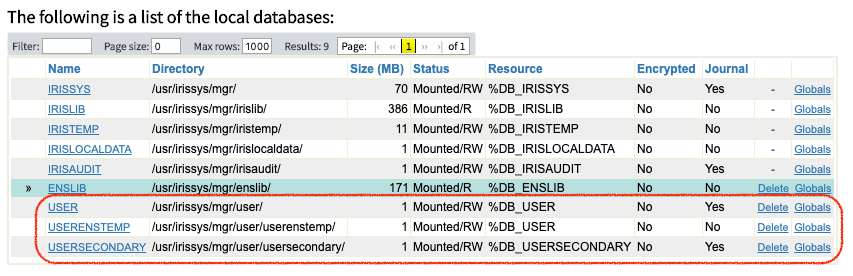
To create another database and enabling interoperability throws the same problem (exceeds databases license limit).
So, because IRIS CE is mainly thought for development and not for production I think a best practice is to enable interoperability USER by default.
Thanks
In any case from my point of view this number or user databases limit for CE Edition is not well explained (specially to new people):
This the list of "user" databases (or not system databases) in the list of databases:
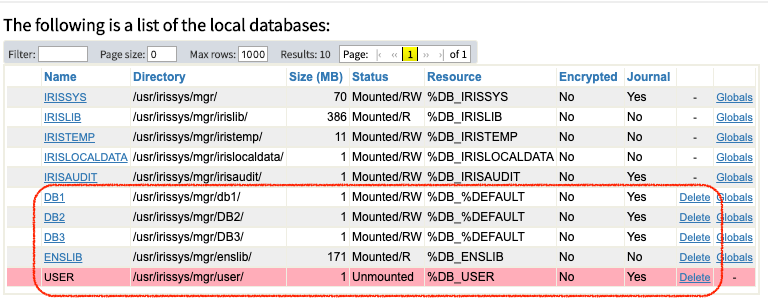
Into the red circle are 5 user databases. So in this case you can't create any more databases with IRIS CE license.
But the license counts ENSLIB as "user database" and is not true. This Database is needed to enable interoperability to any database. According to IRIS documentation:
ENSLIB — This is a read-only database contains additional code needed for InterSystems IRIS Interoperability features, specifically the ability to create productions, which integrate separate software systems. If you create a namespace that is interoperability-enabled, that namespace has access to the code in this database.
So keep in mind that the practical number of user databases for CE is 4.
I think the limit is 5 concurrent users. Anyone can confirm?
I think the link for download is wrong. The right one is https://wrc.intersystems.com/wrc/coDistGen.csp. Right @Andreas Dieckow ?