The CD releases are only in containers. review the new release cadence post
- Log in to post comments
The CD releases are only in containers. review the new release cadence post
Check this module
https://openexchange.intersystems.com/package/PHP-module-for-Cach%C3%A9
Hello @Jeff Moffett,
Do you mean HS Health Connect? or HS Information Exchange?.
I think the only place for get the installer right now is WRC
Regards
Yes please, I am curious about the logic behind this
Just curiosity... did you test also with GCP or Azure instances?
Yes, I just see it. I don't know really what is the problem, but if you search for InterSystems in the search box you get to entries:
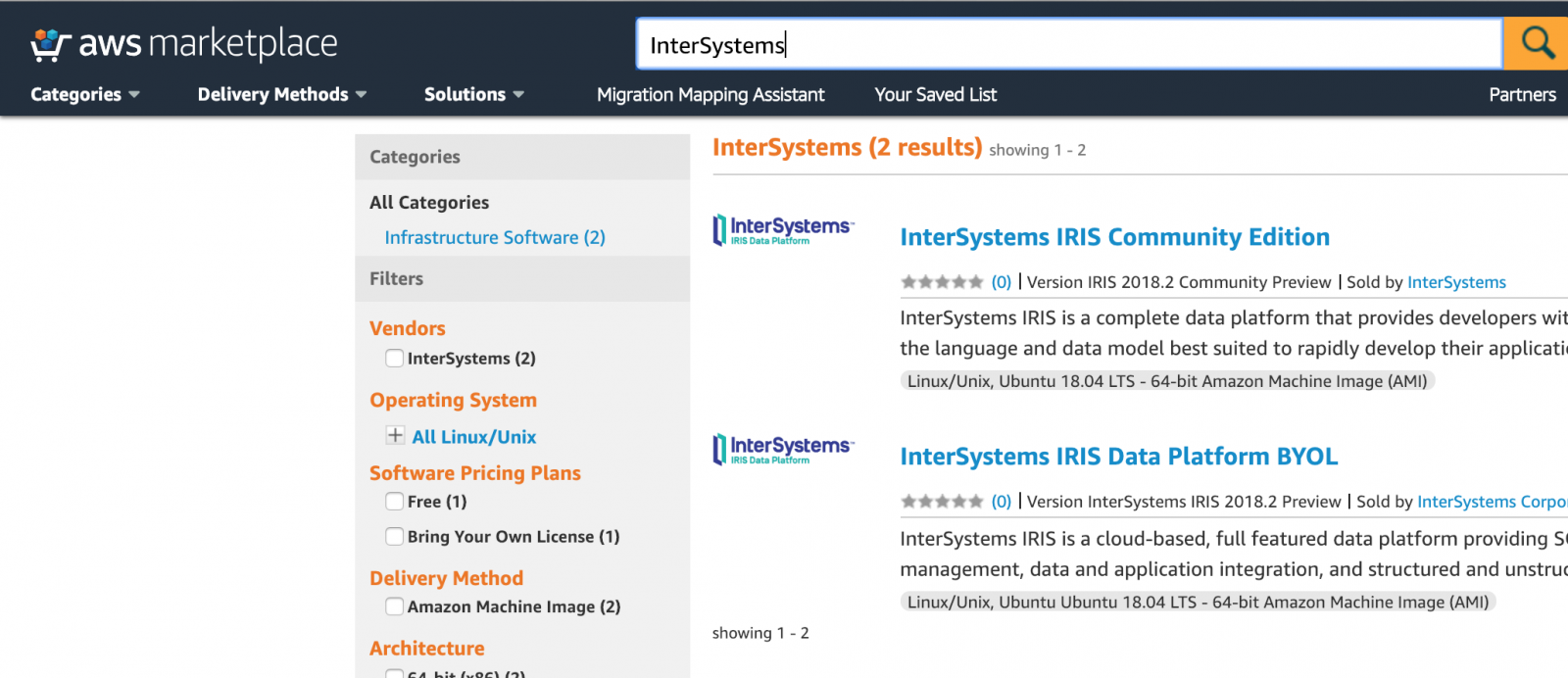
So, the right link now is InterSystems IRIS Community Edition in AWS
Sound very nice!! Thanks @Dimitry Maslennikov I'll used it and let you know 
Hello John, I can't see your email in your DC profile... I don't know if it's my fault or it's not public visible
Ummmh... not sure about this.
Specially in the case of Java Business Host Services and Operations because the JVM must run inside the IRIS instance memory (AFAIK), in this case there is no way of interaction between two different Containers or... there is a way? when I use two or more containers the interaction always was done using TCP/IP (Understand container communication).
This is a good question to clarify.
Thanks
Thank you Conor. You are right. Good point !!
Hello Lassi,
You should create a new Business Service class extending the HL7 Business Service of your election (TCP, HTTP, etc) and after overwrite this method:
method OnConstructReply(Output pReplyDoc As EnsLib.EDI.Document, pOriginalDoc As EnsLib.EDI.Document, ByRef pReplyCode As %String, ByRef pSC As %Status, pEarlyAck As %Boolean) as %Status
Override this method to construct a customized reply document. Inputs are the original document and the reply code and the status code that the framework produced in processing the original document. If you change the status code but do not construct a reply document, the framework will use the new value to construct a standard reply document.
If you construct a non-HL7 object it must still have a property called 'Envelope'. Piece:2 of this value will be written verbatim.
Consider this example (I didn't test it):
method OnConstructReply(Output pReplyDoc As EnsLib.EDI.Document, pOriginalDoc As EnsLib.EDI.Document, ByRef pReplyCode As %String, ByRef pSC As %Status, pEarlyAck As %Boolean) as %Status
{
Set pReplyDoc=pOriginalDoc.NewReplyDocument(,..LocalFacilityApplication)
Set pReplyDoc.Source=pOriginalDoc.%Id()
Do:..#UseOriginalControlId pReplyDoc.SetValueAt(pOriginalDoc.GetValueAt("1:10"),"1:10") ; copy the control id to the ack control id
Set tAckMSA=##class(EnsLib.HL7.Segment).%New($LB("",1))
Set tAckMSA.Separators=pReplyDoc.Separators
Do tAckMSA.SetValueAt("MSA",0)
Do tAckMSA.SetValueAt("CE",1)
Do tAckMSA.SetValueAt(pOriginalDoc.GetValueAt("1:10"),2)
Do:$G($$$ExpectedSequenceNumber) tAckMSA.SetValueAt($$$ExpectedSequenceNumber,4)
Do pReplyDoc.AppendSegment(tAckMSA)
Set pReplyDoc.IsMutable=0
Quit $$$OK
}
Hello Fabian,
You can get it from WRC, go to the Online Distributions options, choose the Components option and after filter using 'node':
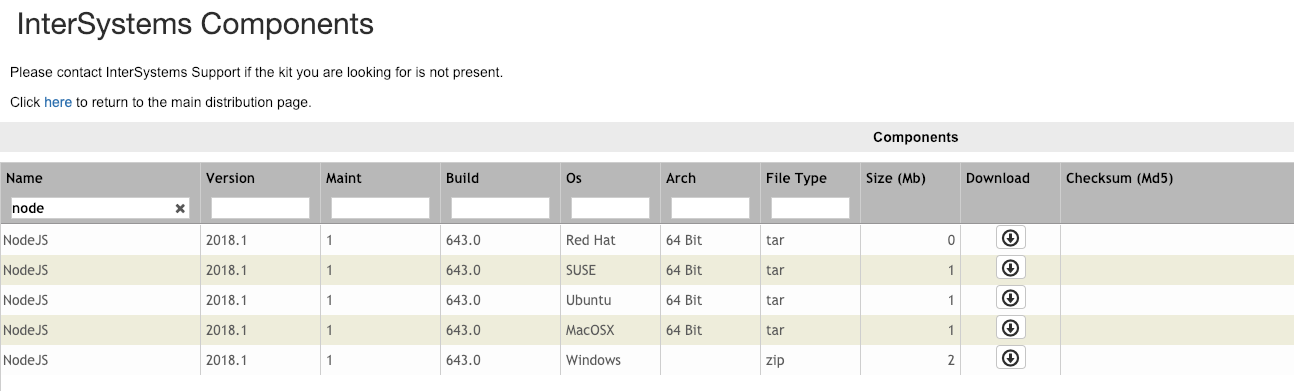
Also, maybe my post Create a Node/Express BackEnd and connect it to IRIS in less you say 'Mississippi' can help you a bit.
Regards
Not sure if helps but in order to compile the class use View/Command Palette and after choose COS: Import and compile

Thanks @Marc François!
Hello @Jeff Fried, quick question.
The CD releases will be Docker Images downloadables only from WRC or will be another public site? (Docker marketplace)
Thanks
I didn't test it yet. But should this works with .Net Core?
Good to know. I'll be tuned to the issue. Thanks
@Evgeny can you tell me:
How to edit an application (title, image, description, etc.) after published? I can't find the option.
And also, how to you publish new versions?
many thanks!
BINGO!!
It works like a charm!!
Generated files are hidden by default, and the .disp class is marked as generated. However to show the class, you have to click the little arrow on the row of buttons at the top right of the Server Explorer to open the customization menu. It’s this one:

From there, choose “Filters and Customization” and then uncheck the “Generated files” option (to disable the filter that hides generated classes) and click OK. After that to can added to the Git repo without problem.
Hello @Ward De Backer,
Have you tested this with IRIS?
I am trying to run it using your guide and the documentation (https://docs.intersystems.com/irislatest/csp/docbook/DocBook.UI.Page.cls?KEY=BXJS_connect), and I have this error:
var db = new irisobj.Iris();
         ^

TypeError: irisobj.Iris is not a constructor
I am using node v8.6.0 and iris.800.node.
My code is almost the same as yours:
let irisobj = require('iris');
var db = new irisobj.Iris();
console.log('Intersystems IRIS instance: ', db);
Thanks
Do you have any example of use with .NetCore? It is possible?
Create an IRIS instance in 5 minutes video... https://youtu.be/f_uVe_Q5X-c
Yeah... that is not funny but is true. You have to add the "files" and not the "packages" in order to get the files inside the XML project file
I guess you are using Studio (Not Atelier) in order to create the Studio Project. Right?
Then the idea is simple. You have to create a new Studio Project, add any class to the project, save the project from "File/Save Project As..." and after use the Project from the Deployment Page at Management Portal.
What's the thing not working?
Laura Blázquez you can do that with JSON because JSON is schema less but XML objects need a schema in a explicit or implicit way you need to define how the object is represented by the XML notation and viceversa.
Thank you Pili !!
Yes, we only use DNI (our national identifier) in Spain but your method still being useful for a lot of DC users... I hope more and more :-D
Yes you are true in your observation. There are severals things to improve.
Regarding get several files in an easy way you can use an Studio Project in order to pack everything you need and select the project in the Deployment screen.
Take a look to this simple example:
https://github.com/drechema/isc-coffe-shop
Maybe it helps to detect the problem
Of course!! For sure the best one