#UI Development

1 Follower · 46 Posts

Topics related to User Interface (UI) development for web, desktop, and mobile clients.

Question Laura Cavanaugh · Nov 26, 2019

Hello community,

I recently added a change to our copy of zenutils.js, and while moving it up to production, I found  different versions of zenutils.js.  I edited a copy stored in the default directory for our web application  (e.g. c:\intersystems\DEV\CSP\{application}) but the file on production is stored in {install dir}\CSP\broker.


Where should this file live, and if it lives in the default dir for our web application, is that location used before CSP\broker?  We have way too many copies of this file, and the copy that I edited was out of sync with the version on production.

1
0 438
Article Peter Steiwer · Dec 16, 2019 3m read

In the previous part of this series, we saw how to define a basic portlet. Now we will look into making this portlet reference a web page that will enhance our dashboard experience.

In this example, we will be embedding a Developer Community article along side a couple of widgets displaying information related to the number of views on the Developer Community articles. This example is not hosted on the Community Analytics server, but if it was we could see the view counts going up as we interacted with the page.

Why use this?

In a real case, perhaps you have an embedded page from an external web site showing the current Emergency Room wait times for Hospitals in your area. This portlet can be used along side widgets from your Emergency Room showing how many people are waiting, how many doctors are active, and how many people are being treated. As other Emergency Room wait times grow, you can possibly expect your volume to increase as well. This can help you make decisions on how to allocate resources.

0
0 483
Article Peter Steiwer · Jan 14, 2020 2m read

In the previous part of this series, we saw how to include data in a portlet from within DeepSee. This used the built in data controller. In this part, we are going to be pulling in data from outside of DeepSee. This will include both information from within InterSystems IRIS and from the OS.

Why use this?

This is useful if you would like to create a dashboard that only contains information about your system. It is also useful if you want to display data about your system along side data that you have stored in DeepSee.

What will we learn?

0
0 392
Article Nikolay Solovyev · Feb 17, 2020 5m read

Dasha.AI is a platform that allows you to create and manage voice interfaces for your applications. One of Dasha’s distinctive features is that most users believe they are talking to a human, not a robot.

Voice is the most natural way for people to interact. Dasha allows to use voice interface to interact with your application as naturally as communication between people.   

The voice interface cannot completely replace the traditional user interface of the application, but some tasks could be perfectly solved with the help of the speech interface.

0
3 380
Article Sergei Sarkisian · Jul 18, 2022 12m read

Hi! Today I would like to talk about one of the most important architectural patterns in Angular.

The pattern itself is not related to Angular directly, but as Angular is component-driven framework, this pattern is one of the most essential for building modern Angular applications.

Container-Presentation pattern

It is believed that good components should be small, focused, independent, testable and most important - reusable.

0
0 1278
Article Jean Millette · Nov 2, 2019 15m read

The Issue

I help support a legacy ZEN application that makes extensive use of the “dataGrid” component. The application reuses a ZEN page with a“dataGrid” for different views of similar data; depending on the view, the application hides or displays some of the columns of the “dataGrid”. The application does this client-side, setting the “hidden” property of the “columnDescriptor” true or false as needed.

Users have reported the following bug in the app: On views which hide a column, data in the other columns are shifted so as to appear under the wrong headers.

0
0 476
InterSystems Official Aya Heshmat · Nov 25, 2025

The Interoperability user interface project has continued from 2025.1 and has incorporated many of the items that you – our customers and partners – have suggested and observed.  We are continuing to invest in feedback and updating this important user experience.   In the latest release, 2025.3 for IRIS, IRIS for Health, Health Connect and Health Connect Cloud, the DTL Editor and Production Configuration applications that are available for opt-in. 
NOTE:

  • You can switch between the modernized and standard experiences. 
  • All other Interoperability screens remain in the Standard user interface.
0
0 130
Article Ward De Backer · Oct 28, 2021 2m read

I wrote a step by step tutorial in the qewd-howtos repository how you can write state of the art multi-page web apps with Node.js using a QEWD-Up WebSocket/REST api back-end integrated with a mainstream web framework like NuxtJS & Vue.js. In particular with the latest NuxtJS/Vue.js frameworks, writing web applications becomes fun again, allowing you to write your applications very efficiently, hiding all boilerplate code from you.

The tutorial should be very easy to try out on your development machine and consists of two parts:

0
3 1312
Question JASON PARKER · Oct 14, 2023

Hi,

Any examples please of connection a Delphi 11 Front end to a Cache database?

I can get it to connect but then when I try and view data it fails


4 fields in front end

SERVER = 127.0.0.1

PORT = 1972

NAMESPACE = DROP DOWN LIST (I SELECT "DEVELOP" FROM THE LIST

EDIT_CLASSNAME = Default value is Test (with maybe 3 fields just of random stuff)


procedure TFMAIN.BtnConnectClick(Sender: TObject);
 var
 ConnectString: string;
 Success: Boolean;
 Col,Row:Integer;
 FieldName:array[0..10] of string;
begin

    IF

0
0 617
Article Peter Steiwer · Jun 26, 2020 1m read

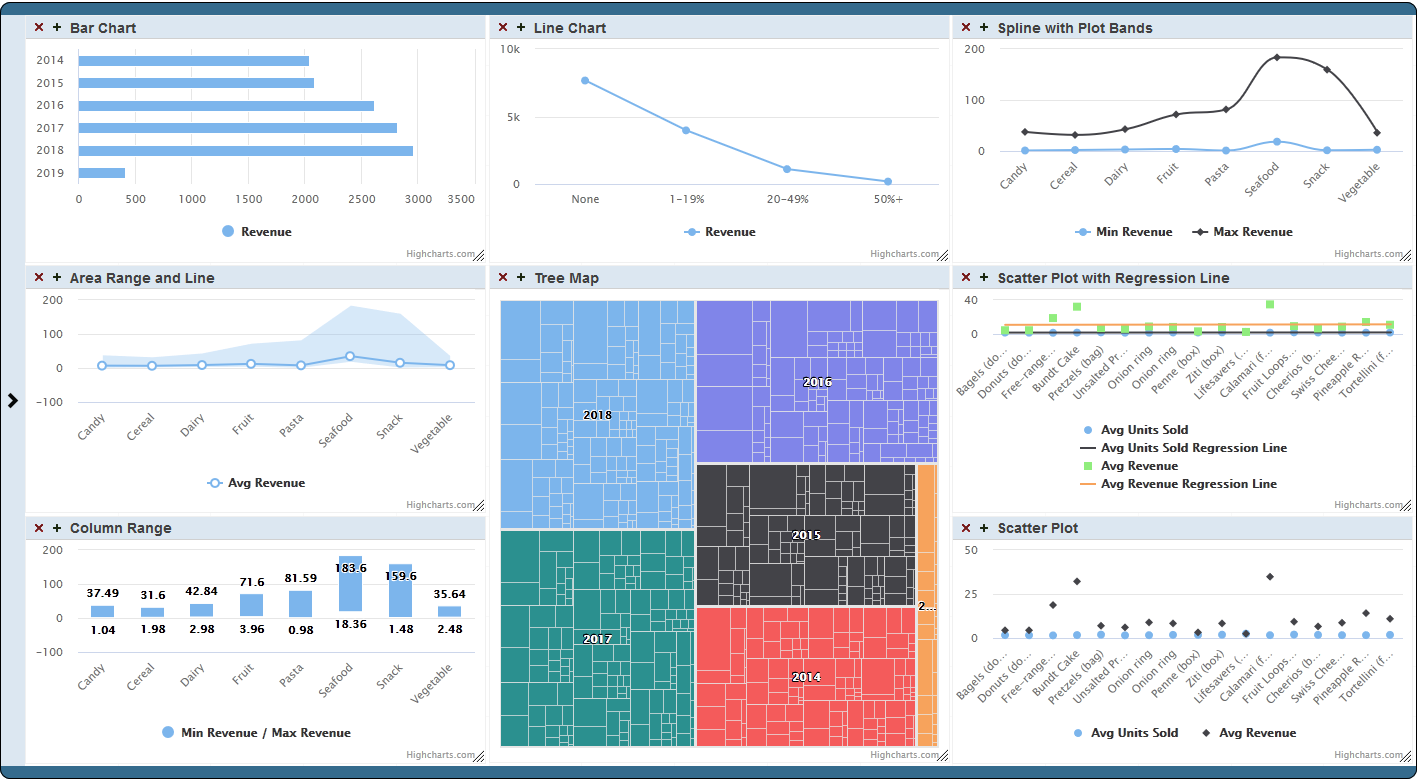
Now available on Open Exchange is a library of third party charts available to use within DeepSee/InterSystems IRIS BI dashboards. To start, simply download and install, select the new portlet as the widget type, then select the chart type that you desire. If you don't find the type of chart you are looking for, you can easily extend the portlet to implement your desired chart type. These new chart types can be used within existing dashboards or you can create new dashboards using them.

0
0 1188