Hi Developers,
We are happy to announce the new InterSystems online programming contest:
🏆 InterSystems Programming Contest: AI Agents for FHIR🏆
Duration: May 25 - June 14, 2026
Prize pool: $12,000

In healthcare, interoperability is the ability of different information technology systems and software applications to communicate, exchange data, and use the information that has been exchanged.
Hi Developers,
We are happy to announce the new InterSystems online programming contest:
🏆 InterSystems Programming Contest: AI Agents for FHIR🏆
Duration: May 25 - June 14, 2026
Prize pool: $12,000

In the previous article, we used pyprod to create production components while relying on the UI for production configuration. That same production can now be defined entirely in Python:
from intersystems_pyprod import Production, ServiceItem, ProcessItem, OperationItem
iris_package_name = "HelloWorld"
class MyProduction(Production):
services = [
ServiceItem(
"MyServiceName",
"HelloWorld.MyService",
host_settings={"target": "MyProcessName"},
)
]
processes = [
ProcessItem(
"MyProcessName",
"HelloWorld.MyProcess",
host_settings={"target": "MyOperationName"},
)
]
operations = [
OperationItem("MyOperationName", "HelloWorld.MyOperation")
]
Hi,
It's me again😁, recently I am working on generating some fake patient data for testing purpose with the help of Chat-GPT by using Python. And, at the same time I would like to share my learning curve.😑
1st of all for building a custom REST api service is easy by extending the %CSP.REST
Creating a REST Service Manually
Let's Start !😂
1. Create a class datagen.restservice which extends %CSP.REST
ClassExtends%CSP.REST2. Add a function genpatientcsv() to generate the patient data, and package it into csv string
ExtendsAsyou may test the function in the terminal by typing
.png)
3. Add a function
Hello everyone,
The InterSystems Learning Services Certification Team is pleased to announce the release of the HealthShare Unified Care Record Deployment Specialist Certification exam. The exam is now available for purchase and scheduling in the InterSystems exam catalog.

In the previous IoP article, I showed how IoP can expose Python messages to DTL by generating JSON schemas. That is useful when the message is primarily a Python object and we want the IRIS tooling to understand its structure.
This time, the direction is a little different.
Starting with IoP 3.7.1, a PersistentMessage can now be a native IRIS message body class. The Python class is still the source code you write, but the generated IRIS class extends Ens.MessageBody
We have a long running InterSystems Engine with an Interface Development Team. We have implemented basic interface and code development processes using mostly manually created helper tasks and functions.
We are looking to upgrade these processes by installing and starting to use Embedded GIT in our DEV spaces first. We will not use it to deploy changes to PRODUCTION at first, keeping our same current process that the team is very comfortable with.
We plan to start by using the BASIC mode in GIT, to avoid confusion over multiple branches and other version control functions.
Hi Developers!
Here are the technology bonuses for the InterSystems Programming Contest: AI Agents for FHIR that will give you extra points in the voting:
Hi Community,
Interoperability metrics were enabled for a production using ##class(Ens.Util.Statistics).EnableSAMForNamespace(). However, after running DisableSAMForNamespace() and DisableStatsForProduction(), the metrics continue to appear in the endpoint output.
Is there a way to completely stop these interoperability metrics from displaying in the API metrics stream? Is there an additional step or cache clear required?
I’m looking for recommendations to improve interoperability performance in InterSystems IRIS, especially when handling large volumes of HL7 or healthcare-related messages.
What are the best practices for optimizing productions, business services, operations, and message processing performance? I’d also like to know if there are recommended monitoring tools or settings commonly used in production environments.
Hello Community!
We’re excited to invite you to our upcoming Hebrew webinar, presented by @Keren Skubach, an InterSystems Senior Sales Engineer:
👉A Practical Guide to Leveraging AWS Adapters and APIs 👈
📅 Date & time: June 2nd, 3:00 PM IDT
Discover how to accelerate cloud-based integration with InterSystems' native AWS adapters for S3, SQS, SNS, and CloudWatch.
This session provides a practical look at building modern interoperability workflows — from secure file ingestion and asynchronous messaging to automated notifications and centralized monitoring.
I was really surprised that such a flexible integration platform with a rich toolset specifically for app connections has no out-of-the-box Enterprise Service Bus solution. Like Apache ServiceMix, Mule ESB, SAP PI/PO, etc, what’s the reason? What do you think? Has this pattern lost its relevance completely nowadays? And everybody moved to message brokers, maybe?
Wiki time: An enterprise service bus (ESB) implements a communication system between mutually interacting software applications in a service-oriented architecture (SOA) .
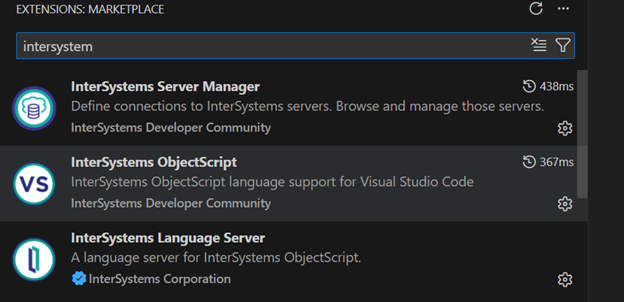
install below 3 extensions

input connection details
IP:localhost
Port: 52773
choose global & http connection method
Input username and password of Intersystems management portal
screenshot for success connection:
I want to develop a REST API for uploading PDF files. I started with OPENAPI spec file. When I test, I get error 8727 referencing missing required parameter file.
"{"$c(13,10,9)"""errors"":[ {"$c(13,10,9,9,9)"""code"":8727,"$c(13,10,9,9,9)"""domain"":""%ObjectErrors"","$c(13,10,9,9,9)"""error"":""ERROR #8727: Parameter required: file."","$c(13,10,9,9,9)"""id"":""RESTRequired"","$c(13,10,9,9,9)"""params"":[""file"""$c(13,10,9,9,9)"]"$c(13,10,9,9)"}"$c(13,10,9)"],"$c(13,10,9)"""summary"":""ERROR #8727: Parameter required: file.
Solar irradiance forecasting is critical for grid stability in photovoltaic (PV) power plants. This article replicates and extends the methodology of Lara-Benítez et al. (2023) "Short-term solar irradiance forecasting in streaming with deep learning" replacing the original offline simulation with a fully operational streaming pipeline built on InterSystems IRIS. We leverage IRIS Interoperability Productions as the streaming backbone, Embedded Python to run MLP, LSTM, and CNN deep learning models, and IntegratedML as an AutoML baseline.
Hi, Community!
Are you gathering data for clinical research? See how InterSystems OMOP can help streamline your data preparation:
The Interoperability user interface now includes modernized user experiences for the DTL Editor and Production Configuration applications that are available for opt-in in all interoperability products. You can switch between the modernized and standard views. All other Interoperability screens remain in the Standard user interface. Please note that changes are limited to these two applications and we identify below the functionality that is currently available.
To try out the new screens prior to upgrading, you can download the 2025.
The 2026.1 release of InterSystems IRIS® data platform, InterSystems IRIS® for Health, and InterSystems Health Connect™ is now Generally Available (GA). This is an Extended Maintenance (EM) release.
I need a %SYS.Python object that will be accessible from different processes. The goal is to avoid reinitializing the Python object whenever it is called. Ways that I checked and decided that it is NOT what I want:
Next, my ideas (none of them look like a silver bullet):
A microservice is an architectural style that structures an application as a collection of small, autonomous services. Each component is developed around a specific business capability, can be deployed independently, and is typically managed by a miniature, specialized, self-governing team. (Source: https://microservices.io/)

I'm a huge sci-fi fan, but while I'm fully onboard the Star Wars train (apologies to my fellow Trekkies!), but I've always appreciated the classic episodes of Star Trek from my childhood. The diverse crew of the USS Enterprise, each masterminding their unique roles, is a perfect metaphor for understanding AI agents and their power in projects like Facilis. So, let's embark on an intergalactic mission, leveraging AI as our ship's crew and boldly go where no man has gone before
Customer support questions span structured data (orders, products 🗃️), unstructured knowledge (docs/FAQs 📚), and live systems (shipping updates 🚚). In this post we’ll ship a compact AI agent that handles all three—using:
The 2025.1.4 and 2024.1.6 maintenance releases of InterSystems IRIS® data platform, InterSystems IRIS® for Health, and InterSystemsHealth Connect™ are now Generally Available (GA). These releases include the fixes for a number of recently issued alerts and advisories, including the following:
|
Alert ID |
Product & Versions Affected |
Risk Category & Score |
Explicit Requirements |
|
IF-9262 |
InterSystems IRIS® for Health InterSystems Health Connect™ versions |
System Stability Concern: 5 (High) |
FHIR and Health interoperability issues may cause upgrade failures and unexpected or adverse product behavior. |
FHIR (Fast Healthcare Interoperability Resources) is the modern standard for storing and exchanging clinical data. But once your data is in a FHIR server, how do you actually explore it? FHIR data is stored as JSON — powerful, but not practical to read directly. I wanted a tool where you could click on a patient, see their conditions, medications, lab results, and more — in a clean, readable format. So I built the FHIR Patient Viewer.
The app runs entirely in Docker and connects directly to an InterSystems IRIS for Health FHIR server.
Working with files often starts off simple. open the file, read, and process. That approach works perfectly well, until the file happens to be an Excel file.
A Common Assumption
At first, an Excel file (.xlsx) looks like just another data file, rows, columns and values. nothing unusual. So it's natural to assume it can be read the same way as a .txt ot .csv file. But that's where things start to break.
Why Excel files behave differently
The key difference is how the data is stored:
-> .txt / .csv - plain text, line-by-line.
-> .
If you have long-running messages here's a simple code to catch them. You can also use Queue Wait Alert to get the same results, although this code will catch even a single active message with an empty queue. It also scans all namespaces with no production modification, so it can be used for debugging.
Include Ensemble
Class User.LongMessagesTask Extends %SYS.Task.Definition
{
Parameter TaskName = "Long running messages";
Property LongRunningMessageThreshold As %Integer(MINVAL = 1) [ InitialExpression = 60 ];
Method OnTask() As %Status
{
set ts = $zdatetime($NOW(0),3,1)
set ns = ""
while 1 {
// Iterate namespaces
set ns = $o($$$EnsJobMonitorRoot(ns))
quit:ns=""
set job =""
while 1 {
// Iterate jobs
set job = $o($$$EnsJobMonitorRoot(ns, job))
quit:job=""
// Get business host name
set bh = $o($$$EnsJobMonitorRoot(ns,job,""))
// Get the time of the last state change
set lastActivity = $$$EnsJobMonitorRoot(ns,job,bh,"%LastActivity")
// Get active message, if any - bh can be just idling
set active = $d(^[ns]Ens.ActiveMessage(job),messageid) // From $$$EnsActiveMessage
if active {
set time = $system.SQL.Functions.DATEDIFF("s", lastActivity, ts)
if time > ..LongRunningMessageThreshold {
set text = $$$FormatText("Long running message %1, in ns: %2, BH: %3, processing since %4, for %5 seconds", messageid, ns, bh, lastActivity, time)
// For debug
// write text, !
do ##class(%SYS.System).WriteToConsoleLog(text)
}
}
}
}
quit $$$OK
}
}RabbitMQ is a message broker that allows producers (those who send a data message) and consumers (those who receive a data message) to establish asynchronous, real-time, and high-performance massive data flows. RabbitMQ supports AMQP (Advanced Message Queuing Protocol), an open standard application layer protocol.
The main reasons to employ RabbitMQ include the following:
v2026.1 was just released as GA, and one of the features I'm looking forward to using is the DTL Explainer feature.
This allows you to take a Data Transformation, and with a click of a button get a human-readable description of the transformation (which you can also use as the basis for the DTL Description).
For complex DTLs, especially ones you didn't write yourself, or you did but a long time ago, this will allow you to get a clear quick understanding of what it's doing.
The Interoperability user interface project has continued from 2025.1 and has incorporated many of the items that you – our customers and partners – have suggested and observed. We are continuing to invest in feedback and updating this important user experience. In the latest release, 2026.1 for IRIS, IRIS for Health, Health Connect and Health Connect Cloud, the BPL Editor and Message Viewer/Visual Trace applications are now available for opt-in!
NOTE:
If you're building solutions on IRIS and want to use Git, that's great! Just use VSCode with a local git repo and push your changes out to the server - it's that easy.
But what if: