2 Followers · 47 Posts

Microsoft Azure is a cloud computing service created by Microsoft for building, testing, deploying, and managing applications and services through Microsoft-managed data centers.

Learn more.

Article Gabriel Ing · Feb 6 8m read

TL;DR This article explains how to deploy InterSystems IRIS Community Edition on Azure using the Azure Marketplace and a Virtual Machine. It covers prerequisites, instance selection, authentication, SSH access, first verification steps, and how to delete resources to avoid charges. The deployment can typically be done using Azure free credits and is suitable for developers who want to quickly start working with IRIS in the cloud.

Who this guide is for. This guide is intended for developers, solution architects, and DevOps engineers who want to deploy InterSystems IRIS Community Edition on Microsoft Azure. No prior Azure automation experience is required, but basic familiarity with the Azure Portal and SSH is helpful.

After following this guide, you will be able to:

  • Launch InterSystems IRIS Community Edition from the Azure Marketplace
  • Configure a small, secure Azure VM
  • Connect to IRIS using SSH and the Management Portal
  • Reset the default IRIS password and verify that IRIS is running

Prerequisites

  • An active Azure subscription (new accounts may have free credits)
  • Permissions to create resource groups, VMs, and networking resources
  • An SSH client and a private key (.pem) you can store securely
  • Basic knowledge of Linux command line

Deployment overview

  • Open the IRIS Community Edition listing in Azure Marketplace and click Get it now
  • In Azure Portal, choose Start with a pre-set configuration (or Create)
  • Configure Basics: subscription, resource group, VM name, region, image, and size (a small VM is usually sufficient)
  • Choose SSH key authentication and generate/download the key if needed
  • Review + Create, accept terms, and deploy; then Go to resource → Connect → SSH
  • First SSH login: run iris password to change _SYSTEM/SYS; start a session with iris session iris
  • Management Portal: http://YOUR_VM_IP:52773/csp/sys/UtilHome.csp
0
0 58
Article Scott Roth · Jan 24, 2025 3m read

Not sure there are many that connect to MS SQL to execute queries, stored procedures, etc, but our Healthsystem has many different MS SQL based databases we use within the Interoperability environment for various reasons.

With the push to moving from on-prem to the Cloud we ran into some difficulties with our SQL Gateway connections and knowing how to config them to use Microsoft Entra for Active Directory Authentication.

There are many articles out on the web, but there was not one that could give us the full answer to what we needed to do, and Microsoft wasn’t much help.

0
1 701
Article Mihoko Iijima · Feb 23, 2024 5m read

I have challenged to create a bot application using Azure Bot that can retrieve and post data to IRIS for Health.


A patient's data has already been registered in the FHIR repository of IRIS for Health.

The patient's MRN is 1001. His name is Taro Yamada. (in Japanese :山田 太郎)

This bot can post new pulse oximeter readings as an observation resource linked to the patient.

2
2 549
Article Keren Skubach · Aug 19, 2024 4m read

Accessing an Azure cloud storage to upload/download blobs is quite easy using the designated %Net.Cloud.Storage.Client class API methods, or using the EnsLib.CloudStorage.* inbound/outbound adaptors.

Note that you'll need to have the %JavaServer External Language Server up and running to use the cloud storage API or adaptors, since they both use the PEX framework using the Java Server.

0
3 609
Article Eduard Lebedyuk · Dec 19, 2023 8m read

If you're running IRIS in a mirrored configuration for HA in Azure, the question of providing a Mirror VIP (Virtual IP) becomes relevant. Virtual IP offers a way for downstream systems to interact with IRIS using one IP address. Even when a failover happens, downstream systems can reconnect to the same IP address and continue working.

The main issue, when deploying to Azure, is that an IRIS VIP has a requirement of IRIS being essentially a network admin, per the docs.

To get HA, IRIS mirror members must be deployed to different availability zones in one subnet (which is possible in Azure as subnets can span several zones). One of the solutions might be load balancers, but they, of course, cost extra, and you need to administrate them.

In this article, I would like to provide a way to configure a Mirror VIP without the using Load Balancers suggested in most other Azure reference architectures.

1
3 1115
Article Anton Umnikov · Jan 21, 2021 26m read

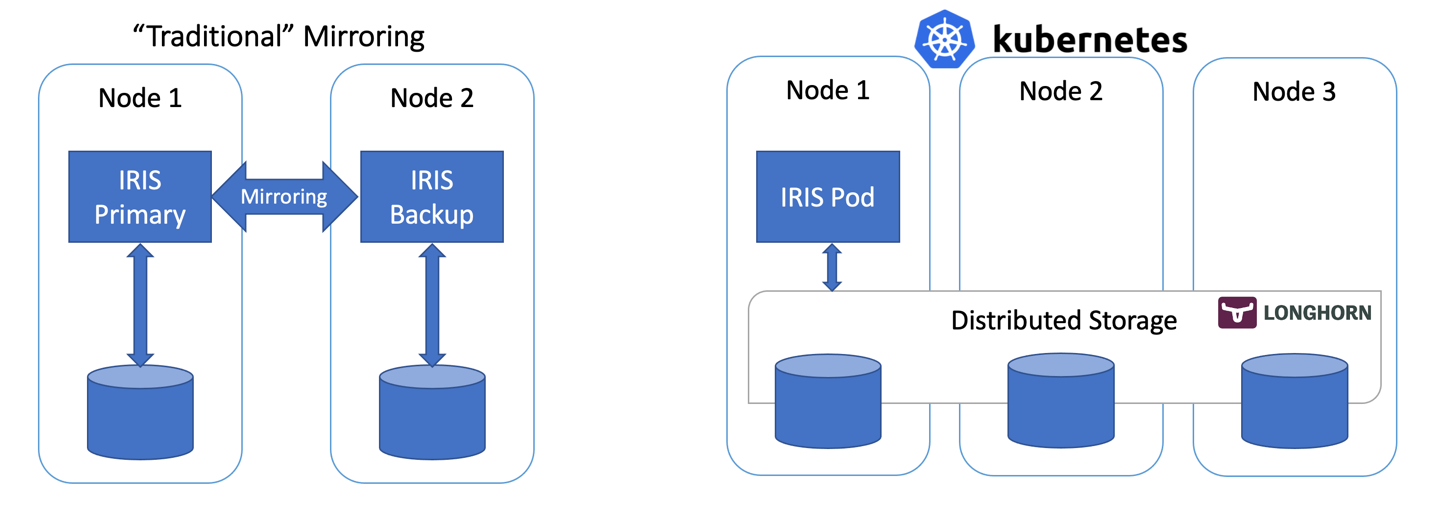
In this article, we’ll build a highly available IRIS configuration using Kubernetes Deployments with distributed persistent storage instead of the “traditional” IRIS mirror pair. This deployment would be able to tolerate infrastructure-related failures, such as node, storage and Availability Zone failures. The described approach greatly reduces the complexity of the deployment at the expense of slightly extended RTO.

16
8 3999
Article Yaron Munz · Jul 12, 2022 5m read

Overview

We started to use Azure Service Bus (ASB) as an enterprise messaging solution 3 years ago. It is being used to publish and consume data between many applications in the organization. Since the data flow is complex, and one application’s data is usually needed in multi applications the “publisher” ---> ”multiple subscribers” model was a great fit. The ASB usage in the organization is dozens of millions of messages per day, while IRIS platform is having around 2-3 million messages/day.

3
3 864
Article Victor Sanner · Apr 20, 2022 2m read

Hi,

I have wrote an article about how to install the intersystems cache driver in a Docker container, and then deploy it using Azure Functions: 

How to run a (Python) Azure Function as a Docker container & Deploy it using Bicep | Victor Sanner
This might be useful to others, especially the dockerfile which I have copied below. This builds a debian docker container and installs the Intersystems Cache driver, which python can then use :)

To enable ssh & remote debugging on app service change the base image to the one below
# FROM mcr.microsoft.com/azure-functions/python:3.0-python3.
0
2 707
Article Mikhail Khomenko · Jan 5, 2022 8m read

We’ve already considered how to run an IRIS-based application in GCP Kubernetes in Deploying InterSystems IRIS Solution into GCP Kubernetes Cluster GKE Using CircleCI. Additionally, we’ve seen how to run an IRIS-based application in AWS Kubernetes in Deploying a Simple IRIS-Based Web Application Using Amazon EKS. Now, let’s look at how to deploy an application to the Azure Kubernetes Service (AKS).

0
0 760
Article Bob Binstock · Apr 26, 2021 9m read

Like hardware hosts, virtual hosts in public and private clouds can develop resource bottlenecks as workloads increase. If you are using and managing InterSystems IRIS instances deployed in public or private clouds, you may have encountered a situation in which addressing performance or other issues requires increasing the capacity of an instance's host (that is, vertically scaling).

One common reason to scale is insufficient memory.

1
0 552
Article Janne Korhonen · Jun 4, 2020 5m read

A lot of developers like to work with Studio and have been looking into source code version control such as GIT or into enabling modern development workflows like CICD or DevOps processes.

This article describe an elementary solution to get you started in CICD and DevOps, even if you are not yet ready to move to Atelier or forth coming VS Code approach which enable client side source code version control.

0
0 1083
Article Renato Banzai · Jun 1, 2020 4m read

Making a Chart using Intersystems IRIS + Python

How to use the IRIS Native API in Python to access globals and plot some charts.

Why Python?

With a large adoption and use in the world, Python have a great community and a lot of accelerators | libraries to deploy any kind of application. If you are curious (https://www.python.org/about/apps/)

Why COVID-19 Data

As the pandemy evolves in the world a lot of information are being spreaded so I decided to create an application to audit those information.

1
0 530
Article Mark Bolinsky · Mar 21, 2017 4m read

Database systems have very specific backup requirements that in enterprise deployments require forethought and planning. For database systems, the operational goal of a backup solution is to create a copy of the data in a state that is equivalent to when application is shut down gracefully.  Application consistent backups meet these requirements and Caché provides a set of APIs that facilitate the integration with external solutions to achieve this level of backup consistency.

7
2 2961
Article Mark Bolinsky · Jul 1, 2016 17m read

++Update: August 2, 2018

This article provides a reference architecture as a sample for providing robust performing and highly available applications based on InterSystems Technologies that are applicable to Caché, Ensemble, HealthShare, TrakCare, and associated embedded technologies such as DeepSee, iKnow, Zen and Zen Mojo.

Azure has two different deployment models for creating and working with resources: Azure Classic and Azure Resource Manager. The information detailed in this article is based on the Azure Resource Manager model (ARM).

4
0 12654