As you know in Caché / IRIS you have the possibility to define a property as Multidimensional as documented here:
https://docs.intersystems.com/iris20201/csp/docbook/DocBook.UI.Page.cls?KEY=GOBJ_proplit#GOBJ_proplit_multidim
and the explanation of how to use it
https://docs.intersystems.com/iris20201/csp/docbook/Doc.View.cls?KEY=GOBJ_proplit#GOBJ_proplit_multidim_values
Though the access is quite comfortable (in traditional COS sense) there are 2 main restrictions that hurt:
#1) It is not saved to disk unless your application includes code to save it specifically.
#2) It cannot be stored in or exposed through SQL tables
there are some more
I'll show how to overcome these limits
A VIEW in SQL is basically a prepared SQL statement.
It has to be executed and assembled like any other SQL query.
MATERIALIZED VIEW means that the content is collected before hands and can be retrieved rather fast.
I saw the concept first with my favorite competitor named O* and they made a lot of noise about it.
{ favorite: because I could win every benchmark against them
}
If you define a Persistent Class / Table the class compiler generates for you an appropriate Storage definition.
A different option is to define a SQL mapping for an already existing Global storage. This has been excellently
explained already in a different series of articles. The Art of Mapping Globals to Classes 1 of 3
The typical WHERE condition in SQL relates mostly to some content of the rows you work on.
So it needs to be calculated and checked for each row you access.
Differently (and that's why I named it STATIC) is a WHERE condition that is independent of the rows you access.
IRIS 2010.1 brought us a new feature: %Net.WebSocket.Client
As a continuation of my series of WS Clients I just couldn't resist to try it.
Well, this is the result and it was rather simple in the end.
- After I succeeded in my personal fight against Windows Firewall ;-)
You basically need to prepare 3 classes:
- Credentials for User, PW, SSL
- an Event Listener
- the Client (Could be a .MAC routine as well)
The example uses the WSS.EchoServer (a derivate from former SAMPLES in Caché).
The default assumption is to have Client and Server on the same system & namespace.
In Caché you had an example of a WebSocket Server in namespace SAMPLES
With IRIS the samples are gone and require additional installation effort.
So I refurbished the code with some useful additions:
- independent of namespace
- timeout control from client
- readable communication log
This contains 2 classes:
- rcc.EchoServer.cls
- rcc.WSScsp.cls for testing. Called from Browser by (http://localhost:52773/csp/user/rcc.WSScsp.cls)
The server is essential for the 'native' WebSocket Client Demo
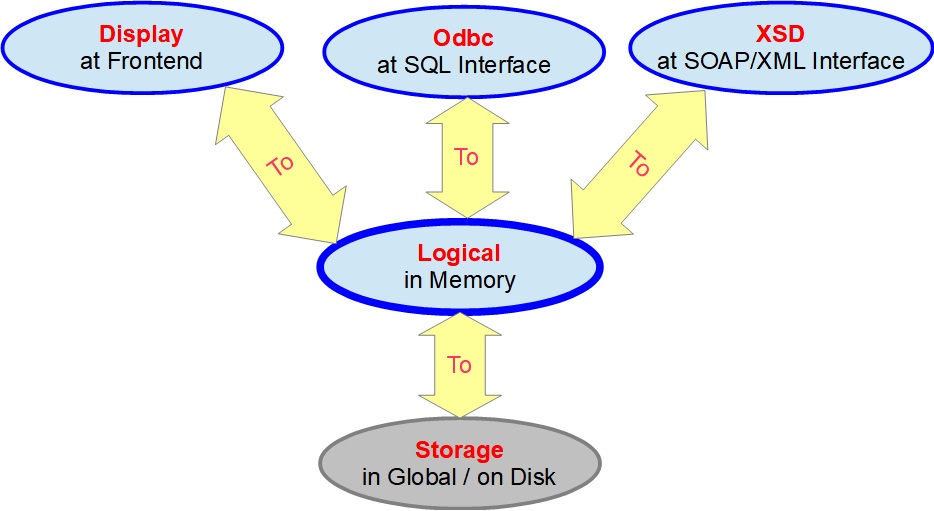
A recent discussion made me aware that the documentation on DataType classes is excellent.
http://docs.intersystems.com/latest/csp/docbook/DocBook.UI.Page.cls?KEY…
I just miss the visualization of the methods for Data Format Conversions.
LogicalToDisplay() / DisplayToLogical()
LogicalToOdbc() / OdbcToLogical()
LogicalToStorage() / StorageToLogical()
LogicalToXSD() / XSDToLogical()
Graphic makes it much easier to understand for anyone beginning with Caché objects.

A demo in traditional style COS
This was written based on a previous trial in .XLS
It is far from being perfect. Rather a challenge for
improvement in all directions (code, interface, ...)
So anyone feel invited to make it better.
USER>d ^SUDOKU5
;; Welcome to this SUDOKU demo !
;; you may solve your SUDOKU easier or create your own
;; under each box entry you find a list
;; of allowed values for this box
;; fill in numbers 1..9 as you need
;; to clear a box enter any character or blank
;; to stop enter . or , for the solver enter ?
;; navigate between boxes by cursor keys <>^v
;;
go:.png)
ENSTEMP was addressed already some time ago;
Article: Preventing Globals From Getting Journaled (Continued from How do I Minimize My Journals)
and is also in public documentation
Where InterSystems IRIS Stores Temporary Production Data
Though I'd like to understand if this is just naming a non-journaled DB
or are there also typical features of CACHETEMP / IRISTEMP related to it:
- automatic clean-up at system startup
- keeping Global Buffers in memory as long as possible
- late writing to the storage file
In other words is it a 2nd, 3rd, .. fully feature blown IRISTEMP ?
During testing your code you are often confronted with the need to examine
the actual content of an object. Either using ZWRITE or $system.OBJ.Dump()
you get a picture of simple properties as "--- attribute values ---"
while "--- swizzled references ---" are more confusing than informative
and with "--- calculated references ---" you are just left in the lurch.
This small helper class allows you to dump an object to terminal or
e.g in background to some stream for later review.
By default, you see just properties with content,
DO ##class(Z.obj).Earlier, I've written about command pipes.
This is the internal variant of a PIPE.
To make this more tangible and visible for you, I prepared a small example
The scenario is to run a monitoring process that receives
input from an unknown number of sensors. (Could be Lab equipment or similar.)
The monitor should not poll its sensors nor run
in a hang loop to scan a common global and work independently of any disk access.
To try it log into a terminal
. DO ##class(IJC.Demo).%Start()
The Highlander principle applies for this example: There can only be one
Next, open a new terminal and run
.
Running a Background Job using the JOB command is a well-known feature.
Using ECP to distribute databases to several servers is also well-known.
But using the combination of both to run a process on a different server
seems to be a rare case.
Sure there are enough other ways to start a remote job, but the special
combination with ECP where the application server starts a process on a
data server without additional networking is worth to be remembered.
The example starts a remote process and receives back a result.
This example is extracted from a long-running installation.
The purpose is to have simple monitoring of several servers at a rather primitive level.
Just slightly more intelligent than a raw PING. But still easy to integrate.
It avoids the overkill of information you are often confronted with while you are just
interested in the number of active processes or similar basic figures.
The example shows a basic skeleton that might be easily filled by your real needs.
Other Sync-Tools just work from Caché/IRIS to Caché/IRIS.
Synchronizing your data to some external DB requires some other solution.
The solution is available in Caché/IRIS since quite some time and works excellent.
^OBJ.DSTIME does the magic.
https://docs.intersystems.com/latest/csp/docbook/DocBook.UI.Page.cls?KEY=D2IMP_ch_current#D2IMP_C23869
It was built to allow data synchronization with DeepSee.
It keeps a very simple journal on Object/Table changes by signaling Modified,New,Deleted
This could be useful not only for DeepSee but for any other type of Table Synchronization.
The Global ^OBJ.
The Caché / Ensemble standard distribution contains in namespace SAMPLES
a nice example of a CSP page consuming WebService as a Client.
I have modified it not only to display the replies but to feed them back into a Global.
I used the classic Hyperevent to achieve this. The replies end up as a log in global^WSREPLY.
When there is no input anymore the page closes and goes away.
There are 2 versions with visible and hidden display during operation.
dc.WSCSP.reverseVerbose.cls and dc.WSCSP.reverseHidden.cls
The message to send is simply passed as a hash after the CSP_URL. (Mind URL encoding!
It will demonstrate the wide range that is openend by making use
of the power embedded in Node.js and its adapter to Caché, Ensemble, Health,..*
Node / JavaScript have wide reputation to work as a WebSocket client.
By using the Caché adapter it becomes easy to control it and to consume the results as a
Client for WebSocket Servers and to collect the replies in Caché, Ensemble, ..
I used node-v6.16.0-x64.msi and cache610.node as cache.node
You provide a Global for input:
^WsockIn="wss://ws.postman-echo.The question has come up several times and I saw mixed answers and no quick example
My personal preference is using CPIPE device as you get back exactly the output you will get at the command line interface of your OS .
The tricky thing is to stop reading in time.
The example just displays what you normally see in your console.
it becomes useful if you look for things that you can't get from any $system.whatever()
e.g.
- your servers IP address or addresses depending on your configuration.
In a single server environment, it is rather easy to create a transaction consistent backup.
Simplified:
You find (or force a specific point in time with no open transactions.
Freeze your server, take a snapshot and you are done.
I'm facing a specific sort problem.
There are several thousands of articles sold all over.
Users expect to get a description in local language sorted by their specific collation.
This data set demonstrates a basic M:N relationship between 2 tables
The dataset is targeted to show a slim implementation of M:N
It's no question that other implementations exist. But at significantly more storage consumption.
If you have worked with Caché Objects,
You know already all about Relationships (one:many , parent:child) ...
But you will not find a word on many:many relationships in the docs.
But I met the question quite often from new adopters of Caché objects:
"Is it possible to implement many:many relationships ?"YES - of course !
HowTo depends on the related tasks: There is a heavy and a lightweight solution.
Both have in common that they are not just out of the box and you have
to add some code to manage
The base class Bmap.Person defines persons within an organization distributed
by various countries. All records are indexed by (Country, PersonalId).
this structure doesn't allow use of bitmaps.
So a wrapper class Bmap.PersonQ around the data eliminates the top level of
the index (Country) and isolates the PersonalId (%Integer, MINVAL=1).
We are ready to use a Bitmap index.
A few performance figures on 300010 generated records.
You see that Relative Cost are sometimes quite misleading.
base
select count(*) from Bmap.This should be an overview over a subject that pops up over several places in online documentation mostly as remarks and never as dedicated chapter.
Once upon a time ... No it's not a fairy tale.
In the beginning of Caché (and before) you had your partition to run your code. Part of that partition was a space with all your local variables nicely sorted by %,A,..Z,a,...z
And whatever values or information you had to store locally was there and visible and available to any piece of code running in your
As I mentioned in an early post the roots of COS were laid in the late 60ies of the 20th century.
Close to that time, BLISS was designed at Carnegie-Mellon University (January 15, 1970)
https://en.wikipedia.org/wiki/BLISS
Similarly in 1972 C language was written at Bell Labs.
https://www.bell-labs.com/usr/dmr/www/chist.html
Both were designed to overcome the portability limits of code written in assembly language.
While BLISS was running on DEC machines and vanished with Digital Equipment Corporation
C language and later C++ expanded on almost any processor technology until today.
This is a rather personal view of the history before Caché.
It is in no sense meant to compete with the excellent books from Mike Kadow discussed in an earlier article.
We have different histories and so this is meant to create a different perspective of the past.
The whole story started in 1966 at MGH (Mass.General Hospital) on a PDP-7 Ser.#103
with 8K of memory (18-bit words) [today = 18K byte ] as a spare system.
"Serial Number 103 - was located in the basement of the now demolished Thayer Building,
currently [2014] the site of the Cox Cancer Center at MGH.
I worked through the Community for proposals to provide end users
in an easy way with data formatted as EXCEL sheet.
There is a great article Tips & Tricks - SQL to Excel
there's an important message embedded: "EXCEL can interpret HTML tables and display them as usual"
Where's the light weight export to EXCEL ?
Good old CSP is well equipped to produce HTML tables accepted from EXCEL as input.
With modern Browsers you don't even need <head>and <body> tags.
So the required code around your SQL result set is really slim.
And you are free to add any formatting you need either by HTML or in SQL.
the useful content is in the replies
showing the use of $SYSTEM.OBJ.ValidateIndices()
In a previous exercise, I was able to show the power of Caché.
A medium-designed set of interdependent tables with some GB of data.
URLs cross reference over some million pages resulting in ~3 billion records
Competition was between
- Caché
- PostgreSQL
- MySQL
Criteria were Speed + Storage consumption
I composed a customized loader fed over a "raw" TCP connection
Mapping the "objects" into the final table by directly writing to Global Storage.
GIS stands for Geographic Information System.
and it's not a typical arena for Caché. But it's definitely an environment with high data volume.
You see 3 major areas
- Visual front end:
A mature area well covered by a bunch of commercial and open source products.
No need for Caché there.
- GIS mathematics:
JTS (Java Topology Suite) is fixed standard that covers all requirements and can be linked to Caché by the Java Gateway
or the C, C++ incarnation of this standard library using Caché Call Out Gateway.
So far no added value by Caché.
Recently upper case ß was defined as an official character for German
how can this be adjusted in Caché 2017 ?