There does not seem to be any separation between the error code and error text in a %Status object. For custom errors, I simply want to display the message and not Error #5001: Some error text.
I am looking to run some analysis on existing software to quickly identify global variable references. Ideally you would feed in a "starting routine" and after going through all referenced routines you would end up with a finite set of global variables. So the primary purpose is to take say 10,000 lines of code and map out the referenced global structures without relying on a programmers eye. I found the post on Object Script equivalent to Studio "Find in Files" interesting but the downside is that output is too verbose and would require parsing to extract the global structures. How would you override writing to the terminal so that you could parse the data?
In .NET Core you have an option to extend a session using a "sliding expiration". This means that if over half the time has passed and the user actively uses their session then the expiry timer gets reset and the user remains logged in. This can lead to the curious situation where you have an active authenticated user with an expired access token being used in data-access requests.
The .NET Core Identity model has an IPasswordHasher<> interface for for
- Hashing a password so that it can be stored in a database
- Verifying a provided plain-text password matches a previously stored hash.
I am getting invalid password errors during the login process when the .NET Core Identity model computes a hash from a plain text input and compares it to a password hash value I've returned from Caché. The default hashing algorithm is PBKDF2 with HMAC-SHA256, 128-bit salt, 256-bit subkey, and 10,000 iterations (detailed article on .NET Core Identity PasswordHasher). The algorithm Caché uses is probably different which may be why I am getting errors.
I have an OAuth 2.0 development environment where Caché is serving all three roles as the Authorization Server, Client and Resource Server based on a great 3-part series on OAuth 2.0 by @Daniel Kutac. I have a simple password grant type where an x-www-form-urlencoded body (as described in this post) is sent as a POST to the token endpoint at https://localhost:57773/oauth2/token and a response body with a HTTP Response 200 header is returned. The response body looks something like this.
What would a sample DbContext look like and how would you register the DbContext in the Startup.cs ConfigureServices method?
I think I already know the answer to this but I thought I'd ask anyway. So the Node.js adapter allows you to perform operations directly on Globals. Does the InterSystems.Data.CacheClient.dll or InterSystems.CacheExtreme.dll provide a mechanism to access Gobals directly or are you accessing globals via Caché ObjectScript classes?
You have a global ^CODE("TNO","BIO",291,"AKI") that may or may not exist. On the data side of the global ref it can have a boolean value of 0 (false) or 1 (true) and this global is wrapped up in a Caché class accessible from myobject.AKI property. At the object level, how do you check whether the property is defined ie. is there a $DATA equivalent for Cache Object properties? Also, how would you kill /null the property as opposed to making the value 0 (false) or an empty string?
404 Not Found

{
"error": {
 "errors": [
  {
   "domain": "global",
   "reason": "notFound",
   "message": "Not Found"
  }
 ],
 "code": 404,
 "message": "Not Found"
 }
}
I want to do something like the above sample from a Google Storage JSON API. I have a call to Write obj.%ToJSON() followed by return ..ReportHttpStatusCode(..#HTTP404NOTFOUND) however the HTTP Status code is always 200. If I remove the Write obj.%ToJSON() statement it returns a 404 status with no body. How do I return both?
So by queryString I mean name-value pairs passed in as part of the URL. Currently my service works when called like this
http://{{SERVER}}:{{PORT}}/bsolabs/api/codemanagement/testcode/BIO/CRP
What would I need to change so I can call it like this?
http://{{SERVER}}:{{PORT}}/bsolabs/api/codemanagement/testcode?Discipline=BIO&TestCode=CRP
When I delete a class package, it seems to delete it from my workspace but the delete action is not synchronized with the server. Is there a way to delete this package both locally and on the connected server within Atelier?
#UPDATE - Added product version information
Atelier version: 1.2.118 (Beta)
Caché $ZV: Cache for UNIX (IBM AIX for System Power System-64) 2017.2 (Build 744) Fri Sep 29 2017 11:04:53 EDT
In Studio, you can open the inspector and view the SQL Storage Map on %Persistent classes. Can you do this in Atelier or do you have to read the XML text? If it doesn't currently exist, are there plans to include it? The inability to perform certain functions in Atelier that can be done in Studio can be a 'point of conflict' when asking/forcing/encouraging developers to move to Atelier.

I was following the Node.js: installation and connection test for use with Caché and was wondering how to populate a subscript with a value calculated by a built-in COS function eg. $HOROLOG without having to write wrappers for every built-in function or use temporary global storage. Any ideas?
Does developing a RESTful API in Caché remove the requirement to use the InterSystems.Data.CacheClient.dll and generate proxy classes using the Caché Object Binding Wizard for .NET web development? If anyone has links to sample applications using .NET with Caché and REST Services, I would be grateful if you could share them.
I discovered the upload file button does not appear to work properly but you can still attach files under 'change additional settings'. Are there plans to fix this?

So you have a namespace with thousands of .INT files and you want to identify routines that have not been executed in say the last 5 years. How would you do that without amending any existing software?
These Globals are usually cleared out as part of the startup/shutdown processes. If your server never reboots how would you clean these out?
Has anybody defined their own Cache ObjectScript (COS) commands and symbols? Is it even possible? For a list of currently used commands and symbols please use the following link.
http://docs.intersystems.com/latest/csp/docbook/DocBook.UI.Page.cls?KEY=RCOS
I came across this behaviour when debugging some Cache ObjectScript code. I have provided a simple example below.
Example 1:
STARTZBREAK ZBREAK
Trace Output:
Trace: ZBREAK SET VAR3="" at START+5^TRACE

Trace: ZBREAK KILL VAR1 at START+6^TRACE

Trace: ZBREAK KILL VAR2 at START+6^TRACE

Trace: ZBREAK KILL VAR3 at START+6^TRACE
$ZV value:
Notice that the SET statement in the log file only refers to VAR3 - the last variable that was initialised to empty string. Here are a couple of ways to mitigate this issue.
I am running a ZBREAK trace on a legacy FDBMS application that uses arrays but rather than displaying the array value contents, I am seeing logs similar to the following.
Trace: ZBREAK SET LINE=Array Val at BIOPWR+6^BIOPWR
My ZBREAK trace settings are as follows:
ZBREAK /TRACE:ON:"/somedir/trace1.log"
ZBREAK *LINE:"T"
The 'LINE' array has a single integer subscript and some string data. The subscript is sometimes calculated using arbitrary calculations such as S LINE(I-33)="BLAH BLAH BLAH" This makes the code very difficult to read and debug.
I know there's a whole chapter on the subject but I would love a super simple video demo or sample configuration or training course. The myriad menu of options and unfamiliar prompts can make it a bit daunting. The challenge is simple. Send an email notification if the license usage exceeds n% LU consumption. Why? A recent software change seemed to be responsible for causing the LU total consumption to reach 100%. That means users can't get logged in and support staff can't access the System Management Portal. A pretty daunting situation I am sure you all would agree.
I was wondering if anyone has combined ZEN Web Development with frameworks such as W3Schools W3.CSS Framework or the popular Bootstrap Framework?
We are currently using Caché 2013.1.6 so we do not have ZEN Mojo installed which ships in Caché 2014.2 or later.
What would be the recommended approach if looking to integrate one of these frameworks?
I look forward to hearing your suggestions!
I discovered a possible error in one of the courses but unlike other learning platforms, it isn't obvious how to report it.
Can you create ad-hoc Caché relationship objects that are not part of the original Caché class definition? One of the drawbacks with relationships is that that the more relationships you have defined, the more difficult it can be manage. I was wondering rather than having all your relationships defined in the Caché class, could you programmatically create relationships between classes as and when they are required? We mostly use parent-child relationships in our classes.
I have a tablePane ZEN Component and I am trying to get a filter running on the Specimen Id / Lab Number. The SQL is fairly complex with 3 UNION ALL statements joining 4 tables and a couple of lookup tables.
How would I get the filter on SpecId to work for my tablePane? It's not automatically applying the filter for me so I think I need code something.
I have a tablePane that always displays with the bottom row selected. The SQL is executed when the submit/search button is clicked. See attached.
Does anyone know how to enable row selection but prevent the bottom row being selected after the button onClick event?
= javascript ]
UPDATE:
Working stripped down example attached. Some minor CSS omissions so styling will be different to earlier screenshot. To use the example, you will need to import the .
TablePane1 is populated when a %ZEN.Component.button on a form is clicked from a JavaScript onclick method.
onselectrow=zenPage.onSelectRow()
This JavaScript method gets the RowID and feeds it into ClassMethod GetAuditLogs(ByRef pRowId) [ ZenMethod ] to get the audit events for that record.
ClientMethod onSelectRow() [ Language zenPage.getComponentById(
The audit events are stored in a global and sorted by $H date/time value.
I have been following the online Zen Quickstart Tutorial using the lastest release documentation. In addition to playing around with the styling and making a few minor functionality tweaks, I wanted to add an additional column that shows a count of the number of phone numbers for that Contact (as shown in the image below).
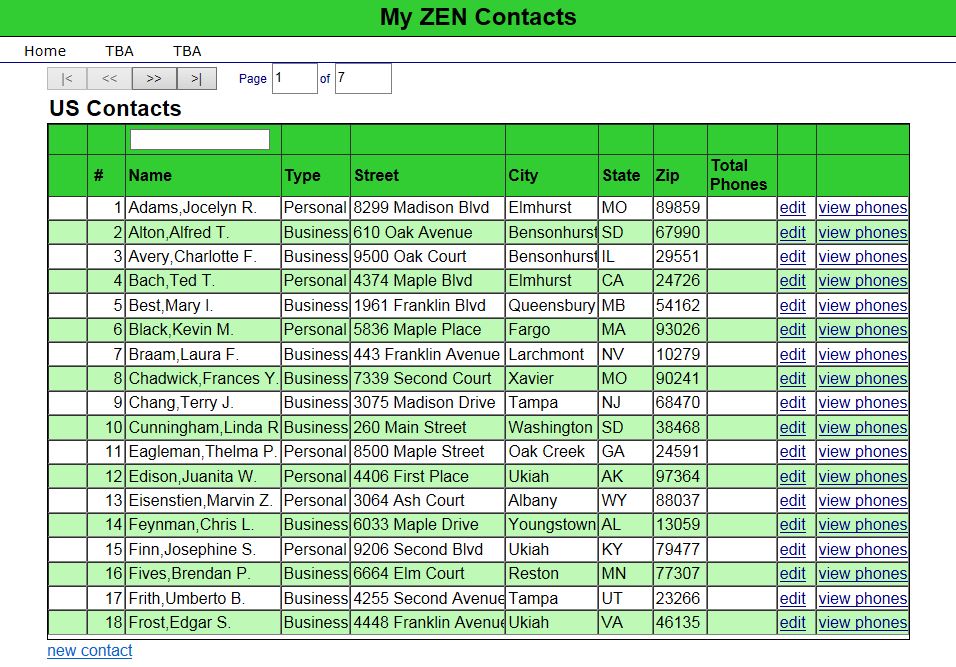
The idea here is that you can see what contacts have phone numbers without having to click on the "view phones" link. All I have done here is add a blank additional column to the %ZEN.Component.tablePane object
UPDATE: Found a reason in my code why this could be occurring. Still it would be interesting to hear what people come back with.
Consider the following MERGE statement.