Eduard Lebedyuk · Feb 27, 2019 go to post

What does this command return?

dumpbin /headers c:/InterSystems/IRIS_2019/CSP/bin/CSPa24.dll

For me (on IRIS for Windows (x86-64) 2018.2 (Build 241U) Fri Jan 26 2018 01:06:37 EST) it shows:

Dump of file ./CSPa24.dll

PE signature found

File Type: DLL

FILE HEADER VALUES
             14C machine (x86)
               5 number of sections
        5BC558F7 time date stamp Tue Oct 16 06:20:23 2018
               0 file pointer to symbol table
               0 number of symbols
              E0 size of optional header
            2102 characteristics
                   Executable
                   32 bit word machine
                   DLL

Note 14C machine (x86) value, it means that it's a 32bit dll. If you have similar output, I recommend installing 32 bit apache.

Eduard Lebedyuk · Feb 26, 2019 go to post

I have not tested the code on Windows, but here's my idea.

As you can see in the code for test method in cause of exceptions I end all my processes with

do$system.Process.Terminate(, 1)

it seems this path is getting hit.

How to fix this exception:

  1. Check that test method actually gets called. Write to a global in a first line.
  2. In exception handler add do ex.Log() and check application error log to see exception details.
Eduard Lebedyuk · Feb 26, 2019 go to post

I recommend locking as a solution to that problem.

Create a table/class/global which holds {filename, lock, ownerJobId}.

All service jobs execute the same file search, take first filename, check the lock table. If it's empty - write into it and start processing the file.

If lock table has the entry take the next file, till you find one without lock.

After file is processed delete/move it and remove the entry from lock table.

On job shutdown purge the table records associated with job id.

This way you can scale jobs easily.

Eduard Lebedyuk · Feb 25, 2019 go to post

Here's how you can do it:

  1. Download CSPGateway kit from WRC  for 2017.2.1
  2. Install it on a new server
  3. Connect it to IIS
  4. Open csp/bin/Systems/Module.cxw and add required application(s)

I think this documentation page describes exactly what you want to do.

Eduard Lebedyuk · Feb 24, 2019 go to post

You get this error (Datatype value '2019-02-01' is not a valid number) because %Date stores data in horolog format, so you need to do one of:

  • (Recommended approach) Convert date value from external format (2019-02-01) into internal format (horolog) using $zdh function:
Set consumerRecord.ActivePeriod.StartDate = $zdh(obj.activePeriod.startDate, 3)
  • Use datatype for which this value is valid, i.e. %TimeStamp. To check, all datatype classes offer IsValid method, you can use it to check value validity
zw ##class(%TimeStamp).IsValid("2019-02-01")
  • If you're using InterSystems IRIS you can store dates as %PosixTime.

Regarding Atelier, I use it to debug REST services and it shows variable values. You can try to reinstall it. If you're on Windows you can also use Studio.

Eduard Lebedyuk · Feb 23, 2019 go to post
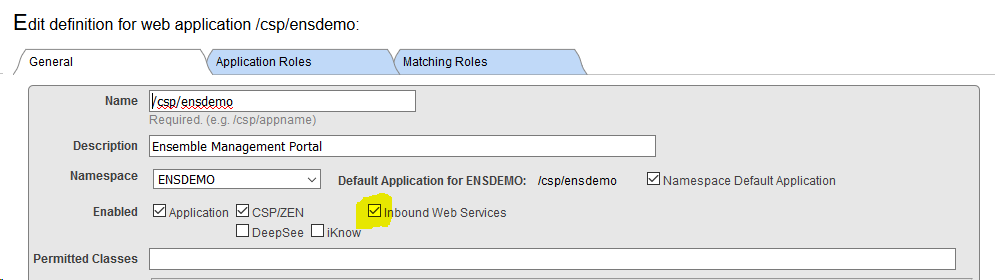
  1. Go to SMP - Menu - Manage Web Applications.
  2. Open /csp/healthshare/hspc/  application settings.
  3. Check that Inbound Web Services are enabled for the application.
  4. Press Save button.

Eduard Lebedyuk · Feb 22, 2019 go to post

Small addition: objects are always passed by reference, so usually you don't need to pass them with dot.

Eduard Lebedyuk · Feb 22, 2019 go to post

What does this output in a terminal:

set respText="{""access_token"":""4SDFDSFDSF-aSDASDASD"",""expires_in"":""3300"",""refresh_token"":"""",""scope"":""sms_send"",""token_type"":""Bearer""}"  
set sc = ##class(%ZEN.Auxiliary.jsonProvider).%ParseJSON(respText,,.pObject,1)
zw pObject

I tried it on a later verison and got:

pObject=<OBJECT REFERENCE>[1@%ZEN.proxyObject]
+----------------- general information ---------------
|      oref value: 1
|      class name: %ZEN.proxyObject
| reference count: 2
+----------------- attribute values ------------------
|           %changed = 1
|%data("access_token") = "4SDFDSFDSF-aSDASDASD"
|%data("expires_in") = 3300
|%data("refresh_token") = ""
|     %data("scope") = "sms_send"
|%data("token_type") = "Bearer"
|             %index = ""
+-----------------------------------------------------
Eduard Lebedyuk · Feb 22, 2019 go to post

That is a fairly common problem - the need to compare two different codebases. It could be a test and prod server or just different production servers. Anyway I usually compare them like this:

  1. Install source control hook (I prefer cache-tort-git udl fork but any udl based will do) on all affected servers.
  2. Export everything from the base server (with oldest sources) using source control hook into a new repostory.
  3. Commit this state as an initial state.
  4. Clone the repository with initial state to the other server.
  5. Export everything from the other server into the repository.
  6. Commit again (if you have more than two parallel codebases you may need to branch out).
  7. Use any commit viewer to see the difference (I prefer GitHub/GitLab).
Eduard Lebedyuk · Feb 22, 2019 go to post

Looks like it works correctly.

write pObject

outputs the object oref.

If you want to display the whole object, use zwrite:

zwrite pObject

If you need a specific property, access them like this:

write pObject."access_token"

write pObject.in
Eduard Lebedyuk · Feb 20, 2019 go to post

I don't think you can have a root (/) maps as it would create unwanted ambiguity.

Why not put the  / routes directly into My.Code.BS.ApiRoute?

Eduard Lebedyuk · Feb 20, 2019 go to post

Please do not use DES as it's currently a broken cypher with bruteforce time of about a day.

Eduard Lebedyuk · Feb 19, 2019 go to post

Yes,  that would work for notification.

The main issue is resuming from where things went wrong.

Eduard Lebedyuk · Feb 19, 2019 go to post

My goal is not to reexecute the process, but rather resume from the point I got an error (or immediately before, i.e. on a last successfull request/response).

Eduard Lebedyuk · Feb 19, 2019 go to post

I don't think it's possible.

You can spawn cterm from powershell with

ccontrol cterminal ENSEMBLE

Eduard Lebedyuk · Feb 19, 2019 go to post

Is that a production instance?

Is that 8bit or Unicode instance?

What I/O tables NLS routine shows? (Note that modifying locales/defaults can be potentially application-breaking change so do it only if you know what you're doing)

zn "%SYS"

do ^NLS
 
 
1) Display current locale
2) Select defaults
3) Change locale
4) Display loaded settings
5) Advanced
 
NLS option? 2
 
1) Internal tables
2) I/O tables
3) CSP files
4) Date, time and number formats
 
Category of defaults? 2
 
Items marked with (*) represent the locale's original default
 
I/O table              Current default
---------------------  --------------------
 
1) Process             RAW (*)
2) Cache Terminal      UTF8 (*)
3) Other terminal      UTF8 (*)
4) File                UTF8 (*)
5) Magtape             UTF8 (*)
6) TCP/IP              RAW (*)
7) System call         RAW (*)
8) Printer             CP1251 (*)

Eduard Lebedyuk · Feb 19, 2019 go to post

Try:

CHCP 65001

in the beginning  of your script.

Also you need to check that your console font has required symbols.

Eduard Lebedyuk · Feb 18, 2019 go to post

Would process user not cut it?

You can later convert it into app user if you have 1:1 matching.

It would work faster than getting local variables.

Eduard Lebedyuk · Feb 18, 2019 go to post

Some general advice:

  1. Root directory should be a configurable setting,
    • Before changing config, call NormalizeDirectory method of %File class
    • Check that directory exists and you can write to it
    • If it's Ensemble check that Ensemble can write to that directory too
  2. Try to minimize the number of root directories, if you have to have several. It's preferable to use subdirectories.
  3. Calculate all subdirectories via calls to SubDirectoryName method from %File class
  4. You should not have slash symbols for directories/files purposes in your code base.
Eduard Lebedyuk · Feb 18, 2019 go to post

This seems to work for me:

set x = "%sqlcq.something.value.foo"

write x?1"%sqlcq".E

That said, I assume you're iterating over some list of classes. If so, it may be better to add this or equivalent condition to the builder of the class list. If you do it via SQL and %Dictionary package, then excluding System classes, or generated classes or even classes that %STARTSWITH '%sqlcq' may be a better solution.

Eduard Lebedyuk · Feb 16, 2019 go to post

Any particular reason to prefer:

$system.Dictionary.comMemberKeyGet

over

$$$comMemberKeyGet

?

Eduard Lebedyuk · Feb 8, 2019 go to post

You can easily develop your own custom function. Here's an example of a custom function which checks that the number is valid.

/// Functions to use in rule definitions.
Class Custom.Functions Extends Ens.Rule.FunctionSet
{

/// Returns 1 if a string is a number, 0 otherwise
ClassMethod IsValidNumber(string As %String) As %Boolean [ CodeMode = expression, Final ]
{
$ISVALIDNUM(string)
}

}
Eduard Lebedyuk · Feb 6, 2019 go to post

COS Faker is for generating random data.

I'm more interested in meaningful initial data.