You're calling an Operation, right?
Operations can be called in async mode.
- Log in to post comments
You're calling an Operation, right?
Operations can be called in async mode.
Make the call async and add wait activity?
Another check. Properties can't be SQL reserved words. I often name properties "Date", etc. only to forget that they can't be used in SQL as is only quoted, so I need to go to Class view and rename them to something else.
The main check we need is parametrization. SQL should not be concattenated from user input, but user input should be passed as an argument.
Well, what do you want to do with that list? Depending on your use case, the solution may differ.
For example to get a list of dashboards execute this query:
SELECT *
FROM %DeepSee_Dashboard.Definition
And to get a list of Pivots execute this one:
SELECT *
FROM %DeepSee_Dashboard.Pivot
And in MDX2JSON project I need to get a list of dashboards visible to the current user. I use custom result set for that (because user may have access to dashes but not to SQL).
And Tuesday, April 23rd at 11am EDT we would be running an English version of the webinar.
If it's possible restart the DR Mirror. WIJ should be recreated on startup.
Or a Skype group.
Right after you get this error, what's in your ^||isc.debug global?
zw ^||isc.debugThe easiest way would be to configure web server on customersdomain.com to act as a reverse proxy. In this case it would proxy requests to yourownserver.com or wherever you need.
Another way is to install CSP Gateway on a customersdomain.com. After that connect CSP Gateway to your Cache/Ensemble/InterSystems IRIS instance on yourownserver.com. And connect web server on customersdomain.com to CSP Gateway on customersdomain.com.
Advantage of this approach is that static would be served directly from customersdomain.com server.
I never use return unless I really do want to exit from the method while inside some inner loop. So mainly I use quit.
You can separate a file into structured data using Virtual Document API.
To import HL7 into Ensemble please refer to these guides.
Generally it could look like this: HL7 → Virtual Document → Persistent storage → SQL GateWay → MS SQL Server.
-Creating SSL/TLS configurations in S1's Healthshare portal (also tried with a %SuperServer... but where and how could I use them ? I haven't found it)
Your SSL configuration should be called %SuperServer. Currently it's called AccDirSsl. You need to create new/rename existing configuration to %SuperServer.
Also, can you show a screen from the Portal’s System-wide Security Parameters page (System Administration > Security > System Security > System-wide Security Parameters)? For the Superserver SSL/TLS Support choice, you should select Enabled (not Required).
Also does HS OS user has access to C:\chr11614pem? I'd try to copy certificates/keys to HS temp directory and modify paths in config accordingly.
From docs. RETURN and QUIT differ when issued from within a FOR, DO WHILE, or WHILE flow-of-control structure, or a TRY or CATCH block.
Note that return and quit are not equal.
If you already have HL7 message inside Ensemble you can use Caché SQL Gateway which provides access from Caché to external databases via JDBC and ODBC. You can use SQL Gateway (probably in ODBC mode) to update SQL Server table(s).
How can I code without:
quit:$$$ISERR(sc) scit's basically 5% of the code I write.
How about
do:condition ..Method()Your options are:
Cache is officially supported on Ubuntu 16.04 LTS according to Supported Platforms table.
If you're just starting I recommend using InterSystems IRIS (which is supported on Ubuntu 16.04 LTS and 18.04 LTS among other platforms).
You can download all kits from WRC:


You can try to write to a TCP device with SSL. Doesn't require additional permissions:
ClassMethod Exists(ssl As %String) As %Boolean
{
	#dim exists As %Boolean = $$$YES
	set host = "google.com"
	set port = 443
	set timeout = 1

	set io = $io

	set device = "|TCP|" _ ##class(%PopulateUtils).Integer(5000, 10000)
	try {
		open device:(host:port:/SSL=ssl):timeout
		use device

		// real check
		write "GET /" _ $c(10),*-3
		// real check - end

		// should be HTTP/1.0 200 OK but we don't really care
		//read response:timeout
		//write response
	} catch ex {
		set exists = $$$NO
	}

	use io

	close device


	quit exists
}
It's slower than direct global check but if you want to do it rarely, I think it could be okay. Doesn't require additional permissions.
Code to compare times:
ClassMethod ExistGlobal(ssl) [ CodeMode = expression ]
{
$d(^|"%SYS"|SYS("Security","SSLConfigsD",ssl))#10
}

/// do ##class().Compare()
ClassMethod Compare(count = 1, ssl = "GitHub")
{
    Write "Iterations: ", count,!
    Write "Config exists: ", ..Exists(ssl),!

    set start = $zh
    for i=1:1:count {
        set exists = ..Exists(ssl)
    }

    set end = $zh

    set time = end - start
    Write "Device check: ", time,!

    set start = $zh
    for i=1:1:count {
        set exists = ..ExistGlobal(ssl)
    }

    set end = $zh

    set time2 = end - start
    write "Global check: ", time2,!
}
Results:
Iterations: 1
Config exists: 1
Device check: .054983
Global check: .000032

Iterations: 1
Config exists: 0
Device check: .017351
Global check: .00001

Iterations: 50
Config exists: 1
Device check: 2.804497
Global check: .000097

Iterations: 50
Config exists: 0
Device check: .906424
Global check: .000078You can use negative integers to subtract hours. DATEADD also words with timestamps:
write $SYSTEM.SQL.DATEADD("hour", -3, "2019-03-09 10:00:00")
>2019-03-09 07:00:00I can use ($ztimestamp) to get UTC time and then convert it into local time i am using the below way is this correct?
SET stamp=$ZTIMESTAMP
w !,stamp
SET localutc=$ZDATETIMEH(stamp,-3)
w $ZDATETIME(localutc,3,1,2)
Yes, sure.
My Question is how i can program this task in the below way
You heed to add three hours. Use DATEADD method for this:
write $SYSTEM.SQL.DATEADD("hour", 3, yourDate)ODBC log and maybe Audit log can contain additional information.
IRIS Text Analytics/iKnow and Analytics/DeepSee are enabled on per-application basis. Interoperability/Ensemble/HealthShare are enabled on a per-namespace basis.
First you need to get default application from the namespace:
set namespace = "USER"
set app = $System.CSP.GetDefaultApp(namespace) _ "/"
And then call one of these methods:
do EnableIKnow^%SYS.cspServer(app)
do EnableDeepSee^%SYS.cspServer(app)
If you want to enable Interoperability/Ensemble call:
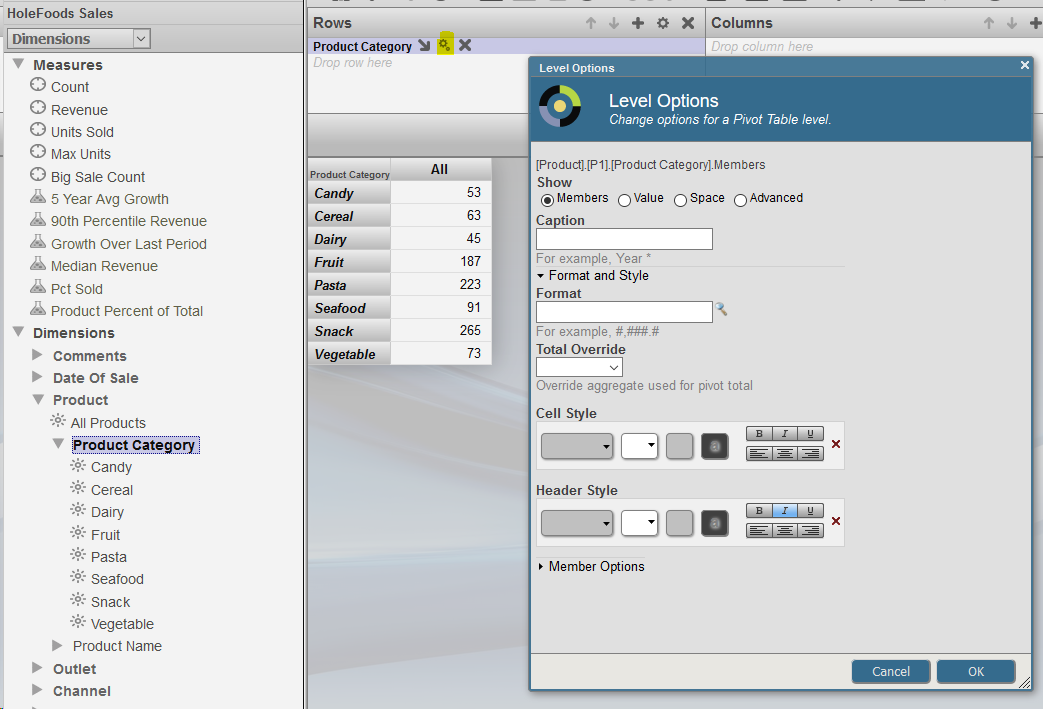
set sc = ##class(%EnsembleMgr).EnableNamespace(namespace,1)You can do that in Analyzer.
Choose the row/column you want displayed this way, click on it's settings and set italic header:
You can use CreateDirectoryChain method of %File class to create directory tree instead of several calls to CreateDirectory.