thanks, @John Murray ! Will give it a try!
- Log in to post comments
thanks, @John Murray ! Will give it a try!
Thanks @Heloisa Paiva ! Also want to say thank you to @Guillaume Rongier - the author of the app
Great stuff, @Yuri Marx! You motivated me to improve the base template, so I made a new release of REST API template - with improved universal Dockerfile and added link to the VSCode menu for the swagger doc.
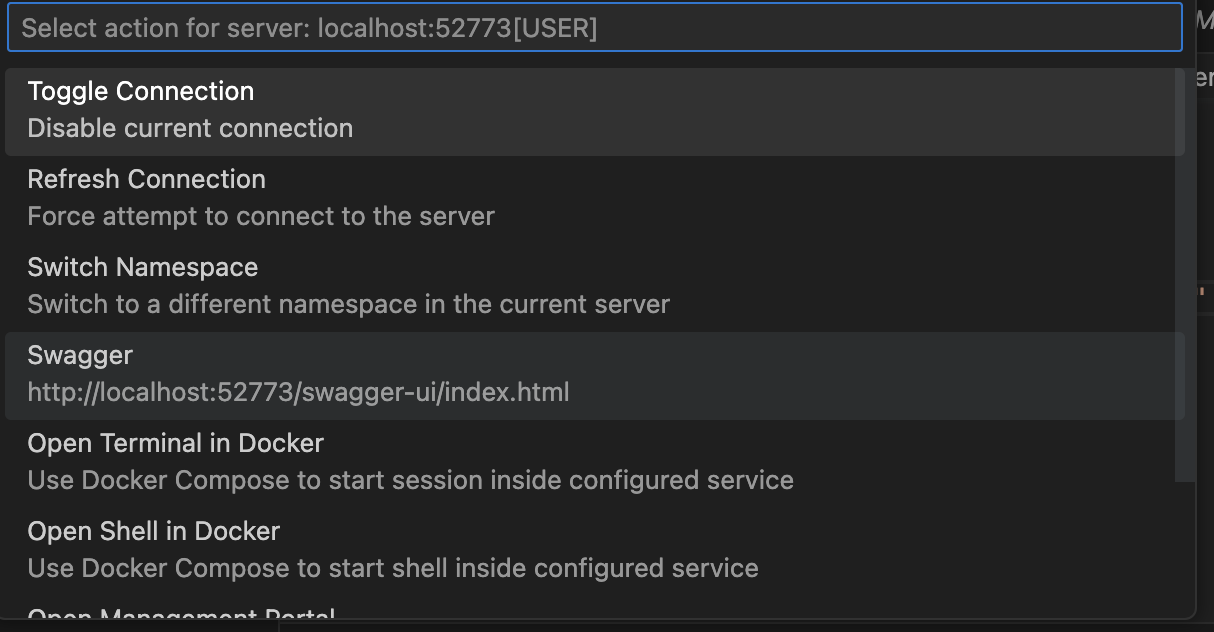
Also turned on passwordless mode - make sure you don't use it on production solutions ;)
Great stuff! Do you want to publish it on OEX?
wow
Yes, this will work. But you also need to +1 for the "top" of the array to indicate the amount of params.
I'd do the following:
set arr($I(arr))=valuein this case $I will increment the value at arr as arr=arr+1, and return it to let you enter the value of a new param
They are "special" :) and called locals for variables and globals for persisted variables.
in case if you are in debug you can always print out the array with zwrite array_name. E.g. in your case:
USER>zw args
will print out all the data it contains. useful for understanding and debugging.
Please, give VSCode a try.
Regarding of extensions, you can give students a repository with .vscode/extensions.json, that will already contain examples. E.g. here is how my extensions.json looks like:
{
    "recommendations": [
        "eamodio.gitlens",
        "georgejames.gjlocate",
        "github.copilot",
        "intersystems-community.servermanager",
        "intersystems-community.sqltools-intersystems-driver",
        "intersystems-community.vscode-objectscript",
        "intersystems.language-server",
        "mohsen1.prettify-json",
        "ms-azuretools.vscode-docker",
        "ms-python.python",
        "ms-python.vscode-pylance",
        "ms-vscode-remote.remote-containers"
    ]
}
This will not install extensions automatically, but they will be shown as recommended for the workspace, like that:

Here is the template they can start from and here is an example extensions.json file.
Here is also the related video
thank you, @Pravin Barton ! Any feedback and issues are welcome! And kudos to @Gevorg Arutiunian
who introduced it!
Thanks Brett!
I will add the support of:
And options to use 3rd-party plugins, e.g. from George James, @John Murray mentioned earlier.
Thanks @Michael Angeleri !
Do you plan to write a similar article related to Visual Studio Code? Just connecting it to the recent announcement.
And there is no "verbose" flag available?
What is the benefit of exporting to XML vs exporting to CLS?
Maybe it is an issue of VSCode?
Thanks Tim! How do you debug a particular unit test in VSCode?
Thanks! this is helpful.
I think 1 easy 10 hard :)
@Alex Woodhead , do you know by a chance why unittest methods are instance methods but not classmethods? Could it be converted to classmethods or provided the option to do that?
In fact there is a handy way to run all the tests via:
zpm "test module-name"
But, I'd love to see debugging of it
Thanks Alex.
See the following:
USER>Do ##class(%UnitTest.Manager).DebugRunTestCase("", "dc.irisbi.unittests.TestBI", "", "TestPivots")
(root) begins ...
LogStateStatus:0:Finding directories: ERROR #5007: Directory name '/usr/irissys/mgr/user/u:/internal/testing/unit_tests/' is invalid <<==== **FAILED** (root)::
Thanks, Dima! Is there a listed related issue?
Hi @Mikko Taittonen! Why would you need XML export for classes/routines? Why not UDL? UDL is much more readable?
Maybe ZPM uninstall is not ideal. At the moment ZPM is just an open-source app that can be installed into IRIS.
And maybe it doesn't clearly uninstall itself.
What is the business goal of the exercise? To test ZPM or to test IRIS on leakages?
Congrats, @Robert Cemper !
BTW, how come this article is shown as new and came in April's digest? I see comments from 2017
try DeepSeeWeb which as an Angular UI layer over IRIS BI dashboards.
You can create usual IRIS BI dashboards and access them outside Ensemble/HealthShare environment in Angular UI, even on mobile. No additional development needed.
A nice extension to this: run iris and with an ipm package on-board. Here is one command to start IRIS and install web-terminal:
docker run --rm --name iris-ce -d -p 9091:1972 -p 9092:52773 -e IRIS_PASSWORD=demo -e IRIS_USERNAME=demo intersystemsdc/iris-community -a "echo 'zpm \"install webterminal\"' | iriscli"
You mean you like Visual Studio Code? )
Thank you, Ben!
Hi Hugh!
In my case even the messages are csv lines they are being resulted in one csv file.
It is the matter of what file is pointed out in the outbound adapter, as @Jeffrey Drumm
mentioned. Take a look the code or try to run this production - it is in docker, so it is really easy to reproduce it on your laptop and see how it works.