7 Followers · 249 Posts

Zen is a school of Mahayana Buddhism that originated in China during the Tang dynasty as Zen Buddhism. Zen school was strongly influenced by Taoism and developed as a distinct school of Chinese Buddhism.

In InterSystems Data Platform Zen is a name for MVC web application framework for rapid software development.

Documentation.

Question Ben Spead · Aug 17, 2016

I am going to start playing with Zen Mojo (again) and as I understand it there are two ways to manage moving data to/from your Zen Mojo page:

  • interacting with REST services
  • using Mojo's built-in transport

I would like to understand the pros and cons of each approach.  Which is recommended in different situations and why?  I would like to create a sample application that will hopefully be reusable and helpful to others and I would like to  understand which approach to pick for my app.

4
0 584
Question Derek Day · Aug 16, 2016

Has anyone configured Zen Reports/FOP to support png images? If you have, could you please share the library that you used, the configuration required, and whether it was worth it (vs converting images to one of the natively supported formats)?

3
0 740
Question Laura Cavanaugh · Aug 11, 2016

I'm running into difficulty calling a javascript method from a Zenmethod.  I pass in a parameter, but in the javascript method the parameter is undefined.  Here is the code:

...

...

Method doSave() [ ZenMethod ]
{

          If (..ID = "AddNew"){
                    //do save code here                   
                    &js<zen

9
0 1755
Question Laura Cavanaugh · Jul 29, 2016

I'm getting the above error.  My zen page calls other javascript methods  and other server methods just fine.  But when I call my  method, I get the error.  Yes, I've tried making it look exactly like the methods that work.  But for some reason, it doesn't seem to know that DoLogout is a zen method. 


Anyone ever get this error?

THanks

L


for example

ClientMethod logout() [ Language = javascript ]  {   zenPage.DoLogout();  }

Method DoLogout() [ZenMethod]   {   //blah blah  }

3
0 1071
Question Pavel Pogorelov · Jul 25, 2016

Hi,

I want to create a table with a dynamic display of data using the DataGrid.

On the page there  dataCombo and the table.

According to the plan, when the user selects an item in dataCombo the table is filled with data. If select another item - data is updated.

But in fact, the data in the table are loaded once when the page is loaded, and when I select value in DataCombo, I receive an error:

I would be happy if you tell me how to fix it.

Thank you.

XData Contents [ XMLNamespace = "http://www.intersystems.com/zen]
{
<page xmlns="http://www.intersystems.

1
0 487
Question Fabio Goncalves · Jul 19, 2016

I have a Zen Mojo application, developed using Bootstrap plugin and using "Explicit Dispatch" with multiple templates.

I have every template representing an specific area of my application (customer, order, logon, application settings, etc.). 

Each template has specific code,  client side validation and so on related to its areas by using javascript.

So, I would like to know if it is possible, for example, through my order template call a javascript function from another template (e.g.: customer), where I there is functions for document id validation, date of birth validation, etc.?

Thank you.

2
0 365
Question Alexandre Marques · Jul 18, 2016

I have two pages and I am using the push and pop to go and back navigation. When I click the button forward and back in the browser, I can't navigate more between pages.


The following code:

Page 1 - onSelect Method:
var obj = {idExame: VALID, objUsu: ObjUsu};
zenPage.gotoArea ('itemexames', key, key, false);
view.pushDocument (key, obj, key, obj);


Page 2 - onSelectMethod, back:

var documentKey = "PacienteExamesinitial";
var layoutKey = "PacienteExamesinitial";
var area = "pacienteexames";

view.popDocument ();
zenPage.gotoArea (area, layoutKey, documentKey, false);


I am using ZenMojo with Bootstrap.

4
0 467
Question Nick VanDuyne · Jul 14, 2016

I'm new to Cache and trying to follow the Using Cache Studio PDF. In section 2.4.3(Adding a Zen form) it tells you insert the following code;

Unfortunately that code fails compilation. If you try and use the tools there is no o select option nor a select or onselect option. I was wondering if anyone has used this PDF before and knows what the correct attribute should be?

3
0 221
Question Megumi Kakechi · Jul 11, 2016

Hello,

One of our AP would like us to provide the file upload/download sample code by using ZEN Mojo.

I already provided them the attached "upload-sample".

I tried to create the "download-sample" in a similar way, but I couldn't do it yet.

Does anyone have a good idea/sample about this?

I'd like to download the server side file(e.g. c:\temp\nene.jpg) into client machine with a OpenFileDialog(image.png).


Thank you in advance.

6
0 960
Question Laura Cavanaugh · Jun 16, 2016

Hello,

I have a question about how to set the value of a radioSet.  Yes, I know -- the documentation says that setValue can be used "client side", but gives no example.  Plus, I'm trying to set the value of a radioSet in %onAfterCreatePage, which is a Zen method? Server side method? I'm not sure.


In my Zen page I create a radioSet like this:

<radioSet id="appRadio" name="appRadio" 
displayList="App One,App Two,App Three" 
valueList="One,Two,Three"/>


I want to select a radio based on a sepcific value, that I get from code.

e.g.

Method %OnAfterCreatePage() as %Status

set value = class.

4
0 699
Question Simcha Gershon · Jun 9, 2016

Hi

I'm trying to inser a button into a grid cell with no sucssess.
1
0 390
Question Alexandre Marques · May 16, 2016

I have a homeTemplate and ExamesTemplate page. When I'm in ExamesTemplate and make a resfresh (F5 browser), the page back to the HomeTemplate. I need the page ExamesTemplate not return HomeTemplate.

I'm using ZenMojo with Bootstrap

Can someone help me?


Thanks.

4
0 523
Question Marco Blom · Apr 2, 2016

Hi,

I am working on a DataGrid based upon ZenTest.Datagrid.cls

I want to save data after changes on a row.

The existing samples do not explain how to save changes on data in a grid.

I have tried something like zen(‘json’).save

Does anybody has some sample code?

4
0 1047
Question Evandro Santos · May 25, 2016

Hi.


I'm facing a problem when I try to use the Runtime Expression below inside the XData Contents:

<html>#($$$Text("Testing!"))#</html>

It compiles correctly, but when I open the page on the browser I get the message "Expression Error" instead of "Testing!".


How could I use the $$$Text macro with Runtime Expressions? Is there a way to make this?


Thanks!

5
0 483
Question Steve Pisani · May 19, 2016

Hi -

Let's say I want to override the HTML that is generated by provided ZEN Mojo Helper Plugins I use the onloadHandler method of my document page, retrieving elements, and modifying them using jQuery syntax.

For example, I'm using bootstrap, and, I want  the <button> element automatically generated with the use of the $navbar layout object, to collapse/expand a different <DIV> on my page, to the default one it produces. 

Is this the correct spot and approach to use ? 

thanks

Steve

2
0 314
Question Peter Kopp · May 23, 2016

Good morning, I am using a tableNavigatorBar on a tablepane. I want to execute the onselectrow method of the tablepane each time the tableNavigatorBar is used to proceed to a tablepane record. Has anyone connected these two component in this way before? Thank you for any hints, input and/or comments.

4
0 385
Question Fabio Goncalves · May 16, 2016

Hi All, 

I am providing support to an AP about using document criteria on Multiple Templates (Explicit Dispatch).

I am trying to set the  criteria value from:

view.setDocumentKey('initial-search',{patirntId:tPatId});

 However it is not possible to get the criteria value on %GetJSONContent through pCriteria parameter object.

How can I do this with Multiple Templates on bootstrap plugin?

Thanks.

1
0 367
Article Tony Beukes · May 6, 2016 2m read

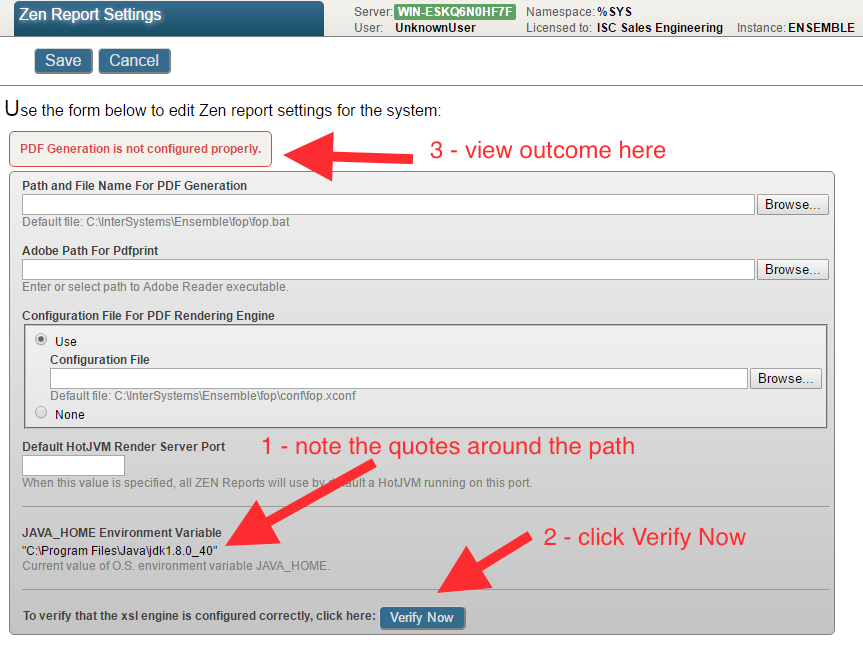
You may experience errors executing Java programs that rely on the JAVA_HOME environment.

For example when Create PDF from this pivot in DeepSee or in this case, outputting a Zen Report as PDF.

You can verify the PDF generation configuration by clicking on the Verify Now button on the Management Portal System > Configuration > Zen Report Settings page:


Outputting a Zen Report as PDF causes an error, for example ZENApp.MyReport.

0
0 964
Question Steve Pisani · May 4, 2016

Hi,  The ZEN Mojo Widget reference at ../csp/sys/%ZEN.Mojo.WidgetReference.bootstrap33xHomepage.cls is a great reference for viewing the different components available with each helper plugin - and it also supplies snippets of JSON code to use in your layout definitions.


I'm having problems with the Bootstrap $navbar component however.

1
0 414
Question Steve Pisani · Apr 27, 2016

Hi,

Is it possible to have a ZEN Mojo application that uses Bootstrap and controls from jQMobile ?

In a fresh installation running Zen Mojo version 1.1.1, my ZEN Mojo page declares:

Parameter CSSINCLUDES As STRING = "bootstrap-3-3-5/dist/css/bootstrap.min.css,jquery.mobile-1.4.5.min.css";
Parameter JSINCLUDES As STRING = "jquery-1.10.2.min.js, jquery.mobile-1.4.5.min.js,jquery-1.11.3.min.js,bootstrap-3-3-5/dist/js/bootstrap.min.js";
..

and a pageContents of:

XData pageContents [ XMLNamespace = "http://www.intersystems.com/zen]
{
<pane xmlns="http://www.intersystems.com/zen" xmlns:mojo="http://www

6
0 644
Announcement Stefan Wittmann · Apr 15, 2016

I am happy to share the news that Zen Mojo 1.1.1 has been released. This release includes many improvements and bugfixes, the most important are:

  • Multiple improvements for the offline bundle generation, e.g. subfolders are correctly copied to the target folder
  • Optimizations for the dojo library, including a reduced load time by prepackaging required widgets into a single JS file
  • The utility functions $show and $hide are now supported by the dojo and chart.js plugin
  • Zen Mojo now stops event propagation by default.
0
0 418
Question Jose Antonio Cañizares · Apr 1, 2016

Hi all,

I've been looking for a way to extract the sorting  from the  ^CacheTemp.zenData global that contain the tablePane snapshot data in order to use it on a report following the current UI sorting criteria.

I could see that if the column is sorted by one column, new entries with this structure are created:

^CacheTemp.zenData(<sessionId>,<snapShotId>,<tablePaneId>,"index",<columnId>,<value>,<dataId>)=""

These are created the first time that the sort criteria is applied (asc) and has the same amount of entries as the data being displayed.

6
0 622
Question Chris Stewart · Mar 29, 2016

Hi

I have been experimenting with the creation of a set of REST services for an app.  The basic GET operation is set to create a %ZEN.proxyObject instance, and then set an instance of a Persistant class as a property, which gives me all of the values I want to return.  However, it also gives me some values that I don't want to return over REST (because they are both private, and large registered objects which will bog down performance)

How do I remove these values from the ZENproxyObject?

3
0 575
Question Renee Cannon · Mar 14, 2016

I have a tablepane in my Zen page that is tied to a class query.  When the page first loads, the table is empty.  A button onclick event causes the tablepane query to execute and load query results into the table.  I want an onchange event from a datalistbox to clear the tablepane so that it looks empty as it was when the page first loaded.  I have had no luck fiddling with javascript in the datalistbox's onchange.

1
0 465
Question Fabio Goncalves · Mar 7, 2016

I would like to know how to get the key value from a dropdownmenuitem placed on a navbar.

I have tried to get from onselect and onchange events of the template class, but it didn´t  work.

According to the snapshot attached I am trying to retrieve the values from 'action-1' and 'action-2'. 

I have attached a ZIP file with a snapshot which value I am trying to retrieve and example classes.

Thanks.

8
0 391
Announcement Bill McCormick · Mar 3, 2016

Zen Reports has offered multiple choices for direct printing including use of Adobe Reader or Foxit reader. Recent changes in Windows 10 and in the readers themselves have made it no longer possible to invoke these readers from background processes in Windows 10 and all future versions. Because of this Zen Reports will no longer support printing with these tools on Windows 10.

Windows 10 support was added for 2015.1 and 2015.2.  On Windows 10, the only option for direct printing with Zen Reports will be Qoppa JPDFPrint.

3
0 444