Hi developers!

There is a very neat variable in IPM ${ipmdir} that lets packages be installed on a particular IRIS server and ensures that the data and resources they bring don't mess around as ${ipmdir} variable during the installation transforms into:

iris installation dir/ipm/package_name/version/whatever_you_install_here

It is very convenient, e.g., to bring some data and resource files that can be useful during the installation setup, e.g., via FILECOPY. Indeed, suppose you bring some csv_file, e.g. titanic.csv via FILECOPY as:

<FileCopy Name="data/titanic.csv" Target="${ipmdir}data/titanic.csv"/>

or even the whole folder of data in the source code repo into the package:

<FileCopy Name="data/" Target="${ipmdir}data/"/>

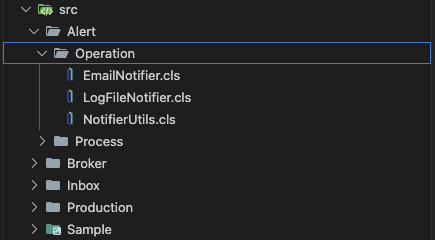
And in the case of Iris in Docker it resides in:

/usr/irissys/ipm/package_name/1.0.0/data/titanic.csv

This is all great, but is there any way for the installed code to determine the location of the data files? It'd be neat to let the installed app know somehow where is the data that came with it? Could it be the method in the IPM client that will resolve ${ipmdir} for the app?

0 2
0 49

Hi Developers!

Consider I have a persistent class derived from %Persistent and I want it to be derived from %JSON.Adaptor to enjoy all the JSON features.

Can I do it programmatically?

So, it'd be wonderful to have a method in some util class that makes it happen? Something like:

Do ClassUtil.AddAncestor("MyPackage.MyPersistentClass","%JSON.Adaptor")

Any ideas?

0 6
1 76

You probably know this situation:
Some time ago, you found a very special $ZU function for a very specific type of problem. Some kind of mystical formula. It became popular and was used by many developers throughout your code and across all your installations.

Several versions and updates later, you are informed by ISC that your mystical $ZU is deprecated and no longer supported. You are advised to replace it with a new $something().

3 2
0 76

When working with InterSystems Interoperability (Iris / Health Connect / Ensemble), configuration data is often spread across many production items: services, processes, operations, adapters, and their settings.

A common operational or security need is to answer questions like:

9 0
2 61

Here is what is currently used.

..CurrentDateTime("%Y%m%d%H%M%S")

The format is not the issue.

I need to make it our current time as it is five hours ahead.

How can I access the header property of either of these.

Or, if I can't do that, subtract five hours or the equivalent time in seconds.

example, if I receive 20201224161922, how can I make it 20201224111922?

Thanks,

Jonathan

0 3
0 55

Embeddedpy-bridge: A Toolkit for Embedded Python

Overview

Embedded Python is a game-changer for InterSystems IRIS, offering access to the vast Python ecosystem directly within the database. However, bridging the gap between ObjectScript and Python can sometimes feel like translating between two different worlds.

2 1
2 54

Hi developers!
Happy holidays!

In ObjectScript there is neat option to log errors - call Log() method of an exception intance, e.g.:

ClassMethod MyMethod() {

Try {

w 1/0

}

Catch e {

do e.Log() // logging error in the app log

write "the error happened: "_e.DisplayString()

}

}

Is there anything like that for Embedded Python? e.g:

ClassMethod MyMethod() [Language = python] {

 try:

   print(1/0)

 except ZeroDivisionError as e:

   // how can I log e into IRIS App Error Log here?

   print("Caught exception: " + str(e))

}

Any ideas?

1 8
0 67

Project Overview / Introduction

Developing and testing REST APIs in InterSystems IRIS often requires a significant amount of boilerplate code. While ObjectScript provides powerful tools for building APIs, writing consistent and repeatable tests can be time‑consuming. This is where IrisOASTestGen comes in.

4 2
0 86

In this article, we will discuss all the debugging tools included in the Microsoft Visual Studio Code IDE.

What will be covered:

  • Breakpoints
  • Watch window
  • Call Stack

Let's start by learning about debugging requirements!

Prerequisites

There are two plugins (extensions) for debugging ObjectScript:

The first is part of the InterSystems ObjectScript Extension Pack. The second is Serenji, a standalone plugin that provides an editor, file manager, and debugging functionality. Both plugins can be installed from the plugin store. To activate key functionality, Serenji requires a license. For this article, we'll use the InterSystems ObjectScript Extension Pack to reduce the learning curve. After you've mastered the basics, you can consider purchasing a paid license for Serenji.

9 2
5 228

The previous article introduced IrisOASTestGen, a tool designed to generate REST API test code for InterSystems IRIS based on OpenAPI 2.0 specifications. It demonstrated how to scaffold test cases using the default templates bundled with OpenAPI Generator.

This follow-up focuses on the next natural step: customizing the generated test code.
By extending the code generation logic with Mustache templates, it becomes possible to express richer semantics, implement CRUD-aware tests, and create more meaningful test suites.

0 0
0 44
Article
· Dec 4, 2025 6m read
Sub-Table Security

InterSystems IRIS provides extensive configurable security options, yet many developers primarily use roles and resources to secure entire tables or routines. Today, we will delve deeper. We can also secure individual columns and rows separately, but these two mechanisms operate very differently. Let's begin with the columns.

Column Security

For testing and demonstration, we will keep our table structure concise and straightforward. We have a table called "Person" in the USER namespace that contains an ID column, a date of birth column (DOB), first name, and last name.

5 0
1 140

There's a pattern I've encountered several times where I need to use a temp file/folder and have it cleaned up at some point later.

The natural thing to do here is to follow the patterns from "Robust Error Handling and Cleanup in ObjectScript" with a try/catch/pseudo-finally or a registered object to manage cleanup in the destructor. %Stream.File* also has a "RemoveOnClose" property that you can set - but use with care, as you could accidentally remove an important file, and this flag gets reset by calls to %Save() so you'll need to set it back to 1 after doing that.

There's one tricky case, though - suppose you need the temp file to survive in an enclosing stack level. e.g.:

1 0
0 60