JSON (JavaScript Object Notation) is a lightweight data-interchange format. It is easy for humans to read and write.
Hi all,
I have an incoming JSON message with a string field exceeding in length the 'caché long-string limit' of 3641144 characters.
Using {}.%FromJSON(instream) I am able to create %DynamicObject properly. However, I am unable to access the long property, as in every assignment, I get the <MAXSTRING> error.
Is there any way for me to obtain contents of the 'too long' string field as a stream?
Thanks
Jiri
When using the JSON_OBJECT() function in Caché SQL on a %String property that contains JSON syntax, it converts the %String into a JSON object instead of escaping it as a string literal. How can I prevent this? (without ridiculous hacks like "add a space to the beginning of the value" as we don't always know which properties will contain these values and I certainly don't want to have to check for nulls and add/remove a space every single place this value is used in the application)
I don't want these strings automatically marshalled into JSON objects.
For example:
SELECT ID, JSON_OBJECT('ID':
I try to test our REST/JSON (POST) services,where queryparametres are in content as json and the answer in contet is also as json.
This is my testClient:
Class XXX.RESTClient Extends %RegisteredObject
{
ClassMethod TestXXX()
{
#dim tRequest As %Net.HttpRequest = ##class(%Net.HttpRequest).%New()
set tRequest.ContentType="application/json"
s json=##class(%ZEN.proxyObject).%New()
s json.x="XXX"
d ##class(%ZEN.Auxiliary.jsonProvider).%WriteJSONStreamFromObject(.jsonStream,json)
set jsonText=jsonStream.Read(jsonStream.Size)
set tSC=tRequest.EntityBody.Write(jsonText)
set tSC = tRequest.Post("http://server:577
Recently, a partner company started to develop an Angular client for their Cache application. Together, we decided to leverage the power of Caché dynamic objects to exchange JSON encoded data between client and server parts. However, we realized that currently there is a gap in Cache JSON implementation that prevents simple use of traditional registered and persistent classes to exposed their data with the same ease as with XML. I wrote a small JSON adapter, that does the job and bridgers the gap. It's purpose is simple expose data described by a regular Cache class in a one-to-one fashion to a %DynamicObject. On the other hand, when a serialized JSON data comes in, it can be easily deserialized into dynamic object and subsequently bound to regular class by the newly created adapter.
Hi,
How to code the client and what all we have to code and set on server?
private _loginUrl =
Hello everyone,
i want to create an iris document database with Atelier with some properties, where i can import my JSON formatted data from an API to the database which i created. Right now i know how to import my local JSON formatted data to my created database:
ClassUser.Classtest
{
ClassMethodgetFile()as%Status
{
setfilename="/home/student/Downloads/own_scrobble.json"
IF$SYSTEM.DocDB.Exists("db.Streamingdatabase"){
SETdb=##class(%DocDB.Database).%GetDatabase("db.Streamingdatabase")
}
Hi,
This is available on github and wairing for approval on the Open Exchange.
It allows you to
- "Serialize" any class instance that extends from the adapter to a DynamicObject.
- "Deserialize" a DynamicObject to a class instance that extends the adapter.
- References to other classes can be followed recursively and serialized.
- Arrays and lists of Serial objects and DataTypes are handled for serialization en deserialization
- Arrays and lists of Persistent objects can be serialized in full, on the deserialization it can't create referenced objects, but an array or list of ID values can be provided and it
Hi everyone,
I need submit a object have a json string as property of class, but I get an issue, object can't save to SQL table if I take json data to json property. I try making a test class with only json property and get the same issue, no data row in SQL table after run ClassMethod . Some one know what's problem, please help me. Here my test class:
{
Property jsonStorer As %String;
ClassMethod saveJson()
{
Set jsonStr = "{"
_"""k0"": {"
_"""k1"":""Default"","
_"""k2"":[ {"
_"""k21"":""Default"","
_"""k22"":""Default"","
_"""k23"":[]"
_"}],"
_"""k3"":null,"
_"""
Developing a Full-Stack JavaScript web app with Caché requires you to bring together the right building blocks. In this third part of this article series I will show how to link our React app to our three back-ends we created in part 2.
404 Not Found
{
"error": {
"errors": [
{
"domain": "global",
"reason": "notFound",
"message": "Not Found"
}
],
"code": 404,
"message": "Not Found"
}
}I want to do something like the above sample from a Google Storage JSON API. I have a call to Write obj.%ToJSON() followed by return ..ReportHttpStatusCode(..#HTTP404NOTFOUND) however the HTTP Status code is always 200. If I remove the Write obj.%ToJSON() statement it returns a 404 status with no body. How do I return both?
Generally speaking, InterSystems products supported dynamic objects and JSON for a long while, but version 2016.2 came with a completely new implementation of these features, and the corresponding code was moved from the ObjectScript level to the kernel/C level, which made for a substantial performance boost in these areas. This article is about innovations in the new version and the migration process (including the ways of preserving backward compatibility).
Hello,
We are running cache version 2012.1.4
Is it possible to make an HTTP Post passing in JSON string?
Example:
I want to send this request to Authorize.net. How can I do this in cache object script?
URL: https://apitest.authorize.net/xml/v1/request.api
Body:
{
"createTransactionRequest": {
"merchantAuthentication": {
"name": "gfufet9QVgT5P",
"transactionKey": "8pg6FJjxuekeY62m"
},
"refId": "123456",
"transactionRequest": {
"transactionType": "authCaptureTransaction",
"amount": "5",
"payment": {
In a EnsLib.REST.Operation I have...
Set tSC=..Adapter.Post(.tHttpResponse,,pRequest.stream)
This sends JSON string over HTTP
I am getting this error back from the server
ErrHTTPStatus: Received non-OK status 415 from remote HTTP server: 'HTTP/1.1 415 Unsupported Media Type'
I have been told that the media type should be "JSON"
how do I go about changing the media-type of the HTTP Request?
I'm trying to have my REST service return the entire data set for one of our legacy globals. Currently I am parsing the object from a SQL statement into generic objects to be returned like this:
Set specimenArray=[]
WHILE resultSet.%Next() {
Set specimen = {}
Set specimen.SpecimenId= resultSet.SpecimenId
Set specimen.ProjectId = resultSet.ProjectId
Set Oref = specimenArray.%Push(specimen)
}
Set tProxy = specimenArray.%ToJSON()
set %response.Status = 200
set %response.ContentType
or "Didn't you say you would cover Persistent Objects in Part 5, Chris?"
Yes, that was the plan. This is a pretty important topic, so it get's its own Article
Up until now, we've display widget JSON that has been created by a basic loop. Clearly this isn't of much value. Now we have our stack connected together, and we can see that the data is flowing to the Welcome page, it's time to complete the stack and start feeding our service from "real" data.
Let's start with our (very basic) Persistent class for Widgets. We have 4 properties to hold Name, Description, Price and current Quantity.
Hi everyone,
I am still learning the platform for a student project and have to do some streaming and data analysis next. Since for my case I have no "live api" I wanted to just stream json files and output the data as it comes in from the files. (basically to emulate a incoming data scenario)
So thanks to the documentation and community posts I have figured how to create a stream and read data from a JSON but since I'm also new to JSON I have some parsing problems. I don't know how to access subarrays/sub-objects via objectscript.
The structure of the JSON File, I will omit some data because
Is it possible to produce a .json format using Ensemble 2015.2.2? Not sure what the trigger will be as of yet, but we have our local Department of Health trying to develop a reporting piece using .json.
Not sure how this will work with our Ensemble instance not being in the DMZ to send outside our network, but I thought I would ask anyway to see if it is possible.
Thanks
Scott Roth
Hi
Made a request for API REST.
Using HTTP Request adapter.
Adapter As EnsLib.HTTP.OutboundAdapter
Outside the Ensemble an API response is JSON (CORRECT)
Answer in Ensemble: =?Á
Â0
?_eä,cÒ
'=
*^<YÙF¡í$í¼ÈÞÝt
oÉ÷ý$?|
¤1¡{Dâhà°Ý?Öù)2ós??R?¸¼?ºd?$,ñD+»??
?
ÔºQZéýNÕ V{C?óò?b¢?éÍ )$
²5Å?wEë? ??©tÖã1z×2FëÊnôeË æ??]Zßq ܺ?á
Help me.
Thank you
Hello.
We have a request message with properties that has underscore. This is because we need to convert that request to JSON.
The problem is when we try to assign a value in a Business Process with the editor. It doesn't work, it doesn't compile.
How can we fix this?
This is the object used in the request:
{
Property "status_id" As %String(MAXLEN = "");
Property service As %String(MAXLEN = "");
}
And this is the error:
Compilando clase test.bp.TestBP
Compilando tabla
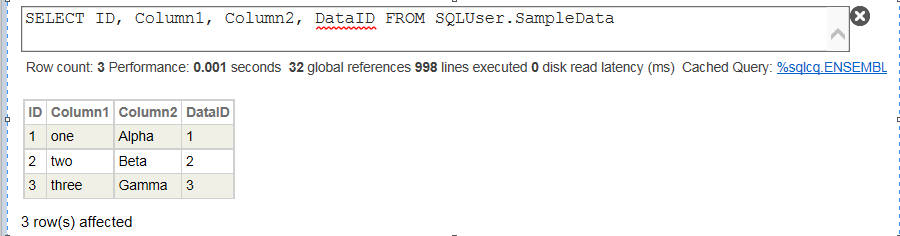
How to convert SQL persistent classes to JSON output - I have tried 1 option but appears to be very lengthy process.
I have many other SQL storage's defined and have to expose them as well to JSON. Can anyone please suggest a better approach.
My column names usually match with my Json properties.
My User.TestClass is the class with GetJsonList() as my method to return /output JSON formatted data.
The Code tried and SQL storage structure are as follows -

Class User.TestClass Extends %RegisteredObject
{
ClassMethod GetJsonList() As %Status
{
Set SQL="SELECT ID, Column1, Column2, DataID FROM
Server:
Class webservice.SOAPResponse Extends (%RegisteredObject, %XML.Adaptor){Property CustomerID As %String;Property Name As %String;Property Street As %String;Property City As %String;Property State As %String;Property Zip As %String;}//--------------------
///
Class webservice.webServiceServer Extends %SOAP.WebService [ ProcedureBlock ]
{
Parameter SERVICENAME = "webServiceServer";
Parameter NAMESPACE = "http://tempuri.org";
Parameter USECLASSNAMESPACES = 1;
Method info(queryInfo As %String) As webservice.SOAPResponse [ WebMethod ]
{most of my jSON data is single words, but when it comes to sending chunks of a memo/email via JSON, that totally different
which is the correct conversion process to prepare data ready to insert into the data part of a JSON string so that all problem characters are converted
JSON of course crashes if you use the wrong format of quotes (single or double) and you ned up having to use " and \' to get around that but is there a simple call to something that will just take care of preparing the data from the JSON string both on the inward and outward part of JSON
kevin
This series of articles aims to address the following topics:
- Creation of a web application based on REST pages;
- Overview of some tools for tracing (debugging) HTTP requests;
- Switching from hyperevents to... hyperevents;
- Integration with jQuery File Upload;
- Conversion of JSON from the {id:1,parentId:1} format to the {id:1,children:[{}]} format for tree visualization;
- Integration with jQuery EasyUI (using datagrid and tree as examples);
- Other topics.
I am trying to use the automated unittest class for a %CSP.Rest service.
So my Unittest code set's %request and %response from %CSP.Req/resp respectively
I build a tProxy with the fields I need for the post and set it %ToJson... I have tried seting %request.Content = tProxy (and not)
I call the method for the post url directly...
When that method calls %fromJson to set an object with the info. I passed...
- when I don't set %request.content.. I get a error '5035 - premature end of data code 12'
- when I set %request.content=tProxy.. I get an errror Method Does not exist
Any tips on
How can get the data stored in the JSON object? I try StringObject but doesn't work.
I've been trying to interoperate with careevoltion using their backend-services.
Spec: http://docs.smarthealthit.org/authorization/backend-services/
This involves creating a JWT (JSON Web Token) that I have been unable to do using %OAuth2.JWT:ObjectToJWT.
I downloaded jwt.pfx and then ran the following openssl commands to create some pem files.
openssl pkcs12 -in jwt.pfx -out file.nokey.pem -nokeys openssl pkcs12 -in jwt.pfx -out file.withkey.pem openssl rsa -in file.withkey.pem -out file.key cat file.nokey.pem file.key > file.combo.pem3
I then ran some node code to create the private
(I am new to this language) I have got a JSON request to handle in a web application which is in %CSP.Request object. But the request which I am going to handle is of type array of objects.
like,
[
{
"Name": "bat"
},
{
"Name": "Cat"
},
{
"Name": "rat"
},
{
"Name": "mat"
},
{
"Name": "hat"
},
{
"Name": "chat"
},
{
"Name": "please"
},
{
"Name": "help"
},
{
"Name": "me"
},
{
"Name": "in"
},
{
"Name": "getting"
},
{
"Name": "the"
},
{
"Name": "value"
},
{Hi Guys,
I'm using the below code to Post JSON request to a REST API, but I'm getting "Failed to parse JSON request content." Error,
Set Body = ##class(%ZEN.proxyObject).%New()Set Body.ElectronicMailAddressT = "ElectronicMailAddressT"Set Body.TelephoneMinimalN = "TelephoneMinimalN"Set Body.AustralianBusinessNumberId = "AustralianBusinessNumberId"Set Body.OrganisationDetailsOrganisationBranchC = "OrganisationDetailsOrganisationBranchC"Set Body.DetailsOrganisationalNameT = "DetailsOrganisationalNameT"Set Body.PersonUnstructuredNameFullNameT = "PersonUnstructuredNameFullNameT"
Hi Guys,
I've a working that sent Http request to a REST API and is working fine,
Set Body = ##class(%ZEN.proxyObject).%New()Set Body.ElectronicMailAddressT = "ElectronicMailAddressT"Set Body.TelephoneMinimalN = "TelephoneMinimalN"Set Request.ContentType = "application/json"Set Request.Https=1Set Request.SSLConfiguration="TLS"Set Status = ##class(%ZEN.Auxiliary.jsonProvider).%WriteJSONStreamFromObject(Request.EntityBody, Body)Set Status = Request.Post(,2)
but now I'm looking to basically add an array or data inside the body so that it looks like this:
{