Evgeny Shvarov · Mar 11, 2019 go to post

Hi, Ed!

it’s good that you cited docs here, all is fair.

but you didn’t answer my question on the cases you use this particular expression. 

And considering that it checks the error status it mostly means that you quit from the method with it, right?

so this should be return and not quit. Right?

Evgeny Shvarov · Mar 11, 2019 go to post

But I think in this case should be:

return:$$$ISERR(sc) sc

I believe it's always the return from the method. Right, Ed?

Evgeny Shvarov · Mar 11, 2019 go to post

Hola Daniel!

Thank you for your explanation! And thank you for a really great tool!

if condition
    do ..something()

I agree, and this is not a good practice - two lines with if.

But nobody does that in ObjectScript. As developers consider spaces in Python so developer follows the nuances of the ObjectScript. And oneliner

if condition do ..something()  

is considered as a readable and convenient way to code ObjectScript.

As well as postconditions on 

quit:$$$ISERR(sc) sc

Daniel!

I suggest to let Developer Community vote for the rules and this will let Community have a general version of adopted ObjectSript coding guidelines along with a general tool - CacheQuality which can so nicely help to control these guidelines.  What do you think?

Evgeny Shvarov · Mar 10, 2019 go to post

Don't like post conditions.

And anyway - for this you'll get from CacheQuality:

"Consider using an If statement instead of a postconditional (cachequality:OS0039)"

with description:

"This feature of the language may lead to shorter code overall; however, users unfamiliar with the language may have trouble understanding what this syntax means.

For understandability reasons, it is preferred to use an if statement instead."

;)

Evgeny Shvarov · Mar 10, 2019 go to post

Why the construction:

if condition do ..Method() 

is considered as a bad practice?

IMHO it's more readable than :

If condition {

 do ..Method()

}

I have plenty of this, e.g. here:

if globalPath[".gz"  do ..importXMLGlobal(globalPath)
  if globalPath[".xml" do $System.OBJ.Load(globalPath)

Can I turn off the rule?

Evgeny Shvarov · Mar 1, 2019 go to post

IMHO this deserves an enhancement request. Data for mapped lib classes is stored in User Namespaces,  but tune params for this data in Lib Namespace. Looks difficult to use persistent classes as part of a library in this case. 

Maybe you can generate automatically the storage class @Eduard Lebedyuk mentioned with the first call from a User Namespace?

Evgeny Shvarov · Feb 28, 2019 go to post

But why? "@" introduces an additional stack, right? And what is above in stack should be visible. Or not?

Evgeny Shvarov · Feb 28, 2019 go to post

Wow. Confirm that for IRIS for UNIX (Ubuntu Server LTS for x86-64 Containers) 2019.1.0S 

Evgeny Shvarov · Feb 26, 2019 go to post

Hi David!

Great you've found the answer by yourself! It happens to me sometimes right after I end writing a question)

There is no need to add "Solved" to the title to indicate the question is closed. We have the feature of an accepted answer. So you can mark your answer as Accepted and this will be the indicator for the question as solved and it will disappear from the filter of Not accepted answers.

Thanks for your contribution!

Evgeny Shvarov · Feb 26, 2019 go to post

Kyle! Really great staff! 

This is also very helpful for DeepSee/IRIS Analytics projects, where you every time need to expand the access rules on yet another listing table.

Evgeny Shvarov · Feb 23, 2019 go to post

Yes, understood. Maybe we need to allow this? But the idea is if Author of the question accepted the answer that means he doesn't want any new changes to it and wants to keep it.

Evgeny Shvarov · Feb 22, 2019 go to post

Agree with @Eduard Lebedyuk answer, want to introduce another toolset:

1. Import ISC_DEV utility to a DEFAULT_INSTANCE say in a USER namespace and map the classes of the utility to %All.

2. Setup the workdir to export the code

YOURNAMESPACE> w ##class(dev.code).workdir("/path/to/your/wor
king/directory/")

2. export code calling:

YOURNAMESPACE> w ##class(dev.code).export()

This will export cls, routines, and dfi (DeepSee) into separate files.

3. Create the repository in git and commit all the files from the directory into the repository (and even push, if you use Github/Gitlab)

4. Repeat p1-2 for a PRODUCTION_INSTANCE and export classes into the same directory.

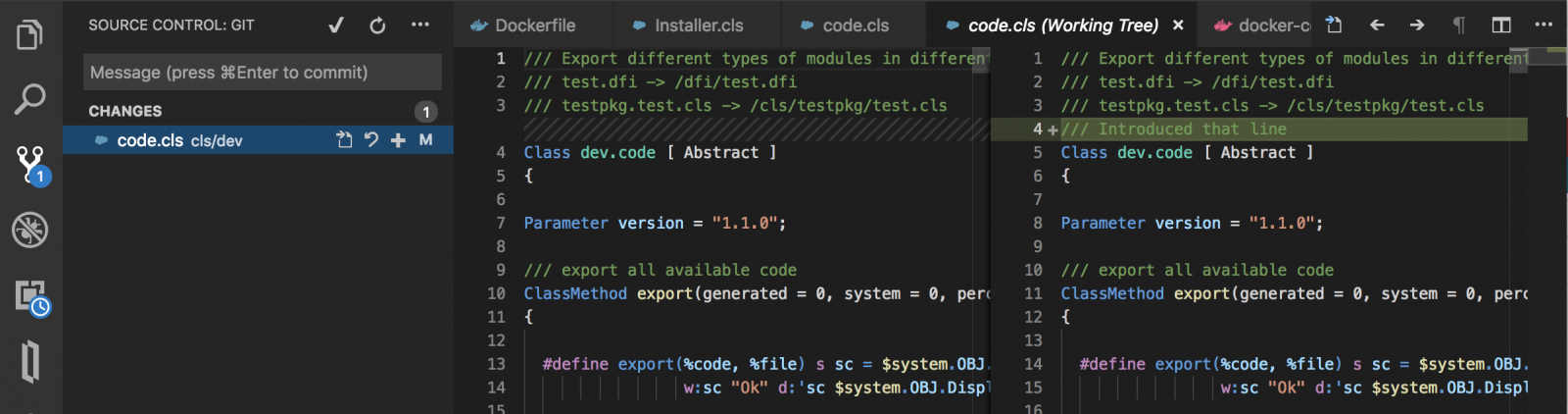
5. Compare the changes.  If you Open the directory in  VSCode with Object_Script plugin by @Dmitry Maslennikov you will immediately see the changes in Source Control section of VSCode. E.g. I introduced one line and saved the class and it shows the files changed since the latest commit and the line with the change.

Alternatively you can commit and push changes to Github/Gitlub and see the diff since the latest commit. E.g. like changes in this commit.

If you don't have DeepSee resources, p.1 can be changed to Atelier or VSCode - both have the out-of-the-box functionality to export the source into files in UDL form.

HTH

Evgeny Shvarov · Feb 16, 2019 go to post

Like the clickable InterSystems Data Platforms tags in the repo:

@Dmitry Maslennikov , could you share, please, the code to be inserted into Reaadme.md to introduce it into the repo?

Evgeny Shvarov · Feb 16, 2019 go to post

Yes, you cannot change the content of an accepted answer.

we did this intentionally: what is the reason to change the answer, which resolved the question?

Evgeny Shvarov · Feb 15, 2019 go to post

New cool update came up with VSCode!

What's new in this version

  • IMPORTANT: Connection disabled by default, now. Set "objectscript.conn.active": true to enable it
  • Automatically Preview XML files as UDL, (disabled by default, setting objectscript.autoPreviewXML)
  • Preview XML As UDL by command from Command Palette and from Context Menu
  • Fixed highlighting for XData with css in style tag
  • Show percent-member in outline
  • Multi-root workspace supported now, for different connections
  • Multi-root workspace also for server explorer
  • Go to definition now goes to real file if such presented, or opens from the server
  • Basic syntax highlighting for CSP files, only as HTML
  • Added some snippets for class
  • Go to Subclass for the current class, available in command palette
  • Go to Super class for the current class, available in command palette
  • Go To any class/method in the workspace including server (by Cmd+T/Ctrl+T)
  • some small fixes in the highlighting, and selecting words/variables
  • Intellisense. Show list of methods for ##class(SomeClass)
  • Go to macros definition
  • Go to definition for methods and properties for self object like ..Name..SomeMethod()
  • Added completion for class parameters
  • Export without storage

Well done, Dmitry!

Evgeny Shvarov · Feb 14, 2019 go to post

Thank you, Vitaly! ObjectScript is full of opportunities! With a creative community, of course :)