Great initiative!
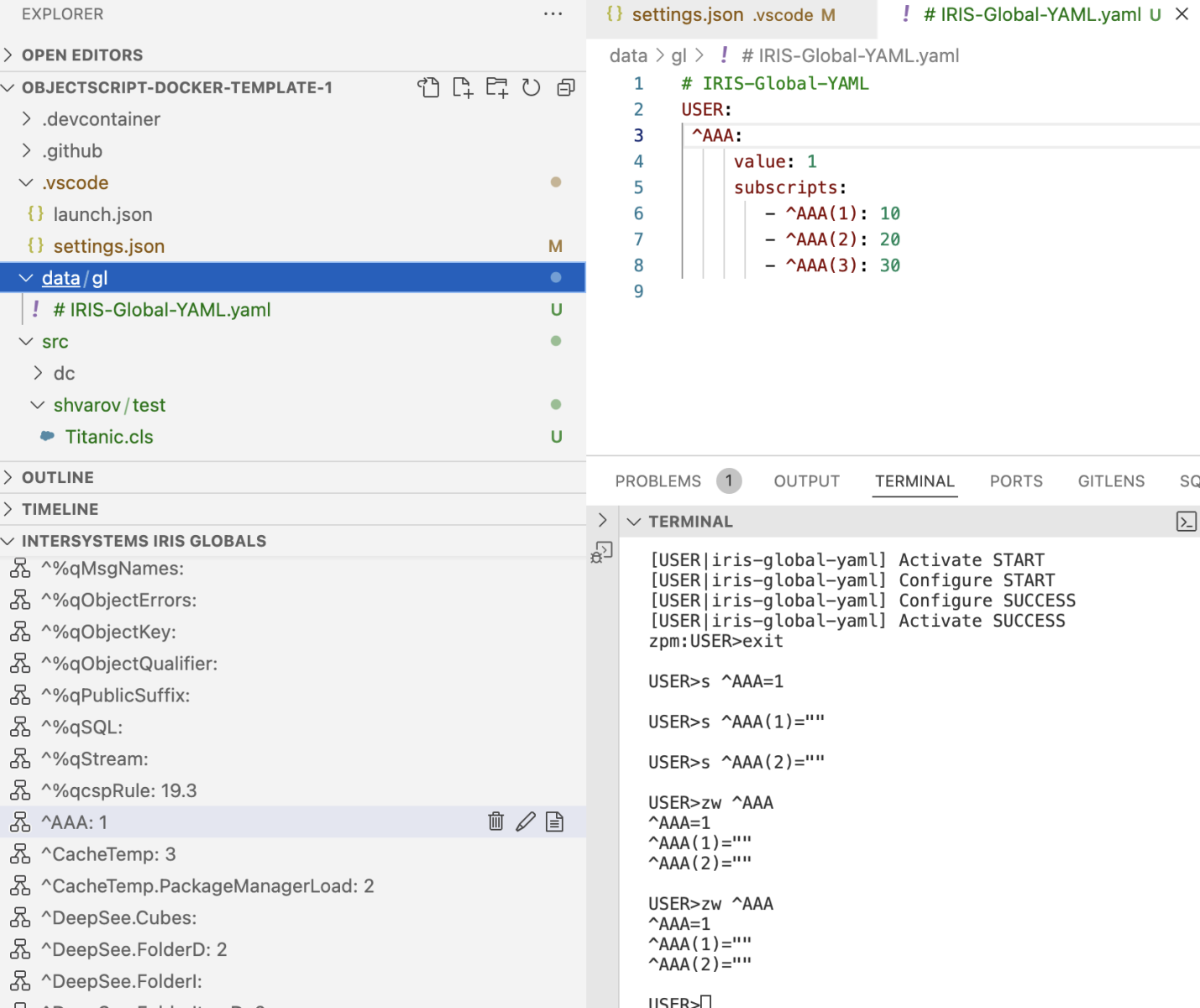
Reading works, but editing and saving doesn't. Created global ^AAA first (in terminal), then read it in VSCode, opened YAML file, edited, saved in /data/gl folder - how can data can be imported to IRIS?
- Log in to post comments
Great initiative!
Reading works, but editing and saving doesn't. Created global ^AAA first (in terminal), then read it in VSCode, opened YAML file, edited, saved in /data/gl folder - how can data can be imported to IRIS?
The most thoughtful and clear demos on IRIS - my top preference @Alberto Fuentes!
I quickly examined https://openexchange.intersystems.com and found an app that seems useful at a first glance. May be @Sergey Mikhailenko can follow up from here.
Maybe some path issue? Not enough rights to access the folder with the driver?
Glad this is settled!
I think open-source and private IP policy should be balanced. But Microsoft's financial success and approach which let company to become a largest contributor to open-source could be a good argument that balanced open-source contribution maybe connected to company's prosperity.
Regarding user/pass - it should be a user and his/her password that is allowed to access web app /registry in your IRIS server.
You can go to the list of Web Apps: http://localhost:52773/csp/sys/sec/%25CSP.UI.Portal.Applications.WebLis… and observe other and setup your own.
It can be passwordless, basic authentication, bearer token, OAuth, delegated - whatever you decide in your system.
If you are on a community edition of IRIS from a vanilla iris docker image then login/pass you use for your admin access, e.g. to access Management Portal http://localhost:32783/csp/sys/%25CSP.Portal.Home.zen
will work for the registry as well.
There are two steps to publish into a registry.
1. Load a package into a namespace - you can load from a file directory that contains module.xml, or from a github repo, e.g.
load /folder_with_module/
2. switch to a current registry, where you can publish. You can install your own registry, or use a test registry, which is always avaliable for different tests:
ZPM:USER>repo -n registry -r -url https://test.pm.community.intersystems.com/registry/ -user test -pass PassWord42
3. Publish a pachage with the command:
publish package_name
Hi @Jani Hurskainen ! Have you solved your question with publishing in a registry?
@Jani Hurskainen , do you have your unittest framework published as open-source by a chance?
Nice workaround!
@Timothy Leavitt, do we want to consider support alternative unittest framework in IPM client?
No problem found it https://github.com/intersystems/ipm/releases
First I went to OEX and didn't find it there.
Great news, @Timothy Leavitt!
How can I test the 9.0 beta IPM client?
I see your point, maybe the IRIS package will not help here. But thinking loud I could imagine a user-specific setting that will lock a particular SMP language just for the user you are signing in with. Here the package providing such a functionality could help.
Thank you, @Alexander Koblov !
Sounds like an opportunity for a usefull "addon" package for IRIS, no?
Thank you, @Alexander Koblov !
Should the developer of the REST.API service call this method everytime, or there is a way to understand whether the Audit is on for the particular REST.API service?
Exactly ;)
Thank you @Timothy Leavitt !
Thank you, @Timothy Leavitt
I'll take a look, thank you
Hi @John Murray !
Yes, it just works, thanks to @Timothy Leavitt and his team.
The only thing you need is to make sure that your dev module is described via IPM, and install and setup git-source-control.
Here is an example template for interoperability production that demonstrates the feature.
And here is the only setup line that is needed after git-source-control is installed via IPM:
 zpm "install git-source-control"
do ##class(%Studio.SourceControl.Interface).SourceControlClassSet("SourceControl.Git.Extension")@Brett Saviano , maybe I'm mixing something up, but I'm just trying to provide you feedback, that developers that follow the client-side paradigm (actually the majority of existing developers to my knowledge) should still have any option to edit BPL/DTL and DFI and today the way is via server-side UI tools, and of course, they would expect changes reflected in their client git setup, which git-source-control wonderfully does.
Thanks, @John Murray !
I made it work by manually filing the server in a docker container.
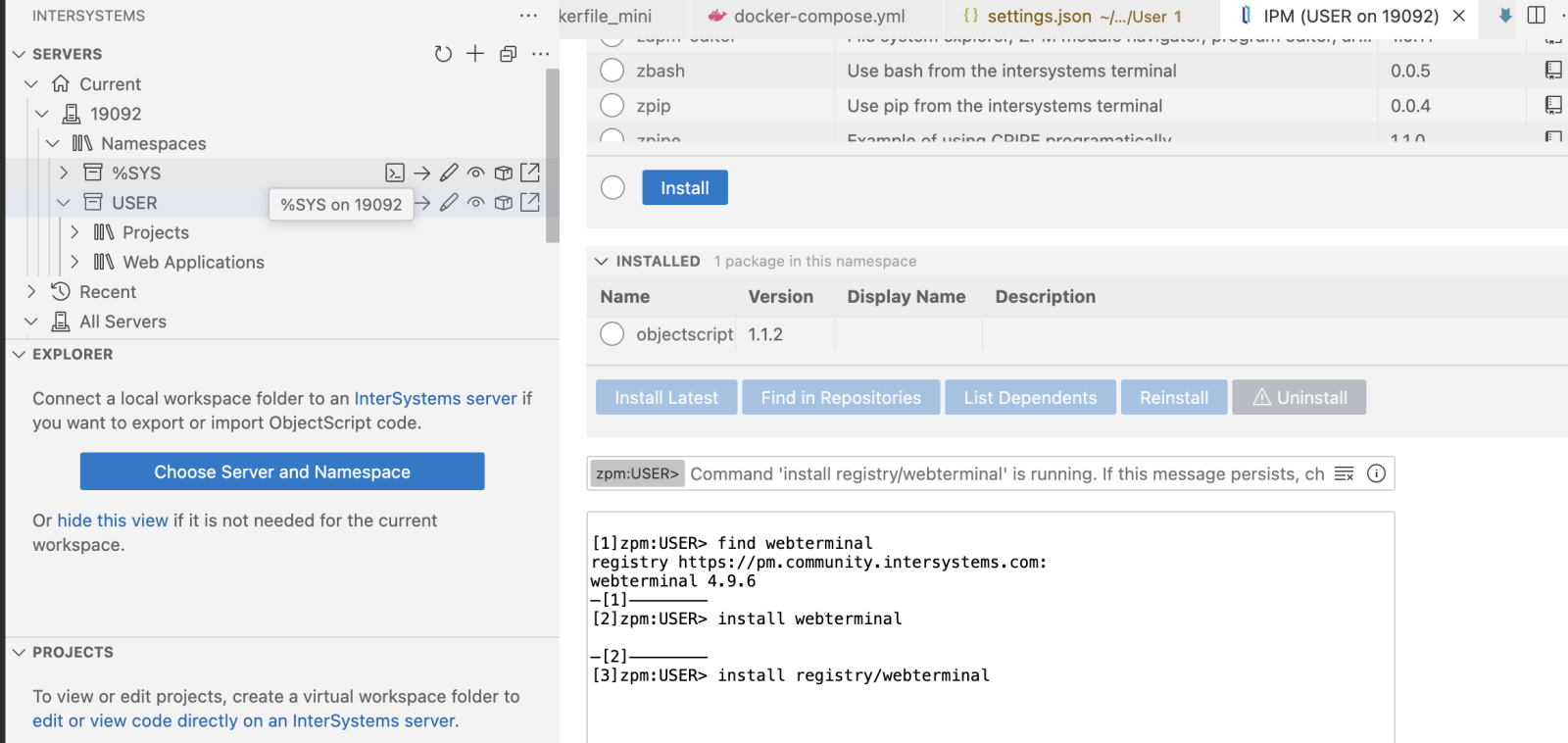
The IPM browser works nicely!
And it beautifully displays what is installed in the namespace.
But I wasn't able to install any app, e.g. tried with Webterminal:
1. Yes, but it can add some automation, as for docker-way port can be a random everytime, so this mean manual setup every build. Which is easy to setup, but every time.
2. Yes, UI Integration. And, if we are talking about client-side editing it is possible to edit those files manually (they are just XML files) of course. But ideally, the developer could call a UI in IRIS to edit the file from within a file, and the changes be saved into this file after editing in the IRIS UI app.
3. What exactly is "incorrect"? ) git-source-control perfectly works as a tool to deliver changes made in IRIS developer UI tools into client-side files. Well, you can say that it is server-side editing, and I agree, as every IRIS-driven developer UI tool is on the IRIS side, meaning server-side in this case. But still, it works perfectly and doesn't demand developers to change their client-side approach to a server-side in this case.
It is possible to deploy frontend/fullstack apps via IPM. Take a look e.g. this or this one.
There is also a helper package for js-based frontend by @Timothy Leavitt, which suggests yet another approach.
Great app! Why not to add IPM package deployment?
Thanks for introducing it, @John Murray !
How does it work with docker dev environment?
I launched the basic docker environment via this basic template and don't see the functionality, though have Server Explorer working:
So: for everyone who tries it via IPM - works ONLY if installed in %SYS.
Otherwise it installs itself but doesn't work silently.