Hi Community!
New video is already on InterSystems Developers YouTube Channel:
Topics related to User Interface (UI) development for web, desktop, and mobile clients.
Hi Community!
New video is already on InterSystems Developers YouTube Channel:
You may have missed it, but it's here.
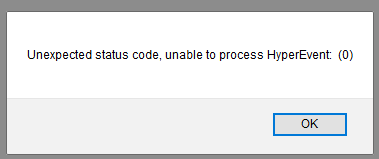
Now popups from SMP when you're restarting the instance or just lost connection can be suppressed.
All you need to do is set this global:
set ^%SYS("Portal","DisableConnectivityPopup") = 1
Available for 2018.1.2 and later. Documentation.
Thank you, @akoblovfor the find!
I successfully got everything in this guide to work: https://community.intersystems.com/post/ensemble-rabbitmq-java-client-q…
I am now using the information I gained from this guide along side with this guide:
https://www.rabbitmq.com/tutorials/tutorial-one-spring-amqp.html
I am running into an issue though. In the RabbitMQ guide I just posted, they have a "Receive message" functionality. I use that alongside with the SendMsg from Ensemble method in the InterSystems guide.
 ˮ This is one of my articles which was never published in English. Let's fix it!
Hello! This article is about quite a practical way of developing InterSystems solutions without using the integrated tools like Studio or Atelier. All the code of the project can be stored in the form of "traditional" source code files, edited in your favorite development environment (for example, Visual Studio Code), indexed by any version control system and arbitrarily combined with many external tools for code analysis, preprocessing, packaging and so on.
Last time, we stopped on static stuff. Let’s continue...
This series of articles aims to address the following topics:
Developers,
I am working with a CSP page with among other fields a checkbox.
Based on the checkbox I want to populate a drop-down box with specific options with a server side method using &html<....>.
I have the status of the checkbox in a javascript var.
Can I access this var or maybe the checkbox setting in the server side method?
Basically how do I know the status of the checkbox to populate the drop-down box correctly?
Any suggestions are appreciated!
Jacques
Hi Guys,
I would to know, I have a drop down list items in my applications. While, am clicking on the drop down bx, there are few numbers of listed items, while am doing mouse over action, I should display the entire text of selected item from that drop down list box, even am not selecting that item. I would like to know about the what is exact text it contains in Zen framework.
If any lead would be appreciated.
Thank you in advance.
Hi All,
Does anybody has experience with Angular application and have implemented some solution in order to track and record pageviews?
We are interested in to know how to capture those pageviews information and call a Caché REST Api in order to store those data.
Thanks.
Let’s continue our series of articles about creating a web application using REST only.
... but let’s first take a look at two relatively small topics, and namely:
We only have one page for now. How about adding one more? Said - done.
... but let’s first look at error handling.
As many of you, our partners, are more widely using modern UI frameworks to create client front-end, you may have encountered a question, "So how do I secure my data when I just finished developing all new fancy browser based client experience?"
The answer is easy. Use a standard, proven OAuth2 and OpenID!
"OK, but how can I do it? I have never done it before."
No problem, just have a look here, if your client is Angular (not AngularJS) based, there is a demo project available for you to review and get inspired!
My boss would like to change the Ensemble logo that one sees in the mangement portal, because it's part of the DeepSee Anaylzer.
I can see where it lives on the generated html.
I kow that you can set the logo for the User POrtal settings in DeepSee -- you can specifiy a URL for your logo. But we'd like to go one stee further and change the Ensemble by InterSystems to our own logo / company name.
Is it possible to change this in the code? Is there a Configuration setting to change this?
Thanks,
Laura
Hi Every Body
I'm studying AngularJS now ( looking for a substitute for my zen-mojo application ) , I would like to understand how can I connect from the client (AngularJS) with the server , passing data & invoking methods server side.
I was wondering if anyone has combined ZEN Web Development with frameworks such as W3Schools W3.CSS Framework or the popular Bootstrap Framework?
We are currently using Caché 2013.1.6 so we do not have ZEN Mojo installed which ships in Caché 2014.2 or later.
What would be the recommended approach if looking to integrate one of these frameworks?
I look forward to hearing your suggestions!
Hi!
There is a 'New_window' control in DeepSee Widget which opens the page in a new tab in a browser with a given URL.
With the help of this control you can open another dashboard and supply some parameters in SETTINGS clause.
Consider I can setup in Dash1 the URL like:
_DeepSee.UserPortal.DashboardViewer.zen?DASHBOARD=Postings.dashboard&SETTINGS=TARGET:W1;FILTER: [Author].[H1].[Author].%26[$$$VALUELIST]

to filter the widget W1 in Postings dashboard with filter [Author].[H1].[Author].%26[$$$VALUELIST], where $$$VALUELIST is some value from the listing in a widget in Dash1.