Greetings all,
Need to connect your VSCode to an InterSystems Server?
Heard of this option?
.png)
Greetings all,
Need to connect your VSCode to an InterSystems Server?
Heard of this option?
For the benefit of those who want to use the Document Database (DocDB) capabilities within InterSystems IRIS, and specifically the REST API it provides, I put together a Postman Collection that provides samples for several basic calls.
For example:
.png)
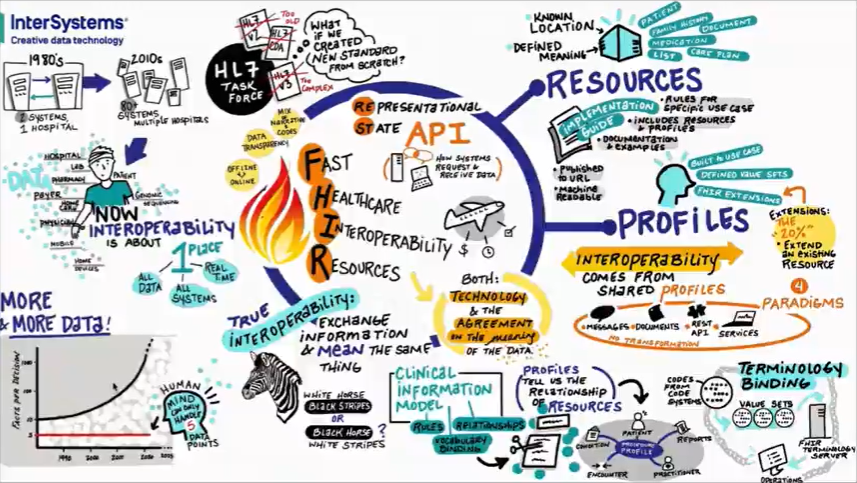
For those that want to catch up on the FHIR-related content in our Virtual Summit 2020 I put together a list of the Focus Sessions:
You might have encountered this and not known how to prevent it, or perhaps not even noticed it...
In this article I'd like to share with you a phenomena that is best you avoid - something you should be aware of when designing your data model (or building your Business Processes) in Caché or in Ensemble (or older HealthShare Health Connect Ensemble-based versions).
While reviewing our documentation for our ^pButtons (in IRIS renamed as ^SystemPerformance) performance monitoring utility, a customer told me: "I understand all of this, but I wish it could be simpler… easier to define profiles, manage them etc.".
After this session I thought it would be a nice exercise to try and provide some easier human interface for this.
The first step in this was to wrap a class-based API to the existing pButtons routine.
I was also able to add some more "features" like showing what profiles are currently running, their time remaining to run, previously running processes and more.
The next step was to add on top of this API, a REST API class.
With this artifact (a pButtons REST API) in hand, one can go ahead and build a modern UI on top of that.
For example -
.png)
Following up on the topic of making sure that referenced instances are deleted when the referrer is deleted –
Coming back to the topic of how to minimize journals.
Hi all (and specifically Eduard L. ;)
The Ensemble Workflow REST API provided here:
https://github.com/intersystems-ru/EnsembleWorkflow
(and mentioned before in this Community, also as the basis of the Angular UI, also available in the same Git)
Has some very basic documentation as to how to work with the API (which also seems to be possibly a little out-dated as I think the /login URL is deprecated, for example).
Is there somewhere a more comprehensive documentation of this API?
Following my previous post, some urged me to get to the point – ok, so I found my "star" journaling globals, the ones that take up the most space – but how do I avoid this? How do I minimize the journal's size?
[DISCLAIMER: Some might still be disappointed after this post as well  but wait till the next one... ]
Question:
My journal files are growing rapidly - what could be the cause? How can I minimize the phenomena?
When calling out to web services there are several settings of the Business Operation that play together in controlling what will happen when a response is not returned in the desired time.
One of the topics that comes up often when managing Ensemble productions is disk space:
The database (the CACHE.DAT file) grows in a rate that was unexpected; or the Journal files build up at a fast pace; or the database grows continuously though the system has a scheduled purge of the Ensemble runtime data.
It would have been better if these kind of phenomena would have been observed and accounted for yet at the development and testing stage rather than on a live system.
For this purpose I created a basic framework that could aid in this task.
Question:
How can I get a value of a setting of a Production item programmatically?
Answer:
You can use one of the API methods of the Ens.Director class, for example:
Ens.Director:GetItemSettingValue()
For example –
In the Production Demo.Workflow.Production the item (Business Operation) 'Demo-Development' has an 'Auto Create Role' setting:
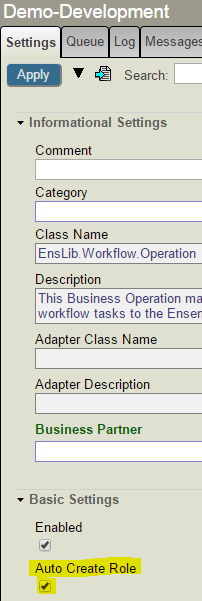
Clicking on the Settings Defaults button you can see this is a 'Host' setting:
And you can access the value using this call for example:
ENSDEMO>write ##class(Ens.Director).GetItemSettingValue("Demo-Development","Host","AutoCreateRole",.status)

1Question
I am configuring IIS to work with the CSP Gateway but I'm running into this error:
"The Module DLL 'C:\Inetpub\CSPGateway\CSPms.dll' could not be loaded due to a configuration problem. The current configuration only supports loading images built for a x86 processor architecture."
Answer
Question:
How can I create, change etc. Security entities (like Users and Roles) programmatically?
Answer:
You can use the Security package classes in the %SYS namespace. For example Security.Roles or Security.Users.
Of course in order to perform these actions the user will require the needed authorization.
Here's a small example using Security.Roles:
 // Create a Role
%SYS>Set status = ##class(Security.Roles).Create("testRole","a test Role","%Development:U,%DB_USER:R")


// Creation was successful
%SYS>Write status
1

// Now lets examine the Role created
%SYS>Set status = ##class(Security.Roles).Get("testRole",.properties)

// We got the properties correctly
%SYS>Write status
1

// The properties were returned by reference
%SYS>ZWrite properties
properties("Description")="a test Role"
properties("GrantedRoles")=""
properties("Resources")="%DB_USER:R,%Development:U"


// Now we want to add another permission
%SYS>Set properties("Resources")=properties("Resources")_",%DB_SAMPLES:RW"


// And modify our Role
%SYS>Set status = ##class(Security.Roles).Modify("testRole",.properties)

%SYS>Write status
1

// Let's verify this worked
%SYS>Set status = ##class(Security.Roles).Get("testRole",.latestProperties)

%SYS>ZWrite latestProperties
latestProperties("Description")="a test Role"
latestProperties("GrantedRoles")=""
latestProperties("Resources")="%DB_SAMPLES:RW,%DB_USER:R,%Development:U"Question:
How do I get a list of files residing in a certain folder/directory, according to some wildcard/filter.
For example all '*.txt' files in 'C:\Temp'.
Answer:
In CACHE –
You can use the %Library.File's FileSet class query.
Here's some sample code using it (also attached):
run(pDir,pFileSpec)

      Set tRS=##class(%ResultSet).%New("%Library.File:FileSet")
And here's an example running it:
USER>do run^testFileSet("C:\Temp","*.txt")

Name                          Date Modified          Type

--------------------------------------------------------------------------

C:\Temp\hl7.txt               2014-07-30 12:09:18    F

C:\Temp\hsaa_msgs.txt         2015-06-25 13:02:16    F

C:\Temp\JSONRESTProxy_10.txt  2014-05-04 14:29:04    F

C:\Temp\JSONRESTProxy_8.txt   2014-05-04 14:28:09    F

C:\Temp\myTestFile2.txt       2014-05-05 09:19:31    F

C:\Temp\newStream.txt         2015-07-09 09:41:59    F

C:\Temp\oldStream.txt         2015-07-09 09:41:27    F

C:\Temp\tcpTrace.txt          2014-05-29 12:13:11    F

C:\Temp\tempadts.txt          2015-06-22 08:35:03    F

C:\Temp\WSLic.txt             2014-06-08 10:34:13    F