I may have mentioned this before: I believe the Visual Traces, these sequence diagrams with full content of each step, are a fantastic feature of the IRIS Data platform! Detailed information about how the API works internally, as a visual trace, can be very useful for projects on the IRIS platform. Of course, this applies when we are not developing a high-load solution, in which case we simply don't have time for saving/reading messages. For all other cases, welcome to this tutorial!
In this article, I aim to demonstrate a couple of methods for easily adding validation to REST APIs on InterSystems IRIS Data Platform. I believe a specification-first approach is an excellent idea for API development. IRIS already has features for generating an implementation stub from a specification and publishing that specification for external developers (use it with iris-web-swagger-ui for the best results). The remaining important thing not yet implemented in the platform is the request validator. Let's fix it!
When I started my journey with InterSystems IRIS, especially in Interoperability, one of the initial and common questions I had was: how can I run something on an interval or schedule? In this topic, I want to share two simple classes that address this issue. I'm surprised that some similar classes are not located somewhere in EnsLib. Or maybe I didn't search well? Anyway, this topic is not meant to be complex work, just a couple of snippets for beginners.
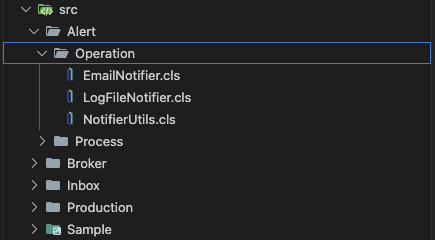
Over time, while I was working with Interoperability on the IRIS Data Platform, I developed rules for organizing a project code into packages and classes. That is what is called a Naming Convention, usually. In this topic, I want to organize and share these rules. I hope it can be helpful for somebody.
Disclaimer: This guide is a good fit for Interoperability projects. When you have integrations, data flows, when you use IRIS for ETL processes, etc. Overall, when your code is combined with Productions.
I know the next ones:
1. Place all different settings in environment variables. You have a different .env file for each environment, and you must add some code to Production for reading and setting these values. It's good for deploying into containers, but challenging for management when we have a large production. I mean, we have many settings that can vary depending on the environment: active flag, pool size, timeouts, and so on. Not only endpoints.
2. My own case.
I was really surprised that such a flexible integration platform with a rich toolset specifically for app connections has no out-of-the-box Enterprise Service Bus solution. Like Apache ServiceMix, Mule ESB, SAP PI/PO, etc, what’s the reason? What do you think? Has this pattern lost its relevance completely nowadays? And everybody moved to message brokers, maybe?
Wiki time: An enterprise service bus (ESB) implements a communication system between mutually interacting software applications in a service-oriented architecture (SOA) .
Hi everyone,
I'm currently seeking a new position related to InterSystems technologies. My major skill is app integration and data flow development on the InterSystems IRIS platform (Interoperability). I develop high-load, mission-critical software. My coding background on Cache ObjectScript includes hundreds of data flows, thousands of Production business hosts, dozens of APIs, and other solutions on InterSystems IRIS. I worked to integrate such applications as SAP S/4HANA, Oracle Siebel, SAP Commerce Cloud, many custom apps, and all that can be integrated. I have also gained experience in various areas, including SQL, Java, Docker, IRIS administration, Apache Kafka, and Flutter (Dart).
Here is my code:
{
s tSC = pRequest.NewResponse(.pResponse)
q:$$$ISERR(tSC) tSC
#dim pRS As EnsLib.SQL.GatewayResultSet
s tSC = ..Adapter.ExecuteQuery(.pRS, "select jsonb_agg(s) #>> '{}' FROM prod.stocks s where s.""Warehouse"" = ?", pRequest.Warehouse)
q:$$$ISERR(tSC) tSC
s pResponse = ##class(Ens.StreamContainer).%New()
s pResponse.Stream = ##class(%GlobalCharacterStream).%New()
i pRS.Next() {
d pResponse.Stream.CopyFrom(pRS